When you click on links to various merchants on this site and make a purchase, this can result in this site earning a commission. Affiliate programs and affiliations include, but are not limited to, the eBay Partner Network.
re-drilled another set of holes higher, moved the mounting shims and mounted it. No problem getting to the release. Now to run the wiring. Wish there was an easier way to get to the back of the radio.
I have to fill the antifreeze and bleed it along with some programming for JCW brakes, Xenon headlights and dissable bulb check, new rear bumper lights for the Aero bumper and side lights in the fender skirts. I went with the gloss black kit that doesn't have them in it. Maybe I should do the under body accent lights and power them via the skirt sockets. LOL, not my style.
Last edited by DogfaceSGM; Aug 31, 2024 at 06:27 AM.
I got the license plate camera mounted and working, and all the hatch molding back on.
I started filling my coolant but ran into a snag. I cannot find the coolant bleeder screw. I know where it is located but mine has a sensor there. Since the R56 Forum gets more traffic, I posted the question there. https://www.northamericanmotoring.co...der-screw.html
Finished the programming of the Xenons. That was pretty straight forward. Getting the version of ISTA that I downloaded took a bit of work. I finally figured out what settings I had to use to get it to connect. Once connected, the time/date was set correctly.
Oops, just realized I didn't disable the auto level. I will have to do that tomorrow.
Last edited by DogfaceSGM; Sep 2, 2024 at 08:26 PM.
I also need to chase down two engine error codes. When I took the air box off to help me see where the coolant bleeder screw was, I must have accidentally messed with the or disconnected the manifold air pressure sensor. Since putting the air box back on I have had 2C58 and 2C86 error codes both dealing with boost pressure and ambient pressure
Got it topped off with coolant and ran it for the first time in two months. No wheels on it and man, it made me miss it more.
I am not sure why but Bimmerlink will not let me clear the 2C58 or 2C86 codes. I just about have to have something disconnected but I don't know what it is. Start fresh on it tomorrow night.
Okay, so tonight I want to check what is going on with the 2C58/2C86 codes. When I connect with BimmerLink, I now have 3 more codes:
29E0 Charge air temp sensor, electrical: short to posititve
2C6F Boost pressure sensor, electrical: shot to positive
29E2 charge air temp sensor, votage change: too fast
I ordered a new boost pressure/temp sensor last PM so I think that is going to cure my issue.
I had to take the front bumper cover back off tonight to mount the gloss black trim on it. Got it on but didn't get the bumper cover mounted back on. After I get the code/sensor figured out, about all I have left is some lights/trim, mount the GP2 diffuser, the rear bumper cover, the tires and get it aligned. I still need to mount the front and rear emblems on the hood and trunk but want to buff it out 1st. I am removing the black "swoosh" emblem on the sides and want to do the buff after that
My boost pressure/temp sensor came this weekend while I was doing my military stuff. Had to at least put it in this PM and see if it clears the engine fault. Yep, no more half engine in the window.
Still waiting on a few more parts and he will be done. I think once I finish I will have to change the name of my car. I have called him Jesus (Spanish pronunciation) but when done I think I will call him Lazarus as Jesus raised Lazarus from the dead.
Still waiting on just a few more small parts. About all that is left to assemble is the rear diffuser and bumper.
I have some coding to do for the Xenon and JCW big brakes but I am having an issue getting BimmerGeeks Protool to read my Vehicle Order. Tomorrow night, I will dig back into NCS expert and verify it can read it. If it can, then it is something software related as I am using the same K+DCAN cable
Gotta love the old USPS!
New York to Columbus, OH to California back to Columbus, OH added a week to my delivery.
Tires are mounted on the car. it will still need front and back badges, center caps for the rims and the reverse lights in the bumper along with some coding
Tonight is the "unveiling" after he gets a bath. 5 months in my nasty old garage and it is dust covered.
Last edited by DogfaceSGM; Sep 13, 2024 at 03:32 AM.
Had a similar issue with USPS not long ago. Got a partial delivery. Looked up the other part and it said that it was with the local post office ready for delivery. After a week I went and talked with them. Nope, nothing. Did that several times, nothing. Called the place I ordered from to have them push from their end. A couple of days later I got a package by UPS. The Company replaced it. Bless them; I didn’t ask for that. But they did it. A month later I got the USPS package.
I did take it for a country mile block drive to listen for noises and make sure everything was solid. (Nobody could tell how dirty it was as it is dark) Definitely needs an alignment! I also need to do more work bleeding the brakes. I think it is the ABS that is causing it. Will go through a complete bleed tomorrow.
This is after the uninsured idiot caused an accident
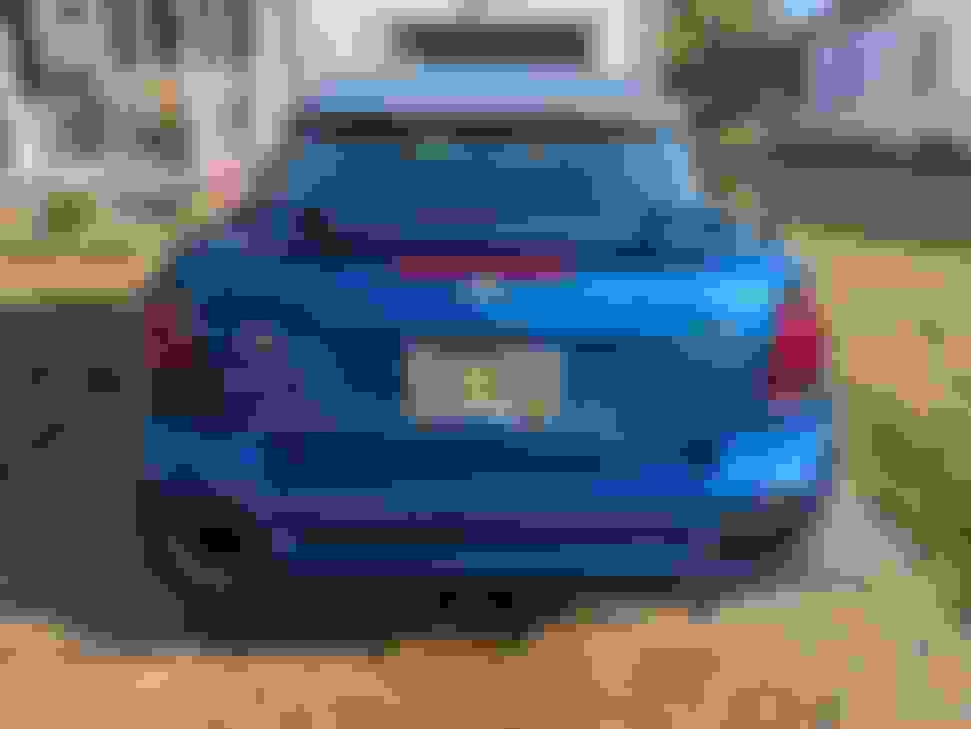
This is after my "NASCAR" repair in order to drive it home from Columbus, OH (two hour drive)
And these are after hours of labor and research.
Still have to put new badges on, the hood belt line, get new clips or new molding for the rear window belt line, waiting for the lights that go in the bumper and a couple other odds and ends.
I still need to do some coding for some of the goodies I added.
I have been trying to get Bimmergeeks Protool to work. I tried about everything. For whatever reason, it couldn't read my vehicle order. With some help from Tigger2011 I reset all the modules back to factory, that didn't do it. Tore the whole dash apart to check/clean contacts on the CAS and notta. I was still within requesting a refund and did so. Happily, I will say Bimmergeeks did refund. Kind of bummed I didn't get it to work after seeing how other members have used it.
I need to go back through with NCS Expert and setup the Xenon and put some feelers out there on programming the JCW brakes.
I am going to buff it out Saturday and put my trim pieces on then it will be back to a daily driver.
The lights were easy, very well documented in a thread here on NAM, add $522 to the VO, change AUTO_LWR_ENABLE and DYNAM_LWR_ENABLE from nicht_aktiv to aktiv, and PWM_FL_BEI_BIXENON to wert_01
The brakes were the challenge. I spent most of the day yesterday trying to get it to take. Tigger2011 let me know the proper code for it was $PBR/SPBR. I tried both several times using multiple profiles and other things with no luck.
Today while I was watching the NASCAR race, I was doing some searching. Since I was told this could be done with Protool, I did a search for Protool SPBR. On one of the Bimmer sites, someone coded their E-series car with Protool for the JCW brakes. He also posted a screenshot of his VO after doing so. This was my break through/AHA moment. It was at the end of his VO as +SPBR. My VO has a +KCBS at the end. I went out, edited the VO, added +SPBR and it took. I wrote it to both the CAS and FRM then did a "Factory Reset" to the DSC which sets all the parameters from your VO.
My trim pieces arrive tomorrow, so buff it out, add a couple more exterior updates and trim and I am done.