


R56 Auxiliary Input Volume too Low


6th Gear
Joined: Mar 2007
Posts: 7,578
Likes: 4
From: Paradise
Looks like it is different with the NAV. The only volume adjustment under AUX is the Speed-dependent Volume. This increases the volume as speed increases. You set the degree to which the volume increases. Do the non-NAV systems have this?

4th Gear
Joined: Jul 2007
Posts: 342
Likes: 0
From: Sacramento, CA
I tried out changing the volume on the iPod, and manifest is correct--no effect on the volume via aux.
6th Gear
Joined: Mar 2007
Posts: 7,578
Likes: 4
From: Paradise
This isn't really a fix for the low-volume aux input, though. The adjustment I describe above is the fix.
I tried out changing the volume on the iPod, and manifest is correct--no effect on the volume via aux.
4th Gear
Joined: Jul 2007
Posts: 342
Likes: 0
From: Sacramento, CA
When I first got the Mini, I set it as high as it goes for the aux jack and assumed it would be up for everything else. Then when I went back, it was lower on cd mode...at least I think. My memory is fuzzy. Maybe I'll try it again. Could have been that I used the other fob (that is what it's called, right?), now that I think about it.
And you're right, I am using the dock port, so maybe that's why the volume on the iPod doesn't do anything.
4th Gear
Joined: Jul 2007
Posts: 342
Likes: 0
From: Sacramento, CA
Just tried it. You're right. Must have been that I had switched keys initially (before husband and I decided which was which and stuck to it), and had a different setting on the other key.

Sorry for the mis-info.

2nd Gear
Joined: Jun 2007
Posts: 113
Likes: 0
From: Willowick, OH
I too have the same Belkin adaptor Wondermini recommends and it works great. Also generally speaking the sound quality out of the line out of the ipod (dock adapter) will sound better than the headphone output when fed into another unit such as the Aux jack.
I tapped into the cig. lighter circuit with a radio shack cig. plug and I plugged the Belkin unit into it and hid it up under the edge of the center console so only the wire to the dock adapter come out. I plug it into the ipod and it sits in the well under the hand brake. The power comes on with the car and charges the ipod as well as having the wire come up through the back of the center console and plug into the Aux jack. All in all it works quite well.
I tapped into the cig. lighter circuit with a radio shack cig. plug and I plugged the Belkin unit into it and hid it up under the edge of the center console so only the wire to the dock adapter come out. I plug it into the ipod and it sits in the well under the hand brake. The power comes on with the car and charges the ipod as well as having the wire come up through the back of the center console and plug into the Aux jack. All in all it works quite well.
4th Gear
Joined: Jul 2007
Posts: 342
Likes: 0
From: Sacramento, CA
I tapped into the cig. lighter circuit with a radio shack cig. plug and I plugged the Belkin unit into it and hid it up under the edge of the center console so only the wire to the dock adapter come out. I plug it into the ipod and it sits in the well under the hand brake. The power comes on with the car and charges the ipod as well as having the wire come up through the back of the center console and plug into the Aux jack. All in all it works quite well.
I have my iPod sitting in the driver's side cup holder (fits perfectly and is in plain view, easy to use, and does not move when driving vigorously). It's obviously plugged in at the bottom to the Belkin adapter which is plugged into the cigarette lighter. Finally there's a very short (found a 6in one at Rad Shack) aux cable from the Belkin into the auxiliary jack. I've got all the cord together in a binder and it's not terrible, but not completely hidden. I'd like to attach it up under the console so it's completely out of site...haven't come up with a good plan to do this. Did you just use tape?
Here's a picture of what it looks like now from passenger seat:

From driver's seat:

From above:

Suggestions? I'm alone in the Mini 99% of the time, so using a cupholder is not a big deal to me. I like that it's so easy to see and use. Wish the cords were even less visible.
Last edited by wondermini; Aug 25, 2007 at 08:26 AM. Reason: typo
6th Gear
Joined: Mar 2007
Posts: 7,578
Likes: 4
From: Paradise
I try to stay away from Belkin products. I've had too much trouble with them.
Here is a photo of the Griffin TuneFlex AUX Flexible Charging Cradle. Bought it at the Apple Store online. It connects to the dock port on the iPod and has a small preamp. There is a switch to bypass it, if you wish.
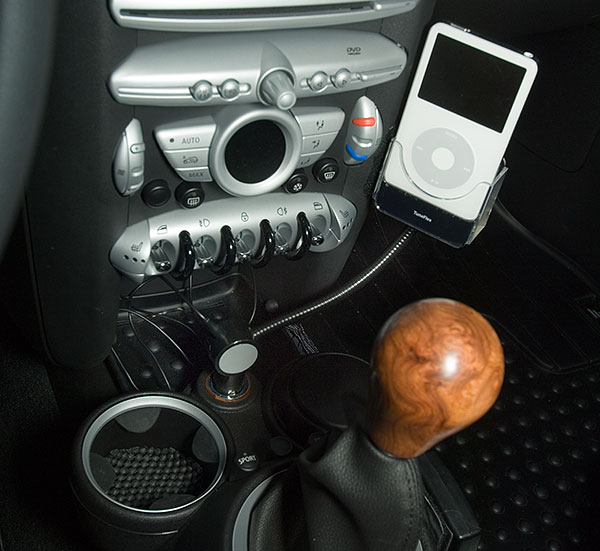
It plugs into the cigarette lighter outlet and charges the iPod and has a cord for connecting to the AUX. You can use the same cord to bypass the Griffin and go from the headphone jack on the iPod straight to the AUX, if you wish.
The one problem with the Griffin is that the stalk is a little long, and not stiff enough for the 60 GB iPod. That is easily fixed with a little industrial Velcro on the edge of the dock and the console.
Here is a photo of the Griffin TuneFlex AUX Flexible Charging Cradle. Bought it at the Apple Store online. It connects to the dock port on the iPod and has a small preamp. There is a switch to bypass it, if you wish.
It plugs into the cigarette lighter outlet and charges the iPod and has a cord for connecting to the AUX. You can use the same cord to bypass the Griffin and go from the headphone jack on the iPod straight to the AUX, if you wish.
The one problem with the Griffin is that the stalk is a little long, and not stiff enough for the 60 GB iPod. That is easily fixed with a little industrial Velcro on the edge of the dock and the console.
4th Gear
Joined: Jul 2007
Posts: 342
Likes: 0
From: Sacramento, CA
Here is a photo of the Griffin TuneFlex AUX Flexible Charging Cradle....It plugs into the cigarette lighter outlet and charges the iPod and has a cord for connecting to the AUX. You can use the same cord to bypass the Griffin and go from the headphone jack on the iPod straight to the AUX, if you wish.
The one problem with the Griffin is that the stalk is a little long, and not stiff enough for the 60 GB iPod. That is easily fixed with a little industrial Velcro on the edge of the dock and the console.
The one problem with the Griffin is that the stalk is a little long, and not stiff enough for the 60 GB iPod. That is easily fixed with a little industrial Velcro on the edge of the dock and the console.

6th Gear
Joined: Mar 2007
Posts: 7,578
Likes: 4
From: Paradise
I had seen this Griffen adapter on another thread and wasn't too keen on the idea of putting velcro on my console--but I can't even see there's velcro present in your picture...must rethink. I only have the 30GB, so maybe it would be strong enough even without velcro?


Thread
Thread Starter
Forum
Replies
Last Post
Sailorlite
F55/F56 :: Hatch Talk (2014+)
6
Sep 4, 2015 07:03 PM

