


Navigation & Audio MINI Navigation


Thread Starter
|
2nd Gear
Joined: Apr 2004
Posts: 80
Likes: 0
From: New York
MINI Navigation
Hi Gang,
I am still awaiting my WP/MCS Black w/ stripes. I ordered the DVD Navigation. I am psyched about the whoile thing. I want to get some feedback from owners of the navigation system. Things like usability, visibility, how it works while stereo is on, added features, etc.
Please no flames on getting the system from non-nav drivers. This is a coll feature for me.
Thanks,
Nando
I am still awaiting my WP/MCS Black w/ stripes. I ordered the DVD Navigation. I am psyched about the whoile thing. I want to get some feedback from owners of the navigation system. Things like usability, visibility, how it works while stereo is on, added features, etc.
Please no flames on getting the system from non-nav drivers. This is a coll feature for me.
Thanks,
Nando

6th Gear
Joined: Oct 2002
Posts: 3,652
Likes: 6
From: Lansdale, PA
Despite a few shortcomings, I really enjoy my Nav system. There is a bit of a learning curve, but there are only two controls, a Menu button and a twist/push ****. Most of the selections are menu-driven from on screen lists. A few handy tips:
You can silence the navigation voice by holding in the twist/push **** for a few seconds.
In the Settings screen, holding down the Menu button for 5 seconds will get you into a "hidden" menu showing actual speed, gps coordinates, individual satellite info, etc.
You have your choice of full-mode or half-mode for the display. I find that half-mode is much more useful since I have both the map and detailed location/turns information on the same screen. Here's a pic in action:
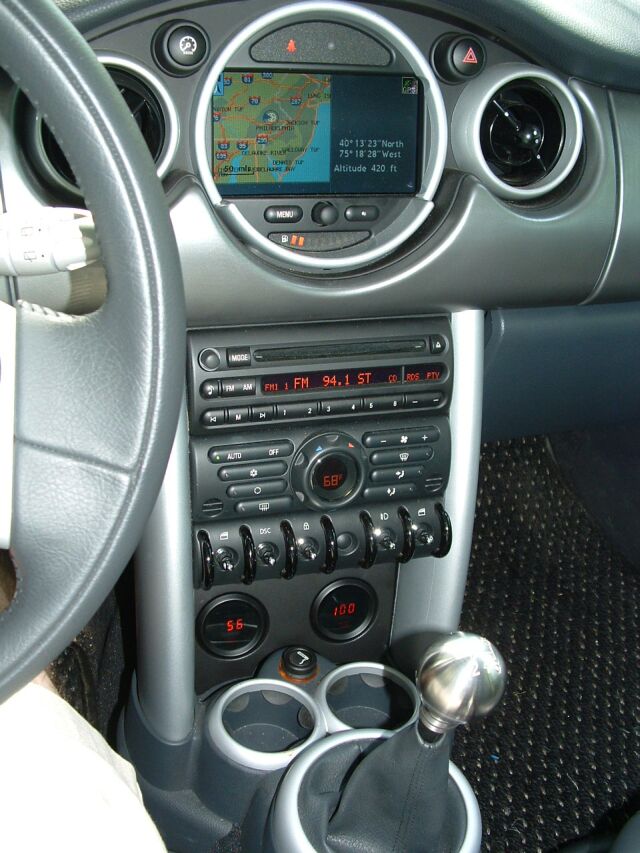
You can silence the navigation voice by holding in the twist/push **** for a few seconds.
In the Settings screen, holding down the Menu button for 5 seconds will get you into a "hidden" menu showing actual speed, gps coordinates, individual satellite info, etc.
You have your choice of full-mode or half-mode for the display. I find that half-mode is much more useful since I have both the map and detailed location/turns information on the same screen. Here's a pic in action:

6th Gear
Joined: Feb 2003
Posts: 2,489
Likes: 0
From: Chicago, IL
Although the interface is a bit clunky, I think you will be very happy with your navigation system, especially since you got the DVD based one.
Most of the time, I always leave my Nav in map mode, so I always have a snapshot of the area I'm in. It's very useful for finding shortcuts, etc.
If you're planning a trip, I highly recommend you check MapBlast too and compare directions that your Nav offered. I only suggest this because sometimes when you set your route to shortest, or fastest, the Nav recommends some ridiculous route. That route might in theory be the shortest, but it would be a giant pain in the ***.
Before you ask, you won't be able to turn off the safety disclaimer that pops up when you first fire up the car.
Voice recognition would be nice, but for now you have to rely on one **** for everything, which gets kinda annoying.
Hope this helps. Let me know if you have more specific questions.
Most of the time, I always leave my Nav in map mode, so I always have a snapshot of the area I'm in. It's very useful for finding shortcuts, etc.
If you're planning a trip, I highly recommend you check MapBlast too and compare directions that your Nav offered. I only suggest this because sometimes when you set your route to shortest, or fastest, the Nav recommends some ridiculous route. That route might in theory be the shortest, but it would be a giant pain in the ***.
Before you ask, you won't be able to turn off the safety disclaimer that pops up when you first fire up the car.
Voice recognition would be nice, but for now you have to rely on one **** for everything, which gets kinda annoying.
Hope this helps. Let me know if you have more specific questions.

3rd Gear
Joined: Jun 2003
Posts: 272
Likes: 0
From: St Pete Beach, FL
I really love the simplicity of it. We've got an aftermarket system in our Aviator with the popup screen and there are WAY too many buttons (hard buttons and on screen buttons) to fool with! I agree with sambusik about checking your route, it's given me some wacky directions before. I find if i just zoom out the magnification i can tell where it's going to take me and then adjust the route preferences from there. For someone like me that has a hard time finding my own mailbox everyday it's been awesome, i'll never have another car without it again!

5th Gear
Joined: May 2004
Posts: 853
Likes: 0
From: Fort Lauderdale, FL
No MC nav for me
I love nav in a car. In fact I don't think I would get another car w/o one. My last car was an 03 accord and I did not get is and I regret it every time I get stuck in traffic or go somewhere new or pass an exit on the highway cuz I was playing with the radio.
I tryed the MC nav and was not overly inpressed with the menu system. I found it hard to use and not very accurate (Itryed putting in a few addresses to see if it could find them) In one instance it did not have the zipcode to the correct town. aka not gonna tell me where to go in this town.
I would much prefer an aftermarket nav. They function better, have more points of intrest, more accurate, and hold alot more address. They also have more features in the radio.
This means replacing the radio with an aftermarket screen and more $$. It will cost you $2500 to do this vs the $1700 for the MC nav. But you will be getting a radio that is night and day better. If you are ordering a car then $1700 nav + $500 HK = $2200 almost the great & radio nav price.
I suggest a Kenwood screen and nav & sirius radio. They have the best nav.
Aftermarket nav Its whats for supper!
I tryed the MC nav and was not overly inpressed with the menu system. I found it hard to use and not very accurate (Itryed putting in a few addresses to see if it could find them) In one instance it did not have the zipcode to the correct town. aka not gonna tell me where to go in this town.
I would much prefer an aftermarket nav. They function better, have more points of intrest, more accurate, and hold alot more address. They also have more features in the radio.
This means replacing the radio with an aftermarket screen and more $$. It will cost you $2500 to do this vs the $1700 for the MC nav. But you will be getting a radio that is night and day better. If you are ordering a car then $1700 nav + $500 HK = $2200 almost the great & radio nav price.
I suggest a Kenwood screen and nav & sirius radio. They have the best nav.
Aftermarket nav Its whats for supper!

2nd Gear
Joined: May 2004
Posts: 64
Likes: 0
From: San Diego, CA
As a new Mini owner (well, used 02 Mini, new owner) I really like the Navigation though I have the CD version not DVD version. The one oddity that I have seen is that the system will continually show the route back to your last destination, though doesn't speak it, it keeps highlighting (in white) the route back to the previous destination.
I went and bought the manual from the dealer hoping it would have some details about changing this, then found out it's available online. Oh, well. But the manual didn't have anything about this.
So, I live with it, but if there's a way to say "stop doing that" I'd love to know.
Scott
I went and bought the manual from the dealer hoping it would have some details about changing this, then found out it's available online.
Oh, well. But the manual didn't have anything about this.So, I live with it, but if there's a way to say "stop doing that" I'd love to know.
Scott
6th Gear
Joined: Oct 2002
Posts: 3,652
Likes: 6
From: Lansdale, PA
Try selecting a country, but no city. Then go to the map view. That should remove the white line.
Trending Topics


2nd Gear
Joined: May 2004
Posts: 64
Likes: 0
From: San Diego, CA
Andy,
Do you need to do this everytime you have a destination, and you're finished navigating to it?
Scott
PS> Lot15, I have the dual Lab Navigation backup for the in-dash Nav, but they tend to just like going to parks & ponds. Plus, with one Black and one Yellow, we always have matching hair.
Do you need to do this everytime you have a destination, and you're finished navigating to it?
Scott
PS> Lot15, I have the dual Lab Navigation backup for the in-dash Nav, but they tend to just like going to parks & ponds. Plus, with one Black and one Yellow, we always have matching hair.
Thread Starter
|
2nd Gear
Joined: Apr 2004
Posts: 80
Likes: 0
From: New York
Originally Posted by sck_nogas
I went and bought the manual from the dealer hoping it would have some details about changing this, then found out it's available online. Oh, well. But the manual didn't have anything about this.
Scott
Oh, well. But the manual didn't have anything about this.Scott
Thanks,
Nando
6th Gear
Joined: Jan 2003
Posts: 4,406
Likes: 0
From: Northeast Ohio
The MINI system isn't the best out there, I got the system thinking it would be very much like the Hertz Nevrlost which in my opinion is fantastic. I was sorely disappointed...
However, once I learned how to use the system I became quite satisfied. The map is very visible in all lighting conditions, you will never have a hard time hearing the voice prompts.
My biggest ongoing disappointment is that I have the CD system even though I was expecting the DVD (long story don't ask). I hate the fact that 30 miles away from my home is off of my map CD. Head to the Dragon, and Tennesse is on one map CD, North Carolina on another! DVD owners don't have that problem.
I have found the latest map update (2004-2) is a MASSIVE improvement coverage wise than the one I got with my car (2003-1).
However, once I learned how to use the system I became quite satisfied. The map is very visible in all lighting conditions, you will never have a hard time hearing the voice prompts.
My biggest ongoing disappointment is that I have the CD system even though I was expecting the DVD (long story don't ask). I hate the fact that 30 miles away from my home is off of my map CD. Head to the Dragon, and Tennesse is on one map CD, North Carolina on another! DVD owners don't have that problem.
I have found the latest map update (2004-2) is a MASSIVE improvement coverage wise than the one I got with my car (2003-1).
5th Gear
Joined: May 2004
Posts: 853
Likes: 0
From: Fort Lauderdale, FL
Originally Posted by andy@ross-tech.com
What are those way cool gages under your switch pannel. I want some they match perfectly! Honestly I dont care what they do. Just tell me where they came from!
2nd Gear
Joined: May 2004
Posts: 64
Likes: 0
From: San Diego, CA
Originally Posted by Nando
Scott, where can you download (view online) the manual for the navigation? I would love to take a look.
Thanks,
Nando
Thanks,
Nando
Is a good place to start.

Scott
6th Gear
Joined: Oct 2002
Posts: 3,652
Likes: 6
From: Lansdale, PA
Originally Posted by ninjamini
What are those way cool gages under your switch pannel. I want some they match perfectly! Honestly I dont care what they do. Just tell me where they came from!
6th Gear
Joined: Jan 2003
Posts: 4,406
Likes: 0
From: Northeast Ohio
Originally Posted by rg
where can we go to get the latest DVD for the NAV system?!
After that map updates are purchased directly from NavTech, you can do it through their website www.navtech.com
3rd Gear
Joined: Jun 2003
Posts: 272
Likes: 0
From: St Pete Beach, FL
Originally Posted by mbabischkin
You should get a complimentary update disk approximately 12 to 15 months after you purchased your car direct from NavTech.
After that map updates are purchased directly from NavTech, you can do it through their website www.navtech.com
After that map updates are purchased directly from NavTech, you can do it through their website www.navtech.com


Anyone know how much the Navteq updated DVDs cost? I'm looking at getting Nav, and would like to know what kind of maintenance $ stream I'm looking at. The website only mentions that '20% of the road system changes each year', it doesn't have list prices.
TIA
TIA
6th Gear
Joined: Jan 2003
Posts: 4,406
Likes: 0
From: Northeast Ohio
Originally Posted by rg
does the complimentary update come automatically or do i need to ask for it somewhere? I'm almost at the 12 month mark. Thanks for the info.
I'm guessing that since the first MINI's with DVD should be getting their update disks around now that NavTech hasn't decided on pricing for the later disks. My guess would be somewhere between $129 and $199 for the updated DVD.
NavTech wants $129 per region CD and $199 for the entire North American set of CDs, my guess is the the National DVD will be somewhere between that price...
2nd Gear
Joined: May 2004
Posts: 64
Likes: 0
From: San Diego, CA
Originally Posted by Eric_Rowland
Anyone know how much the Navteq updated DVDs cost? I'm looking at getting Nav, and would like to know what kind of maintenance $ stream I'm looking at. The website only mentions that '20% of the road system changes each year', it doesn't have list prices.
TIA
TIA
http://www.navteq.com/UserOrdersServ...continentId=NA
Furthermore, I'm alittle concerned that the "updated" map for the CD is "Version 2003.2)" Isn't this now 20% outof date? What is the real latest version from Navteq for both DVD and CD?
Scott
2nd Gear
Joined: May 2004
Posts: 64
Likes: 0
From: San Diego, CA
Originally Posted by mbabischkin
You should get a complimentary update disk approximately 12 to 15 months after you purchased your car direct from NavTech.
After that map updates are purchased directly from NavTech, you can do it through their website www.navtech.com
After that map updates are purchased directly from NavTech, you can do it through their website www.navtech.com
Does anyone have the old CD update that they would'nt need?
Scott