


Navigation & Audio Retrofit Black 12-13 R56 Radio into 08 MCS


http://www.ecstuning.com/Search/SiteSearch/84109229246/ES2136345/
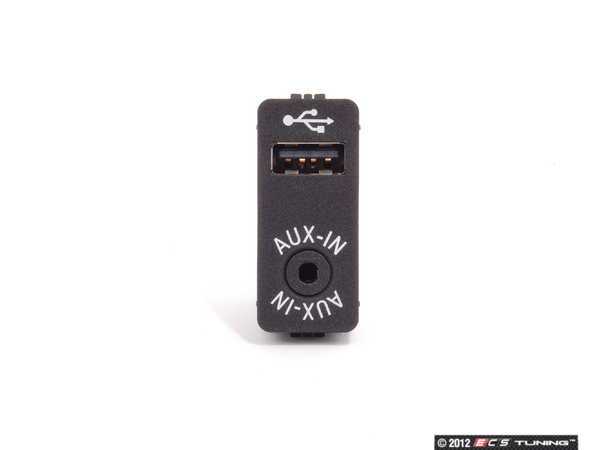
Yep that the part right there for 84109229246 , looks like the Ebay guy copied our pictures. :(
Yep that the part right there for 84109229246 , looks like the Ebay guy copied our pictures. :(
__________________

MINI Guru/ MINI Owner Since 2004 | NEW Lifetime Part Replacement | Local Pickup
Milltek | Genuine MINI | Forge Motorsport | NM Engineering | ECS Performance | M7 Speed
Customer Service Hours: 8am-8pm EST|Sales Team Hours: 8am-11pm | SAT 10am-7pm 800.924.5172
MINI Guru/ MINI Owner Since 2004 | NEW Lifetime Part Replacement | Local Pickup
Milltek | Genuine MINI | Forge Motorsport | NM Engineering | ECS Performance | M7 Speed
Customer Service Hours: 8am-8pm EST|Sales Team Hours: 8am-11pm | SAT 10am-7pm 800.924.5172

1st Gear

Joined: Dec 2014
Posts: 16
Likes: 0
Thanks! This is good stuff. I'll have to check out my Aux socket, as you said, to make sure it's the same connector.
Have a look at the connector going into your existing aux socket and make sure it looks like this (the one on the left in the second picture).
The one on the right is the USB socket connector.
Sorry, I missed the link
http://www.ebay.co.uk/itm/BMW-USB-AU...item3aa4fdc625
The one on the right is the USB socket connector.
Sorry, I missed the link
http://www.ebay.co.uk/itm/BMW-USB-AU...item3aa4fdc625
I spent more on the block than I wanted to in the end and when for this from EBay
http://www.ebay.co.uk/itm/2313333735...%3AMEBIDX%3AIT
which is titled:
BMW USB AUX-IN Buchse Schaltbar Adapter 84109229246
The cable I also got from ebay with my original block that did not fit or work correctly. This item has disappeared out og my Ebay account and I am having a job to find it .
This is an example of the sort of cable you need although this one, like the one I have is longer than required:
http://www.aliexpress.com/store/prod...866279888.html
http://www.ebay.co.uk/itm/2313333735...%3AMEBIDX%3AIT
which is titled:
BMW USB AUX-IN Buchse Schaltbar Adapter 84109229246
The cable I also got from ebay with my original block that did not fit or work correctly. This item has disappeared out og my Ebay account and I am having a job to find it .
This is an example of the sort of cable you need although this one, like the one I have is longer than required:
http://www.aliexpress.com/store/prod...866279888.html
1st Gear
Joined: Dec 2014
Posts: 16
Likes: 0
Any chance you also have the USB wire, between the back of the socket and the rear of the head unit?
http://www.ecstuning.com/Search/SiteSearch/84109229246/ES2136345/
Yep that the part right there for 84109229246 , looks like the Ebay guy copied our pictures. :(
Yep that the part right there for 84109229246 , looks like the Ebay guy copied our pictures. :(

Neutral
Joined: Dec 2013
Posts: 6
Likes: 0
Date of production
It works....just the need the radio, cd player, and bezel and everything is plug and play.
Pics here: https://www.northamericanmotoring.co...post12075.html
Pics here: https://www.northamericanmotoring.co...post12075.html
Just a simple question for you DirtyMini: what's the month of production of your car, before or after September 2008? What I want to know is if the car is a R56 or a pre-LCI R56?
Cheers and tkx in advance!

1st Gear
Joined: Dec 2014
Posts: 16
Likes: 0
Well, I got my radio today. Unfortunately it doesn't seem to be working correctly.
All the lights work and you can hear static on the radio, but the display on the speedometer is blank. The fuel gauge, etc work on the speedometer and the LCD lights up, but nothing is displayed.
Could this be a programming issue or is it more likely that the radio just doesn't work?
The speedometer display still works just fine with the old radio.
Any ideas anyone?
I believe it was a pre-LCI. You can tell by the silver CD player, etc.
All the lights work and you can hear static on the radio, but the display on the speedometer is blank. The fuel gauge, etc work on the speedometer and the LCD lights up, but nothing is displayed.
Could this be a programming issue or is it more likely that the radio just doesn't work?
The speedometer display still works just fine with the old radio.
Any ideas anyone?
Very inspiring post, been searching for this all over the net!
Just a simple question for you DirtyMini: what's the month of production of your car, before or after September 2008? What I want to know is if the car is a R56 or a pre-LCI R56?
Cheers and tkx in advance!
Just a simple question for you DirtyMini: what's the month of production of your car, before or after September 2008? What I want to know is if the car is a R56 or a pre-LCI R56?
Cheers and tkx in advance!

1st Gear
Joined: Dec 2014
Posts: 28
Likes: 3
From: Yeovil, UK
Radio Display not working
The radio display is not connected to the speedo the speedo just mounts on it mechanically.
I hope this is not a silly question but I assume you took the speedo off of your old radio and display and fitted it, the speedo, to the display of your new radio so now you have black controls instead of silver, or do you own an LCI anyway?
I would expect that the radio would work without anything to do with coding as it has a live feed and is swirched from within the radio its self.
One of the reasons you may hear a hiss in the speakers is because you are no tuned to a station but because you can't see what is on in the display you can tune it.
Does the radio turn on and off?
Post a picture of what you have with the radio on at night with the lights on so the displays are lit.
Also post a picture of the back of your old radio.
I hope this is not a silly question but I assume you took the speedo off of your old radio and display and fitted it, the speedo, to the display of your new radio so now you have black controls instead of silver, or do you own an LCI anyway?
I would expect that the radio would work without anything to do with coding as it has a live feed and is swirched from within the radio its self.
One of the reasons you may hear a hiss in the speakers is because you are no tuned to a station but because you can't see what is on in the display you can tune it.
Does the radio turn on and off?
Post a picture of what you have with the radio on at night with the lights on so the displays are lit.
Also post a picture of the back of your old radio.
1st Gear
Joined: Dec 2014
Posts: 16
Likes: 0
Thanks for all the help, shrubba!
1st Gear
Joined: Dec 2014
Posts: 28
Likes: 3
From: Yeovil, UK
New Radio
NormallyI see these radios on offer with the display attached, did your radio not come with a display?
If it didn't then you may have an incompatibilty issue or you may not have connected the ribon correctly.
What is the Pt No of your new radio?
If it didn't then you may have an incompatibilty issue or you may not have connected the ribon correctly.
What is the Pt No of your new radio?
1st Gear
Joined: Dec 2014
Posts: 16
Likes: 0
Straight from the eBay auction:
http://www.ebay.com/itm/151613621448?_trksid=p2059210.m2749.l2649&ssPageName=STRK%3AMEBIDX%3AIT
EDIT: It seems like a lot of radios don't match up to actual part numbers.
http://www.ebay.com/itm/151613621448?_trksid=p2059210.m2749.l2649&ssPageName=STRK%3AMEBIDX%3AIT
EDIT: It seems like a lot of radios don't match up to actual part numbers.
Last edited by aetherair; Mar 20, 2015 at 03:38 PM. Reason: more info
1st Gear
Joined: Dec 2014
Posts: 28
Likes: 3
From: Yeovil, UK
Pt No
Is it perhaps 65123456815?
Is that the Pt No of the new or old radio?
Do you have a Nav Screen or similar or do you have an normal full face speedo with the small 2 line radio dispaly with push button controls underneath them?
65123456815 is not for a full face speedo but the again I wouldnt expect it to have a ribon either.
Is that the Pt No of the new or old radio?
Do you have a Nav Screen or similar or do you have an normal full face speedo with the small 2 line radio dispaly with push button controls underneath them?
65123456815 is not for a full face speedo but the again I wouldnt expect it to have a ribon either.
1st Gear
Joined: Dec 2014
Posts: 16
Likes: 0
65123456518 is definitely the part number of the newly installed radio.
I have the full-face speedometer with the small 2-line display.
My old one definitely had a ribbon that hooked into the speedometer. Hooking the old one up still works fine. I swapped the radios a couple times last night, so I doubt I'm putting the ribbon cable in wrong or something.
I have the full-face speedometer with the small 2-line display.
My old one definitely had a ribbon that hooked into the speedometer. Hooking the old one up still works fine. I swapped the radios a couple times last night, so I doubt I'm putting the ribbon cable in wrong or something.
1st Gear
Joined: Dec 2014
Posts: 28
Likes: 3
From: Yeovil, UK
doh!!!!!!!!!!!!2
I guess you answered all my question while I was typing it!
Its kust a shame you didn't get the display with the radio.
I got mine from the Chzech Republic as well.
I assume you connected the radio aerial cable to the centre Fakra connector next to the white USB connector?
Its kust a shame you didn't get the display with the radio.
I got mine from the Chzech Republic as well.
I assume you connected the radio aerial cable to the centre Fakra connector next to the white USB connector?
1st Gear
Joined: Dec 2014
Posts: 28
Likes: 3
From: Yeovil, UK
Diagnosis
It looks like you've done pretty much all you can to check everything has been put together correctly. It a shame I cant seem to line up the part number with something in RealOEM to get an idea what your new rasdio came from.
For the record the display and radio controls are part of the radio and the speedo slots onto them and is secured by four screws on the back.
I can't imagine that there will be much differnce to the displays and controls on any of the various post LCI radios of this sort so I am begining to think that your radio is duff (or it does need coding), well at least the output to the display.
One thing you could try is to take the front trim off of the radio to make sure the ribbon is connected to the radio body correctly.
I took the front trim of my pre LCI radio off the other day and it was just held on wiith four screws that go in from the front. The post LCI may be different but I cant remember. What I'm thinking is that the seller may have dislodged the ribbon at the radio body when they removed the speedo complete with the radio controls
For the record the display and radio controls are part of the radio and the speedo slots onto them and is secured by four screws on the back.
I can't imagine that there will be much differnce to the displays and controls on any of the various post LCI radios of this sort so I am begining to think that your radio is duff (or it does need coding), well at least the output to the display.
One thing you could try is to take the front trim off of the radio to make sure the ribbon is connected to the radio body correctly.
I took the front trim of my pre LCI radio off the other day and it was just held on wiith four screws that go in from the front. The post LCI may be different but I cant remember. What I'm thinking is that the seller may have dislodged the ribbon at the radio body when they removed the speedo complete with the radio controls
1st Gear
Joined: Dec 2014
Posts: 28
Likes: 3
From: Yeovil, UK
Alternative
If you want a cheep alternative for now try looking at the Kinivo 455.
It will give you Bluetooth to your phone via the 3.5mm AUX in Jack and you will be able to stream music from your phone.
It does mean have your head unit on AUX all of the time but it's a good stop gap and you can even keep it if and when you get your radio sorted to give you the music streaming capability.
I've sill got mine fitted and I have hidden the power supply by crimping in an extra lighter socket hideen under the hand brake console and I have run the wires up inside the console and the control button is stuck on the speedo on the drivers side just above the radio display with the wire disappearing into the speedo cowl.
http://www.kinivo.com/Kinivo-BTC455-.../dp/B00JK0G8KC
It will give you Bluetooth to your phone via the 3.5mm AUX in Jack and you will be able to stream music from your phone.
It does mean have your head unit on AUX all of the time but it's a good stop gap and you can even keep it if and when you get your radio sorted to give you the music streaming capability.
I've sill got mine fitted and I have hidden the power supply by crimping in an extra lighter socket hideen under the hand brake console and I have run the wires up inside the console and the control button is stuck on the speedo on the drivers side just above the radio display with the wire disappearing into the speedo cowl.
http://www.kinivo.com/Kinivo-BTC455-.../dp/B00JK0G8KC
1st Gear
Joined: Dec 2014
Posts: 16
Likes: 0
One thing you could try is to take the front trim off of the radio to make sure the ribbon is connected to the radio body correctly.
I took the front trim of my pre LCI radio off the other day and it was just held on wiith four screws that go in from the front. The post LCI may be different but I cant remember. What I'm thinking is that the seller may have dislodged the ribbon at the radio body when they removed the speedo complete with the radio controls
I took the front trim of my pre LCI radio off the other day and it was just held on wiith four screws that go in from the front. The post LCI may be different but I cant remember. What I'm thinking is that the seller may have dislodged the ribbon at the radio body when they removed the speedo complete with the radio controls
The new radio doesn't say "Navigation" or "Visual Boost" on it at all. Could this at least tell us it does come from a vehicle with a the full-face speedometer?
1st Gear
Joined: Dec 2014
Posts: 16
Likes: 0
The Kinvio is neat, but I'm not in enough of a hurry to buy a temporary solution. Realistically, I'll probably end up using the USB anyway. Either a USB stick with music on it or my old iPod.
1st Gear
Joined: Dec 2014
Posts: 28
Likes: 3
From: Yeovil, UK
Original Radio Pt No
Cant say that I have studied too many Mini Radio labels but if this sort of detail does appear on the label you couldbe right. However I thought that the head unit for lcd display variants have additional controls on the front of the CD slot.
Do you have USB already and hence were just after the BT?
I guess not as you were asking about USB cables.
Do you have USB already and hence were just after the BT?
I guess not as you were asking about USB cables.
1st Gear
Joined: Dec 2014
Posts: 16
Likes: 0
Correct, I'm after USB and Bluetooth. I know I can just plug it into the AUX port, but it would be nice to have steering wheel controls.
I tried taking the face plate off my radio to check the cable. It is put together significantly different from the pre-LCI silver radios, so I was unable to get to where the ribbon cable plugs in. It seems you have to pull it apart a lot more than I was willing to.
I tried taking the face plate off my radio to check the cable. It is put together significantly different from the pre-LCI silver radios, so I was unable to get to where the ribbon cable plugs in. It seems you have to pull it apart a lot more than I was willing to.
1st Gear
Joined: May 2006
Posts: 35
Likes: 0
From: Maine
I just updated my entire dash and wheel controls to the all black 2013 stuff out of a Roadster and R56 but couldn't get the mic to connect (added the mic From ECS as my R55 did not have bluetooth). I think this is literally the only place on the interwebs I have found that mentions the connections in the back of the radio. I'm guessing the pins are loose and taped to the harness somewhere behind the radio. Bummer that I have to take apart the dash again but it will be soooo nice having the mic working as the Bluetooth connects and interfaces with my iphone perfectly.
For anyone else doing the upgrade, I was surprised by how easily everything outside of the the addition of the mic worked out. My R55 already had wheel controls though so the harness was prepped for the mic.
Thanks for the update. just saw this.
__________________
MINI Guru/ MINI Owner Since 2004 | NEW Lifetime Part Replacement | Local Pickup
Milltek | Genuine MINI | Forge Motorsport | NM Engineering | ECS Performance | M7 Speed
Customer Service Hours: 8am-8pm EST|Sales Team Hours: 8am-11pm | SAT 10am-7pm 800.924.5172
MINI Guru/ MINI Owner Since 2004 | NEW Lifetime Part Replacement | Local Pickup
Milltek | Genuine MINI | Forge Motorsport | NM Engineering | ECS Performance | M7 Speed
Customer Service Hours: 8am-8pm EST|Sales Team Hours: 8am-11pm | SAT 10am-7pm 800.924.5172

Neutral
Joined: Nov 2012
Posts: 7
Likes: 0
I currently have an 09 JCW with silver gauges and upgraded my center stack to the all 2011 black center guages and steering wheel controls/airbag. I lost my factory MIC and sound quality. The radio I replaced it with did not have the digital input. It did have satellite, but I'll save that upgrade for later. Do you know if there's a way to regain the factory MIC? Did I miss plugging in a cable?
I suppose I could put up with the degraded sound until I'm able to replace the head unit with what I think is Harmon Kardon type of radio. Not entirely sure.
Any help you can provide would be appreciated.
Thanks
Curt
My 2009 radio looks identical to this. Part no.s are the same listed from ebay here. 65.12-3454567-01
http://www.ebay.com/itm/2008-mini-co...p2047675.l2557
and the 2011 looks identical to this.
http://www.ebay.com/itm/11-12-13-14-...9Wl~LO&vxp=mtr
I suppose I could put up with the degraded sound until I'm able to replace the head unit with what I think is Harmon Kardon type of radio. Not entirely sure.
Any help you can provide would be appreciated.
Thanks
Curt
My 2009 radio looks identical to this. Part no.s are the same listed from ebay here. 65.12-3454567-01
http://www.ebay.com/itm/2008-mini-co...p2047675.l2557
and the 2011 looks identical to this.
http://www.ebay.com/itm/11-12-13-14-...9Wl~LO&vxp=mtr
1st Gear
Joined: Dec 2014
Posts: 28
Likes: 3
From: Yeovil, UK
[QUOTE=Blur;4171252]I currently have an 09 JCW with silver gauges and upgraded my center stack to the all 2011 black center guages and steering wheel controls/airbag. I lost my factory MIC and sound quality. The radio I replaced it with did not have the digital input.
Hi
This article was really about getting bluetooth into a non-bluetooth specced MCS.
If you already had a MIC then I assume you already had Bluetooth.
If you already had Bluetooth you may have lost some of your original connections. My original radio had an optical bus input for the CD player and any other optical bus based options.
My new radio didn't so I can't fit a CD player (if I wanted one that is as I prefer having the storage).(bu the way your links just took me to ebay and not to a specific add).
May I ask why you upgraded, was it just to blackout your dash, and what options did you already have?
I probably won't be able to help you anyway but I get the feeling that you may have paid a lot of money for a black dash.
For example to black-out my speedo I just bought the little bit of trim that that goes around the switches for £12 direct from a Stealer.
I did a lot of research before I put my toe in the water on this one and the only loose end I had was the MIC as I did not know where to connect it to once I fitted it.
Hi
This article was really about getting bluetooth into a non-bluetooth specced MCS.
If you already had a MIC then I assume you already had Bluetooth.
If you already had Bluetooth you may have lost some of your original connections. My original radio had an optical bus input for the CD player and any other optical bus based options.
My new radio didn't so I can't fit a CD player (if I wanted one that is as I prefer having the storage).(bu the way your links just took me to ebay and not to a specific add).
May I ask why you upgraded, was it just to blackout your dash, and what options did you already have?
I probably won't be able to help you anyway but I get the feeling that you may have paid a lot of money for a black dash.
For example to black-out my speedo I just bought the little bit of trim that that goes around the switches for £12 direct from a Stealer.
I did a lot of research before I put my toe in the water on this one and the only loose end I had was the MIC as I did not know where to connect it to once I fitted it.