


Navigation & Audio IPhone 4 Question


Neutral
Joined: Sep 2010
Posts: 3
Likes: 0
Hi all. I work with ProClipUSA and have helped quite a few people with charging solutions in their car and have a workaround for you, most likely using your stock cable. I tried posting once, but with it being my first post it deleted all the effort I put in to writing and linking and images and told me to say hi and introduce myself first. Pain in the butt. So the next post should have the info for you, well it should after a moderator approves it. The joys of being a newb on a forum.
Last edited by crogs571; Sep 4, 2010 at 08:02 AM.
Neutral
Joined: Sep 2010
Posts: 3
Likes: 0
1st...USB drive solution. To get songs to play back in track order, just rename the tracks with an 01, 02, 03.... in front of them. I did that on my slacker g2 since it did the same thing. Worked like a charm.
2nd. charging solution for the iphone.
Tap into your fuse box with a simple add-a-circuit fuse tap
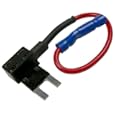
then hardwire a 12v socket to it:hardwired 12v socket
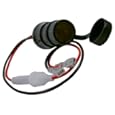
then plug in a 12v usb adapter
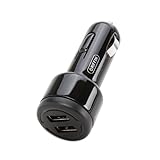
And plug the usb from the cable into it. Takes the wonky Mini usb out of the picture. You can use quite a few different 12v usb adapters. The griffin above is just for reference.
If you find the cable is part of the problem, you can always try the deal extreme one or the Kenwood one below definitely works. It was designed for an ipod, but it charges and plays with the iphone perfectly. You just can't use it to sync the iphone, which you're not doing that in the car anyway.
Kenwood cable
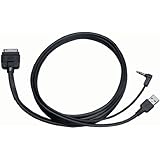
Hope this helps. And if you're looking to do a nice dash mount with your iphone, let me know. I can save you a few bucks off of proclip's products.


Ryan
2nd. charging solution for the iphone.
Tap into your fuse box with a simple add-a-circuit fuse tap
then hardwire a 12v socket to it:hardwired 12v socket
then plug in a 12v usb adapter
And plug the usb from the cable into it. Takes the wonky Mini usb out of the picture. You can use quite a few different 12v usb adapters. The griffin above is just for reference.
If you find the cable is part of the problem, you can always try the deal extreme one or the Kenwood one below definitely works. It was designed for an ipod, but it charges and plays with the iphone perfectly. You just can't use it to sync the iphone, which you're not doing that in the car anyway.
Kenwood cable
Hope this helps. And if you're looking to do a nice dash mount with your iphone, let me know. I can save you a few bucks off of proclip's products.
Ryan
Neutral
Joined: Sep 2010
Posts: 3
Likes: 0
also...just try the usb adapter in a cigarette lighter in the car. Since the adapter is adjusting the voltage and amperage, it should do the trick too with the cooper's usb cable. Not sure where the locations of outlets are, but if they allow for nice cable routing, it'll save you the trouble of the add-a-fuse and hardwired 12v socket. Heck, you can go to Five Below and pick one up for $5. Marshalls and TJ Maxx have them too for cheap.

1st Gear
Joined: Feb 2011
Posts: 31
Likes: 0
I have a 2009 MCS and recently tried using my new iphone 4 by connecting it to the adaptor but for some reason I can't get the songs to play. I can see all my songs/playlist on the screen but I the steering wheel buttons don't work and neither does manually trying to control it from the radio buttons. Is there a fix for this either from the dealership or third party vendor of a different cable or something? 
Do you think it's a cable problem, because I bought from some no-name place and not from the dealer?
Also it seems like there is no way to scroll quickly through the lists (?), which probably makes the whole thing useless anyway, and maybe I'll just go back to using the aux-in jack only.
Finally, music of a USB stick can be controlled and plays without an issue.
Thx, ..Roger
1st Gear
Joined: Feb 2011
Posts: 31
Likes: 0
iPhone 4 Question - solved
I have a 2008 Clubman S, and I have the same problem. I just bought the Y-cable (as it didn't come with the car I just bought as a private deal in Canada) off of eBay, 0440796 stamped on it, shipped from Hong Kong. I can see the song/artist/etc lists but nothing plays, then finally I get some message on the radio display which I think was "device failed to read" or something similar. I have an iPhone4 running 4.2.1. BTW, it does charge.
Do you think it's a cable problem, because I bought from some no-name place and not from the dealer?
Also it seems like there is no way to scroll quickly through the lists (?), which probably makes the whole thing useless anyway, and maybe I'll just go back to using the aux-in jack only.
Finally, music of a USB stick can be controlled and plays without an issue.
Thx, ..Roger
Do you think it's a cable problem, because I bought from some no-name place and not from the dealer?
Also it seems like there is no way to scroll quickly through the lists (?), which probably makes the whole thing useless anyway, and maybe I'll just go back to using the aux-in jack only.
Finally, music of a USB stick can be controlled and plays without an issue.
Thx, ..Roger
ok solved the not playing problem:
I removed some of the music so that I had about 10% free memory on my iPhone4 and then tried it again and it seemed to work, so I'm not sure if it is just the reconnecting or freeing up memory that fixed it. I did see a comment on the Mini Cooper USB/MP3 player notes PDF posted somewhere here on the forums, about ensuring you have 10% memory free, so that's what gave me the idea to try this.
However, the lack of a fast scroll almost makes this interface useless except for playing a few playlists. I might see about designing a USB switch so I can quickly disconnect the iPhone from the car and then use screen control and then put it back to get track display on the radio.
..Roger

Thread Starter
|
2nd Gear
Joined: Jun 2010
Posts: 59
Likes: 1
From: San Antonio, Texas
iPhone 4 adaptor/cradle works with 2010 MINI
I just received my adaptor/cradle for my MINI 2010.
So, to my original question in this thread, there is now an adaptor that works with the 2010 MINI armrest option. The part number I purchased for about $170 is: 84 21 2 199 390 - Labeled "MUSIC SNAP-IN ADAPTOR".
-- Plays my music library to my stereo from the phone and understands the names and playlists
-- Fits the iPhone 4 correctly
-- Charges the phone while playing music or talking on the phone
-- Works seamlessly with every other option like multi touch steering wheel, stereo options, bluetooth, on and on.
I can't find anything that doesn't work.
Thought I'd share with the group.
Perry
So, to my original question in this thread, there is now an adaptor that works with the 2010 MINI armrest option. The part number I purchased for about $170 is: 84 21 2 199 390 - Labeled "MUSIC SNAP-IN ADAPTOR".
-- Plays my music library to my stereo from the phone and understands the names and playlists
-- Fits the iPhone 4 correctly
-- Charges the phone while playing music or talking on the phone
-- Works seamlessly with every other option like multi touch steering wheel, stereo options, bluetooth, on and on.
I can't find anything that doesn't work.
Thought I'd share with the group.
Perry

Thread
Thread Starter
Forum
Replies
Last Post
R50/53 More supercharger hulabaloo
one73ronin
R50/R53 :: Hatch Talk (2002-2006)
23
Sep 22, 2015 09:56 AM
Mini Mania
Interior/Exterior Products
1
Sep 11, 2015 01:15 PM