


Navigation & Audio iPhone 3GS


5th Gear
Joined: May 2008
Posts: 952
Likes: 7
From: Chandler, AZ
Is the part number visible on the cable someplace? If so I'll yank it and check. I have a feeling it's a brand new part number.

1st Gear
Joined: Jan 2010
Posts: 45
Likes: 0
From: Milwaukee, WI
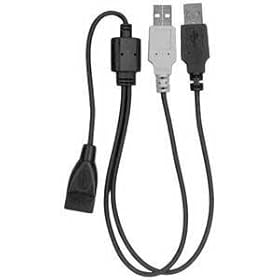
I just tried on my '10 Cooper with USB cable PN 61 12 0 440 796 and my iPhone 3GS, and I got the same old "This device isn't supported for charging" error as generally reported. If there _is_ a new cable for '10, it didn't get into my car at the factory. (Or is that done at the dealership?)
That said, having used the stereo integration on my wife's Clubman S, I'm sort of underwhelmed with it. It might be OK with smaller storage devices, but 2 lines of scrollable data just sucks when you're trying to find an [artist|album|song] near the middle of the alphabet. I'm perfectly happy with my Griffin Autopilot, although I want to figure out a better way of routing the cable up to my Cravenspeed Flexpod iPhone mount. The major loss is that I can't use the wheel mounted controls to skip tracks, but I'll live. It _is_ sort of annoying that it seems as though the car is presenting a bluetooth AV profile to the car, but not actually doing anything with the music data the iPhone is sending it. Quelle slick, BMW.
That said, having used the stereo integration on my wife's Clubman S, I'm sort of underwhelmed with it. It might be OK with smaller storage devices, but 2 lines of scrollable data just sucks when you're trying to find an [artist|album|song] near the middle of the alphabet. I'm perfectly happy with my Griffin Autopilot, although I want to figure out a better way of routing the cable up to my Cravenspeed Flexpod iPhone mount. The major loss is that I can't use the wheel mounted controls to skip tracks, but I'll live. It _is_ sort of annoying that it seems as though the car is presenting a bluetooth AV profile to the car, but not actually doing anything with the music data the iPhone is sending it. Quelle slick, BMW.
Last edited by pfriedel; Jan 9, 2010 at 09:51 PM. Reason: Clarification, lack of awesomeness.

Neutral
Joined: Jan 2010
Posts: 4
Likes: 0
I have the 61120440796 Y-Cable, which in August I was told was the latest one.
It does not charge my 3GS in 2008 Mini Cooper S.
I tried to provide additional charging power via the cigarette lighter as suggested earlier in this thread. I did this with the Apricorn splitter from Amazon (http://www.amazon.com/gp/product/B00..._ya_oh_product) but doesn't charge the phone either. Tried it with 2 different USB Car Lighter-USB adapters and both didn't work.
Will post here if I find a solution.

2nd Gear
Joined: May 2009
Posts: 55
Likes: 0
I tried to provide additional charging power via the cigarette lighter as suggested earlier in this thread. I did this with the Apricorn splitter from Amazon (http://www.amazon.com/gp/product/B00..._ya_oh_product) but doesn't charge the phone either. Tried it with 2 different USB Car Lighter-USB adapters and both didn't work.

6th Gear
Joined: Jul 2008
Posts: 1,589
Likes: 0
From: St. Louis
It can make a difference whether you plug the iPhone in before or after starting the car. I find that if I start the car first, the regular cable works, but if I plug the iPhone in first and then start, I get the device not supported error.
Last edited by RaceTripper; Jan 10, 2010 at 08:16 AM.
5th Gear
Joined: May 2008
Posts: 952
Likes: 7
From: Chandler, AZ
I'm not home but I'll check my cable's p/n tomorrow and report back.
I do get an error when plugging in my 3GS - doesn't specifically say anything about charging, just that it's an "unsupported device" or similar, and wants to know if I want to enable airplane mode. But letting the error time out (or answering "no" to the airplane question) and it's fine, showing the normal charging icon, and I've charged it up from near-dead to fully charged. With my iPod Nano (5G), there's no error at all - just reports that it's now connected in "accessory mode" or similar.
Now I'm really curious to see if I have a new p/n.. which might be good news for the rest of you, a solution could be available.
I do get an error when plugging in my 3GS - doesn't specifically say anything about charging, just that it's an "unsupported device" or similar, and wants to know if I want to enable airplane mode. But letting the error time out (or answering "no" to the airplane question) and it's fine, showing the normal charging icon, and I've charged it up from near-dead to fully charged. With my iPod Nano (5G), there's no error at all - just reports that it's now connected in "accessory mode" or similar.
Now I'm really curious to see if I have a new p/n.. which might be good news for the rest of you, a solution could be available.
Neutral
Joined: Jan 2010
Posts: 4
Likes: 0
Actually plugging the black male side into the charge DOES charge my phone. But then of course, plugging the gray male into the Mini doesnt show IPOD in the car stereo.
I'll try plugging in everything with the engine started and see if it makes any difference.

I'm not home but I'll check my cable's p/n tomorrow and report back.
I do get an error when plugging in my 3GS - doesn't specifically say anything about charging, just that it's an "unsupported device" or similar, and wants to know if I want to enable airplane mode. But letting the error time out (or answering "no" to the airplane question) and it's fine, showing the normal charging icon, and I've charged it up from near-dead to fully charged. With my iPod Nano (5G), there's no error at all - just reports that it's now connected in "accessory mode" or similar.
Now I'm really curious to see if I have a new p/n.. which might be good news for the rest of you, a solution could be available.
I do get an error when plugging in my 3GS - doesn't specifically say anything about charging, just that it's an "unsupported device" or similar, and wants to know if I want to enable airplane mode. But letting the error time out (or answering "no" to the airplane question) and it's fine, showing the normal charging icon, and I've charged it up from near-dead to fully charged. With my iPod Nano (5G), there's no error at all - just reports that it's now connected in "accessory mode" or similar.
Now I'm really curious to see if I have a new p/n.. which might be good news for the rest of you, a solution could be available.
Neutral
Joined: Jan 2010
Posts: 4
Likes: 0
Ok it did make a difference. Charging and audio work when the iphone is plugged in with the engine started, and there's no more funny noise. Thanks for all your help.
5th Gear
Joined: May 2008
Posts: 952
Likes: 7
From: Chandler, AZ
That said - somebody having the issue should check with their local parts department and see if there's a new cable in stock or listed in their system. Should be pretty easy for a parts guy to determine.
5th Gear
Joined: May 2008
Posts: 952
Likes: 7
From: Chandler, AZ
Duh, I didn't even notice that.. didn't pay attention after seeing I had less digits.
I'm sure you're right, must be the same thing. But it works fine for me.. so is the USB port putting out more juice, or wth is going on here? The plot thickens.


What cradle? There are about a thousand iphone cradles on the market. Can you be more specific? Brand and model please?
5th Gear
Joined: May 2008
Posts: 952
Likes: 7
From: Chandler, AZ
Hmm.. do you have a CD changer? Might not be possible to have both? Bad connection to the cradle? Assuming this is the in-armrest cradle, it should work.

6th Gear
Joined: May 2007
Posts: 1,304
Likes: 0
From: Stanwood, WA
You'll need cradle number 84 21 2 158 683 and SmartPhone (option 6NF) integration to connect an iPhone 3GS from the armrest and play music.

4th Gear
Joined: Feb 2007
Posts: 362
Likes: 2
From: Ashburn, Virginia
Like Nicknbecka said, you'll need that ***683 part number. Forgive me for going into details you might know:
It's a big deal at my dealer if you "get an electrical Part" and want to return it. I've been twice to Sterling MINI to pick up the Iphone adapter and realized I needed to have the 3GS adapter not the previous. The model numbers have changed more than once since then. So hopefully, if you know for sure you do have the smartphone option in your car, you can return the adapter you got and get the 683 one.
There is a possibility that your car with smartphone option isn't working, but the dealer will have to verify that.
Also, check out the link to the Bluetooth Phone's compatibility list (with adapter part numbers) in Nicknbecka's signature. He has been keeping that up to date, Thanks!
Good luck!
It's a big deal at my dealer if you "get an electrical Part" and want to return it. I've been twice to Sterling MINI to pick up the Iphone adapter and realized I needed to have the 3GS adapter not the previous. The model numbers have changed more than once since then. So hopefully, if you know for sure you do have the smartphone option in your car, you can return the adapter you got and get the 683 one.
There is a possibility that your car with smartphone option isn't working, but the dealer will have to verify that.
Also, check out the link to the Bluetooth Phone's compatibility list (with adapter part numbers) in Nicknbecka's signature. He has been keeping that up to date, Thanks!
Good luck!

Neutral
Joined: May 2010
Posts: 1
Likes: 0
iPhone/iPod Integration Issue
[quote=pfriedel;2953899]...That said, having used the stereo integration on my wife's Clubman S, I'm sort of underwhelmed with it. It might be OK with smaller storage devices, but 2 lines of scrollable data just sucks when you're trying to find an [artist|album|song] near the middle of the alphabet. ...quote]
I have been searching for more posts on this topic - anyone know why they didn't include an alphabetical scroll feature for artist/album/song like the bluetooth phone menu has for the contact list? I agree with pfriedel - my iPhone has 3,459 songs on it, and it is agonizingly tedious to scroll to a desired song, or artist or album that is more than a few letters from the beginning of the alphabet.
I have been searching for more posts on this topic - anyone know why they didn't include an alphabetical scroll feature for artist/album/song like the bluetooth phone menu has for the contact list? I agree with pfriedel - my iPhone has 3,459 songs on it, and it is agonizingly tedious to scroll to a desired song, or artist or album that is more than a few letters from the beginning of the alphabet.

Thread
Thread Starter
Forum
Replies
Last Post
bradstyle
F55/F56 :: Hatch Talk (2014+)
4
Oct 1, 2015 11:15 AM
leonardogia
F55/F56/F57 Stock Problems/Issues
2
Sep 19, 2015 12:25 PM