


Navigation & Audio Y Cable (Bluetooth Audio package) doesn't work with iPhone OS 3


6th Gear
Joined: Mar 2007
Posts: 7,578
Likes: 4
From: Paradise
https://www.northamericanmotoring.co...ml#post2814907

6th Gear
Joined: May 2007
Posts: 1,304
Likes: 0
From: Stanwood, WA
When I went to the Apple Store Genius Bar.. they tested the Y cable and it powered the 3Gs fine. I think the problem is that the USB plug in the dash does not transfer enough power to recharge the iPhone.
In an earlier post, I mentioned that in my past when I have used self-powered (USB) devices such as external drives, they would not charge if plugged them into a keyboard USB port but only when directly plugged into a computer tower port. I think it is like daisy chaining your cable tv it degrades the signal strength. I think this issue has something to do with Mini's USB port.
In an earlier post, I mentioned that in my past when I have used self-powered (USB) devices such as external drives, they would not charge if plugged them into a keyboard USB port but only when directly plugged into a computer tower port. I think it is like daisy chaining your cable tv it degrades the signal strength. I think this issue has something to do with Mini's USB port.
USB devices are supposed to connect at the low power draw first, and then specifically request an additional power draw if it's supported, but Minis have the USB to serial converter between the USB port and the iPod. Perhaps it's the serial converter chip in the cord that's making the additional power level request and supplying a fixed current level to the dock connector that's correct for older iPhones/Pods but the 3GS requires more?
I couldn't track down any info on what each Apple device requires for current when USB charging... Does connecting directly to the car using a standard USB cable charge a 3GS?

6th Gear
Joined: Jul 2008
Posts: 1,589
Likes: 0
From: St. Louis
Not sure if it's come up in this thread or not (all these similar iPod threads get confusing!) but the MINI's USB port has been reported as a low-power device USB port, which should make it rated at a minimum of 100mA.
USB devices are supposed to connect at the low power draw first, and then specifically request an additional power draw if it's supported, but Minis have the USB to serial converter between the USB port and the iPod. Perhaps it's the serial converter chip in the cord that's making the additional power level request and supplying a fixed current level to the dock connector that's correct for older iPhones/Pods but the 3GS requires more?
I couldn't track down any info on what each Apple device requires for current when USB charging... Does connecting directly to the car using a standard USB cable charge a 3GS?
USB devices are supposed to connect at the low power draw first, and then specifically request an additional power draw if it's supported, but Minis have the USB to serial converter between the USB port and the iPod. Perhaps it's the serial converter chip in the cord that's making the additional power level request and supplying a fixed current level to the dock connector that's correct for older iPhones/Pods but the 3GS requires more?
I couldn't track down any info on what each Apple device requires for current when USB charging... Does connecting directly to the car using a standard USB cable charge a 3GS?
6th Gear
Joined: May 2007
Posts: 1,304
Likes: 0
From: Stanwood, WA
Ah- sorry, I was responding from the e-mail notice and missed your post. That seems pretty definitive that it's just short on current from the port then. I wonder what the 3GS requires and what the car's actual limit is?
6th Gear
Joined: Mar 2007
Posts: 7,578
Likes: 4
From: Paradise
Whether it charges or not, I don't think it will connect properly to the radio for listing and control. You also wont get any audio, unless you connect the headphone jack to the AUX. So, there really isn't much point in trying the Apple cable.

2nd Gear
Joined: Feb 2008
Posts: 55
Likes: 0
From: Richmond, VA
I have been away for a few and missed some interesting discussions. It looks like the issue is boiling down to the Mini USB port, Y-Cable or possibly the computer. This is interesting because the Mini dealer told me a few weeks back that since Apple change the OS it could have something to do with the new OS 3.0. I personally find that unlikely since these seems to be more of a hardware issue.
I have posted my question and a link to this thread to the Mini Owner's Lounge and beside a few comments no real answers yet. I have my fingers crossed.
I have posted my question and a link to this thread to the Mini Owner's Lounge and beside a few comments no real answers yet. I have my fingers crossed.

4th Gear
Joined: Feb 2007
Posts: 362
Likes: 2
From: Ashburn, Virginia
I'll have to check again, but my iPhone 3GS won't charge using the usb cable that came with it - when connected to our R57 MINI. I am going to try this bluetooth audio option though to see how that works. I have the 6NE option and am wishing I had just paid the extra 100 dollars to get the smartphone option. At the time I was finalizing my specs for the car, I wasn't "completely sure" I was going to get an iPhone.
I would also like to find out how to get more charging power from the MINI while being able to control the audio on the iPhone through the SATNAV.
I would also like to find out how to get more charging power from the MINI while being able to control the audio on the iPhone through the SATNAV.

Neutral
Joined: Jul 2009
Posts: 9
Likes: 0
I was just curious and trying to figure out another way to isolate the issue. Sounds like it's definitely the Mini's USB port not providing enough power though.
Does this same issue occur for those of you that have the iPod connector in the secret compartment?
Does this same issue occur for those of you that have the iPod connector in the secret compartment?

OVERDRIVE
Joined: May 2005
Posts: 8,233
Likes: 127
From: San Francisco
From the evidence so far, the most likely possibility is that the MINI's USB port doesn't put out enough power. The MINI documentation says the USB will charge devices, up to 500mA maximum. What is the requirement for an iPhone?
Here's a goofy workaround that may work. Some USB external hard drives use a USB Y power cable -- one branch is for USB+power, the other branch is just to draw extra power from a second USB port. Apply the same principle here. Get a USB Y power cable like this: http://www.amazon.com/USB-Power-Adap.../dp/B000JIOHDE
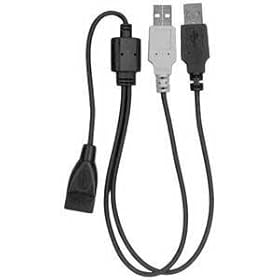
Plug one end into the USB port and the other end into a cigarette lighter USB power adapter, then plug the MINI Y cable into the output side. You'll have the pleasure of using two Y cables at the same time!
Here's a goofy workaround that may work. Some USB external hard drives use a USB Y power cable -- one branch is for USB+power, the other branch is just to draw extra power from a second USB port. Apply the same principle here. Get a USB Y power cable like this: http://www.amazon.com/USB-Power-Adap.../dp/B000JIOHDE
Plug one end into the USB port and the other end into a cigarette lighter USB power adapter, then plug the MINI Y cable into the output side. You'll have the pleasure of using two Y cables at the same time!
4th Gear
Joined: Feb 2007
Posts: 362
Likes: 2
From: Ashburn, Virginia
Update on the native USB iPHONE cable. It didn't charge my iphone when it was connected to the R57 USB port.
I think the closest option is to go ahead and get the (no smartphone prep) cradle (part number ends in 038) and pray for an updated Y-Cable.
Any difference in cradles sold by MINI vs BMW? Shouldn't be right? there is only one MINI dealer near me in the Washington DC area and it's Sterling MINI.
I think the closest option is to go ahead and get the (no smartphone prep) cradle (part number ends in 038) and pray for an updated Y-Cable.
Any difference in cradles sold by MINI vs BMW? Shouldn't be right? there is only one MINI dealer near me in the Washington DC area and it's Sterling MINI.
6th Gear
Joined: Jul 2008
Posts: 1,589
Likes: 0
From: St. Louis
Update on the native USB iPHONE cable. It didn't charge my iphone when it was connected to the R57 USB port.
I think the closest option is to go ahead and get the (no smartphone prep) cradle (part number ends in 038) and pray for an updated Y-Cable.
Any difference in cradles sold by MINI vs BMW? Shouldn't be right? there is only one MINI dealer near me in the Washington DC area and it's Sterling MINI.
I think the closest option is to go ahead and get the (no smartphone prep) cradle (part number ends in 038) and pray for an updated Y-Cable.
Any difference in cradles sold by MINI vs BMW? Shouldn't be right? there is only one MINI dealer near me in the Washington DC area and it's Sterling MINI.

1st Gear
Joined: May 2009
Posts: 38
Likes: 0
From: Upstate NY
Well I placed my order last week for the ipod/bluetooth option. I have an 2g ipod touch. I am not a cell phone fan but the motorola cell that my company gives me is listed to work.
I'll test it with my ipod and post back when I get the car.
I'll test it with my ipod and post back when I get the car.

Neutral
Joined: Jul 2009
Posts: 2
Likes: 0
From the evidence so far, the most likely possibility is that the MINI's USB port doesn't put out enough power. The MINI documentation says the USB will charge devices, up to 500mA maximum. What is the requirement for an iPhone?
Here's a goofy workaround that may work. Some USB external hard drives use a USB Y power cable -- one branch is for USB+power, the other branch is just to draw extra power from a second USB port. Apply the same principle here. Get a USB Y power cable like this: http://www.amazon.com/USB-Power-Adap.../dp/B000JIOHDE
Plug one end into the USB port and the other end into a cigarette lighter USB power adapter, then plug the MINI Y cable into the output side. You'll have the pleasure of using two Y cables at the same time!
Here's a goofy workaround that may work. Some USB external hard drives use a USB Y power cable -- one branch is for USB+power, the other branch is just to draw extra power from a second USB port. Apply the same principle here. Get a USB Y power cable like this: http://www.amazon.com/USB-Power-Adap.../dp/B000JIOHDE
Plug one end into the USB port and the other end into a cigarette lighter USB power adapter, then plug the MINI Y cable into the output side. You'll have the pleasure of using two Y cables at the same time!
2nd Gear
Joined: Feb 2008
Posts: 55
Likes: 0
From: Richmond, VA
I also ordered the Y-cable too and hopefully should get it this week. It looks likely to work with the Mini Y-Cable but it will look like spaghetti. I hope that a better work around is in the near future from Mini. I will post back when I get the cable.

3rd Gear
Joined: May 2007
Posts: 288
Likes: 1
From: México City
It's highly possible that the problem is not enough current on the USB port.
Try plugging a removable HD formatted with FAT32 on there, and see what happens... nothing. There's just not enough power for my own unit. I wouldn't be surprised to see this is the real issue.
If this is the case, then no Y cable will fix it, unless it taps into the cigarrette lighter socket, too. Or they change something in the USB interface.
Try plugging a removable HD formatted with FAT32 on there, and see what happens... nothing. There's just not enough power for my own unit. I wouldn't be surprised to see this is the real issue.
If this is the case, then no Y cable will fix it, unless it taps into the cigarrette lighter socket, too. Or they change something in the USB interface.

Neutral
Joined: Jun 2009
Posts: 10
Likes: 0
Just to add to the list:
I picked up my 2009 MCS yesterday with the y-cable and bluetooth, but without nav.
My iPhone 3GS with latest software updates connects great and everything seems to work, even with 2500+ songs and 1200+ contacts.
Haven't figured out voice dialing yet, but I've only had the car for one night. :-)
I picked up my 2009 MCS yesterday with the y-cable and bluetooth, but without nav.
My iPhone 3GS with latest software updates connects great and everything seems to work, even with 2500+ songs and 1200+ contacts.
Haven't figured out voice dialing yet, but I've only had the car for one night. :-)

6th Gear
Joined: Jul 2008
Posts: 1,174
Likes: 13
From: Ohio
From the evidence so far, the most likely possibility is that the MINI's USB port doesn't put out enough power. The MINI documentation says the USB will charge devices, up to 500mA maximum. What is the requirement for an iPhone?
Here's a goofy workaround that may work. Some USB external hard drives use a USB Y power cable -- one branch is for USB+power, the other branch is just to draw extra power from a second USB port. Apply the same principle here. Get a USB Y power cable like this: http://www.amazon.com/USB-Power-Adap.../dp/B000JIOHDE
Plug one end into the USB port and the other end into a cigarette lighter USB power adapter, then plug the MINI Y cable into the output side. You'll have the pleasure of using two Y cables at the same time!
Here's a goofy workaround that may work. Some USB external hard drives use a USB Y power cable -- one branch is for USB+power, the other branch is just to draw extra power from a second USB port. Apply the same principle here. Get a USB Y power cable like this: http://www.amazon.com/USB-Power-Adap.../dp/B000JIOHDE
Plug one end into the USB port and the other end into a cigarette lighter USB power adapter, then plug the MINI Y cable into the output side. You'll have the pleasure of using two Y cables at the same time!

3rd Gear
Joined: Jul 2008
Posts: 169
Likes: 0
From: Gaithersburg
this works sort of
problem with this set up is the audio jack from the y split cable. If i am not mistaken, the bluetooth for the phone part should still list all your contacts but you need the usb plug for ipod functions with the audio jack plug. i could be wrong here .
From the evidence so far, the most likely possibility is that the MINI's USB port doesn't put out enough power. The MINI documentation says the USB will charge devices, up to 500mA maximum. What is the requirement for an iPhone?
Here's a goofy workaround that may work. Some USB external hard drives use a USB Y power cable -- one branch is for USB+power, the other branch is just to draw extra power from a second USB port. Apply the same principle here. Get a USB Y power cable like this: http://www.amazon.com/USB-Power-Adap.../dp/B000JIOHDE
Plug one end into the USB port and the other end into a cigarette lighter USB power adapter, then plug the MINI Y cable into the output side. You'll have the pleasure of using two Y cables at the same time!
Here's a goofy workaround that may work. Some USB external hard drives use a USB Y power cable -- one branch is for USB+power, the other branch is just to draw extra power from a second USB port. Apply the same principle here. Get a USB Y power cable like this: http://www.amazon.com/USB-Power-Adap.../dp/B000JIOHDE
Plug one end into the USB port and the other end into a cigarette lighter USB power adapter, then plug the MINI Y cable into the output side. You'll have the pleasure of using two Y cables at the same time!
6th Gear
Joined: Jul 2008
Posts: 1,174
Likes: 13
From: Ohio
It's only been a couple days, and I haven't driven that much this weekend (with a low-battery iPhone anyway), but so far it does look to charge the iPhone 3GS. I'll know more after my hour commute this morning -- should be enough time to charge it up full from it's present 82%.
Update: by the time I left for work, the battery was down in the 60s... one hour of driving (and podcast listening) later, it was charged to 96%. So, yes, it does charge with this cable... not super fast, but certainly *much* better than the 2-3% charge I was seeing before (and with no charging error messages this time). I recommend this cable to any MINI owners with an iPhone 3GS who don't want to use an armrest cradle.
Last edited by fishbert; Jul 27, 2009 at 11:16 AM.
Neutral
Joined: Jun 2009
Posts: 10
Likes: 0
Just to add to the list:
I picked up my 2009 MCS yesterday with the y-cable and bluetooth, but without nav.
My iPhone 3GS with latest software updates connects great and everything seems to work, even with 2500+ songs and 1200+ contacts.
Haven't figured out voice dialing yet, but I've only had the car for one night. :-)
I picked up my 2009 MCS yesterday with the y-cable and bluetooth, but without nav.
My iPhone 3GS with latest software updates connects great and everything seems to work, even with 2500+ songs and 1200+ contacts.
Haven't figured out voice dialing yet, but I've only had the car for one night. :-)
The worst part of the Y-cable is that it's really too short to use the iPhone's GPS capabilities, because of the viewing angles required.