


Navigation & Audio iPhone 3G owners BEWARE!


Vendor & Moderator :: MINI Camera and Video & c3 club forum
iTrader: (6)
Thanks for the tip! Just downloaded and installed it!

Coordinator :: Upstate MINIs
Joined: Apr 2006
Posts: 1,203
Likes: 0
In my 2008 MCS, my iPhone will show a charging logo on the screen, but it won't actually charge. I've thought about buying one of these to see if it worked:
http://www.thinkgeek.com/gadgets/travelpower/b43f/
But I don't use my iphone too much in the MINI since I have a dedicated ipod for it.
http://www.thinkgeek.com/gadgets/travelpower/b43f/
But I don't use my iphone too much in the MINI since I have a dedicated ipod for it.

Vendor & Moderator :: MINI Camera and Video & c3 club forum
iTrader: (6)
Anyone experiencea connection issue with their 3G? With the Scosche adaptor and the OEM iPod cable--I'll have the iPhone display rapidly flash. Seems after I turn the iPhone off, then the OEM Head Unit off, then the iPhone on again, and then the HU, it will connect eventually.
It's kind of frustrating. Not sure if it's my cable or what.
CDC doesn't show up on the hu when this happens..sometimes it does, but it can't read the PlayLists.
Anyone else experience anything similar? I'm a newbie with this.
Richard
It's kind of frustrating. Not sure if it's my cable or what.
CDC doesn't show up on the hu when this happens..sometimes it does, but it can't read the PlayLists.
Anyone else experience anything similar? I'm a newbie with this.
Richard
Vendor & Moderator :: MINI Camera and Video & c3 club forum
iTrader: (6)
Was that with the OEM MINI iPod adapter or the Scosche adapter?
Just trying to understand which adapter you dumped.
Richard
Just trying to understand which adapter you dumped.
Richard

4th Gear
Joined: Sep 2007
Posts: 482
Likes: 0
From: Ephrata Washington
Okay I think there might be some confusion is 1st and 2nd gen cars and phone. Old Ipods and Iphones worked on my 1st gen with the factory cable. My G3 needed the adapter. I am not sure how you can run 1st gen Iphone on a 2nd gen Mini. I never got the manual for HK with the factory Ipod conector so there is very little I can tell you except that you build Mini playlist and number them 1-5 and that I got Pandora to run
John
John

1st Gear
Joined: Aug 2008
Posts: 49
Likes: 0
Steve

7th Gear
Joined: Sep 2007
Posts: 405
Likes: 0
From: Hillsborough, NJ
I'd like to report that after my initial issue with the Scosche and returning it, I dared to try it again. Looks like the first unit I got was a bum connector.
I picked up a Scosche Passport today and my iPhone 3G works correctly with my Cooper. I get the message about the device not being compatible each time I connect it, but I just hit No for airplane mode and I'm playing again. Now I can charge and play on my factory installed iPod cable.
I picked up a Scosche Passport today and my iPhone 3G works correctly with my Cooper. I get the message about the device not being compatible each time I connect it, but I just hit No for airplane mode and I'm playing again. Now I can charge and play on my factory installed iPod cable.
Vendor & Moderator :: MINI Camera and Video & c3 club forum
iTrader: (6)
With my 2005, I've found the way to get it to work all the time is to put the iPhone into the playlist mode and even playing a song before I connect the Scosche adapter and with the headunit off.
Then turn on the headunit, and it finds the iPhone everytime. If I don't have it playing music first, sometimes it just flashes forever.
This works great with Pandora as was previously mentioned.
Richard
Then turn on the headunit, and it finds the iPhone everytime. If I don't have it playing music first, sometimes it just flashes forever.
This works great with Pandora as was previously mentioned.
Richard

2nd Gear
Joined: Apr 2008
Posts: 100
Likes: 0
From: Moscow, ID & Northbrook, IL
I am posting to this forum thread because I am interested in finding a solution to the iPhone 3G charging problem in the R56. I might be interested in the cradle for the armrest if it really works. I had the cradle for the Motorola Razr V3 but I had to remove the lid to the R56 armrest to install the cradle and to put in (and take out) the Razr V3 phone. Now that I have the iPhone I don’t need the V3 cradle. I would be happy if I could just get a cable that would charge the iPhone.

6th Gear
Joined: Mar 2007
Posts: 7,578
Likes: 5
From: Paradise
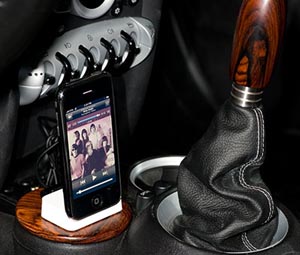

2nd Gear
Joined: Apr 2008
Posts: 100
Likes: 0
From: Moscow, ID & Northbrook, IL
Robin, that looks like an elegant solution.
I’m sorry, I should have been more specific. I would really like ‘one’ cable that allows me to charge and use the iPod function of my iPhone without using the 12v cigarette socket. I would probably ultimately like to get one cable, use an iPhone cradle for the armrest, or use a cable in the armrest so I can free up the space around the shifter. I am currently using the 12v socket for a radar detector which I also need to get wired into an alternate power source (which is another issue).
I’m sorry, I should have been more specific. I would really like ‘one’ cable that allows me to charge and use the iPod function of my iPhone without using the 12v cigarette socket. I would probably ultimately like to get one cable, use an iPhone cradle for the armrest, or use a cable in the armrest so I can free up the space around the shifter. I am currently using the 12v socket for a radar detector which I also need to get wired into an alternate power source (which is another issue).

4th Gear
Joined: Dec 2008
Posts: 333
Likes: 1
From: Chesterfield, VA
The problem stems from the original iPods, which supported both Firewire (8 to 30V)and USB (5V). Apple announced that the original IPhone and 4th gen iPods would be the last to support firewire. Most manufacturers used the pins in the iPod /iPhone connector cable that supported Firewire since they can supply a straight 12v signal. Those pins are no longer active in the new iPods/Iphone 3G.

2nd Gear
Joined: Mar 2008
Posts: 55
Likes: 0
From: Northridge, Claifornia
This issue has been discussed many times here.
It is NOT a 12v to 5v problem.
The mini actually outputs a 5v signal, the problem is it is a low power usb port. If this was a 12v to 5v issue all the adapters mentioned would work perfectly. The other way to tell it is not 12v is it is capable of reading usb flash drives, which would fry if they were sent a 12v signal.
There are different usb specs the one mini went with does not have enough juice in it to charge the 3g phone.
This is why it will charge sometimes and not all the time. The iphone does not take a constant draw from the power. It fluctuates, depending on usage, how full the battery is, and more.
This is the same reason most usb bus powered hard drives don't work in the mini. Some work if they require low enough power.
I wouldnt get my hopes up for an inline converter that would work, there is just not enough power to support it.
I have been struggling with this issue since the 3g phone came out. It looks like the only way to consistently charge the phone and have ipod functionality would be to use the supplied y-cable, splice into the wire, grab the wire's carrying the 5v and put them into a cigarette lighter charger.
I hope I'm wrong and mini addresses this issue.
It is NOT a 12v to 5v problem.
The mini actually outputs a 5v signal, the problem is it is a low power usb port. If this was a 12v to 5v issue all the adapters mentioned would work perfectly. The other way to tell it is not 12v is it is capable of reading usb flash drives, which would fry if they were sent a 12v signal.
There are different usb specs the one mini went with does not have enough juice in it to charge the 3g phone.
This is why it will charge sometimes and not all the time. The iphone does not take a constant draw from the power. It fluctuates, depending on usage, how full the battery is, and more.
This is the same reason most usb bus powered hard drives don't work in the mini. Some work if they require low enough power.
I wouldnt get my hopes up for an inline converter that would work, there is just not enough power to support it.
I have been struggling with this issue since the 3g phone came out. It looks like the only way to consistently charge the phone and have ipod functionality would be to use the supplied y-cable, splice into the wire, grab the wire's carrying the 5v and put them into a cigarette lighter charger.
I hope I'm wrong and mini addresses this issue.
4th Gear
Joined: Dec 2008
Posts: 333
Likes: 1
From: Chesterfield, VA
I have been struggling with this issue since the 3g phone came out. It looks like the only way to consistently charge the phone and have ipod functionality would be to use the supplied y-cable, splice into the wire, grab the wire's carrying the 5v and put them into a cigarette lighter charger.
I hope I'm wrong and mini addresses this issue.
I hope I'm wrong and mini addresses this issue.
Before you do this read this post from the Apple Support website:
"Charging the iPhone isn't simply a matter of applying 5 volts to the USB Pins. In order to initialize charging, the iPhone must "see" a certain voltage on the USB data pins (specifically ~2.8v on Pin 25 and ~2v on Pin 27). Because of this you need to incorporate a voltage divider network to provide the appropriate voltages."
Sorry that I must have reposted the previous info - I didn't read the entire thread. Just trying to be helpful.
Can I ask this question though - why do you want to use the funky controls that MINI provides when you have one of the best designed UI's on earth? Just purchase a cheap Griffin Autopilot and a good mount - it'll be under $60, and use the UI of the 3G. I am tickled to death with mine and now that I have put some real speakers and a sub in, it rocks!
2nd Gear
Joined: Mar 2008
Posts: 55
Likes: 0
From: Northridge, Claifornia
Don't get me wrong i love the iphone ui, it's just easier to do simple tasks using the mfsw. If i have a playlist going and i want to fast forward one song it's much easier. Plus i run g-maps which is nav software it is nice to be able to leave the phone in the nav software and still have control of the music. otherwise i have to exit then re-enter g-maps and reinput my route.
Eulls
I actually made a y adapter that connects my bmw y cable to the cigarette lighter for power and the car for ipod functionality. It works perfectly and costed me nothing but a spare usb cable and a spare usb extension cable. Now i can charge the iphone consistently while using the mfsw
Eulls
I actually made a y adapter that connects my bmw y cable to the cigarette lighter for power and the car for ipod functionality. It works perfectly and costed me nothing but a spare usb cable and a spare usb extension cable. Now i can charge the iphone consistently while using the mfsw
2nd Gear
Joined: Mar 2008
Posts: 55
Likes: 0
From: Northridge, Claifornia
Here is the only way I know of to Charge the phone and have integrated ipod functionality.
(Check my Gallery For A Photo)
The only catch is it will use your cigarette plug also.
Here is the list of things you will need
USB Cable
USB extension cable
USB cigarette charger adapter
Remove part of the outer covering of the usb extension cable
(remove about an inch near the female end.)
You will find four wires inside Red Green Black and White.
Cut the black and red wires, strip the side that leads to the female end.
Cut the regular usb cable about four inches away from the side with the "male A" connector " (this is the flatter of the two sides that usually plugs into a computer.)
Strip the outer sheath of the wire and then strip the ends of the red and black wires.
Connect the red from the usb cable to the red of the usb extension, then do the same with the black wires. This wire will go to the cigarette adapter
Put electrical tape around the wires so they do not cross with each other. Then put electrical tape around the wires to secure them together.
You now have a y-adapter that will connect to a usb cigarette lighter adapter and the mini at the same time.
There are photos in my gallery.
One is of the black red wire stripped from the usb extender
Another is the USB Cable spliced into the USB Extender
The third is it all put together.
(Check my Gallery For A Photo)
The only catch is it will use your cigarette plug also.
Here is the list of things you will need
USB Cable
USB extension cable
USB cigarette charger adapter
Remove part of the outer covering of the usb extension cable
(remove about an inch near the female end.)
You will find four wires inside Red Green Black and White.
Cut the black and red wires, strip the side that leads to the female end.
Cut the regular usb cable about four inches away from the side with the "male A" connector " (this is the flatter of the two sides that usually plugs into a computer.)
Strip the outer sheath of the wire and then strip the ends of the red and black wires.
Connect the red from the usb cable to the red of the usb extension, then do the same with the black wires. This wire will go to the cigarette adapter
Put electrical tape around the wires so they do not cross with each other. Then put electrical tape around the wires to secure them together.
You now have a y-adapter that will connect to a usb cigarette lighter adapter and the mini at the same time.
There are photos in my gallery.
One is of the black red wire stripped from the usb extender
Another is the USB Cable spliced into the USB Extender
The third is it all put together.
4th Gear
Joined: Dec 2008
Posts: 333
Likes: 1
From: Chesterfield, VA
Don't get me wrong i love the iphone ui, it's just easier to do simple tasks using the mfsw. If i have a playlist going and i want to fast forward one song it's much easier. Plus i run g-maps which is nav software it is nice to be able to leave the phone in the nav software and still have control of the music. otherwise i have to exit then re-enter g-maps and reinput my route.
2nd Gear
Joined: Mar 2008
Posts: 55
Likes: 0
From: Northridge, Claifornia
thanks i thought of it a couple of days ago. I was pretty happy to find something that at least gave me the functionality i needed.
Next i was thinking of installing the converter somewhere behind the dash and splicing directly into the usb port.
Next i was thinking of installing the converter somewhere behind the dash and splicing directly into the usb port.
4th Gear
Joined: Dec 2008
Posts: 333
Likes: 1
From: Chesterfield, VA
Since there is a whole thread here on the subject - maybe you should manufacture these - or at least patent it and sell it to a manufacturer?