When you click on links to various merchants on this site and make a purchase, this can result in this site earning a commission. Affiliate programs and affiliations include, but are not limited to, the eBay Partner Network.
Please help me to upgrade my nav/infotainment screen
I recently picked up a 2017 Mini Cooper S F55. It came with a 6.5" non touchscreen, no nav, no Carplay/AA.
From what I've read, I know I can add a Roadtop box to give it wireless Carplay/AA, but ideally id like a bigger screen that is also touchscreen. From what I can tell, my only real option if I want to keep the Mini screen is an 8,8" screen, which would work fine really as long as it was touchscreen. I could care less about the onboard nav as I would be using Google Maps anyway.
Here is where I am getting confused. I am told my car has EntryNav head unit. I have seen screens on ebay that are 8.8" but they rarely say if they are touchscreen or not. When I message a seller, some say they are, some say they aren't. All these 8.8" screens look exactly alike.
Can anyone tell me if there are 8.8" screens that are touchscreen, and some that are not? Or are all of the 8.8" screens touchscreen?
The next question is, would all of the 8.8" screens work plug n play in my F55? I figure if I can get an 8.8" touchscreen working as it is supposed to, I figure I can add a Roadtop box and have wireless AA and be good to go - but I just keep getting conflicting info on these 8.8" screens. I want to make sure what I am buying is touchscreen, and it will work with my current head unit.
Last question is, my MINI did not come with a backup camera, which I want. I also want to make sre whatever I am buying to upgrade will take the backup camera. I'm not sure if it would plug into the screen, the head unit or the potential Roadtop box.
I think my system is ID4 and the last 7 of my VIN is 2D31676 if that helps!
I don’t think this offbeat and weird “solution” will be a very helpful reply for you but here goes anyway:
For me, the cost of upgrading the R56 2009 Nav Unit was so crazy-expensive that I simply used an old (really old!) iPad Mini that I had on hand—please note that this is the very smallest of the Apple iPads and has NOTHING to do with Mini Coopers; it’s about the size of a small Kindle but has a color screen— and mounted the little iPad in front of the Mini Cooper screen.
I had a CD/DVD player in my Mini Coper so I purchased a “iPad Mini” mount (“holder”) from Amazon that mounted in the car by sliding a part into the Mini Cooper’s CD slot.
Then I set up the iPad Mini as a “Faux CarPlay Device”
Instantly and at no-cost (I already owned the old iPad), I had a device that could:
* link to the internet via my iPhone cell phone service
…. or you COULD set up a new paid account, but i just log onto my iPhone’s network
* I set up the screen to be a mock Apple CarPlay device
…. Google Maps, Apple Maps, WAZE, Messages, Spotify, Overcast (podcasts), etc. on the home screen
* a wire connecting my audio port AUX to the Mini Cooper input to the stereo system
* when I leave the car, I grab the iPad Mini and have an iPad for reading Kindle books, Reddit posts, daily news, etc.
Beep beep! That was fast: A touchscreen, up to date Nav system (Google Maps, etc.), a way to play podcasts and music.
Clunky? Kinda stupid? you bet!
Free and works great?? yes
I recently picked up a 2017 Mini Cooper S F55. It came with a 6.5" non touchscreen, no nav, no Carplay/AA.
From what I've read, I know I can add a Roadtop box to give it wireless Carplay/AA, but ideally id like a bigger screen that is also touchscreen. From what I can tell, my only real option if I want to keep the Mini screen is an 8,8" screen, which would work fine really as long as it was touchscreen. I could care less about the onboard nav as I would be using Google Maps anyway.
Here is where I am getting confused. I am told my car has EntryNav head unit. I have seen screens on ebay that are 8.8" but they rarely say if they are touchscreen or not. When I message a seller, some say they are, some say they aren't. All these 8.8" screens look exactly alike.
Can anyone tell me if there are 8.8" screens that are touchscreen, and some that are not? Or are all of the 8.8" screens touchscreen?
The next question is, would all of the 8.8" screens work plug n play in my F55? I figure if I can get an 8.8" touchscreen working as it is supposed to, I figure I can add a Roadtop box and have wireless AA and be good to go - but I just keep getting conflicting info on these 8.8" screens. I want to make sure what I am buying is touchscreen, and it will work with my current head unit.
Last question is, my MINI did not come with a backup camera, which I want. I also want to make sre whatever I am buying to upgrade will take the backup camera. I'm not sure if it would plug into the screen, the head unit or the potential Roadtop box.
I think my system is ID4 and the last 7 of my VIN is 2D31676 if that helps!
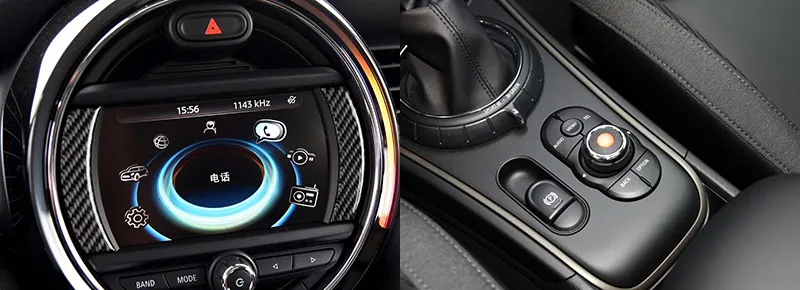
I have included photos of my screen/head unit.
Please help a new MINI user out 😊
I had a similar setup as yours when I picked up my 2017 F56 JCW. I went the $$$$ route and sourced all genuine OEM parts to upgrade my infotainment system to iDrive 6 and the touchscreen 8.8" screen with EntryNAV2 and wireless CarPlay. I contacted Ethan Jones of Car Creations and he helped me get set up with everything needed to do this upgrade. For most this is way too costly and not worth the money but for me I wanted 100% genuine OEM parts as I would not have any issues of any kind going forward. I did tis back in May and have not had any issues regarding my "upgraded" OEM infotainment setup.
Ethan can be contacted on his instagram account. Just do a search for Car Creations when you're on Instagram and you will see contact links and just send him a message. He will respond. He was very helpful every step of the way for me. I'm very happy with my upgrade. Good luck with your search for the best solution for you.
This is how my current setup looks like after my upgrade . . .
This shows the CarPlay display
I use the WAZE app as my preference for GPS mapping as I get alerts to LEOs and other traffic related issues ahead as I'm driving.
This is Apple's Map app and also works well. I can use Google Maps and won't have any issue using this as it will also come up.
I really love the improved functionality of the new system and also that is is OEM. No aftermarket stuff here.