


Part number help for brakes on 2012 MC


Thread Starter
|
Neutral
Joined: Nov 2011
Posts: 8
Likes: 0
From: Tampa, FL, USA
Part number help for brakes on 2012 MC
The brake warning light just popped off on my bone stock 2012 MC, at a little over 36k on the odo. From my searching on here it seems I should replace both the pads and rotors, front and rear, because the OEM rotors are relatively soft.
I'm not too pleased about having to replace the rotors at a mere 36k, though, and I'm not much for buying maintenance parts from the dealer, anyway, so my questions for the collected wisdom of the forum are what Napa part numbers to use for the rotors and pads. I'm not really considering mail-order parts because if there is a problem I will be stuck driving my 1996 Ford F-350 for two weeks, and that will be a miserable experience.
The pad selection from Napa seems relatively straightforward:
Front Pad Set - SS8423M - $49.99
Rear Pad Set - SS8424M - $36.99
And same for the rear rotor:
Rear Rotor - NB 48880604
But for the front rotors the situation is a bit more murky, as Napa lists two different diameters:
280mm Front Rotor - NB 48880606
294mm Front Rotor - NB 48880605
Finally, any comments on the performance of the Napa parts would be welcome.
Thanks!
I'm not too pleased about having to replace the rotors at a mere 36k, though, and I'm not much for buying maintenance parts from the dealer, anyway, so my questions for the collected wisdom of the forum are what Napa part numbers to use for the rotors and pads. I'm not really considering mail-order parts because if there is a problem I will be stuck driving my 1996 Ford F-350 for two weeks, and that will be a miserable experience.
The pad selection from Napa seems relatively straightforward:
Front Pad Set - SS8423M - $49.99
Rear Pad Set - SS8424M - $36.99
And same for the rear rotor:
Rear Rotor - NB 48880604
But for the front rotors the situation is a bit more murky, as Napa lists two different diameters:
280mm Front Rotor - NB 48880606
294mm Front Rotor - NB 48880605
Finally, any comments on the performance of the Napa parts would be welcome.
Thanks!
Unless you are having some pulsing thru the brakes, just check to see if they are within the specs. You can check the specs which is stamped on the edge of the rotor, then check them with a micrometer to see if they are within specs.
I can not help you on the NAPA pads, sorry.
I can not help you on the NAPA pads, sorry.

OVERDRIVE
Joined: Jul 2006
Posts: 7,037
Likes: 283
From: Melbourne, FL
Been an owner since 2002, do my own brakes and have done for many others. I consistently go 2 sets of pads to one set of rotors on cars that are not tracked.
SIZE: copied this from
http://new.minimania.com/part/G2NMB2...8-59-Cooper--S
Front rotors are 280 x 22mm for Cooper and 294 x 22mm for Cooper S, and 259 x 10mm for rears on both models.
SOURCE: Last time I ordered pads and rotors from Way he shipping flat rate priority mail and I had the stuff in 48 hours. Last person I talked to who had a problem with something WAY shipped {damaged in transit} he shipped replacements the same day he got a call..... If you order from a MINI savvy source, and you TALK TO THEM, your chances of getting an incorrect part are very much reduced . .
CHOICE: If you dislike the dust you get on the wheels, esp'ly the fronts, I recommend you consider EBC RED pads. I get zero dust in routine street use on my 7-S
{in the early days the dealers ALWAYS replaced rotors with pads. but now they typically go 2 sets of pads to a set of rotors if there is no unusual wear. resurfacing the rotors is NOT recommended. If not comfortable doing your own, take a drive over here to the Space Coast, I'll put 'em on for 'free' - you buy lunch. Actually you'll put 'em on, but I've done 'em b4 and will make sure you don't make any mistakes and I have the proper tool for the rears . . .}
SIZE: copied this from
http://new.minimania.com/part/G2NMB2...8-59-Cooper--S
Front rotors are 280 x 22mm for Cooper and 294 x 22mm for Cooper S, and 259 x 10mm for rears on both models.
SOURCE: Last time I ordered pads and rotors from Way he shipping flat rate priority mail and I had the stuff in 48 hours. Last person I talked to who had a problem with something WAY shipped {damaged in transit} he shipped replacements the same day he got a call..... If you order from a MINI savvy source, and you TALK TO THEM, your chances of getting an incorrect part are very much reduced . .
CHOICE: If you dislike the dust you get on the wheels, esp'ly the fronts, I recommend you consider EBC RED pads. I get zero dust in routine street use on my 7-S
{in the early days the dealers ALWAYS replaced rotors with pads. but now they typically go 2 sets of pads to a set of rotors if there is no unusual wear. resurfacing the rotors is NOT recommended. If not comfortable doing your own, take a drive over here to the Space Coast, I'll put 'em on for 'free' - you buy lunch. Actually you'll put 'em on, but I've done 'em b4 and will make sure you don't make any mistakes and I have the proper tool for the rears . . .}
Last edited by Capt_bj; Aug 4, 2013 at 02:16 PM.
Thread Starter
|
Neutral
Joined: Nov 2011
Posts: 8
Likes: 0
From: Tampa, FL, USA
Thanks for the replies, Braminator and Capt_bj!
I refreshed this page about 30 minutes ago to give NAM one last try before I yanked off a wheel to measure the rotor myself but of course the reply from Capt_bj didn't show up until now (despite that it seemed to post at 1:39PM). Murphy's Law strikes again.
So, yeah, I can confirm that the front rotor is, indeed, 280mm .
.
And thanks for the tip to check the rotor thickness, Braminator. The left front rotor mic'ed out at 21.64mm, which seems to be barely worn if the stock thickness is 22mm (but this is what I would expect given the low mileage on them!).
I *would* like to reduce brake dust, Capt_bj, and I would even like to take you up on your offer (lunch in exchange for your supervision), but I don't know if I have the patience to wait for mail-order pads, mainly because that damn warning chime drives me crazy. It's one of just two things I don't like about the car (the other being the weird lag in the throttle response during initial acceleration from a dead stop). Other than those two things, I *love* this car. Then again, my last two vehicles were pickup trucks...
I refreshed this page about 30 minutes ago to give NAM one last try before I yanked off a wheel to measure the rotor myself but of course the reply from Capt_bj didn't show up until now (despite that it seemed to post at 1:39PM). Murphy's Law strikes again.
So, yeah, I can confirm that the front rotor is, indeed, 280mm
. And thanks for the tip to check the rotor thickness, Braminator. The left front rotor mic'ed out at 21.64mm, which seems to be barely worn if the stock thickness is 22mm (but this is what I would expect given the low mileage on them!).
I *would* like to reduce brake dust, Capt_bj, and I would even like to take you up on your offer (lunch in exchange for your supervision), but I don't know if I have the patience to wait for mail-order pads, mainly because that damn warning chime drives me crazy. It's one of just two things I don't like about the car (the other being the weird lag in the throttle response during initial acceleration from a dead stop). Other than those two things, I *love* this car. Then again, my last two vehicles were pickup trucks...
Thread Starter
|
Neutral
Joined: Nov 2011
Posts: 8
Likes: 0
From: Tampa, FL, USA
A quick update - the NAPA pads fit fine and after a quick test drive they don't squeal (the pads come with new spring clips, so I replaced those, too).
Two things I figured out the hard way were that you should only remove the bolts for the two caliper slide pins - rather than the whole caliper - and that to push the pistons back in on the rear calipers you need to both spin them clockwise and push at the same time; just spinning or just pushing didn't work (I used the pin wrench for my angle grinder to do this - worked great).
There's just one last thing that is driving me bat$ħit crazy: the rear pad sensor warning is the one that triggered all this hullabaloo, but the wire clip on the sensor was intact (I thought it broke or came off or something when the pad was too worn?). Given that it's $25 and it looked okay, I just cleaned off the dust buildup with a wire brush and reinstalled it. But now I am unable to reset the brake service warning, which was 99% of the motivation to replace the pads as soon as possible.
I'm guessing that despite appearances the sensor really did trip, and I either need to install a new one, or else clip the wires to it and wire-nut them together. The latter option is looking mighty appealing at the moment, assuming that it works. And yes, I know that I won't be warned when my brake pads are wearing out in the future, but you know what - none of my previous 10 or so cars warned me about that, either, and I never once had to replace a rotor from allowing the pads to get down to the rivets.
Two things I figured out the hard way were that you should only remove the bolts for the two caliper slide pins - rather than the whole caliper - and that to push the pistons back in on the rear calipers you need to both spin them clockwise and push at the same time; just spinning or just pushing didn't work (I used the pin wrench for my angle grinder to do this - worked great).
There's just one last thing that is driving me bat$ħit crazy: the rear pad sensor warning is the one that triggered all this hullabaloo, but the wire clip on the sensor was intact (I thought it broke or came off or something when the pad was too worn?). Given that it's $25 and it looked okay, I just cleaned off the dust buildup with a wire brush and reinstalled it. But now I am unable to reset the brake service warning, which was 99% of the motivation to replace the pads as soon as possible.
I'm guessing that despite appearances the sensor really did trip, and I either need to install a new one, or else clip the wires to it and wire-nut them together. The latter option is looking mighty appealing at the moment, assuming that it works. And yes, I know that I won't be warned when my brake pads are wearing out in the future, but you know what - none of my previous 10 or so cars warned me about that, either, and I never once had to replace a rotor from allowing the pads to get down to the rivets.
OVERDRIVE
Joined: Jul 2006
Posts: 7,037
Likes: 283
From: Melbourne, FL
just the tip pf the sensor wears off, exposing the wire loop inside the plastic; when the wire is broken the sensor says 'time to replace'
here's a worn sensor in the pad, with the wire stubs marked
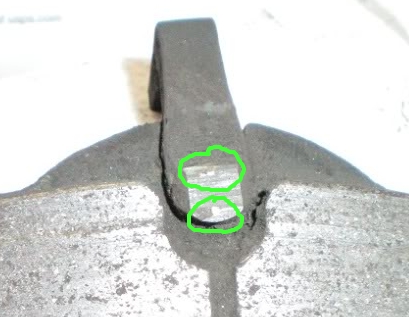
Connecting the wire ends of the sensor works for sure - I've run that way for some time now and have done this for others. I solder the wires and use heat shrink to seal the splice tho ... you don't want water to short things and give you new problems.
side view of a dissected GEN2 worn sensor

here's a worn sensor in the pad, with the wire stubs marked

Connecting the wire ends of the sensor works for sure - I've run that way for some time now and have done this for others. I solder the wires and use heat shrink to seal the splice tho ... you don't want water to short things and give you new problems.
side view of a dissected GEN2 worn sensor

Trending Topics
Thread Starter
|
Neutral
Joined: Nov 2011
Posts: 8
Likes: 0
From: Tampa, FL, USA
My sensor looks a bit different than the picture you posted, Capt_bj, but I went ahead and followed your advice to the letter: I cut the cable near the caliper, spliced the wires together, then soldered and heat-shrinked them. Got back in the car, started her up and was then able to reset the rear brake service warning.
So, thanks to North American Motoring - especially Capt-bj and Braminator - for the help!
So, thanks to North American Motoring - especially Capt-bj and Braminator - for the help!

Thread
Thread Starter
Forum
Replies
Last Post
ryGuyMCS
MINI Parts for Sale
2
Oct 20, 2015 02:24 PM
Cal45fan
MINI Parts for Sale
0
Aug 11, 2015 03:50 PM
