


2010 Mini Brake Warning Light


Thread Starter
|
1st Gear
Joined: May 2010
Posts: 14
Likes: 0
From: LA CHINATOWN
2010 Mini Brake Warning Light
After I did an oil change on my wife's car, I get another warning light of an Exclamation mark and Car in the center.
What does this mean now?
Does it happen to mean that my back brake pads maybe me wearing out?
Thanks for everyone's help in advance.
What does this mean now?
Does it happen to mean that my back brake pads maybe me wearing out?
Thanks for everyone's help in advance.
Last edited by coopercarly; Jul 29, 2013 at 11:27 PM.

3rd Gear
Joined: Jun 2012
Posts: 295
Likes: 0
From: West Palm Beach, FL
That is correct.

If under 36k miles or 3 yrs have the dealer do it for free. If not, keep an eye on the service next time. You are already in the negative for service due (it should still be fine, but it warns you as it counts down every time you start the car up).

Yes, as others have said...rear brakes are due.
Or overdue, perhaps. It counts down from ~6000 miles or so, a "negative" number means...get after it, sooner vs. later.
This is the first time you've seen this display? Curious.
Or overdue, perhaps. It counts down from ~6000 miles or so, a "negative" number means...get after it, sooner vs. later.
This is the first time you've seen this display? Curious.

6th Gear
Joined: Oct 2006
Posts: 1,781
Likes: 3
At what point in the service can I remove the brake sensor from the brakes so that it will stop showing the wear and counting down? Once I am out of service warranty and doing brakes my self I see no need to have the service countdown and chance having to buy a sensor to get it to remove the warning. Its simple enough to look at pad thickness and replace as necessary.

6th Gear
Joined: Apr 2013
Posts: 1,894
Likes: 8
From: Philly PA
At what point in the service can I remove the brake sensor from the brakes so that it will stop showing the wear and counting down? Once I am out of service warranty and doing brakes my self I see no need to have the service countdown and chance having to buy a sensor to get it to remove the warning. Its simple enough to look at pad thickness and replace as necessary.
Trending Topics
At what point in the service can I remove the brake sensor from the brakes so that it will stop showing the wear and counting down? Once I am out of service warranty and doing brakes my self I see no need to have the service countdown and chance having to buy a sensor to get it to remove the warning. Its simple enough to look at pad thickness and replace as necessary.
You need to install the sensor for it to see the change in resistance from the old to new, but you can zip tie it out of the way and not put it into the pad. IMO, for the $20 for the sensor and the hassle to rest it all I like having the sensor, but if you swap pads a lot or track the car a lot or actually check your brakes like 2% of the population, you should be fine.

OVERDRIVE
Joined: Jul 2006
Posts: 7,037
Likes: 283
From: Melbourne, FL
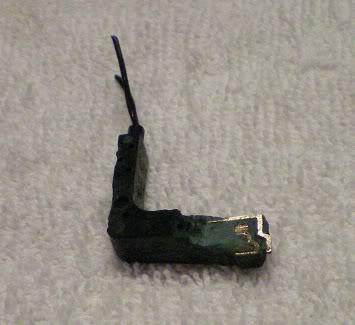
when you get the cal' off and are removing the old pads you'll eventually pull the sensor out of the slot on the inner pad -- you'll see that it is just a plastic bit on the end of two wires - actually one wire that forms a loop in the sensor. Here's a GEN2 sensor that's been cut off and dissected
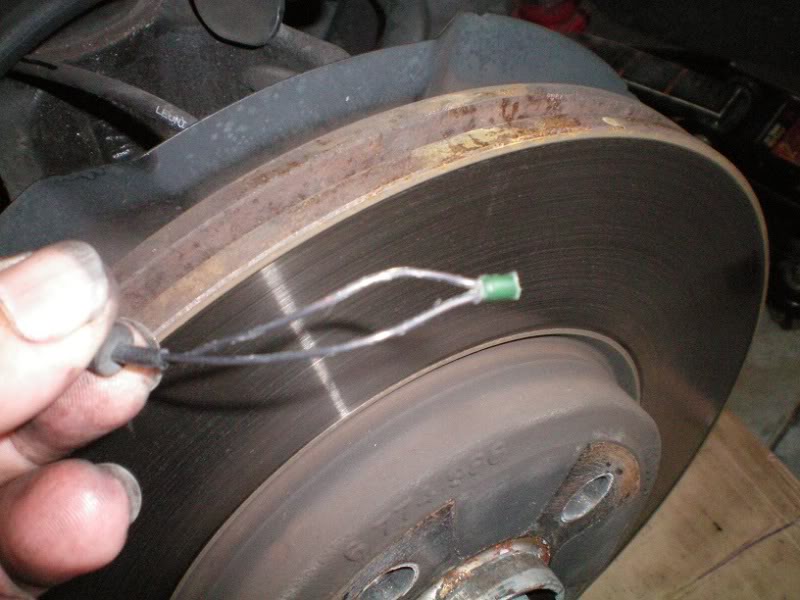
In order to 'bypass' the sensor you need to trick the computer into thinking a good sensor is present because "worn" happens when this loop of wire breaks as the plastic bit wears against the rotor. You can simply splice the two ends together, seal up the splice and then zip-tie the pigtail out of the way. I solder it and seal with heat shrink tube.
THEN you go thru the procedure to reset the computer warning and counter per normal procedures. You are still going to see the counter go down ... if it gets near zero just reset it again or ignore it. You are not going to get the final warning tho because your sensor will never wear ...
Here's a worn sensor in the pad - look carefully at you can see the two bright spots where the wire stubs are in the face of the sensor . .


In order to 'bypass' the sensor you need to trick the computer into thinking a good sensor is present because "worn" happens when this loop of wire breaks as the plastic bit wears against the rotor. You can simply splice the two ends together, seal up the splice and then zip-tie the pigtail out of the way. I solder it and seal with heat shrink tube.

THEN you go thru the procedure to reset the computer warning and counter per normal procedures. You are still going to see the counter go down ... if it gets near zero just reset it again or ignore it. You are not going to get the final warning tho because your sensor will never wear ...
Here's a worn sensor in the pad - look carefully at you can see the two bright spots where the wire stubs are in the face of the sensor . .


coopercarly, replacing the rear pads is a pretty straightforward project if you'd like to try yourself. Take a look at our install instructions here at least to see what the process is.
If you'd like to shop for rear pads, we carry Genuine MINI as well as Textar & Akebono, details here.
Let us know what questions you have.
Mark/Pelican Parts
If you'd like to shop for rear pads, we carry Genuine MINI as well as Textar & Akebono, details here.
Let us know what questions you have.
Mark/Pelican Parts
__________________
Your Trusted Source For DIY and Parts
FREE SHIPPING over $99 click here
MINI Parts | DIY Help | Facebook | Twitter | Instagram | YouTube | Promos
888.280.7799 | 6am - 5pm PST

FREE SHIPPING over $99 click here
MINI Parts | DIY Help | Facebook | Twitter | Instagram | YouTube | Promos
888.280.7799 | 6am - 5pm PST
Thread Starter
|
1st Gear
Joined: May 2010
Posts: 14
Likes: 0
From: LA CHINATOWN
SoundMessage: Thanks for the direct answer.
danjreed: Funny, h a r - h a r. Thanks answering.
ljmattox: This (red car rear exclamation display light) never came up, only the word "BRAKE" stayed on, that's why I notice something wrong.
Also the ( amber service light of a amber car lifted) came on and I check the oil was dirty so I changed the oil and went to reset the service light and was going through the tach menu when I saw the (red car rear exclamation display light).
I remember the front brake pads was replaced once during warranty so they should be good. I had my dad check the back and front pads, and by looking at them, they look like there is still a lot of life on the back and front?
PelicanParts.com: Thank you for the info link.
danjreed: Funny, h a r - h a r. Thanks answering.
ljmattox: This (red car rear exclamation display light) never came up, only the word "BRAKE" stayed on, that's why I notice something wrong.
Also the ( amber service light of a amber car lifted) came on and I check the oil was dirty so I changed the oil and went to reset the service light and was going through the tach menu when I saw the (red car rear exclamation display light).
I remember the front brake pads was replaced once during warranty so they should be good. I had my dad check the back and front pads, and by looking at them, they look like there is still a lot of life on the back and front?
PelicanParts.com: Thank you for the info link.

Thread
Thread Starter
Forum
Replies
Last Post
igzekyativ
MINIs & Minis for Sale
34
Jul 16, 2020 12:54 PM
igzekyativ
MINIs & Minis for Sale
28
Dec 23, 2015 10:36 AM
truedrew
R60/R61 Stock Problems/Issues
4
Aug 10, 2015 10:39 AM