


R50/53 aeroforce interceptor or scangauge


Thread Starter
|
2nd Gear
Joined: Aug 2011
Posts: 69
Likes: 0
From: Elk Grove, CA
aeroforce interceptor or scangauge
they seem comparable in function... scangauge is a bit less expensive while the aeroforce has a cleaner look. anybody have the aeroforce unit and if so does it meet your expectations

FWIW I purchased a Scanguage II used, here in the marketplaces few years ago. Last month at WOT, the screen would go blank.
I emailed Scangauge and received a prompt reply to send it in for a "free program upgrade and servicing." I sent it in w/o the cable since it's routed behind my dashboard.
They charged me $0.00 and it was back in my mailbox two weeks later WITH a new OBDII cable !
I emailed Scangauge and received a prompt reply to send it in for a "free program upgrade and servicing." I sent it in w/o the cable since it's routed behind my dashboard.
They charged me $0.00 and it was back in my mailbox two weeks later WITH a new OBDII cable !

Coordinator :: Eastern Iowa MINIs
Joined: Dec 2006
Posts: 5,520
Likes: 4
From: Decorah, IA
I have dual AeroForce Interceptor gauges, and I can say that they've actually exceeded my expectations. I love the frequency of data update (which is configurable and blows away the Scangauge II) -- I have mine set on 10 Hz (originally 5 Hz) which is not the fastest setting. I'm also happy to report that in my '11 MCS I actually get MORE functionality than is listed in the Aeroforce online manual (e.g., the manual doesn't list Boost Pressure as an available setting for the MINI, but it does, in fact, display).
I'm sure the performance in a 1st Gen install would be comparable.
Here's a little clip I assembled to document my install:
I'm sure the performance in a 1st Gen install would be comparable.
Here's a little clip I assembled to document my install:
Last edited by Gil-galad; Oct 2, 2011 at 02:29 PM.

4th Gear
Joined: Mar 2006
Posts: 564
Likes: 0
From: Barnwell, SC
Like the looks of the AeroForce set up! The only concern I would have is the size of the text (not the numbers) - looks like that could be an issue for older eyes to read, but perhaps the white lettering on the dark background would improve that. Otherwise, VERY nice!
Coordinator :: Eastern Iowa MINIs
Joined: Dec 2006
Posts: 5,520
Likes: 4
From: Decorah, IA
Like the looks of the AeroForce set up! The only concern I would have is the size of the text (not the numbers) - looks like that could be an issue for older eyes to read, but perhaps the white lettering on the dark background would improve that. Otherwise, VERY nice!
I get a bit of reflection off the gauge faces through the driver's side window during bright, overcast sky conditions which is the only time the contrast is a bit reduced, but even then they are clearly readable. If this was a bother, one could easily relocate the gauges to the right-hand side of the steering column to mitigate it. It's not worth it to me; I much prefer the look of the gauges to the left of the column.
Thread Starter
|
2nd Gear
Joined: Aug 2011
Posts: 69
Likes: 0
From: Elk Grove, CA
Gil-galad, install looks reallygood.. where did you get a wire for power, and did you just strip back the insulation a bit and wrap power wire for interceptor gauge around it? Also, in regard to the other wire that goes to port where did you route it?
Coordinator :: Eastern Iowa MINIs
Joined: Dec 2006
Posts: 5,520
Likes: 4
From: Decorah, IA
The data cable just feeds down along the steering column and down to the left of the clutch pedal mechanism to the data port. I coiled the extra length of cable behind the knee bolster. Neat, tidy, and functional.
Trending Topics

6th Gear
Joined: Jul 2007
Posts: 2,881
Likes: 6
Love my Aeroforce Interceptor. It replaced a Scangauge II. The Aeroforce updates much quicker and looks nicer when mounted in a gauge pod compared to the rectangle SGII mounted near the tach. Also like the configurable LEDs. I have mine set when water temp gets to a certain number. They can be used as shift lights as well.
The person who recommended the Aeroforce to me had a mechanical boost gauge along side the Aeroforce. The Aeroforce updated just as fast as the mechanical boost gauge, if not faster. Literally in milliseconds. The SGII has about a 2 second delay and out of the box doesn't display boost without programming. The Aeroforce has an altimeter so it corrects the boost reading. The SGII doesn't have this function.
The display on the SGII is better. I had a lot of glare with the Aeroforce when mounted on the right side of the tach. I had to move it to the left side to keep from seeing the rear sunroof reflection. That's the only downside for me. It's clearly visible in direct sunlight, changes color slightly just like the display on the tach when sun hits it. Once I mounted it on the left of the tach, glare was no longer an issue.
I powered it from the cig lighter socket.
The person who recommended the Aeroforce to me had a mechanical boost gauge along side the Aeroforce. The Aeroforce updated just as fast as the mechanical boost gauge, if not faster. Literally in milliseconds. The SGII has about a 2 second delay and out of the box doesn't display boost without programming. The Aeroforce has an altimeter so it corrects the boost reading. The SGII doesn't have this function.
The display on the SGII is better. I had a lot of glare with the Aeroforce when mounted on the right side of the tach. I had to move it to the left side to keep from seeing the rear sunroof reflection. That's the only downside for me. It's clearly visible in direct sunlight, changes color slightly just like the display on the tach when sun hits it. Once I mounted it on the left of the tach, glare was no longer an issue.
I powered it from the cig lighter socket.

3rd Gear
Joined: Jul 2011
Posts: 237
Likes: 1
From: Alameda
Anybody else bothered that you can't change the display on the Aeroforce to match the color of the dash lights? I know its A/R of me, but I am just annoyed when my accessory lights do not match the dash!
Coordinator :: Eastern Iowa MINIs
Joined: Dec 2006
Posts: 5,520
Likes: 4
From: Decorah, IA
http://aeroforcetech.com/images.html
...but you are correct that none of them are an exact match for the amber MINI lighting. I've seen the red displays in other MINI applications; I prefer the black/white.
I can't speak for how close of a color match you can get with a Scangauge.
6th Gear
Joined: Jul 2007
Posts: 2,881
Likes: 6
I chose the red display Aeroforce. It's not a match to the the MINI's dash but looks ok to me. I also use a V1 remote display in a 52mm gauge pod with an orange display. It matches exactly. So color and glare were the two con's of the Aeroforce for me. But the features outweighted those issues. SGII gives you 4 fields at once while the Aeroforce gives you only 2. You can set the Aeroforce to cycle through different fields automatically though.
Edit: This is what the red display looks like. This was before I moved the gauge to the left side of the tach.
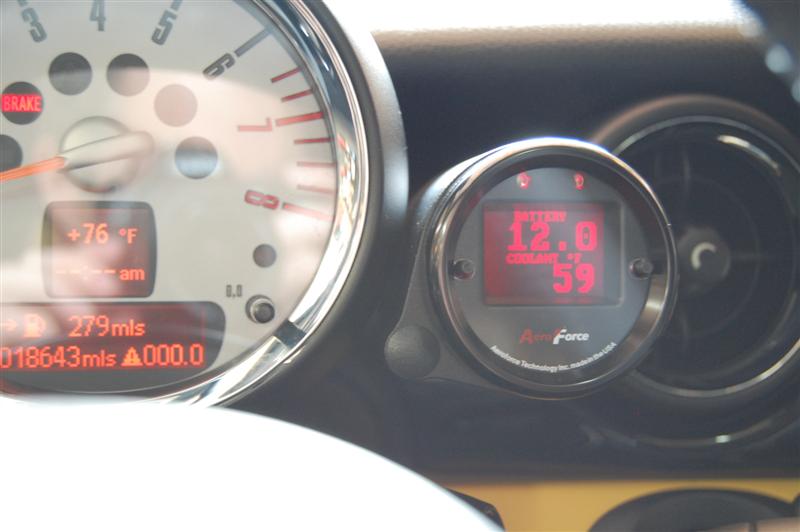
Edit: This is what the red display looks like. This was before I moved the gauge to the left side of the tach.
Last edited by Minidrivr; Oct 4, 2011 at 06:17 PM.


1st Gear
Joined: Dec 2010
Posts: 19
Likes: 0
I'm quite interested in getting 1, if not 2, Aeroforce Interceptor gauges, but I wonder how many settings it reads from the OBD II port are calculated as opposed to real? I know this isn't a drawback of the aeroforce gauge itself, especially since they offer additional external sensors, but it would be a deciding factor for me.
On the accessport, it shows EGT and IAT and the like, but are these values calculated, or real? Same goes with lbs of boost.
Thanks!
On the accessport, it shows EGT and IAT and the like, but are these values calculated, or real? Same goes with lbs of boost.
Thanks!
6th Gear
Joined: Jul 2007
Posts: 2,881
Likes: 6
I'm quite interested in getting 1, if not 2, Aeroforce Interceptor gauges, but I wonder how many settings it reads from the OBD II port are calculated as opposed to real? I know this isn't a drawback of the aeroforce gauge itself, especially since they offer additional external sensors, but it would be a deciding factor for me.
On the accessport, it shows EGT and IAT and the like, but are these values calculated, or real? Same goes with lbs of boost.
Thanks!
On the accessport, it shows EGT and IAT and the like, but are these values calculated, or real? Same goes with lbs of boost.
Thanks!

If you have a smartphone, why not the PLX Kiwi? Using the Torque App, You can run anywhere from one to six gauges per screen. I have engine temp and GPS speed on two screens, then on another I have a collection of six gauges displaying stuff, including boost. I have yet to configure the four other screens. It is fully customizable and reads the data directly from your OBDII port. Moving between screens is a quick swipe. Torque will also allow you to read and clear fault codes.
I always have my phone, so I simply snap it into my cradle, click on the Kiwi, launch torque and it communicates via Bluetooth, so no wires to hide or trip over.
I believe the Kiwi with shipping and the purchase of the Torque app, I am into the setup maybe $100. I'll take the Pepsi Challenge against the Scanngauge or Aeroforce all day long.
I always have my phone, so I simply snap it into my cradle, click on the Kiwi, launch torque and it communicates via Bluetooth, so no wires to hide or trip over.
I believe the Kiwi with shipping and the purchase of the Torque app, I am into the setup maybe $100. I'll take the Pepsi Challenge against the Scanngauge or Aeroforce all day long.

Thread Starter
|
2nd Gear
Joined: Aug 2011
Posts: 69
Likes: 0
From: Elk Grove, CA
I do always have my smartphone and regularly use it to stream music via bluetooth.
Thus, it would be logical to try kiwi...gonna do a bit of reading on it and see. With a good mount it can be tucked down low or higher and even used to video..
Thus, it would be logical to try kiwi...gonna do a bit of reading on it and see. With a good mount it can be tucked down low or higher and even used to video..

1st Gear
Joined: Sep 2011
Posts: 17
Likes: 0
From: Seattle WA
just started looking into these. for iPhone, are you using the KIWI Wifi or KIWI bluetooth? I do use bluetooth already for my phone functions/handsfree, so maybe better to use wifi link? pretty cool that can get multiple gauges displayed.
also interested what iPhone mounts you find seem to work best when using as a gauge display?
also interested what iPhone mounts you find seem to work best when using as a gauge display?
I run KIWI Bluetooth through my Android phone.
I have the Panavise universal mount number 15523. They also have an i-specific mount for a lot more money. http://panavise.com/index.html?pageI...ECTIONSword=ww
I have the Panavise universal mount number 15523. They also have an i-specific mount for a lot more money. http://panavise.com/index.html?pageI...ECTIONSword=ww


Thread
Thread Starter
Forum
Replies
Last Post
jayk
All other MINI parts and items for Sale (archive)
1
Jun 7, 2008 09:05 AM