


Help. Strange pixels?


Thread Starter
|
Photographer / Beer Dude
Joined: Jul 2003
Posts: 2,342
Likes: 0
From: SoCal (562)
Help. Strange pixels?
I've been encountering some awkward-looking horizontal lines in some of my (D70) images lately. These appear more pronounced in dark areas, regardless of lens used. What am I doing wrong?
Here is an impromptu photo I shot yesterday. The lines I'm referring to show up in the shadows of the background trees. The photograph is clickable.

Here is an impromptu photo I shot yesterday. The lines I'm referring to show up in the shadows of the background trees. The photograph is clickable.




pug poo picker-upper
Joined: Jun 2002
Posts: 9,803
Likes: 30
From: California
I think what you're seeing is referred to as "banding". How long are the exposures? I'm guessing you're under a second from the amount of light. That seem strange to me. I have only seen that in the past on longer exposures (multiple minutes).
Thread Starter
|
Photographer / Beer Dude
Joined: Jul 2003
Posts: 2,342
Likes: 0
From: SoCal (562)
The exposures were around the 1/50 - 1/30 range on a 50mm f/1.8 lens seeing as how it was handheld, while the MINI under tree shot was more like 1/125 using 70-300mm zoom.
They do seem more like something one would encounter under long exposures. You think it might help to use that setting despite the faster shutter?
They do seem more like something one would encounter under long exposures. You think it might help to use that setting despite the faster shutter?

2nd Gear
Joined: Oct 2004
Posts: 51
Likes: 0
From: Overland Park, Kansas

Trending Topics
Thread Starter
|
Photographer / Beer Dude
Joined: Jul 2003
Posts: 2,342
Likes: 0
From: SoCal (562)
ISO was 200.
Those bands are even in the RAW file.
Did a google search and found an article on DPReview. It discusses banding but at longer exposures. Nikonians had a post but no replies.
Those bands are even in the RAW file.
Did a google search and found an article on DPReview. It discusses banding but at longer exposures. Nikonians had a post but no replies.

It's being caused by areas of bright light/overexposure. You've seen it on TV, where for example the sun or stadium lights cause those bands across the entire picture.
But I don't think your dslr should be doing that, maybe a cheap digicam, but not a D70. You may wish to contact Nikon.
But I don't think your dslr should be doing that, maybe a cheap digicam, but not a D70. You may wish to contact Nikon.

Vendor & Moderator :: MINI Camera and Video & c3 club forum
iTrader: (6)
I took the 2nd image you posted and overprocessed it in Pshp with the Levels command. I assume you are referring to this horizontal dark area?

Also I cropped out a portion of the first picture and highlighted with arrows the various dark lines. Again, I'm assuming this is what you are referring to.
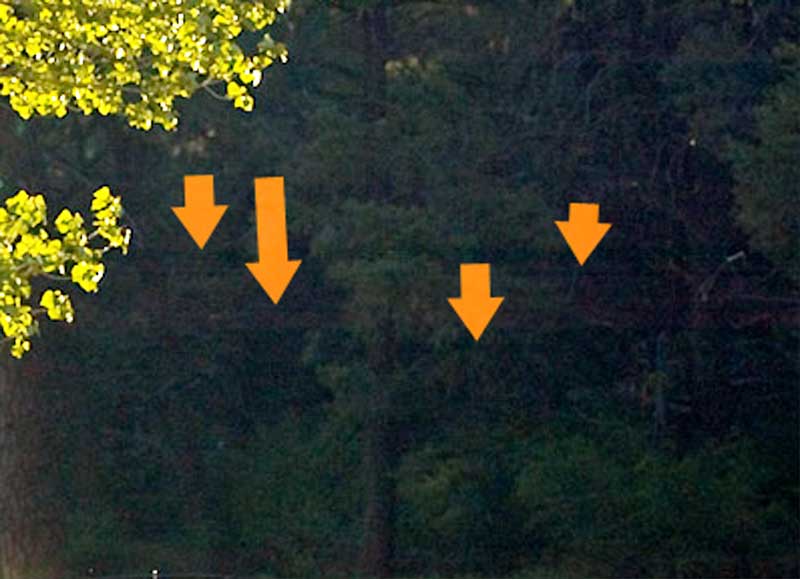
I wonder if they happen in the same area of every picture or are they random? That is could you overlap 2 images of the same size and would the bands line up? Even though they may only be visible in the relative dark areas.
I would try to mock up this shot and see if I could reproduce it.
Also I cropped out a portion of the first picture and highlighted with arrows the various dark lines. Again, I'm assuming this is what you are referring to.
I wonder if they happen in the same area of every picture or are they random? That is could you overlap 2 images of the same size and would the bands line up? Even though they may only be visible in the relative dark areas.
I would try to mock up this shot and see if I could reproduce it.
Vendor & Moderator :: MINI Camera and Video & c3 club forum
iTrader: (6)
Found this article that seems relevant:
http://www.dcresource.com/forums/showthread.php?t=8194
They call it amplifier noise. Here's the picture thats related to that article.

http://www.dcresource.com/forums/showthread.php?t=8194
They call it amplifier noise. Here's the picture thats related to that article.
Vendor & Moderator :: MINI Camera and Video & c3 club forum
iTrader: (6)
You're welcome. For what it's worth, my buddy was saying his friends $10K D1s exhibits this problem as well.
Richard
Richard
Originally Posted by blacknblue
Thanks for the article link Richard.
It appears that I'm not the only D70 user experiencing this problem.
I guess I'll have to remember to use the NR setting.
It appears that I'm not the only D70 user experiencing this problem.
I guess I'll have to remember to use the NR setting.

Thread
Thread Starter
Forum
Replies
Last Post
daviday
R50/R53 :: Hatch Talk (2002-2006)
1
Sep 25, 2015 01:31 AM