


Looking for a Video Camcorder?


Looking for a Video Camcorder?
I've put this Sticky up as a guide for anyone looking to purchase a new camcorder for use with the VacuCam. I will be focusing on current Sony and Canon camcorders and will be basing the info on the manufacturers spec sheet. I will note any personal experiences if any.
Some basic facts to keep in mind:
-- Choose a Digital Camcorder--miniDV or Digital8
-- LANC port is HIGHLY desirable (found only on miniDV)
-- Analog to Digital Conversion with Pass-Through
-- Most newer Canon camcorder do not support LANC. If it's got a USB port, it most likely doesn't have a LANC port.
-- None of the Digital8, DVD camcorders, nor MicroMV support LANC
-- If I were buying a new camcorder, I would choose a Sony MINI DV camcorder that supports LANC, since it offers the most features. However there are many low cost camcorders from Canon, JVC, and others which can work, but all lack some of the most important functions.
I recently tried a JVC consumer camcorder and experienced much difficulty in getting the camcorder to accept incoming video.
Street prices were taken from B&H Photo/Video in New York
==================
Least Expensive Digital Recording Medium:
Digital8® Handycam® Camcorder
DCR-TRV460
$499 List
$379 Street
See Sony Website

Based on the MFG Spec Sheet, this is the only current Digital8 model that offers analog inputs. The tape format is 8mm analog tape, but records digital signals on it. I think this is a great low cost format, but the main drawback is the lack of LANC(Control-L) control. LANC is found only on the more expensive miniDV camcorders. What is LANC you say? It's a way of controlling the camcorder from say a computer or editing controller. For the VacuCams, No LANC, means No Remote Control for starting/stopping the camcorder. Once you use our Remote Start/Stop, you won't want to do it any other way!
**********
If you can spend a little bit extra money, I would recommend this to be the basic starting point:
Mini DV Camcorder
Sony DCR-HC30
$699 List
$479 Street

Offers LANC and analog in. Seems to be a decent all around camcorder. Get the optional NP-FP90 InfoLithium Battery -2460mAh, and you can record all day without a battery change.
What do I use personally?
Mini DV Camcorder
Sony DCR-TRV950 3 CCD
$2199 List
$1649 Street

This 3CCD camcorder offers the most bang for the buck. It's considered a consumer camcorder but offers most of the features of their prosumer line such as the VX-2000 which sells for about $1,000 more.
It appears Sony has discontinued this camera and is being replaced by the DCR-HC1000. Specs are similar.
*********
A good used camcorder is the Canon ZR-10. You can find these on eBay for between $50 to $200 depending on condition. This camcorder is very small and even has a LANC port, and works great with the VacuCam.
Some basic facts to keep in mind:
-- Choose a Digital Camcorder--miniDV or Digital8
-- LANC port is HIGHLY desirable (found only on miniDV)
-- Analog to Digital Conversion with Pass-Through
-- Most newer Canon camcorder do not support LANC. If it's got a USB port, it most likely doesn't have a LANC port.
-- None of the Digital8, DVD camcorders, nor MicroMV support LANC
-- If I were buying a new camcorder, I would choose a Sony MINI DV camcorder that supports LANC, since it offers the most features. However there are many low cost camcorders from Canon, JVC, and others which can work, but all lack some of the most important functions.
I recently tried a JVC consumer camcorder and experienced much difficulty in getting the camcorder to accept incoming video.
Street prices were taken from B&H Photo/Video in New York
==================
Least Expensive Digital Recording Medium:
Digital8® Handycam® Camcorder
DCR-TRV460
$499 List
$379 Street
See Sony Website
Based on the MFG Spec Sheet, this is the only current Digital8 model that offers analog inputs. The tape format is 8mm analog tape, but records digital signals on it. I think this is a great low cost format, but the main drawback is the lack of LANC(Control-L) control. LANC is found only on the more expensive miniDV camcorders. What is LANC you say? It's a way of controlling the camcorder from say a computer or editing controller. For the VacuCams, No LANC, means No Remote Control for starting/stopping the camcorder. Once you use our Remote Start/Stop, you won't want to do it any other way!
**********
If you can spend a little bit extra money, I would recommend this to be the basic starting point:
Mini DV Camcorder
Sony DCR-HC30
$699 List
$479 Street
Offers LANC and analog in. Seems to be a decent all around camcorder. Get the optional NP-FP90 InfoLithium Battery -2460mAh, and you can record all day without a battery change.
What do I use personally?
Mini DV Camcorder
Sony DCR-TRV950 3 CCD
$2199 List
$1649 Street
This 3CCD camcorder offers the most bang for the buck. It's considered a consumer camcorder but offers most of the features of their prosumer line such as the VX-2000 which sells for about $1,000 more.
It appears Sony has discontinued this camera and is being replaced by the DCR-HC1000. Specs are similar.
*********
A good used camcorder is the Canon ZR-10. You can find these on eBay for between $50 to $200 depending on condition. This camcorder is very small and even has a LANC port, and works great with the VacuCam.
Last edited by OctaneGuy; Nov 13, 2004 at 09:43 PM.
LANC Port for Remote?
Here are a couple pix of what the LANC port on your camcorder should look like.
Sony TRV-950

Canon ZR-10

Sony TRV-950
Canon ZR-10


Known Incompatible Models
Today one of my customers showed me her Sony DCR-TRV320 Digital 8 camcorder and after much testing, it was determined that the VacuCam is not compatible with this camera despite it having both LANC and Analog In.
Another known camcorder is the JVC-GRDV500. I will continue to create a list. You can identify a problem camcorder by plugging in the VacuCam to your A/V port and watching to see if video is displayed. If instead you get an intermittent picture, rolling, multicolored image, then please email me the model number.
Thanks!
Richard
If you have one of these camcorders, it's been reported that it will not work with the VacuCam. I'm currently working on a fix ( I hope). I've got a couple of my engineering friends helping me determine why these particular cameras are exhibiting this behavior.
JVC
GRDV500
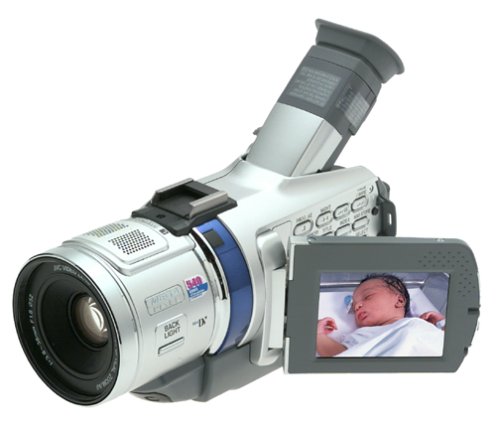
SONY
DCR-TRV320

SONY (June 2000 introduced)
DCR-PC5

Another known camcorder is the JVC-GRDV500. I will continue to create a list. You can identify a problem camcorder by plugging in the VacuCam to your A/V port and watching to see if video is displayed. If instead you get an intermittent picture, rolling, multicolored image, then please email me the model number.
Thanks!
Richard
If you have one of these camcorders, it's been reported that it will not work with the VacuCam. I'm currently working on a fix ( I hope). I've got a couple of my engineering friends helping me determine why these particular cameras are exhibiting this behavior.
JVC
GRDV500
SONY
DCR-TRV320
SONY (June 2000 introduced)
DCR-PC5
View this link from Blue Marble Yearbook on getting the Sony DVD 100 camcorder to work.
https://www.northamericanmotoring.co...ad.php?t=43183
John writes:
I finally figured out how to make MY SONY Handycan DVD 100 work with Richard Lin's VacuCam! I know at least one other person at the Dragon was having a similar problem. If you have a SONY handycam DVD video recorder do the following:
1. push setup
2. scroll down to "ETC"
3. select "display"
4. select "LCD".
5. Push setup again to end.
6. plug into the audio / video cable...see Richard Lin's hand out...
7. Now to view from the remote camera device you record while the wheel on the back right is set to the triangle (play). You should see the image on the camera LCD and it will record.
8. Push the red record button inside the LCD door...
https://www.northamericanmotoring.co...ad.php?t=43183
John writes:
I finally figured out how to make MY SONY Handycan DVD 100 work with Richard Lin's VacuCam! I know at least one other person at the Dragon was having a similar problem. If you have a SONY handycam DVD video recorder do the following:
1. push setup
2. scroll down to "ETC"
3. select "display"
4. select "LCD".
5. Push setup again to end.
6. plug into the audio / video cable...see Richard Lin's hand out...
7. Now to view from the remote camera device you record while the wheel on the back right is set to the triangle (play). You should see the image on the camera LCD and it will record.
8. Push the red record button inside the LCD door...
Too many models to look at? Take a look at these models first.
Sony DCR-HC32
Sony DCR-HC42
Sony DCR-TRV22
Canon ZR100
Canon Elura 50
Canon ZR40
These models SHOULD work, though I have not personally tested all of them. Those in bold are recommended over the others.
SONY
===================
DCR-DVD92
DCR-DVD100
DCR-DVD101
DCR-DVD103
DCR-DVD200
DCR-DVD201
DCR-DVD203
DCR-DVD300
DCR-DVD301
DCR-DVD403
DCR-DVD602
DCR-DVD653
DCR-DVD703
DCR-DVD803
DCR-HC30
DCR-HC32
DCR-HC40
DCR-HC42
DCR-HC65
DCR-HC85
DCR-HC90
DCR-PC109
DCR-TRV22
DCR-TRV25
DCR-TRV27
DCR-TRV30
DCR-TRV33
DCR-TRV340
DCR-TRV350D8
DCR-TRV900
DCR-TRV950
DCR-VX2000
****************
CCD-TR5
CCD-TR917
CCD-TR940
CCD-TRV41
CCD-TRV62
CCD-TRV65
CCD-TRV72
CCD-TRV75
CCD-TRV81
CCD-TRV82
CCD-TRV85
CCD-TRV87
CCD-TRV93
CCD-TRV99
CCD-TRV615
CCD-TRV715
CCD-TRV815
DCM-M1
DCR-DVD7
DCR-HC1000
DCR-IP1
DCR-IP5
DCR-IP7BT
DCR-IP45
DCR-IP55
DCR-IP210
DCR-IP220
------------------------------
CANON
===================
Elura 50 MC
ZR10
ZR20
ZR25 MC
ZR30 MC
ZR40
ZR45 MC
ZR50 MC
***********
Optura 100 MC
Optura 200 MC
GL1
GL2
Elura 40 MC
Sony DCR-HC32
Sony DCR-HC42
Sony DCR-TRV22
Canon ZR100
Canon Elura 50
Canon ZR40
These models SHOULD work, though I have not personally tested all of them. Those in bold are recommended over the others.
SONY
===================
DCR-DVD92
DCR-DVD100
DCR-DVD101
DCR-DVD103
DCR-DVD200
DCR-DVD201
DCR-DVD203
DCR-DVD300
DCR-DVD301
DCR-DVD403
DCR-DVD602
DCR-DVD653
DCR-DVD703
DCR-DVD803
DCR-HC30
DCR-HC32
DCR-HC40
DCR-HC42
DCR-HC65
DCR-HC85
DCR-HC90
DCR-PC109
DCR-TRV22
DCR-TRV25
DCR-TRV27
DCR-TRV30
DCR-TRV33
DCR-TRV340
DCR-TRV350D8
DCR-TRV900
DCR-TRV950
DCR-VX2000
****************
CCD-TR5
CCD-TR917
CCD-TR940
CCD-TRV41
CCD-TRV62
CCD-TRV65
CCD-TRV72
CCD-TRV75
CCD-TRV81
CCD-TRV82
CCD-TRV85
CCD-TRV87
CCD-TRV93
CCD-TRV99
CCD-TRV615
CCD-TRV715
CCD-TRV815
DCM-M1
DCR-DVD7
DCR-HC1000
DCR-IP1
DCR-IP5
DCR-IP7BT
DCR-IP45
DCR-IP55
DCR-IP210
DCR-IP220
------------------------------
CANON
===================
Elura 50 MC
ZR10
ZR20
ZR25 MC
ZR30 MC
ZR40
ZR45 MC
ZR50 MC
***********
Optura 100 MC
Optura 200 MC
GL1
GL2
Elura 40 MC
Last edited by OctaneGuy; Apr 17, 2006 at 11:49 AM.
People often ask me if I could recommend a camcorder for the VacuCam. It's an incredibly difficult task because every few weeks a new model comes out, and older ones get replaced, and there is no guarantee that a new one is still compatible. Instead, I rely on old favorites. Models that I know work for me and work for my customers, and that's how you should decide.
The guidelines are simple, but whether a particular model will work or not can only be determined by physical testing.
The camcorder should have the capability to record an analog video signal, not a digital one. Cheaper digital camcorders don't have the analog to digital circuitry to do this. An analog signal is transferred using a composite video and audio cable, like the ones found on your stereo more commonly referred to as RCA connectors.
Also, it would be great if your camcorder had a LANC port. These are commonly only found on Sony or Canon camcorders, and they are not on all models. Note that Panasonic Control-L is NOT the same as LANC.
Those are the two primary criteria when selecting a camcorder. For my applications, I continue to purchase 6 year old Canon digital camcorders because I know they work. How you decide is up to you.
Here's a link to a camcorder that works.
https://www.northamericanmotoring.co...ad.php?t=64719
Also check out this company. Buy their Remote LANC control if you have LANC! Their cameras cost a lot more than mine, so I don't mind referring you to their site!
http://www.viosport.com/support/inde...=compatibility
Richard
The guidelines are simple, but whether a particular model will work or not can only be determined by physical testing.
The camcorder should have the capability to record an analog video signal, not a digital one. Cheaper digital camcorders don't have the analog to digital circuitry to do this. An analog signal is transferred using a composite video and audio cable, like the ones found on your stereo more commonly referred to as RCA connectors.
Also, it would be great if your camcorder had a LANC port. These are commonly only found on Sony or Canon camcorders, and they are not on all models. Note that Panasonic Control-L is NOT the same as LANC.
Those are the two primary criteria when selecting a camcorder. For my applications, I continue to purchase 6 year old Canon digital camcorders because I know they work. How you decide is up to you.
Here's a link to a camcorder that works.
https://www.northamericanmotoring.co...ad.php?t=64719
Also check out this company. Buy their Remote LANC control if you have LANC! Their cameras cost a lot more than mine, so I don't mind referring you to their site!
http://www.viosport.com/support/inde...=compatibility
Richard

Thread
Thread Starter
Forum
Replies
Last Post
NorthWestEuro
MINI Parts for Sale
1
Oct 21, 2015 08:11 PM
BennyF
F55/F56/F57 Stock Problems/Issues
3
Oct 21, 2015 12:54 PM
MINI Stupor
R50/R53 :: Hatch Talk (2002-2006)
3
Oct 1, 2015 11:36 AM