


F55/F56 Question for Click and Drive Owners Please


Thread Starter
|
1st Gear
Joined: Jul 2015
Posts: 50
Likes: 1
From: Westminster, CO
Question for Click and Drive Owners Please
Since the wiring harness for the Click and Drive only provides power to the phone, I want to know if the harness can be removed from the cradle without having to cut the cable. In other words, does the cable connect to the cradle with a connector?
I would prefer to run a flat black lightning cable running from the console USB port to my iPhone 5s for both power and data and route the cable tucked into the dash. However, if down the road I wanted to mount a Garmin GPS, I would want to be able to use the included wiring harness for power.
Thanks for your responses.
I would prefer to run a flat black lightning cable running from the console USB port to my iPhone 5s for both power and data and route the cable tucked into the dash. However, if down the road I wanted to mount a Garmin GPS, I would want to be able to use the included wiring harness for power.
Thanks for your responses.

5th Gear
Joined: Mar 2014
Posts: 981
Likes: 6
From: Cold, Sleepwalking Winnipeg
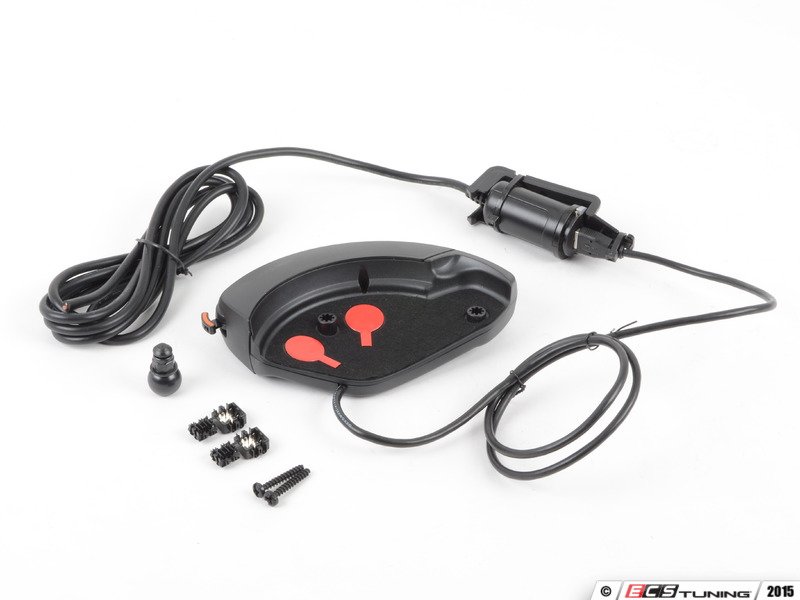
There is a USB cable running from the Click & Drive unit to a car-lighter USB power adapter. The car-lighter adapter is connected to a lighter socket dongle that has wires that run to the Body Dommain Controller (fuse panel in the footwell wall). All of this is zip-tied together.
It should be possible to run that USB cable to the USB port instead, and use a 6" Lightning cable to plug the iPhone into the Click & Drive. This assumes that all four wires are soldered.
See pictures and the installation PDF, if you look closely you will see the end of the USB cable in a bracket that is zip-tied to the adapter and the dongle.
https://www.northamericanmotoring.co...lick-drive.pdf
Here you can see where the little cable plugs into the Click & Drive body's USB port.
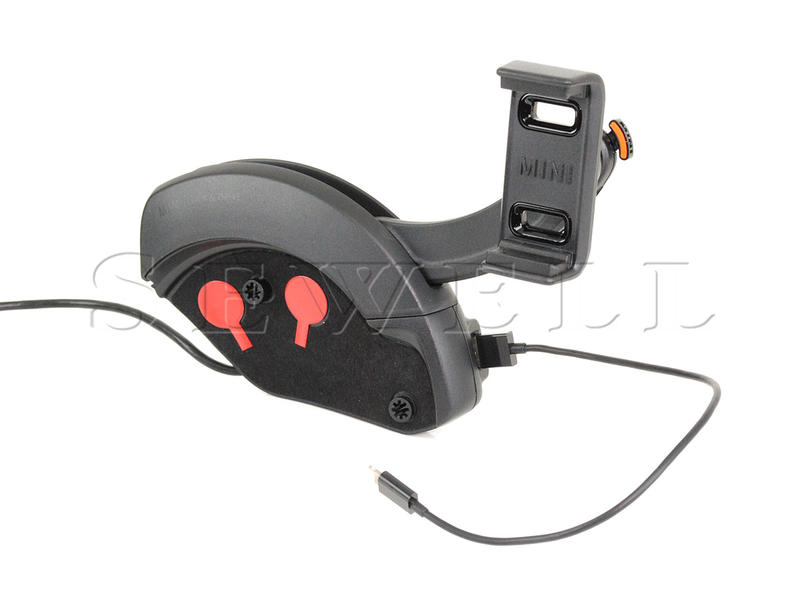
It's all much sexier to run Bluetooth. I'm running a white lightning cable from my iPod Touch because I don't have Bluetooth Audio, and the USB port on the Click & Drive has another cable charging the Bluetooth speaker I use at work. It's a bit of a mess!
It should be possible to run that USB cable to the USB port instead, and use a 6" Lightning cable to plug the iPhone into the Click & Drive. This assumes that all four wires are soldered.
See pictures and the installation PDF, if you look closely you will see the end of the USB cable in a bracket that is zip-tied to the adapter and the dongle.
https://www.northamericanmotoring.co...lick-drive.pdf
Here you can see where the little cable plugs into the Click & Drive body's USB port.
It's all much sexier to run Bluetooth. I'm running a white lightning cable from my iPod Touch because I don't have Bluetooth Audio, and the USB port on the Click & Drive has another cable charging the Bluetooth speaker I use at work. It's a bit of a mess!
Last edited by hammerhands; Oct 30, 2015 at 01:49 PM.

Neutral
Joined: Mar 2015
Posts: 7
Likes: 0
From: Springfield, PA
Since the wiring harness for the Click and Drive only provides power to the phone, I want to know if the harness can be removed from the cradle without having to cut the cable. In other words, does the cable connect to the cradle with a connector?
I would prefer to run a flat black lightning cable running from the console USB port to my iPhone 5s for both power and data and route the cable tucked into the dash. However, if down the road I wanted to mount a Garmin GPS, I would want to be able to use the included wiring harness for power.
Thanks for your responses.
I would prefer to run a flat black lightning cable running from the console USB port to my iPhone 5s for both power and data and route the cable tucked into the dash. However, if down the road I wanted to mount a Garmin GPS, I would want to be able to use the included wiring harness for power.
Thanks for your responses.
The Click and Drive cable is a USB end and can be wired to dash USB then it will power the USB port on Click and Drive. Charge your Iphone and use the multimedia option on radio. If you use a flat black cable and run it along dash looks awesome.
Good luck!!!
Thread Starter
|
1st Gear
Joined: Jul 2015
Posts: 50
Likes: 1
From: Westminster, CO
There is a USB cable running from the Click & Drive unit to a car-lighter USB power adapter. The car-lighter adapter is connected to a lighter socket dongle that has wires that run to the Body Dommain Controller (fuse panel in the footwell wall). All of this is zip-tied together.
It should be possible to run that USB cable to the USB port instead, and use a 6" Lightning cable to plug the iPhone into the Click & Drive. This assumes that all four wires are soldered.
It should be possible to run that USB cable to the USB port instead, and use a 6" Lightning cable to plug the iPhone into the Click & Drive. This assumes that all four wires are soldered.
It looks to me that you are right. I should be able to get both power and data to my iPhone by connecting the cradle's USB cable directly to the console USB port and then connecting a lightening cable from the phone to the cradle USB port. I wonder how long the USB cable portion of the wiring harness might be and if it is long enough to be tucked into the dash and routed to the console USB port?
Thread Starter
|
1st Gear
Joined: Jul 2015
Posts: 50
Likes: 1
From: Westminster, CO
I've seen the linked installation pdf and read thru it several times. The electrical diagrams are unintelligible to me. If 1 wire is power, 1 wire might be data?, what would the other 2 wires do?
I really appreciate your comments.
Last edited by bctf1; Oct 30, 2015 at 08:14 PM.
5th Gear
Joined: Mar 2014
Posts: 981
Likes: 6
From: Cold, Sleepwalking Winnipeg
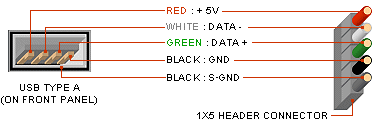
It uses two wires for power 5V+ & GND, and two [or maybe 3?] wires for data. I suspect all the wires are soldered. You just need to plug some device through it and see if it works to find out, I don't remember trying this but I'm somewhat convinced that I did because I was curious. There is no obvious way to open the body, but I'm sure it can be done.
Last edited by hammerhands; Oct 31, 2015 at 04:27 AM.
Trending Topics

Thread
Thread Starter
Forum
Replies
Last Post
R55&R60_N18
MINI Parts for Sale
4
Feb 17, 2016 08:18 AM
Niccolo_Machiavelli
General MINI Talk
16
Jan 26, 2016 11:45 AM