


F55/F56 Phone mount suggestions please


Thread Starter
|
1st Gear
Joined: Aug 2014
Posts: 30
Likes: 0
Phone mount suggestions please
Hey guys! I just got my f56 and I use the WAZE app on my phone for a GPS so I'm trying to find a good mount to use. I want something I can always leave in the car but won't be permanently mounted and won't damage anything or leave any sticky residue behind. It would also be nice if I could find one that will position it somewhat close to me so I can reach the screen if I need to. What kind do you guys use? What do you like and dislike about it? Does anyone have the Click and Drive mount that mini makes? If you have the Click and Drive mount, do you feel that it was worth the $200 plus installation cost?


5th Gear
Joined: Mar 2014
Posts: 981
Likes: 6
From: Cold, Sleepwalking Winnipeg
The CravenSpeed mount is very nice. It's crafted metal.
http://www.cravenspeed.com/products/...nting-Kit.html


I'm probably going to get the MINI Click and Drive mount. It's plastic.
http://www.ecstuning.com/Search/Site...ive/ES2775654/
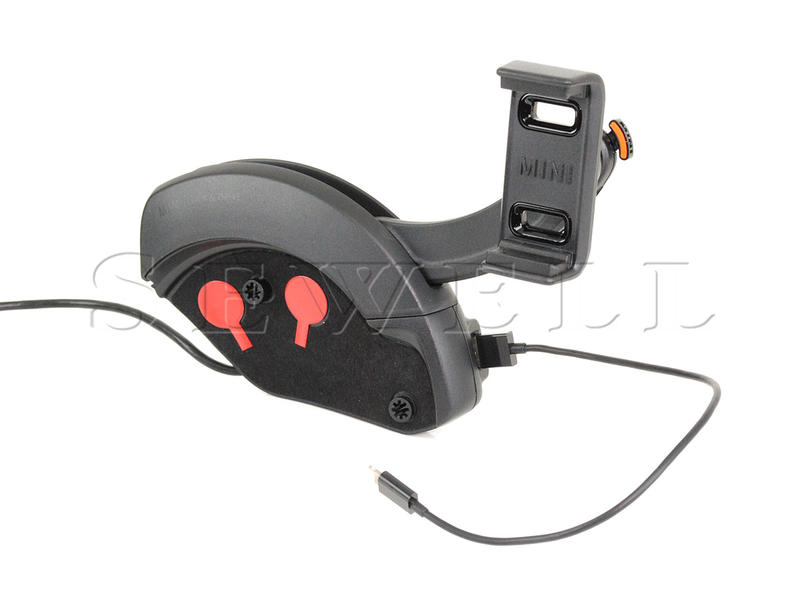
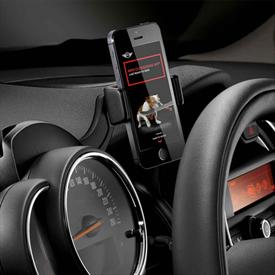
It should work with this cradle.

http://www.cravenspeed.com/products/...nting-Kit.html
I'm probably going to get the MINI Click and Drive mount. It's plastic.
http://www.ecstuning.com/Search/Site...ive/ES2775654/
It should work with this cradle.
Last edited by hammerhands; Nov 27, 2014 at 03:32 AM.


4th Gear
Joined: Apr 2014
Posts: 361
Likes: 1
I have the Cravenspeed mount in both my Minis. They look OE, are all metal, with no funky plastic grippy slider things (technical term).
There is an iPhone version where the phone just clicks in, for Android phones use the universal x-brace mount.
They are pricy at $100, but for something that you use every day and looks this good doing it; that price is reasonable for me.
Christmas is just around the corner...
There is an iPhone version where the phone just clicks in, for Android phones use the universal x-brace mount.
They are pricy at $100, but for something that you use every day and looks this good doing it; that price is reasonable for me.
Christmas is just around the corner...

1st Gear
Joined: Oct 2007
Posts: 45
Likes: 0
Have you had any problems with the LED ring since installing the ProClip? I have the same mount and i am having issues with the ring. I keep it on Blue but the section near the mount turns Green. If i press on the ring it will return to Blue for a short time. I removed the mount but it has not made any difference. I don't know if the issue is related to the installation of the mount or not.
Trending Topics

3rd Gear
Joined: Oct 2014
Posts: 224
Likes: 2
Has anyone tried the iOttie mounts? They get good reviews and are priced right:


4th Gear
Joined: Sep 2014
Posts: 520
Likes: 4
From: Tigard, OR
The thing I hate about suction cups is that they leave some kind of mark which are really hard to remove from the glass no matter what.
Mini's ClickDrive is waaaay overpriced. Almost feels like a rip-off, like most Mini accessories.
Mini's ClickDrive is waaaay overpriced. Almost feels like a rip-off, like most Mini accessories.
3rd Gear
Joined: Oct 2014
Posts: 224
Likes: 2
I was wondering if the suction cup would work on the dash. I was dubious.

2nd Gear
Joined: Feb 2014
Posts: 136
Likes: 1
From: SF Bay Area/Monterey, CA
Craven or Velcro coins are best
I have the Cravenspeed mount in both my Minis. They look OE, are all metal, with no funky plastic grippy slider things (technical term).
There is an iPhone version where the phone just clicks in, for Android phones use the universal x-brace mount.
They are pricy at $100, but for something that you use every day and looks this good doing it; that price is reasonable for me.
There is an iPhone version where the phone just clicks in, for Android phones use the universal x-brace mount.
They are pricy at $100, but for something that you use every day and looks this good doing it; that price is reasonable for me.
Thread Starter
|
1st Gear
Joined: Aug 2014
Posts: 30
Likes: 0
Thanks for everyone's ideas and input. I think I'm leaning toward the craven speed mount or the mini click and drive. I'm just worried about having to take the speedometer off to install either of those. Has anyone done this themselves? Was it hard? Were the directions easy to follow? I'm just worried I'll mess something up and end up voiding my warranty.
4th Gear
Joined: Sep 2014
Posts: 520
Likes: 4
From: Tigard, OR
I looked at the Click_n_Drive manual and it looks like a pretty tough job. Says you have to remove Instrument panel, door sill cover strip, footwell side trim on the A-pillar. And you have to split/tap couple wires.
I spent 3 hours hard wiring my dash cam last night. Tapped into the fuse box. Basically, I stuck the wire in and reinsert the fuse.
Attached the Click Drive manual. I saved this just in case I want to embed a USB charger.
I spent 3 hours hard wiring my dash cam last night. Tapped into the fuse box. Basically, I stuck the wire in and reinsert the fuse.
Attached the Click Drive manual. I saved this just in case I want to embed a USB charger.
2nd Gear
Joined: Feb 2014
Posts: 136
Likes: 1
From: SF Bay Area/Monterey, CA
Craven's EASY!
Thanks for everyone's ideas and input. I think I'm leaning toward the craven speed mount or the mini click and drive. I'm just worried about having to take the speedometer off to install either of those. Has anyone done this themselves? Was it hard? Were the directions easy to follow? I'm just worried I'll mess something up and end up voiding my warranty.
2nd Gear
Joined: Feb 2014
Posts: 136
Likes: 1
From: SF Bay Area/Monterey, CA
Just get a cheap set of 6 Torx drivers, long ones (like a screwdriver length--maybe 6 or 8 inches) from Harbor Freight Tools for 3 or 4 dollars. Have a magnet handy because you WILL DROP the screws into the dash hole otherwise. Job takes about 15 minutes and will bring you great utility and satisfaction. Craven makes great stuff.


I have craven speed and like it very much. I found an even better way to use it though- instead of the arm going up at an angle and viewing my phone over my right hand on the steering wheel, I have the arm going at an angle down, and I view it through the wheel. Maybe a pic would help. But it's nice- easily within tap distance, and eyesight. Got an 18" cord on order from Amazon- hopefully that's a perfect length straight to the outlet.
Thread Starter
|
1st Gear
Joined: Aug 2014
Posts: 30
Likes: 0
That's all really helpful info - thanks!
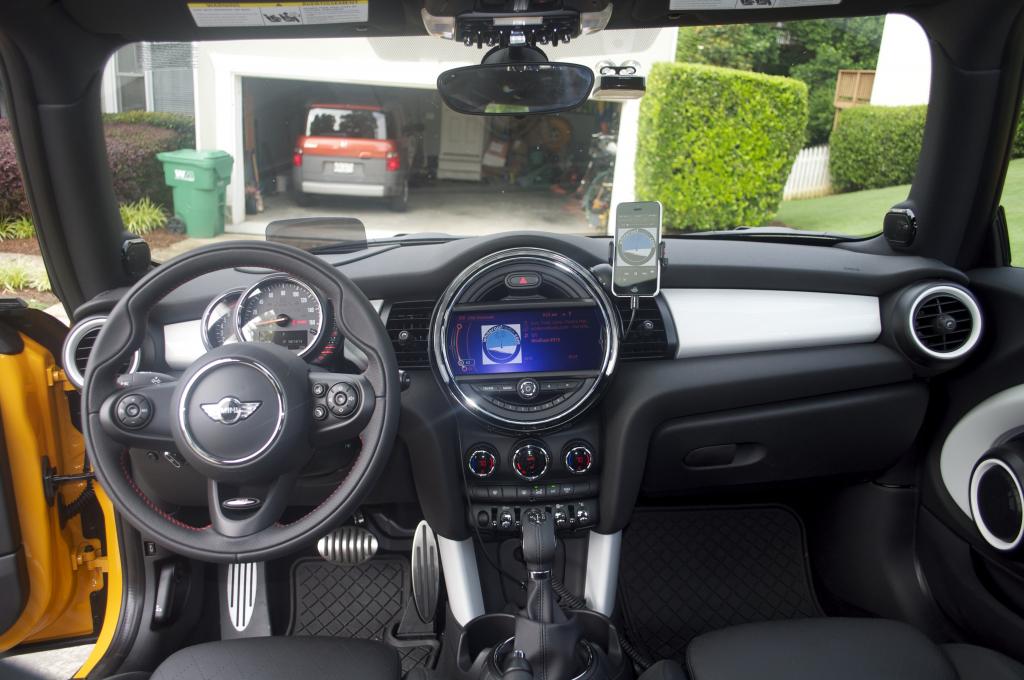
J_L - I'd love to see a picture if it's not too much trouble. Does the phone block the speedometer if you mount it that way?
For anyone who has the craven speed mount- I read a review that said that the universal x shaped holder turns every time you hit a bump, and you can't have the phone in the cradle sideways/longways if you have the USB cord plugged in because the cord weights it down on one side and there's no way to tighten the mount to keep it from turning while you're driving. Has anyone had a problem with that happening? Anyone found a solution? Can someone post a picture of what it looks like from the driver's seat with the phone in place please? I want to make sure the steering wheel won't block my view. Also, I have an iPhone, is the iPhone 5S cradle adjustable so my phone will fit with a case on it, or should I get the universal x shaped mount?
J_L - I'd love to see a picture if it's not too much trouble. Does the phone block the speedometer if you mount it that way?
For anyone who has the craven speed mount- I read a review that said that the universal x shaped holder turns every time you hit a bump, and you can't have the phone in the cradle sideways/longways if you have the USB cord plugged in because the cord weights it down on one side and there's no way to tighten the mount to keep it from turning while you're driving. Has anyone had a problem with that happening? Anyone found a solution? Can someone post a picture of what it looks like from the driver's seat with the phone in place please? I want to make sure the steering wheel won't block my view. Also, I have an iPhone, is the iPhone 5S cradle adjustable so my phone will fit with a case on it, or should I get the universal x shaped mount?
4th Gear
Joined: Apr 2014
Posts: 361
Likes: 1
On the Craven universal mount there is a rubber pad at the center of the cross brace, if the mount rotates to freely simply peal off the pad and tighten the recessed screw. Problem solved.
Horizontal is only a concern if you can't center the phone due to buttons, like on my phone. Tightening the screw above addresses these issues as well.
I've never had a problem with the power cord.
The mount the arm comes with places the phone just above the steering wheel to the right of the tach. The angle is adjustable, and the whole thing is reversible for use on the left side. Depending on your steering wheel position a previous poster angled his downward and views the phone through the wheel.
Cravenspeed.com has photos of the mount installed. Mine look like the Craven photos.
Horizontal is only a concern if you can't center the phone due to buttons, like on my phone. Tightening the screw above addresses these issues as well.
I've never had a problem with the power cord.
The mount the arm comes with places the phone just above the steering wheel to the right of the tach. The angle is adjustable, and the whole thing is reversible for use on the left side. Depending on your steering wheel position a previous poster angled his downward and views the phone through the wheel.
Cravenspeed.com has photos of the mount installed. Mine look like the Craven photos.

4th Gear
Joined: Jul 2014
Posts: 443
Likes: 1
From: SoCal
Furthermore, here's a really helpful thread for those considering the very good Carvenspeed mount.
There are some idiosyncrasies during installation that a few of us experienced (noted in the thread above).
Oh, I'll try to post pics of the phone in place, in both the horizontal and vertical positions from my car tonight. I've found that if you leave a bit of slack in your phone charger, and wind it around the mount itself... see pictures in the thread noted above, the phone will not move.
Good luck!

1st Gear
Joined: Jun 2013
Posts: 12
Likes: 0

I love my iOtti one touch. I use Waze daily and this mount makes it very easy to see and reach my phone. It was under $15 at amazon.
Because it is mounted up on the windshield I can see it out of the corner of my eye when driving, instead of having to look down or sideways.
The suction cup works great if you leave it mounted. If you remove it frequently the suction loses it's strength. My current one has been on for a year and a half and has never failed. It will leave a sticky residue behind when removed, but it does come off with Goo Gone and a little patience.
It should not be mounted on the dash as it can leave a permanent mark.
4th Gear
Joined: Jul 2014
Posts: 443
Likes: 1
From: SoCal
A couple of pictures of an iPhone 5 (in case) mounted horizontally and vertically.


As you can see, plenty of slack on the lightning cable, which is gently wrapped around the mount itself, and snaked between the dashboard panels down to the USB port. (see previously quoted thread for pictures).
As you can see, plenty of slack on the lightning cable, which is gently wrapped around the mount itself, and snaked between the dashboard panels down to the USB port. (see previously quoted thread for pictures).

3rd Gear
Joined: May 2014
Posts: 168
Likes: 2
From: Chicago, IL
I'm going to throw another one into the mix. Personally, I don't having my phone mounted up on the dash. I don't use my phone while I'm driving and I really just wanted a place to put it where it wouldn't flop around in the cup holder. I also hate cables hanging around. As a result, I picked the Macally mcup. It sits near the USB port and I wrapped the cable around the base so it wouldn't be in the way. The phone doesn't flop about and it doesn't get in the way of the shifter. My only gripe is that it's a bit too tall and interferes with my operation of the passenger seat heater. Picture below (sorry for the rubbish photo).