


F55/F56 Anyone purchase the fancy key F56 fob covers with the NFC chip in it?


4th Gear
Joined: Feb 2008
Posts: 328
Likes: 3
From: Illinois
Seriously, this is a gold mine waiting to be uncovered! If someone (listen up MINI) manufactured a slim cover that slipped over/clicked on and was offered in matching paint colors/themes/dash finishes/etc, owners would be eating them up!

4th Gear
Joined: Sep 2014
Posts: 520
Likes: 4
From: Tigard, OR
Look what I did today!
The keyfob you guys are talking about is way overpriced, so I won't be buying one of those. Instead, I used two shoe laces (it was too colorful to use on shoes) and made this.
The keyfob you guys are talking about is way overpriced, so I won't be buying one of those. Instead, I used two shoe laces (it was too colorful to use on shoes) and made this.


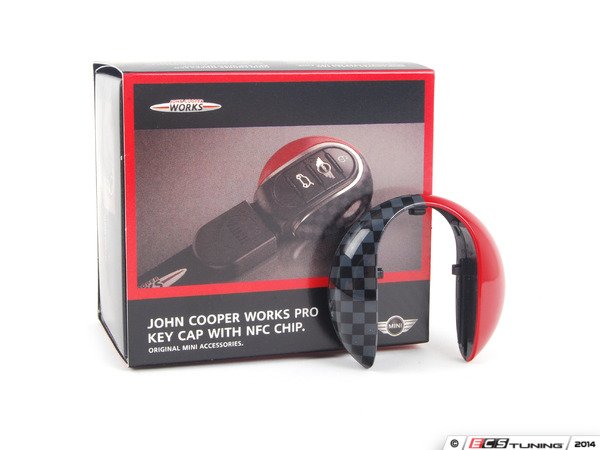
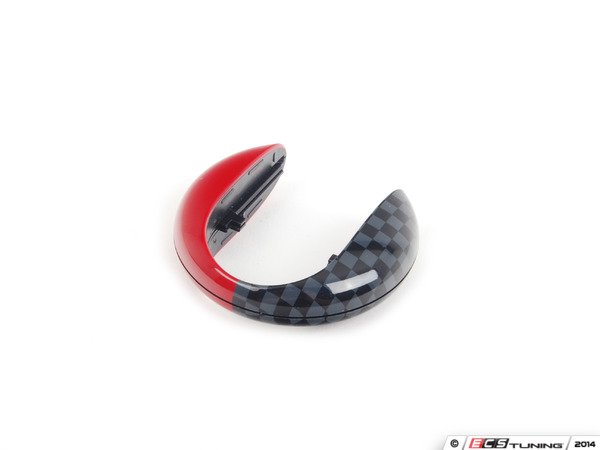
Speedwell blue looks very nice and so does the JCW Pro. They come in nice MINI packaging also. Like most of the newer MINI lifestyle accessories. Here are some pics with the cap by itself.
https://www.northamericanmotoring.co...loor-mats.html
https://www.northamericanmotoring.co...loor-mats.html
__________________

MINI Guru/ MINI Owner Since 2004 | NEW Lifetime Part Replacement | Local Pickup
Milltek | Genuine MINI | Forge Motorsport | NM Engineering | ECS Performance | M7 Speed
Customer Service Hours: 8am-8pm EST|Sales Team Hours: 8am-11pm | SAT 10am-7pm 800.924.5172
MINI Guru/ MINI Owner Since 2004 | NEW Lifetime Part Replacement | Local Pickup
Milltek | Genuine MINI | Forge Motorsport | NM Engineering | ECS Performance | M7 Speed
Customer Service Hours: 8am-8pm EST|Sales Team Hours: 8am-11pm | SAT 10am-7pm 800.924.5172


4th Gear
Joined: Sep 2014
Posts: 520
Likes: 4
From: Tigard, OR
Nah, NFC just automates some tasks. That's all. Think of it like a business card (=nfc tag inside the overpriced keyfob) and you just read that using your phone's camera (=nfc reader). It recognizes it and does what it says on it. It doesn't add any new functions or do cool things. All this can be replaced with automation tasker apps, for example, when your phone pairs with your car, you can start playing music, send text message and timestamp, turn off wifi, enable bell ringing sound, or whatever you normally do to your phone.

5th Gear
Joined: Mar 2014
Posts: 981
Likes: 6
From: Cold, Sleepwalking Winnipeg
Talent!

2nd Gear
Joined: Feb 2009
Posts: 71
Likes: 6
I never did care for the bloated key shape. Maybe its bloat is a flotation device ? I'm thinking maybe cut off most of the pontoons but leaving the latching and catch bits, glue something over the cutoff and re-latch it back on ? But do hope TX1911fan's guy comes through!
Thanks everyone, I now understand NFC - I want that to turn on my phone, enable Bluetooth and startup DashCommand.
p.s. use the pullout emergency key to pop open the key fob - there's a little machined blade on the end which also works the door lock caps if you have the push-button convenience key lock buttons.
-Mike
Thanks everyone, I now understand NFC - I want that to turn on my phone, enable Bluetooth and startup DashCommand.
p.s. use the pullout emergency key to pop open the key fob - there's a little machined blade on the end which also works the door lock caps if you have the push-button convenience key lock buttons.
-Mike
4th Gear
Joined: Sep 2014
Posts: 520
Likes: 4
From: Tigard, OR
NFC on the phone works only when your phone is screen-on. You can make it do only a few things and that depends on which software is used when reading the NFC tag. I tried to like and make use of NFC tags, but ended up being useless.
NFC is also used for transferring and receiving data within couple centimeter distance. This is the only use I had last couple months, only because Softcard & Amex gave back $1 on purchases greater or equal to $1 (up to $50 per month) when paid with Amex Serve using Softcard app. I often go to McDonalds and Wholefoods which accept NFC payments. Now that this promo ended, I probably won't use NFC for a while.
I put a neck strap on my second keyfob so I can just hang it around my neck. MINI Keyfob is too fat to put in my pocket.
NFC is also used for transferring and receiving data within couple centimeter distance. This is the only use I had last couple months, only because Softcard & Amex gave back $1 on purchases greater or equal to $1 (up to $50 per month) when paid with Amex Serve using Softcard app. I often go to McDonalds and Wholefoods which accept NFC payments. Now that this promo ended, I probably won't use NFC for a while.
I put a neck strap on my second keyfob so I can just hang it around my neck. MINI Keyfob is too fat to put in my pocket.

3rd Gear


Joined: Dec 2007
Posts: 276
Likes: 2
From: So. Calif.
I picked up the JCW key cap and the short lanyard a few days ago and promptly threw out the packaging. However I just retrieved the cap box and see that the cap is described as "John Cooper Works Pro Key Cap with NFC Chip", p/n 82292353329. Included is an instruction sheet which does discuss the NFC chip:
"MINI key cap A contains an NFC chip (NXP NTAG203) that can be read by all NFC-enabled smartphones. The chip is positioned on the right-hand side of the cap and is recognisable from the slightly raised area on the cap. It can be custom-programmed. Holding the smartphone in front of it allows the chip to be recognized. The first time the smartphone is touched, if you do not yet have an NFC app, the app download area opens and you can search for NFC apps. If you already have an NFC app, this opens and the chip can be written to. Once the NFC chip has been configured, it can be used to trigger various functions on the smartphone fully automatically, such as volume, WLAN, Bluetooth or an app and, if touched against the smartphone again, causes these actions to be reversed."
I haven't tried this yet, but think I'm glad I took another look at the instructions!
"MINI key cap A contains an NFC chip (NXP NTAG203) that can be read by all NFC-enabled smartphones. The chip is positioned on the right-hand side of the cap and is recognisable from the slightly raised area on the cap. It can be custom-programmed. Holding the smartphone in front of it allows the chip to be recognized. The first time the smartphone is touched, if you do not yet have an NFC app, the app download area opens and you can search for NFC apps. If you already have an NFC app, this opens and the chip can be written to. Once the NFC chip has been configured, it can be used to trigger various functions on the smartphone fully automatically, such as volume, WLAN, Bluetooth or an app and, if touched against the smartphone again, causes these actions to be reversed."
I haven't tried this yet, but think I'm glad I took another look at the instructions!

3rd Gear
Joined: Apr 2015
Posts: 189
Likes: 7
I'm going to buy the JCW version and try it with my Samsung Ezon door lock.
If it works with the door lock, that's one less key for me to carry around.
Might work with other smart-door lock/deadbolt which are NFC-compatible.
If it works with the door lock, that's one less key for me to carry around.
Might work with other smart-door lock/deadbolt which are NFC-compatible.
![Samsung Ezon Digital Door Lock SHS-3320 Universial Deadbolt (US version)-[New Model of SHS-3420] - Door Dead Bolts - Amazon.com](https://www.northamericanmotoring.com/forums/images/misc/amazon_icon.gif)

1st Gear
Joined: Apr 2015
Posts: 14
Likes: 0
Nfc is only for android. Kind of funny that most of the other mini products are meant for Apple, then you have this product for android. Something is wrong here.


Matches your MINI to a "T" 
__________________
MINI Guru/ MINI Owner Since 2004 | NEW Lifetime Part Replacement | Local Pickup
Milltek | Genuine MINI | Forge Motorsport | NM Engineering | ECS Performance | M7 Speed
Customer Service Hours: 8am-8pm EST|Sales Team Hours: 8am-11pm | SAT 10am-7pm 800.924.5172
MINI Guru/ MINI Owner Since 2004 | NEW Lifetime Part Replacement | Local Pickup
Milltek | Genuine MINI | Forge Motorsport | NM Engineering | ECS Performance | M7 Speed
Customer Service Hours: 8am-8pm EST|Sales Team Hours: 8am-11pm | SAT 10am-7pm 800.924.5172
3rd Gear
Joined: Dec 2007
Posts: 276
Likes: 2
From: So. Calif.
Well, I've carefully followed the instructions, even downloaded the AirTap NFC app, but still nobody's home. The fancy cap and my iPhone 5S do not recognize each other.
It doesn't seem like I'm missing out on any important benefits, but I'd like to be able to try out the NFC at least.
It doesn't seem like I'm missing out on any important benefits, but I'd like to be able to try out the NFC at least.



1st Gear
Joined: Jul 2015
Posts: 50
Likes: 1
From: Westminster, CO

Neutral
Joined: Jan 2016
Posts: 1
Likes: 0
From: Seattle, WA
How to replace the key fob cover?
Hello-- newbie MINI owner here. I have a 2015 F56 S and got the fancy cover and got the fancy lanyard and key fob cover-- but I can't figure out how to pop the cover off? Help, please!
I've gotten as far as pulling out the key and slipping a cloth covered mini screwdriver in the notch. Manage to lift up one side, but not the other. Ended up snapping it back together in fear of damaging the fob.
I've gotten as far as pulling out the key and slipping a cloth covered mini screwdriver in the notch. Manage to lift up one side, but not the other. Ended up snapping it back together in fear of damaging the fob.
__________________
MINI Guru/ MINI Owner Since 2004 | NEW Lifetime Part Replacement | Local Pickup
Milltek | Genuine MINI | Forge Motorsport | NM Engineering | ECS Performance | M7 Speed
Customer Service Hours: 8am-8pm EST|Sales Team Hours: 8am-11pm | SAT 10am-7pm 800.924.5172
MINI Guru/ MINI Owner Since 2004 | NEW Lifetime Part Replacement | Local Pickup
Milltek | Genuine MINI | Forge Motorsport | NM Engineering | ECS Performance | M7 Speed
Customer Service Hours: 8am-8pm EST|Sales Team Hours: 8am-11pm | SAT 10am-7pm 800.924.5172
We just landed a big order of these and other F56+ items most with free shipping. We also do local pickup now!
Speedwell blue looks very nice and so does the JCW Pro. They come in nice MINI packaging also. Like most of the newer MINI lifestyle accessories. Here are some pics with the cap by itself.
https://www.northamericanmotoring.co...loor-mats.html
https://www.northamericanmotoring.co...loor-mats.html
__________________
MINI Guru/ MINI Owner Since 2004 | NEW Lifetime Part Replacement | Local Pickup
Milltek | Genuine MINI | Forge Motorsport | NM Engineering | ECS Performance | M7 Speed
Customer Service Hours: 8am-8pm EST|Sales Team Hours: 8am-11pm | SAT 10am-7pm 800.924.5172
MINI Guru/ MINI Owner Since 2004 | NEW Lifetime Part Replacement | Local Pickup
Milltek | Genuine MINI | Forge Motorsport | NM Engineering | ECS Performance | M7 Speed
Customer Service Hours: 8am-8pm EST|Sales Team Hours: 8am-11pm | SAT 10am-7pm 800.924.5172
2nd Gear
Joined: Feb 2009
Posts: 71
Likes: 6
Hi Laurel,
How to is in the owner's manual.
Here's a link where you can get a .pdf or online version: https://www.miniusa.com/owners/tools...r-manuals.html
Happy Motoring
-Mike
How to is in the owner's manual.
Here's a link where you can get a .pdf or online version: https://www.miniusa.com/owners/tools...r-manuals.html
Happy Motoring
-Mike

2nd Gear
Joined: Feb 2008
Posts: 97
Likes: 18
Bump
Anyone try this key fob cover with newer iPhones? Does it still not work? Just got this for Xmas and wondering if the NFC has any function with an iPhone 7 running iOS 12.
I’ve read through several threads from 2015 but I’m not sure those apply to newer iPhones with newer software.
Anyone try this key fob cover with newer iPhones? Does it still not work? Just got this for Xmas and wondering if the NFC has any function with an iPhone 7 running iOS 12.
I’ve read through several threads from 2015 but I’m not sure those apply to newer iPhones with newer software.