


Navigation & Audio Satellite Navigation Problem - No GPS Signals Found!


Thread Starter
|
6th Gear
Joined: Oct 2002
Posts: 3,652
Likes: 6
From: Lansdale, PA
On Friday, my '03 MCS developed a problem with the Navigation System. Somewhere south of Syracuse, NY, it stopped seeing any satellites. I went into the "hidden" mode by holding in the [MENU] button while in the Options screen. The system is definitely seeing the wheel speed, but is finding zero satellites. I have done the following:
Disconnect both battery cables from car and do a "cold boot" - no effect
Check for Nav fault codes and clear codes with our prototype BiM-COM software - no codes, and no effect
Re-install v.22 CD for 3/1-62 - no effect
Schedule appointment at Main Line MINI for next Wednesday - slight placebo effect
So, here are my questions:
Has this happened to anyone else, if so, what was the resolution? Thanks!
Disconnect both battery cables from car and do a "cold boot" - no effect
Check for Nav fault codes and clear codes with our prototype BiM-COM software - no codes, and no effect
Re-install v.22 CD for 3/1-62 - no effect
Schedule appointment at Main Line MINI for next Wednesday - slight placebo effect
So, here are my questions:
Has this happened to anyone else, if so, what was the resolution? Thanks!
Thread Starter
|
6th Gear
Joined: Oct 2002
Posts: 3,652
Likes: 6
From: Lansdale, PA
Update:
I dropped of my MCS yesterday and picked it up today from MINI of the Main Line in Philadelphia (Peter the Service Manager and his tech Paul did great work). My Nav is now working again, it appears that the Nav Computer fried itself and took out the antenna amplifier with it. I now have the following new (or almost-new) parts:
84-50-6-918-548 Antenna
65-50-1-504-068 Amplifier
65-90-0-151-517 RMFD Nav Computer
Everything works as normal, except:
1) Now I have the annoying nag screen that makes me agree to a disclaimer before every use of the Nav system. GRRRR! Peter indicated this is in the new firmware and cannot be changed. Interestingly, the version is now 3-1/63 (I had 3-1/62 previously).
2) I now have a choice for "EMERGENCY" on my main menu. Pressing this shows the current latitude and longitude and has the number for 911.
3) They flashed my DME from v.32 to v.36. I had no driveability issues previously and didn't want the update, but they said it was necessary for interaction with the new Nav update.
So, I'm happy that my Nav is working again, but am unhappy about the new nag screen and the unwanted DME update. Incidentally, I also requested they perform the rear strut bolt recall as per the letter I got in the mail, but according to the dealer's system, my car doesn't fall under the recall.
I dropped of my MCS yesterday and picked it up today from MINI of the Main Line in Philadelphia (Peter the Service Manager and his tech Paul did great work). My Nav is now working again, it appears that the Nav Computer fried itself and took out the antenna amplifier with it. I now have the following new (or almost-new) parts:
84-50-6-918-548 Antenna
65-50-1-504-068 Amplifier
65-90-0-151-517 RMFD Nav Computer
Everything works as normal, except:
1) Now I have the annoying nag screen that makes me agree to a disclaimer before every use of the Nav system. GRRRR! Peter indicated this is in the new firmware and cannot be changed. Interestingly, the version is now 3-1/63 (I had 3-1/62 previously).
2) I now have a choice for "EMERGENCY" on my main menu. Pressing this shows the current latitude and longitude and has the number for 911.
3) They flashed my DME from v.32 to v.36. I had no driveability issues previously and didn't want the update, but they said it was necessary for interaction with the new Nav update.
So, I'm happy that my Nav is working again, but am unhappy about the new nag screen and the unwanted DME update. Incidentally, I also requested they perform the rear strut bolt recall as per the letter I got in the mail, but according to the dealer's system, my car doesn't fall under the recall.
6th Gear
Joined: Jan 2003
Posts: 4,406
Likes: 0
From: Northeast Ohio
2) I now have a choice for "EMERGENCY" on my main menu. Pressing this shows the current latitude and longitude and has the number for 911.


2nd Gear
Joined: Jan 2004
Posts: 127
Likes: 0
From: Newport News, VA
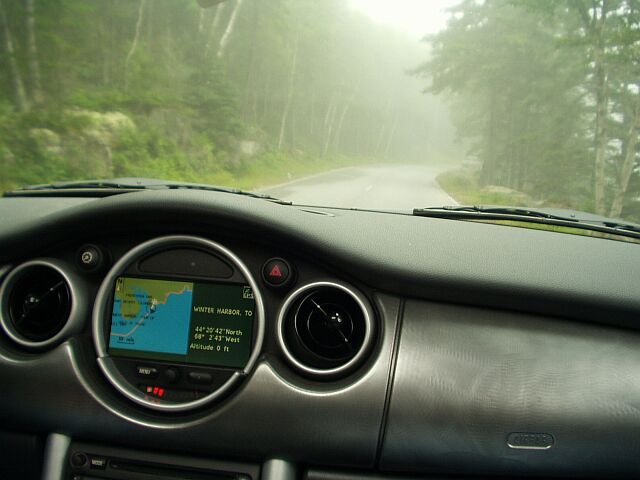
I was returning from a ski trip in Cortina, Italy and going through some very thick fog and the Nav system showed me in Austria somewhere and at about 60,000 feet. Didn't even feel the lack of oxygen!

Thread Starter
|
6th Gear
Joined: Oct 2002
Posts: 3,652
Likes: 6
From: Lansdale, PA
Trending Topics

Banned
Joined: Feb 2004
Posts: 2,604
Likes: 0
>>Update:
>>
>>I dropped of my MCS yesterday and picked it up today from MINI of the Main Line in Philadelphia (Peter the Service Manager and his tech Paul did great work). My Nav is now working again,
Wheeeewww....had me worried there for awhile. Though you had turned left a tad early and left for Saturn' orbit where the system can't pick up the satellites.
>>
>>I dropped of my MCS yesterday and picked it up today from MINI of the Main Line in Philadelphia (Peter the Service Manager and his tech Paul did great work). My Nav is now working again,
Wheeeewww....had me worried there for awhile. Though you had turned left a tad early and left for Saturn' orbit where the system can't pick up the satellites.

Thread
Thread Starter
Forum
Replies
Last Post
Shane Wendel
1st Gen Countryman (R60) Talk (2010-2015)
3
Aug 18, 2015 01:13 PM
Navigation & Audio MINI Branded nuvi 360 Installation
Super Coop
Navigation & Audio
0
Aug 17, 2015 05:09 PM
skippermini
Stock Problems/Issues
2
Aug 13, 2015 06:13 AM