


Navigation & Audio Aux Input installed! (pics)


Here is the original Aux-in/Nav install as posted by Greatbear. Pics are even still there!
https://www.northamericanmotoring.co...lled-pics.html
https://www.northamericanmotoring.co...lled-pics.html


That's a great DIY, MINI still sends the MINI factory instructions for the glove box location in the kit ( 82110153367 ), but can easily be plugged into the back and the mounting plate can be put under the toggle bank. I really like the creatively of the additional locations people have put them in this thread.
Aux Input Cable Retrofit Kit Part # 82110153367
http://www.ecstuning.com/Search/SiteSearch/82110153367/
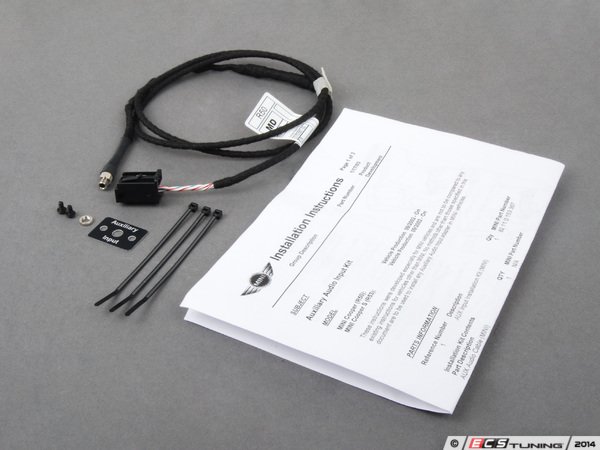
Aux Input Cable Retrofit Kit Part # 82110153367
http://www.ecstuning.com/Search/SiteSearch/82110153367/
__________________

MINI Guru/ MINI Owner Since 2004 | NEW Lifetime Part Replacement | Local Pickup
Milltek | Genuine MINI | Forge Motorsport | NM Engineering | ECS Performance | M7 Speed
Customer Service Hours: 8am-8pm EST|Sales Team Hours: 8am-11pm | SAT 10am-7pm 800.924.5172
MINI Guru/ MINI Owner Since 2004 | NEW Lifetime Part Replacement | Local Pickup
Milltek | Genuine MINI | Forge Motorsport | NM Engineering | ECS Performance | M7 Speed
Customer Service Hours: 8am-8pm EST|Sales Team Hours: 8am-11pm | SAT 10am-7pm 800.924.5172

Neutral
Joined: Aug 2014
Posts: 5
Likes: 0
That's a great DIY, MINI still sends the MINI factory instructions for the glove box location in the kit ( 82110153367 ), but can easily be plugged into the back and the mounting plate can be put under the toggle bank. I really like the creatively of the additional locations people have put them in this thread.
Aux Input Cable Retrofit Kit Part # 82110153367
http://www.ecstuning.com/Search/SiteSearch/82110153367/
Aux Input Cable Retrofit Kit Part # 82110153367
http://www.ecstuning.com/Search/SiteSearch/82110153367/
First question is will this aux input work with my current system?
I have considered installing a new head unit with an adapter to utilize the factory steering wheel controls but my understanding is the speakers are not compatible so new wire must be run from the new unit to the HK speakers?
Just trying to explore all options and pick the best for my situation.
Thanks in advance!

3rd Gear
Joined: Nov 2009
Posts: 151
Likes: 0
There's a how to for the aux install on this forum. As for bluetooth I bought a bluetooth dongle that plugs into the aux. It's awesome, works and it's only $18.99...

Yep, it will work.
DIY install, there is also instructions that come with the kit. Aux Input Cable Retrofit Kit Part # 82110153367 linked above. Then you can plug a male aux cable into your MP3 or Ipod,/ iphone. MINI does not have bluetooth streaming for music for these older models.
https://www.northamericanmotoring.co...lled-pics.html
DIY install, there is also instructions that come with the kit. Aux Input Cable Retrofit Kit Part # 82110153367 linked above. Then you can plug a male aux cable into your MP3 or Ipod,/ iphone. MINI does not have bluetooth streaming for music for these older models.
https://www.northamericanmotoring.co...lled-pics.html
__________________
MINI Guru/ MINI Owner Since 2004 | NEW Lifetime Part Replacement | Local Pickup
Milltek | Genuine MINI | Forge Motorsport | NM Engineering | ECS Performance | M7 Speed
Customer Service Hours: 8am-8pm EST|Sales Team Hours: 8am-11pm | SAT 10am-7pm 800.924.5172
MINI Guru/ MINI Owner Since 2004 | NEW Lifetime Part Replacement | Local Pickup
Milltek | Genuine MINI | Forge Motorsport | NM Engineering | ECS Performance | M7 Speed
Customer Service Hours: 8am-8pm EST|Sales Team Hours: 8am-11pm | SAT 10am-7pm 800.924.5172
Neutral
Joined: Aug 2014
Posts: 5
Likes: 0
Yep, it will work.
DIY install, there is also instructions that come with the kit. Aux Input Cable Retrofit Kit Part # 82110153367 linked above. Then you can plug a male aux cable into your MP3 or Ipod,/ iphone. MINI does not have bluetooth streaming for music for these older models.
https://www.northamericanmotoring.co...lled-pics.html
DIY install, there is also instructions that come with the kit. Aux Input Cable Retrofit Kit Part # 82110153367 linked above. Then you can plug a male aux cable into your MP3 or Ipod,/ iphone. MINI does not have bluetooth streaming for music for these older models.
https://www.northamericanmotoring.co...lled-pics.html
I have been looking and there are some neat kits for bluetooth streaming and even phone calls.
One issue is it will be done through the aux jack. So if the head unit is in radio mode or cd mode no phone calls. The head unit has to be in aux mode for these kits to work. Does anybody know of a way to install one of these kits that would still interrupt radio and cd functions? I have seen a bluetooth kit that installs throughout the antenna but it is only for streaming music not phone calls. Just trying to explore all options.

1st Gear
Joined: Jun 2014
Posts: 15
Likes: 0
Thank you Greatbear (and NAM) for showing me the way for this mod!
I recently bought a 2006 MCS with NAVI and if it wasn't for your excellent instructions, I'm not too sure that I would have attempted the install myself, especially dealing with switching the 3 wires.
BTW, I took a page out of your book and also installed the AUX port on the same side of the parcel shelf (I was lucky, the car came with it already).
I recently bought a 2006 MCS with NAVI and if it wasn't for your excellent instructions, I'm not too sure that I would have attempted the install myself, especially dealing with switching the 3 wires.
BTW, I took a page out of your book and also installed the AUX port on the same side of the parcel shelf (I was lucky, the car came with it already).
rolla , you are welcome.
harleyheaven - way to install one of these kits that would still interrupt radio and cd functions?
If you have your iphone( headphone port ) plugged into the aux port for music and then there is a call , it will go through the speakers and act like a integrated hands free phone. That's an option how to use it. Of course you have to hit answer on the phone.
thanks
harleyheaven - way to install one of these kits that would still interrupt radio and cd functions?
If you have your iphone( headphone port ) plugged into the aux port for music and then there is a call , it will go through the speakers and act like a integrated hands free phone. That's an option how to use it. Of course you have to hit answer on the phone.
thanks
__________________
MINI Guru/ MINI Owner Since 2004 | NEW Lifetime Part Replacement | Local Pickup
Milltek | Genuine MINI | Forge Motorsport | NM Engineering | ECS Performance | M7 Speed
Customer Service Hours: 8am-8pm EST|Sales Team Hours: 8am-11pm | SAT 10am-7pm 800.924.5172
MINI Guru/ MINI Owner Since 2004 | NEW Lifetime Part Replacement | Local Pickup
Milltek | Genuine MINI | Forge Motorsport | NM Engineering | ECS Performance | M7 Speed
Customer Service Hours: 8am-8pm EST|Sales Team Hours: 8am-11pm | SAT 10am-7pm 800.924.5172
Neutral
Joined: Aug 2014
Posts: 5
Likes: 0
rolla , you are welcome.
harleyheaven - way to install one of these kits that would still interrupt radio and cd functions?
If you have your iphone( headphone port ) plugged into the aux port for music and then there is a call , it will go through the speakers and act like a integrated hands free phone. That's an option how to use it. Of course you have to hit answer on the phone.
thanks
harleyheaven - way to install one of these kits that would still interrupt radio and cd functions?
If you have your iphone( headphone port ) plugged into the aux port for music and then there is a call , it will go through the speakers and act like a integrated hands free phone. That's an option how to use it. Of course you have to hit answer on the phone.
thanks
Also, assuming this works. What serves as the mic for the phone? Wouldn't the phone have to at least be in speakerphone mode?
Nope, this is just a work around when you are in Aux mode and have you phone connected to the aux jack using a male connection cable . Like this. You mic is the one on your phone. You are using your phone , listening to a song,... then someone calls you, mutes the sounds and then you are using the phone.
http://www.ecstuning.com/Search/SiteSearch/61122153330/ES2080503/
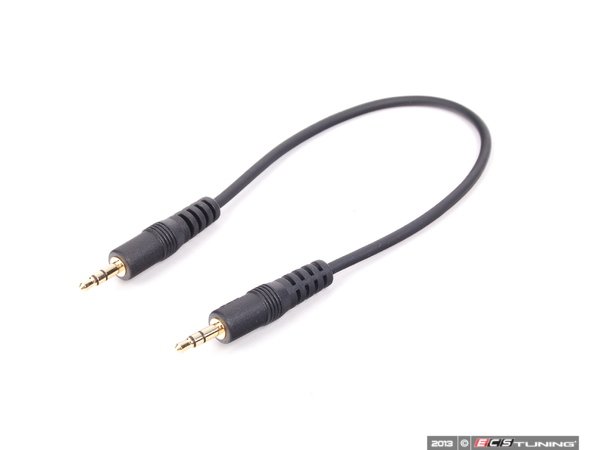
thanks
http://www.ecstuning.com/Search/SiteSearch/61122153330/ES2080503/
thanks
__________________
MINI Guru/ MINI Owner Since 2004 | NEW Lifetime Part Replacement | Local Pickup
Milltek | Genuine MINI | Forge Motorsport | NM Engineering | ECS Performance | M7 Speed
Customer Service Hours: 8am-8pm EST|Sales Team Hours: 8am-11pm | SAT 10am-7pm 800.924.5172
MINI Guru/ MINI Owner Since 2004 | NEW Lifetime Part Replacement | Local Pickup
Milltek | Genuine MINI | Forge Motorsport | NM Engineering | ECS Performance | M7 Speed
Customer Service Hours: 8am-8pm EST|Sales Team Hours: 8am-11pm | SAT 10am-7pm 800.924.5172
Neutral
Joined: Aug 2014
Posts: 5
Likes: 0
Nope, this is just a work around when you are in Aux mode and have you phone connected to the aux jack using a male connection cable . Like this. You mic is the one on your phone. You are using your phone , listening to a song,... then someone calls you, mutes the sounds and then you are using the phone.
http://www.ecstuning.com/Search/SiteSearch/61122153330/ES2080503/
thanks
http://www.ecstuning.com/Search/SiteSearch/61122153330/ES2080503/
thanks
http://www.newministuff.com/new/shop...uctshow&id=116
Last edited by harleyheaven; Aug 25, 2014 at 03:08 PM.

6th Gear
Joined: May 2014
Posts: 1,249
Likes: 2
Part Two - The Snag
Well, upon examination it didn't appear to be a lost cause. This is the Nav connector (yellow wires) removed from the head unit and the Aux connector plug. The Nav system wiring occupies different cavities in the connector than the Aux input. In that case, I can transfer the wires from the Nav into the Aux connector.

The outer shell of the the Nav and Aux connector have to be removed first. The release tab is under my thumbnail.

This is the Aux and Nav connectors opened up. You can see where the wiring positions are different.

I used a small jeweler's screwdriver to release the terminal from the shell. Press down only enough to release the wire, then pull the wire out.

This is what it the freed wire and terminal looks like.

The terminal is pressed into the corresponding cavity in the Aux connector shell.

The same is done for the second wire from the Nav connector. This is what results.

The outer shell is snapped back onto the completed connector.

Now to get back on track....
Well, upon examination it didn't appear to be a lost cause. This is the Nav connector (yellow wires) removed from the head unit and the Aux connector plug. The Nav system wiring occupies different cavities in the connector than the Aux input. In that case, I can transfer the wires from the Nav into the Aux connector.
The outer shell of the the Nav and Aux connector have to be removed first. The release tab is under my thumbnail.
This is the Aux and Nav connectors opened up. You can see where the wiring positions are different.
I used a small jeweler's screwdriver to release the terminal from the shell. Press down only enough to release the wire, then pull the wire out.
This is what it the freed wire and terminal looks like.
The terminal is pressed into the corresponding cavity in the Aux connector shell.
The same is done for the second wire from the Nav connector. This is what results.
The outer shell is snapped back onto the completed connector.
Now to get back on track....
 Tonight I drink a beer in your name!
Pictures really help, Greatbear did a great write-up, two most popular locations have to be : under the toggle bank or in the glovebox. Seen the through the blank toggle switch also.
__________________
MINI Guru/ MINI Owner Since 2004 | NEW Lifetime Part Replacement | Local Pickup
Milltek | Genuine MINI | Forge Motorsport | NM Engineering | ECS Performance | M7 Speed
Customer Service Hours: 8am-8pm EST|Sales Team Hours: 8am-11pm | SAT 10am-7pm 800.924.5172
MINI Guru/ MINI Owner Since 2004 | NEW Lifetime Part Replacement | Local Pickup
Milltek | Genuine MINI | Forge Motorsport | NM Engineering | ECS Performance | M7 Speed
Customer Service Hours: 8am-8pm EST|Sales Team Hours: 8am-11pm | SAT 10am-7pm 800.924.5172

Neutral
Joined: Mar 2015
Posts: 2
Likes: 0
AUX and Nav System
After seeing the Aux with the Navigation issue, would it be possible to use a y connector? Also, if you don't care about the voice navigation thru the stereo, can you just unplug it and only have the visible navigation system to operate without sound?
Chris
Chris
6th Gear
Joined: May 2014
Posts: 1,249
Likes: 2
I have a question for everyone who has ever installed or done this aux "mod" to there mini .. just recently I have ben using my ipod with the aux cable and mode and it has recently just been cutting out, I tried several different cords checked the connection etc but always after about 5-10 min itll cut out and not be present on the mode display until sometime when it "cools off" HELP???? Anyone know how to fix this???
Did you check all the connections on the back of the stereo ?
Also does this happen when you are on CD or just standard stereo radio stations. If so you might have an amp problem if you have the H/K system .
Also does this happen when you are on CD or just standard stereo radio stations. If so you might have an amp problem if you have the H/K system .
__________________
MINI Guru/ MINI Owner Since 2004 | NEW Lifetime Part Replacement | Local Pickup
Milltek | Genuine MINI | Forge Motorsport | NM Engineering | ECS Performance | M7 Speed
Customer Service Hours: 8am-8pm EST|Sales Team Hours: 8am-11pm | SAT 10am-7pm 800.924.5172
MINI Guru/ MINI Owner Since 2004 | NEW Lifetime Part Replacement | Local Pickup
Milltek | Genuine MINI | Forge Motorsport | NM Engineering | ECS Performance | M7 Speed
Customer Service Hours: 8am-8pm EST|Sales Team Hours: 8am-11pm | SAT 10am-7pm 800.924.5172
6th Gear
Joined: May 2014
Posts: 1,249
Likes: 2
Nope the only time it cuts out is when I have AUX on, I have seen other people having a simular issue with NON H/K systems on here but I have a H/K system and CD and radio work great with no issues??

6th Gear
Joined: May 2014
Posts: 1,249
Likes: 2
I am not charging it through the car usb or anything I am using the cigarette litghter usb charger that I installed on my own. Would that be a problem? And thanks ill search tonight for that..

Neutral
Joined: Jul 2015
Posts: 2
Likes: 0
Hey guys, I'm new to the forum and trying to do this mod. The photos are no longer working in OP's instructions. Does anybody have a backup of the photos? I have an R53 with NAV so I'm trying to get the wiring figured out. Thanks in advance!

No connector difference, but the early '02 head units don't have the circuitry to support Aux-in. No definitive date, but it became functional sometime in August or September (HU build date)
You can plug in the Aux-in module, but it won't do anything.
You can plug in the Aux-in module, but it won't do anything.