


Show us your run, in Google Earth


Thread Starter
|
6th Gear
Joined: Jun 2006
Posts: 1,343
Likes: 1
From: Oahu, Hawai'i
Show us your run, in Google Earth
Anyone else out there recording the GPS data from their runs? Obviously, not with the OEM Nav system, but with another GPS?
I made a run today, out into the wald near Heidelberg. The KLM file for it is here -- download it, click on it, and it'll open up in Google Earth (if you have it installed).
Looking at it this way, from space, I have some good ideas for changes to make to the drive, and other places to explore.
I'd love to see similiar files for other favorite driving places, in Germany and throughout Europe.
For what it's worth, I used a Garmin Forerunner 305 for this -- I'm training for a marathon, and use it extensively for that. If you're looking for details on how to get this type of data from your Garmin to a Google Earth format, I have a write-up, here.
I made a run today, out into the wald near Heidelberg. The KLM file for it is here -- download it, click on it, and it'll open up in Google Earth (if you have it installed).
Looking at it this way, from space, I have some good ideas for changes to make to the drive, and other places to explore.
I'd love to see similiar files for other favorite driving places, in Germany and throughout Europe.
For what it's worth, I used a Garmin Forerunner 305 for this -- I'm training for a marathon, and use it extensively for that. If you're looking for details on how to get this type of data from your Garmin to a Google Earth format, I have a write-up, here.


Thread Starter
|
6th Gear
Joined: Jun 2006
Posts: 1,343
Likes: 1
From: Oahu, Hawai'i
There are, as I see it, some advantages to us all learning to share this type of data in a common format, like .kml / .kmz

- It doesn't care what type of computer or operating system you use. In this ever-growing anti-Microsoft world, that actually matters. Data in formats like kml and kmz are in a standard format, unproprietary. Universal. Google Earth, while free, is also available for Windows, OS X, and Linux. Free. Like beer.
- They work with numerous programs. I happen to favor GE. But that's just me. The format, the data, does not care.
- The chase feature is nice. It is neat to "see" the run as it happens, as if a replay.
- The addition of topographic detial is a plus. Just for high is that ridgeline? Why is it so curvy there?
- One can pull up and view numerous kml / kmz overlays at the same time. Compare specific runs, compare routes, look at how to string together different runs. Bunches of options.
4th Gear
Joined: Aug 2005
Posts: 525
Likes: 0
From: Back at Bragg
abuzavi, that looks like an excellent run!
I have a question about the start point, though. GE and my TomTom 910 don't show the starting intersection from your plot. I'm guessing that is a very new road there? I'm trying to coordinate doing your run with my next trip to Ramstein, which is about 3 hours from Holland. Defintely looking forward to it!
I'm really hoping that other's will start posting their Mini Runs here, too. BTW, here's a tool called TYRE that'll allow you to pull GE points into TomTom as intineraries. If/when I find a suitable run here in Nederland, I'll be sure to post. Enjoy!
Cheers!!
I have a question about the start point, though. GE and my TomTom 910 don't show the starting intersection from your plot. I'm guessing that is a very new road there? I'm trying to coordinate doing your run with my next trip to Ramstein, which is about 3 hours from Holland. Defintely looking forward to it!
I'm really hoping that other's will start posting their Mini Runs here, too. BTW, here's a tool called TYRE that'll allow you to pull GE points into TomTom as intineraries. If/when I find a suitable run here in Nederland, I'll be sure to post. Enjoy!
Cheers!!
Thread Starter
|
6th Gear
Joined: Jun 2006
Posts: 1,343
Likes: 1
From: Oahu, Hawai'i
Yes. That starting point is at the traffic light for what is a new road heading up the hill. Been open for a short while -- I've heard hit and miss results on GPS' having it in their data files.
I need to do some more work, to see how to get routes created in Google Earth, back into my Garmin. Lower priority -- I can't see driving and pulling the navigation off of the tiny screen on my wrist.
And yes, I'd love to see more of these types of files. I've got my own server (click on Tess Turbo) and if all else fails, I may look for a way to host them there, if need be.
I need to do some more work, to see how to get routes created in Google Earth, back into my Garmin. Lower priority -- I can't see driving and pulling the navigation off of the tiny screen on my wrist.
And yes, I'd love to see more of these types of files. I've got my own server (click on Tess Turbo) and if all else fails, I may look for a way to host them there, if need be.
Thread Starter
|
6th Gear
Joined: Jun 2006
Posts: 1,343
Likes: 1
From: Oahu, Hawai'i
I just saw that Harley Davidson has launched a new website, to capture great ride routes.
How freakin' cool is that?
How awesome it would be, if there were a similiar site for Mini drivers! And, even better yet, a site set to integrate with (gasp!) the OEM Nav system!
Better still, of course, would be a site that allows input and output of data in any nuber of formats. But that's just crazy dreaming, I suppose....
How freakin' cool is that?
How awesome it would be, if there were a similiar site for Mini drivers! And, even better yet, a site set to integrate with (gasp!) the OEM Nav system!
Better still, of course, would be a site that allows input and output of data in any nuber of formats. But that's just crazy dreaming, I suppose....
Trending Topics

4th Gear
Joined: Mar 2006
Posts: 360
Likes: 0
From: Pittsburgh, PA
That is seriously cool. But I have the factory OEM Nav. It doesn't look like there is anyway to do the same thing unless I manually recorded the route from the route list, or plotted GPS points. This task would be a huge undertaking. Maybe I'm missing something here.
Harley Davidson is doing some really cool things for riders, the new route website being one of them. MINI should have something similiar. It makes me wonder if its possible with our NAV systems.
Certainly not crazy dreaming...
Harley Davidson is doing some really cool things for riders, the new route website being one of them. MINI should have something similiar. It makes me wonder if its possible with our NAV systems.
Certainly not crazy dreaming...
4th Gear
Joined: Aug 2005
Posts: 525
Likes: 0
From: Back at Bragg
Nice ride!
abuzavi, that was an excellent run! Too bad my 910's features beat me down trying to do your run as an itinerary!! I ran that back on the 11th and it was busy. Regardless, a very nice trip and I saw a couple/few Mini's out there. Considering I drove over from Nederlands and back to do that run (10 hours in the car!!), was quite worth the trip! Now, if I can just figure out this TomTom... 
Cheers!
Cheers!
Thread Starter
|
6th Gear
Joined: Jun 2006
Posts: 1,343
Likes: 1
From: Oahu, Hawai'i
You came down from NL? Surely, there was some other reason!
And shame on you, for not PM'ing that you'd be in the area -- hell, I would have made the run again, in a heartbeat!
We're going to go hit the Odenwald this weekend -- I'll see you there. I'll have my GPS with me, too (assuming I remember), so I can crank out a Google Earth for it, too.
And shame on you, for not PM'ing that you'd be in the area -- hell, I would have made the run again, in a heartbeat!
We're going to go hit the Odenwald this weekend -- I'll see you there. I'll have my GPS with me, too (assuming I remember), so I can crank out a Google Earth for it, too.
4th Gear
Joined: Aug 2005
Posts: 525
Likes: 0
From: Back at Bragg
Yup, all the way from Nederlands on a whim!!! Just grabbed my oldest and spent some quality, bonding time chasing the Audis! I figure if I DON'T do a couple of these sorta runs, the Union will come and take Maggie away for mis-, or rather, under-use!! See ya at the Heidelberg linkup for the Odenwald.
Cheers!
Cheers!
Thread Starter
|
6th Gear
Joined: Jun 2006
Posts: 1,343
Likes: 1
From: Oahu, Hawai'i
Odenwald #5
Poppa Bear, as promised, here's the run from today. I've got it hanging off of my own server -- if you can't pull it directly, go here and get it.
Now, explain to me (with links) how you get these KMZ files into your TomTom?
Now, explain to me (with links) how you get these KMZ files into your TomTom?
Thread Starter
|
6th Gear
Joined: Jun 2006
Posts: 1,343
Likes: 1
From: Oahu, Hawai'i
As I had no work today, I went back to the Odenwald and made a better route to where the official run started yesterday. The KMZ / Google Earth files for the driving today is here (1, 2), and if that fails, I've got them up on my blog (here).
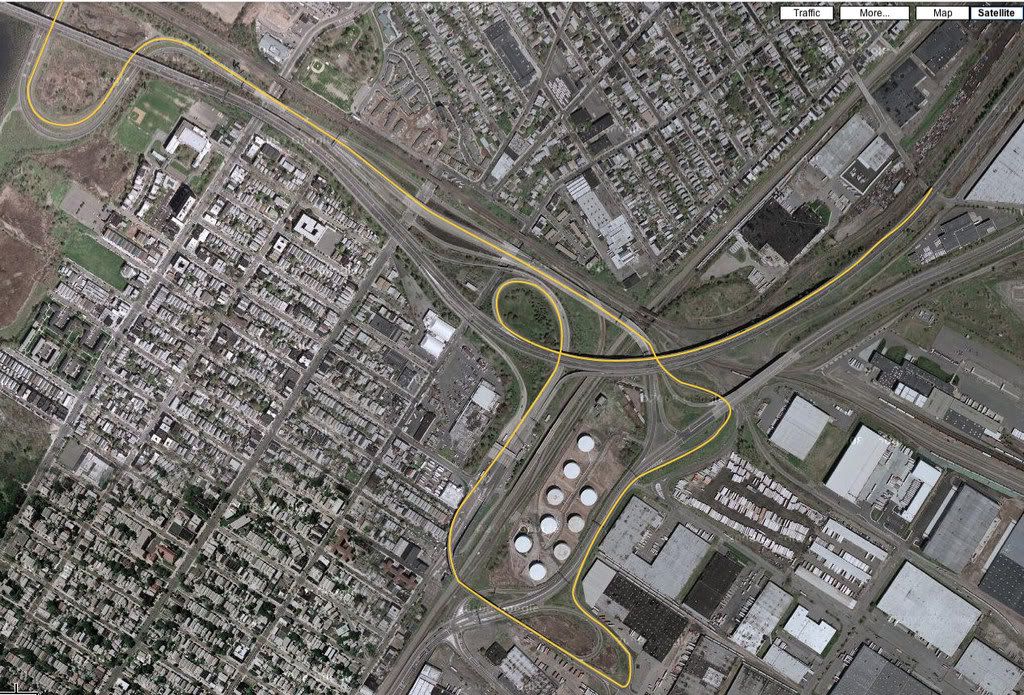
A snapshot of the Google Earth map of the run is attached. I have the OEM Nav, but use my Garmin 305 to record the run, and then these two websites to split the Garmin file and to then convert it to a Google Earth KMZ format. I added markers to Google Earth, to show the cities I had plugged into the OEM Nav, to help navigate (I did deviate some).
Awesome, awesome run today. Lots of twists and turns. Full body workout. Excellent use of that Alta 15% pully I just installed Saturday.
A snapshot of the Google Earth map of the run is attached. I have the OEM Nav, but use my Garmin 305 to record the run, and then these two websites to split the Garmin file and to then convert it to a Google Earth KMZ format. I added markers to Google Earth, to show the cities I had plugged into the OEM Nav, to help navigate (I did deviate some).
Awesome, awesome run today. Lots of twists and turns. Full body workout. Excellent use of that Alta 15% pully I just installed Saturday.
Thread Starter
|
6th Gear
Joined: Jun 2006
Posts: 1,343
Likes: 1
From: Oahu, Hawai'i

6th Gear
Joined: Apr 2007
Posts: 1,533
Likes: 0
From: Fernandina Beach, FL
Extracting files from a Garmin
Can you extract these files from any Garmin unit?
I own a Garmin 660 that allows me to connect it straight to my home PC
and from there I can access the Garmin as a drive.
Is it possible to pulll waypoint files from here and convert them into something that Google Earth will understand?
Thanks for any help... I hate to sound stupid but this looks too good to pass up.
This would be great for showing others the routes to the Dragon and such.
I own a Garmin 660 that allows me to connect it straight to my home PC
and from there I can access the Garmin as a drive.
Is it possible to pulll waypoint files from here and convert them into something that Google Earth will understand?
Thanks for any help... I hate to sound stupid but this looks too good to pass up.
This would be great for showing others the routes to the Dragon and such.
Thread Starter
|
6th Gear
Joined: Jun 2006
Posts: 1,343
Likes: 1
From: Oahu, Hawai'i
I did some more tinkering with my Garmin Forerunner 405 today. I changed two things:
1. I changed the setting, to have it record the location every second. The default has it computing when to record the location based on some (unknown) algorithm. Recording every second increases accuracy, but cuts battery life to 1/3 (not by 1/3 - to 1/3), from about 9 hours to about 3.
2. I brought along the charging adapter and a USB cable, and attached it to a cigarette adapter that has a USB port on it. That let the Garmin keep right on charging while in use, and off-set the accelerated battery consumption. Not an issue for short drives, as in under 3 hours, but really, in life, good drives take a hell of a lot longer than 3 hours.
I've attached a Google Earth file, here. It shows the difference in accuracy for the different recording methods for the Garmin Forerunner 405. Like night and day, as I see it.
1. I changed the setting, to have it record the location every second. The default has it computing when to record the location based on some (unknown) algorithm. Recording every second increases accuracy, but cuts battery life to 1/3 (not by 1/3 - to 1/3), from about 9 hours to about 3.
2. I brought along the charging adapter and a USB cable, and attached it to a cigarette adapter that has a USB port on it. That let the Garmin keep right on charging while in use, and off-set the accelerated battery consumption. Not an issue for short drives, as in under 3 hours, but really, in life, good drives take a hell of a lot longer than 3 hours.
I've attached a Google Earth file, here. It shows the difference in accuracy for the different recording methods for the Garmin Forerunner 405. Like night and day, as I see it.


6th Gear
Joined: Jul 2007
Posts: 2,881
Likes: 6
Can you extract these files from any Garmin unit?
I own a Garmin 660 that allows me to connect it straight to my home PC
and from there I can access the Garmin as a drive.
Is it possible to pulll waypoint files from here and convert them into something that Google Earth will understand?
Thanks for any help... I hate to sound stupid but this looks too good to pass up.
This would be great for showing others the routes to the Dragon and such.
I own a Garmin 660 that allows me to connect it straight to my home PC
and from there I can access the Garmin as a drive.
Is it possible to pulll waypoint files from here and convert them into something that Google Earth will understand?
Thanks for any help... I hate to sound stupid but this looks too good to pass up.
This would be great for showing others the routes to the Dragon and such.
For those with the OEM Nav, it doesn't have a tracklog either. It's just like the Nuvi 660, it's a point to point navigator. You can change if you want it to avoid highways in general, etc, but there is no way of forcing a route on specific roads you want to drive, without picking some kind of waypoint on that specific road. There are no "via" points.
Tracklogs and custom routes were common with GPS devices until Garmin came out with the Nuvi line. They completely dumbed down their product line removing all the nice features that were standard for years before. In what appeared to be an effort to make the devices simpler for the every day, non-techy user.
They have finally started added those features back into their Automobile line of devices. Some of the newer Nuvi's have tracklogs and will accept custom routes. One of those features is the customizable tracklog. You pick either a preset time or distance and it records points as you drive. Those points become a breadcrumb trail and that file of points is what you can view in Google Earth. Just like the one abuzavi posted.
Last edited by Minidrivr; Oct 16, 2008 at 09:08 PM.
6th Gear

Joined: Oct 2008
Posts: 4,963
Likes: 393
From: In the here and now, for now.
Tracking a run and being able to find it on Google Earth is really cool. What would be really really cool is if they could be stored on the G. E. community database so everybody could click the Mini Run icon and they would show up all over the world just like golf courses and Mickey D's do now.
I was going to start a thread inquiring about the interest/possibility of just such a scheme and this and several other threads were suggested. Any thoughts on whether or not something like that could be accomplished?
I was going to start a thread inquiring about the interest/possibility of just such a scheme and this and several other threads were suggested. Any thoughts on whether or not something like that could be accomplished?


Thread
Thread Starter
Forum
Replies
Last Post
minipopkart
R50/R53 :: Hatch Talk (2002-2006)
2
Aug 13, 2015 05:22 AM
Drivetrain Won't hold idle after work performed
Lt. Dan
Drivetrain (Cooper S)
4
Aug 10, 2015 08:23 AM