


Navigation & Audio My New iPod Video in my New MINI S


Thread Starter
|
1st Gear
Joined: Jul 2005
Posts: 16
Likes: 0
My New iPod Video in my New MINI S
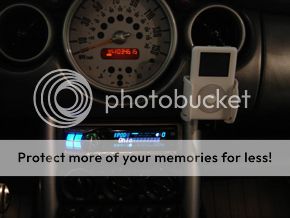
Here is my preffered Ipod in car solution. I tried using USA SPEC ipod interface that connect to the cd changer connection but the sound quality is awful, it might be the unit is defective or its just sucks. So i decided to go with the aux input and very happy about the sound quality.
I chose Kuda mounting base and holder with tilting function (very expensive at $80 total but it s made in Germany) . I really like this setup since the ipod its close to the steering wheel which makes it easy to skip songs, change playlist, etc. I can also look at the ipod without taking my eyes off the road too much.
I also add the pocketdock, which give direct, unamplified signal from the ipod for highest sound quality. It also allow me to charge the ipod while playing.
I feel that $200 icelink is not worth buying, especially with the problems it has caused to many MINIs. The sound quality is NOT better than aux input, even if it is you won't be able to hear it. Aux input sound quality is excellent if you set it up right. It is also insensitive to iPod firmware changes and future iPod models, which seemed like being released every week .
.
In case you are wondering, the long flexy thing is a led flashlight. I use it to illuminate the ipod during night time. The ipod screen turn off if you don't use the ipod, so i can't look at the artist/song information when driving at night unless i keep touching the ipod or leave it always on in the setting which drain the battery very quickly. . The led flashlight is very handy at night, it allow me to look at the ipod screen as if the backlight is on but its not as bright, the led light give a very soft glow to the screen which is way better for driving as its more comfortable to the eyes. VERY COOL!
 Check out the pictures on the very bottom.
Any thoughts?

I chose Kuda mounting base and holder with tilting function (very expensive at $80 total but it s made in Germany) . I really like this setup since the ipod its close to the steering wheel which makes it easy to skip songs, change playlist, etc. I can also look at the ipod without taking my eyes off the road too much.
I also add the pocketdock, which give direct, unamplified signal from the ipod for highest sound quality. It also allow me to charge the ipod while playing.
I feel that $200 icelink is not worth buying, especially with the problems it has caused to many MINIs. The sound quality is NOT better than aux input, even if it is you won't be able to hear it. Aux input sound quality is excellent if you set it up right. It is also insensitive to iPod firmware changes and future iPod models, which seemed like being released every week
. In case you are wondering, the long flexy thing is a led
flashlight. I use it to illuminate the ipod during night time. The ipod screen turn off if you don't use the ipod, so i can't look at the artist/song information when driving at night unless i keep touching the ipod or leave it always on in the setting which drain the battery very quickly. . The led flashlight is very handy at night, it allow me to look at the ipod screen as if the backlight is on but its not as bright, the led light give a very soft glow to the screen which is way better for driving as its more comfortable to the eyes. VERY COOL! Check out the pictures on the very bottom.Any thoughts?


5th Gear
Joined: Nov 2003
Posts: 1,027
Likes: 0
From: Miami, Fl
I was going to say, why do you need a light on the ipod when its backlit. But i'm guessing you use your ipod outside of your car alot so having to change from backlight always on to only 20-30 sec would be a pain in the ****.
Luckily for me my Ipod will be mainly for in car use so it will have its backlight on all the time.
I now have to work on finding a very clean mounting solution.
Luckily for me my Ipod will be mainly for in car use so it will have its backlight on all the time.
I now have to work on finding a very clean mounting solution.


Thread Starter
|
1st Gear
Joined: Jul 2005
Posts: 16
Likes: 0
The reason i use the led LED light thing is that i don't wan't to leave the ipod screen always on. It drains the battery very quickly but the main thing is that the ipod screen light is too bright and a little distracting since i placed the ipod rather high too make it easy to glance at while driving.
Yes, its very easy to switch the song since the ipod light will turn on when you touch the ipod making it easier to read.
Yes, its very easy to switch the song since the ipod light will turn on when you touch the ipod making it easier to read.
5th Gear
Joined: Nov 2003
Posts: 1,027
Likes: 0
From: Miami, Fl
Originally Posted by ppt777
The reason i use the led LED light thing is that i don't wan't to leave the ipod screen always on. It drains the battery very quickly but the main thing is that the ipod screen light is too bright and a little distracting since i placed the ipod rather high too make it easy to glance at while driving.
Yes, its very easy to switch the song since the ipod light will turn on when you touch the ipod making it easier to read.
Yes, its very easy to switch the song since the ipod light will turn on when you touch the ipod making it easier to read.
Thread Starter
|
1st Gear
Joined: Jul 2005
Posts: 16
Likes: 0
Its powered (charged actually) if i connect the ipod to an ipod adapter or interface such as ice-link. The ipod won't be charged if i connect it to the aux input. However, the pocketdock will allow me to plug in a usb charger while the ipod is in use in a car.
5th Gear
Joined: Nov 2003
Posts: 1,027
Likes: 0
From: Miami, Fl
Originally Posted by ppt777
Its powered (charged actually) if i connect the ipod to an ipod adapter or interface such as ice-link. The ipod won't be charged if i connect it to the aux input. However, the pocketdock will allow me to plug in a usb charger while the ipod is in use in a car.
Does the ipod have brightness adjustments for the screen?
Trending Topics

Thread Starter
|
1st Gear
Joined: Jul 2005
Posts: 16
Likes: 0

6th Gear
Joined: Jun 2004
Posts: 1,904
Likes: 1
From: Richardson, Texas
Very nice!
I'm not ready to get either the BMW/MINI iPod connector or the IceLink system, mostly because of cost issues. I also don't like the look of too many cables in my MINI (power from the cigarette lighter and sound to the AUX input jack) so I came up with a cheap simple solution.
Basically, the final product is a small wire lead to an iPod port that powers and connects my iPod to my MINI.
I first started with power. Here is a pic of a connector that creates a 12V lead from the fuse box. You can get these at most auto supply stores for around $7. I chose a fuse that was only live when the key is in turned on.

Next, I wired up a power socket that I picked up from Radio Shack for $7. The red wire went into the fuse box lead and the black was grounded. Within the socket I've plugged in the Belkin Auto Kit which normally retails for $40 but I got one off of ebay for $12 (total with shipping). The cool thing about the BAK is that it supplies power and a connection to the AUX input with only one connection to the iPod. The cable with the gold end is the connection to my AUX input, which is now hidden behind the dash.

Here is a pic of my new center console tray without the AUX input port (the red button is for the Built In Garage Door Opener ).

Here is the dock connector end of the Belkin Auto Kit. The wire is nicely tucked under the gear shift console. The final look is a single connection for power and music.

Finally, here is a pic of my iPod connected. This isn't my final mounting option. I'm still looking into that, so stay tuned. BTW, the total cost so far is $26 or $37 if you include the center console tray.

I'm not ready to get either the BMW/MINI iPod connector or the IceLink system, mostly because of cost issues. I also don't like the look of too many cables in my MINI (power from the cigarette lighter and sound to the AUX input jack) so I came up with a cheap simple solution.
Basically, the final product is a small wire lead to an iPod port that powers and connects my iPod to my MINI.
I first started with power. Here is a pic of a connector that creates a 12V lead from the fuse box. You can get these at most auto supply stores for around $7. I chose a fuse that was only live when the key is in turned on.
Next, I wired up a power socket that I picked up from Radio Shack for $7. The red wire went into the fuse box lead and the black was grounded. Within the socket I've plugged in the Belkin Auto Kit which normally retails for $40 but I got one off of ebay for $12 (total with shipping). The cool thing about the BAK is that it supplies power and a connection to the AUX input with only one connection to the iPod. The cable with the gold end is the connection to my AUX input, which is now hidden behind the dash.
Here is a pic of my new center console tray without the AUX input port (the red button is for the Built In Garage Door Opener ).
Here is the dock connector end of the Belkin Auto Kit. The wire is nicely tucked under the gear shift console. The final look is a single connection for power and music.
Finally, here is a pic of my iPod connected. This isn't my final mounting option. I'm still looking into that, so stay tuned. BTW, the total cost so far is $26 or $37 if you include the center console tray.
Thread Starter
|
1st Gear
Joined: Jul 2005
Posts: 16
Likes: 0
The belkin is nice, however the output is not true line out. The signal is amplified as the belkin have volume control in its unit. It reduced the quality of the audio signal of the ipod but i dont know how much or if you can tell. For me, i like the pocketdock.
Very nice job on the garage opener dickdavid.
Very nice job on the garage opener dickdavid.
6th Gear
Joined: Jun 2004
Posts: 1,904
Likes: 1
From: Richardson, Texas
Originally Posted by ppt777
The belkin is nice, however the output is not true line out. The signal is amplified as the belkin have volume control in its unit. It reduced the quality of the audio signal of the ipod but i dont know how much or if you can tell. For me, i like the pocketdock.
Very nice job on the garage opener dickdavid.
Very nice job on the garage opener dickdavid.
This is from the Belkin site about the BAK:
"Audio-Sound Enhancement - Using the 3.5mm audio-out port on the Auto Kit greatly improves your sound quality over plugging into the port on your iPod. The 3.5mm port on the top of the iPod is filtered and tailored toward headphone use and the quality volume level of a headphone simply cannot compete with your car stereo. Headset sound quality and bass levels are greatly reduced. The bottom dock connector (which transfers audio out of the Auto Kit’s 3.5mm port) generates pure, unfiltered sound. Therefore, using the Auto Kit gives you bass levels and sound quality equivalent to that of a CD."
Here's why there's a volume control:
"When the Auto Kit is plugged into the bottom of the iPod ... the volume control is disabled on the iPod, meaning that you cannot control the sound volume with your iPod controls. It’s important to have volume control, given the many audio options newer technologies have given us. Virtually all car stereos have fluctuating volume levels when switching from CD player to cassette player to radio, etc. When you listen to a CD, you set the volume to satisfy your listening preference. In some cases, “burned” CDs have already low volume quality and most users play them at increased volume levels over a factory-distributed CD. When you switch from CD to tape player (Cassette Adapter) or radio (TuneCast Mobile FM Transmitter), the volume can fluctuate wildly. It can be either loud enough to blow out speakers, or too low to hear. The Auto Kit’s volume amplifier lets you set the volume on your iPod to a fixed and safe level. It eliminates the possibility of damaging your speakers or offending your eardrums when switching from CD player to the TuneCast or Cassette Adapter."
Personally, I haven't noticed any loss in sound quality with the Belkin. Only improvement (or course I was going through the headphone jack before).

6th Gear
Joined: Sep 2004
Posts: 1,506
Likes: 0
You do know you can set the brightness on ALL iPods?
<--- tis a maccaddict.. BTW when you plug it in through the car charger it chargers it.. i mean come on.. there are quite some simple solutions.. look into these things..
<--- tis a maccaddict.. BTW when you plug it in through the car charger it chargers it.. i mean come on.. there are quite some simple solutions.. look into these things..
heres is the best mount ive seen yet, bestbuy has them for 9 bucks a pop and they can be adjusted to fit any and all ipods.
also, i have tha alpine ipod interface, so i really dont even need to have the ipod exposed, but its nice to still see it while i'm using it.
also, i have tha alpine ipod interface, so i really dont even need to have the ipod exposed, but its nice to still see it while i'm using it.

4th Gear
Joined: Aug 2003
Posts: 413
Likes: 0
From: Bahstun, MA
Very nice, especially the Belkin setup...here's my gallery, I just added a shot of my video iPod...since I don't drink in my car, no cup holder needed....
http://www.mini2.com/galleries/showg...0/ppuser/11982
Based on ipodlounge discussions, I too am under the impression the Belkin is a true line-out, it's why I bought it for >$50 a couple of years ago...works great for me, I boost my songs to 80%, my AUX input is set at 3, and the Belkin dial is about 1/2-way....am very pleased w/ my sound.
http://www.mini2.com/galleries/showg...0/ppuser/11982
Based on ipodlounge discussions, I too am under the impression the Belkin is a true line-out, it's why I bought it for >$50 a couple of years ago...works great for me, I boost my songs to 80%, my AUX input is set at 3, and the Belkin dial is about 1/2-way....am very pleased w/ my sound.
Thread Starter
|
1st Gear
Joined: Jul 2005
Posts: 16
Likes: 0
If you don't mind having extra wire to charge the ipod, the pocketdock is a better deal than belkin. You also can take it for you in your home stereo to get high quality sound from your ipod.
The pocketdock gives you true audio out input and usb input (for charging and syncing). So for car charging you will need to get usb car adapter (to plug into your lighter socket) and usb cable.
The pocketdock gives you true audio out input and usb input (for charging and syncing). So for car charging you will need to get usb car adapter (to plug into your lighter socket) and usb cable.
6th Gear
Joined: Jun 2004
Posts: 1,904
Likes: 1
From: Richardson, Texas
Originally Posted by Maximusmini
You do know you can set the brightness on ALL iPods?
Originally Posted by Maximusmini
<--- tis a maccaddict.. BTW when you plug it in through the car charger it chargers it.. i mean come on.. there are quite some simple solutions.. look into these things..
Were you referring to me plugging my BAK into the Radio Shack power socket, behind the dash? I did "look into these things". This, for me, was a simple, CLEAN and CHEAP solution. For me, it's about minimizing exposed cables within my cabin. I'm going for the clean look.
Originally Posted by rednwhitecooper
heres is the best mount ive seen yet, bestbuy has them for 9 bucks a pop and they can be adjusted to fit any and all ipods.
also, i have tha alpine ipod interface, so i really dont even need to have the ipod exposed, but its nice to still see it while i'm using it.
also, i have tha alpine ipod interface, so i really dont even need to have the ipod exposed, but its nice to still see it while i'm using it.
I've seen some pretty cool mounts, but for lots of $$$$$.
You can't beat $9.
Originally Posted by ppt777
If you don't mind having extra wire to charge the ipod, the pocketdock is a better deal than belkin...
I actually thought about getting the Pocketdock (firewire version), but the dual cable thing pushed me away.
Originally Posted by ppt777
...You also can take it for you in your home stereo to get high quality sound from your ipod ...
Originally Posted by ppt777
The pocketdock gives you true audio out input and usb input (for charging and syncing)...
Thread Starter
|
1st Gear
Joined: Jul 2005
Posts: 16
Likes: 0
Originally Posted by Maximusmini
You do know you can set the brightness on ALL iPods?
<--- tis a maccaddict.. BTW when you plug it in through the car charger it chargers it.. i mean come on.. there are quite some simple solutions.. look into these things..
<--- tis a maccaddict.. BTW when you plug it in through the car charger it chargers it.. i mean come on.. there are quite some simple solutions.. look into these things..
The pocketdock cost about 25$ and it seemed to be audiophile favorite. I don't like bunch of cables also but i found this nice product, usb car adapter. Pretty neat, since i need two kind of chargers for Sony Ericsson cellie and Nokia for her.

Originally Posted by dickdavid
That's pretty cool. How does it mount to the car?
I've seen some pretty cool mounts, but for lots of $$$$$.
You can't beat $9.
I've seen some pretty cool mounts, but for lots of $$$$$.
You can't beat $9.
 ) on the back of the holder and smack it somewhere on the dash!
6th Gear
Joined: Sep 2004
Posts: 1,506
Likes: 0
Originally Posted by ppt777
I too am rather confused abt the charger thing.
The pocketdock cost about 25$ and it seemed to be audiophile favorite. I don't like bunch of cables also but i found this nice product, usb car adapter. Pretty neat, since i need two kind of chargers for Sony Ericsson cellie and Nokia for her.
The pocketdock cost about 25$ and it seemed to be audiophile favorite. I don't like bunch of cables also but i found this nice product, usb car adapter. Pretty neat, since i need two kind of chargers for Sony Ericsson cellie and Nokia for her.
6th Gear
Joined: Sep 2004
Posts: 1,506
Likes: 0
Originally Posted by dickdavid
Actually, you can't, at least on the 4G version. You can adjust the contrast, but not the brightness.
Who are you referring to? "the car charger... charges it." Duh. We all know you can plug into the car charger.
Were you referring to me plugging my BAK into the Radio Shack power socket, behind the dash? I did "look into these things". This, for me, was a simple, CLEAN and CHEAP solution. For me, it's about minimizing exposed cables within my cabin. I'm going for the clean look.
Who are you referring to? "the car charger... charges it." Duh. We all know you can plug into the car charger.
Were you referring to me plugging my BAK into the Radio Shack power socket, behind the dash? I did "look into these things". This, for me, was a simple, CLEAN and CHEAP solution. For me, it's about minimizing exposed cables within my cabin. I'm going for the clean look.

1st Gear
Joined: Mar 2005
Posts: 17
Likes: 0
From: Topanga, CA
Actually, no... the new iPod Video uses USB 2.0 - NOT Firewire. Many people are up in arms over this... if you've got an older Mac with only USB 1.1, things are gonna be SLOOOOW with the new iPod Video.
5G iPod Video = NO Firewire, only USB 2.0
Cheers,
-Jay Redd
'reddbear'
5G iPod Video = NO Firewire, only USB 2.0
Cheers,
-Jay Redd
'reddbear'