


Navigation & Audio SMS on MINI's display


Thread Starter
|
3rd Gear
Joined: Aug 2007
Posts: 299
Likes: 1
From: Georgia
SMS on MINI's display
I'm really getting frustrated with MINI and all the "it works" on mine but others "it does not work" option for getting text/SMS messages to display on the car's display. For reference this is a F56/2014 MINI S, production date of May 2014.
I have now tried with 4 different phones, 2 of which MINI USA confirms on the web site and with a phone call should work fine.
iPhone 6, iPhone 5, Nexus 5, and Galaxy S5.
None of them will show my text/SMS messages on my car's display. I have Connected+Boost (no navigation, and not XL)
In all the phone's bluethooth settings and car settings there is no option to show notifications from text/SMS text.
I also can not update my vehicles software. When I put my 7 last of Vin into MINI or BMW it says my software is up to date. I have no idea how a web site knows my software is up to date. I've even changed the Vin number online to get the software, but it will not install on the car.
Dealer and MINI advise the software is current, both don't know what I am talking about regarding text/SMS messages showing in the car. They both seem to think it "should" be possible but answer with a standard canned reply: Must be a compatibility issues with your phone. Come on folks... really?!? If you don't know just say you don't know.
Is there something I am missing here? It works for some and not for others. Is there some option I needed to make this work? I see stuff about "MINI Office" but I don't even see an option for such nor can I find any reference of it online. Anyone know what the heck MINI Office is? Was it an option in 2014?
Anyone have any true insight/ideas on this subject, please? It's driving me nuts. If it will not work fine, but all indications lead to believe it should.
I have now tried with 4 different phones, 2 of which MINI USA confirms on the web site and with a phone call should work fine.
iPhone 6, iPhone 5, Nexus 5, and Galaxy S5.
None of them will show my text/SMS messages on my car's display. I have Connected+Boost (no navigation, and not XL)
In all the phone's bluethooth settings and car settings there is no option to show notifications from text/SMS text.
I also can not update my vehicles software. When I put my 7 last of Vin into MINI or BMW it says my software is up to date. I have no idea how a web site knows my software is up to date. I've even changed the Vin number online to get the software, but it will not install on the car.
Dealer and MINI advise the software is current, both don't know what I am talking about regarding text/SMS messages showing in the car. They both seem to think it "should" be possible but answer with a standard canned reply: Must be a compatibility issues with your phone. Come on folks... really?!? If you don't know just say you don't know.
Is there something I am missing here? It works for some and not for others. Is there some option I needed to make this work? I see stuff about "MINI Office" but I don't even see an option for such nor can I find any reference of it online. Anyone know what the heck MINI Office is? Was it an option in 2014?
Anyone have any true insight/ideas on this subject, please? It's driving me nuts. If it will not work fine, but all indications lead to believe it should.

2nd Gear
Joined: Sep 2014
Posts: 125
Likes: 0
I've used 2 phones in my 2015 F56S, a Galaxy Note 3 and a Windows Phone (running WP8.1) and only the Note 3 worked. Note that I have the Wired Package (Connected + Nav + Visual Boost XL), but both of our cars should have the same basic level of functionality as far as the Bluetooth/phone is concerned.
If it's going to work, (on Android at least) once you pair for the first time, your phone will pop up a message asking if the car can access your address book, and after saying yes/no, another popup should appear asking if the car can access your messages. If you don't get that second popup, you won't be able to view texts on the in-car display.
I couldn't begin to tell you why other phones will/won't work, and I don't have any iOS experience, but that's how it works for me.
If it's going to work, (on Android at least) once you pair for the first time, your phone will pop up a message asking if the car can access your address book, and after saying yes/no, another popup should appear asking if the car can access your messages. If you don't get that second popup, you won't be able to view texts on the in-car display.
I couldn't begin to tell you why other phones will/won't work, and I don't have any iOS experience, but that's how it works for me.

5th Gear
Joined: Mar 2011
Posts: 852
Likes: 1
From: Huntsville Alabama
SMS on MINI's display
Originally Posted by CooperB
I'm really getting frustrated with MINI and all the "it works" on mine but others "it does not work" option for getting text/SMS messages to display on the car's display. For reference this is a F56/2014 MINI S, production date of May 2014.
I have now tried with 4 different phones, 2 of which MINI USA confirms on the web site and with a phone call should work fine.
iPhone 6, iPhone 5, Nexus 5, and Galaxy S5.
None of them will show my text/SMS messages on my car's display. I have Connected+Boost (no navigation, and not XL)
In all the phone's bluethooth settings and car settings there is no option to show notifications from text/SMS text.
I also can not update my vehicles software. When I put my 7 last of Vin into MINI or BMW it says my software is up to date. I have no idea how a web site knows my software is up to date. I've even changed the Vin number online to get the software, but it will not install on the car.
Dealer and MINI advise the software is current, both don't know what I am talking about regarding text/SMS messages showing in the car. They both seem to think it "should" be possible but answer with a standard canned reply: Must be a compatibility issues with your phone. Come on folks... really?!? If you don't know just say you don't know.
Is there something I am missing here? It works for some and not for others. Is there some option I needed to make this work? I see stuff about "MINI Office" but I don't even see an option for such nor can I find any reference of it online. Anyone know what the heck MINI Office is? Was it an option in 2014?
Anyone have any true insight/ideas on this subject, please? It's driving me nuts. If it will not work fine, but all indications lead to believe it should.
I have now tried with 4 different phones, 2 of which MINI USA confirms on the web site and with a phone call should work fine.
iPhone 6, iPhone 5, Nexus 5, and Galaxy S5.
None of them will show my text/SMS messages on my car's display. I have Connected+Boost (no navigation, and not XL)
In all the phone's bluethooth settings and car settings there is no option to show notifications from text/SMS text.
I also can not update my vehicles software. When I put my 7 last of Vin into MINI or BMW it says my software is up to date. I have no idea how a web site knows my software is up to date. I've even changed the Vin number online to get the software, but it will not install on the car.
Dealer and MINI advise the software is current, both don't know what I am talking about regarding text/SMS messages showing in the car. They both seem to think it "should" be possible but answer with a standard canned reply: Must be a compatibility issues with your phone. Come on folks... really?!? If you don't know just say you don't know.
Is there something I am missing here? It works for some and not for others. Is there some option I needed to make this work? I see stuff about "MINI Office" but I don't even see an option for such nor can I find any reference of it online. Anyone know what the heck MINI Office is? Was it an option in 2014?
Anyone have any true insight/ideas on this subject, please? It's driving me nuts. If it will not work fine, but all indications lead to believe it should.
Thread Starter
|
3rd Gear
Joined: Aug 2007
Posts: 299
Likes: 1
From: Georgia
Where is MINI office in the car? I don't see it on my screen. Screen shot would be awesome!
I do have my notifications under messages on the iPhone set as you do; however, under Bluetooth -> MINIXXXX and then pressing the (i) button there is no "show notifications" as some people here are saying must be ON. I don't even have that option. Running iOS 8.4 now.
Thanks!
5th Gear
Joined: Mar 2011
Posts: 852
Likes: 1
From: Huntsville Alabama
Trending Topics
5th Gear
Joined: Mar 2011
Posts: 852
Likes: 1
From: Huntsville Alabama
SMS on MINI's display
I'm running the newest IOS that just came out this week on iPhone 6plus. Hopefully this will help. It took me forever to figure it out. MINI corp even told me that my phone wasn't compatible. WTF? it's a iPhone! But I never gave up.
Thread Starter
|
3rd Gear
Joined: Aug 2007
Posts: 299
Likes: 1
From: Georgia
Thank you!
I don't have Office on my screen... and I still don't have the "show notifications" under bluetooth (i) even with iOS 8.4 (just came out) -- however, my wife's Acura MDX where I also link with bluetooth when I drive it does show my text messages on the screen and I have the "show notifications" under bluetooth (i) with her vehicle (Acura Handsfree)
I don't understand at all but I'm not giving up. Was MINI Office an option in 2014? I don't recall seeing it in the online config tool. Maybe that is the part/option I am missing.
I don't have Office on my screen... and I still don't have the "show notifications" under bluetooth (i) even with iOS 8.4 (just came out) -- however, my wife's Acura MDX where I also link with bluetooth when I drive it does show my text messages on the screen and I have the "show notifications" under bluetooth (i) with her vehicle (Acura Handsfree)
I don't understand at all but I'm not giving up. Was MINI Office an option in 2014? I don't recall seeing it in the online config tool. Maybe that is the part/option I am missing.
5th Gear
Joined: Mar 2011
Posts: 852
Likes: 1
From: Huntsville Alabama
Thank you!
I don't have Office on my screen... and I still don't have the "show notifications" under bluetooth (i) even with iOS 8.4 (just came out) -- however, my wife's Acura MDX where I also link with bluetooth when I drive it does show my text messages on the screen and I have the "show notifications" under bluetooth (i) with her vehicle (Acura Handsfree)
I don't understand at all but I'm not giving up. Was MINI Office an option in 2014? I don't recall seeing it in the online config tool. Maybe that is the part/option I am missing.
I don't have Office on my screen... and I still don't have the "show notifications" under bluetooth (i) even with iOS 8.4 (just came out) -- however, my wife's Acura MDX where I also link with bluetooth when I drive it does show my text messages on the screen and I have the "show notifications" under bluetooth (i) with her vehicle (Acura Handsfree)
I don't understand at all but I'm not giving up. Was MINI Office an option in 2014? I don't recall seeing it in the online config tool. Maybe that is the part/option I am missing.
Hmmm that's strange...not sure why it wouldn't show up the "i" part. If you noticed I had 2 mini listed and one was a loaner car and it worked in it also. As MINI office being a option in a 2014 that's what my car is. Not sure maybe it's a connectXL option. Did you update your Bluetooth software to the latest in the car? You can update it with your vin number on the site with a flash drive. Not sure if it will help but it fixes lots of stuff including Spotify.
http://www.bmw.com/com/en/owners/connected_drive_services/mobile_devices/bluetooth_software_update.html
Thread Starter
|
3rd Gear
Joined: Aug 2007
Posts: 299
Likes: 1
From: Georgia
Hmmm that's strange...not sure why it wouldn't show up the "i" part. If you noticed I had 2 mini listed and one was a loaner car and it worked in it also. As MINI office being a option in a 2014 that's what my car is. Not sure maybe it's a connectXL option. Did you update your Bluetooth software to the latest in the car? You can update it with your vin number on the site with a flash drive. Not sure if it will help but it fixes lots of stuff including Spotify.
http://www.bmw.com/com/en/owners/con...re_update.html
http://www.bmw.com/com/en/owners/con...re_update.html
Just don't understand it all, but thank you for the help. I may try a different dealer and see what answers they give me.

2nd Gear
Joined: Sep 2011
Posts: 104
Likes: 1
From: Tampa, FL
I noticed the same issue. My wife has a 2015 F56 with a build date of Nov 2014 and her screen does not show "Office" (says "Contacts" instead) and the bluetooth settings on the phone do not have "Show Notifications," however my 2015 F55 with a June 2015 build date does have "Office" and does have "Show Notifications."
Note that both cars are equipped with the MINI Connected/Visual Boost packages.
I asked my dealer about it and they didn't seem to have any idea that the software is different.
Also, both cars were able to install the most recent software update from the MINI website.
Note that both cars are equipped with the MINI Connected/Visual Boost packages.
I asked my dealer about it and they didn't seem to have any idea that the software is different.
Also, both cars were able to install the most recent software update from the MINI website.
Thread Starter
|
3rd Gear
Joined: Aug 2007
Posts: 299
Likes: 1
From: Georgia
This is what's so frustrating!
My dealer updated my car to the latest available software which allowed me to install the web site software download. Now I have the "Office" icon on my menu but still no "show notification" button on my phone.
I had to beg my dealer for this update as well -- was originally told no updates available.
The dealer has no idea, MINI USA says my phone, an iPhone 5 is not compatible with Office features.
SMH
My dealer updated my car to the latest available software which allowed me to install the web site software download. Now I have the "Office" icon on my menu but still no "show notification" button on my phone.
I had to beg my dealer for this update as well -- was originally told no updates available.
The dealer has no idea, MINI USA says my phone, an iPhone 5 is not compatible with Office features.
SMH

6th Gear
Joined: Jan 2011
Posts: 1,599
Likes: 42
From: Bothell, WA
Did your car have the Media package installed or just the Connected/Visual Boost by itself? Enhanced Bluetooth is needed for office functions and only comes with the Media package.
If your car does indeed have Media package, go to your Bluetooth devices menu (the list of all your paired devices) and hit the OPTION button on the iDrive controller, then Configure Bluetooth. Make sure all the boxes are checked. If they weren't, check them and try re-pairing your phone (delete first then re-pair).
If your car does indeed have Media package, go to your Bluetooth devices menu (the list of all your paired devices) and hit the OPTION button on the iDrive controller, then Configure Bluetooth. Make sure all the boxes are checked. If they weren't, check them and try re-pairing your phone (delete first then re-pair).
Thread Starter
|
3rd Gear
Joined: Aug 2007
Posts: 299
Likes: 1
From: Georgia
I do have EBT. Without EBT you don't get the "Office" menu on the iDrive main menu.
I've also configured Bluetooth and checked the "Office" button. Phone still does not have show notification which is what is missing/needed to enable the car/display to show the SMS/Text messages. I've tried deleting the phone both ways, from the car devices and the phone itself and then re-pair. Same results each time.
I've also configured Bluetooth and checked the "Office" button. Phone still does not have show notification which is what is missing/needed to enable the car/display to show the SMS/Text messages. I've tried deleting the phone both ways, from the car devices and the phone itself and then re-pair. Same results each time.
6th Gear
Joined: Jan 2011
Posts: 1,599
Likes: 42
From: Bothell, WA
I do have EBT. Without EBT you don't get the "Office" menu on the iDrive main menu.
I've also configured Bluetooth and checked the "Office" button. Phone still does not have show notification which is what is missing/needed to enable the car/display to show the SMS/Text messages. I've tried deleting the phone both ways, from the car devices and the phone itself and then re-pair. Same results each time.
I've also configured Bluetooth and checked the "Office" button. Phone still does not have show notification which is what is missing/needed to enable the car/display to show the SMS/Text messages. I've tried deleting the phone both ways, from the car devices and the phone itself and then re-pair. Same results each time.


2nd Gear
Joined: Dec 2002
Posts: 115
Likes: 1
From: Londonderry, NH USA
I do have EBT. Without EBT you don't get the "Office" menu on the iDrive main menu.
I've also configured Bluetooth and checked the "Office" button. Phone still does not have show notification which is what is missing/needed to enable the car/display to show the SMS/Text messages. I've tried deleting the phone both ways, from the car devices and the phone itself and then re-pair. Same results each time.
I've also configured Bluetooth and checked the "Office" button. Phone still does not have show notification which is what is missing/needed to enable the car/display to show the SMS/Text messages. I've tried deleting the phone both ways, from the car devices and the phone itself and then re-pair. Same results each time.
Thread Starter
|
3rd Gear
Joined: Aug 2007
Posts: 299
Likes: 1
From: Georgia
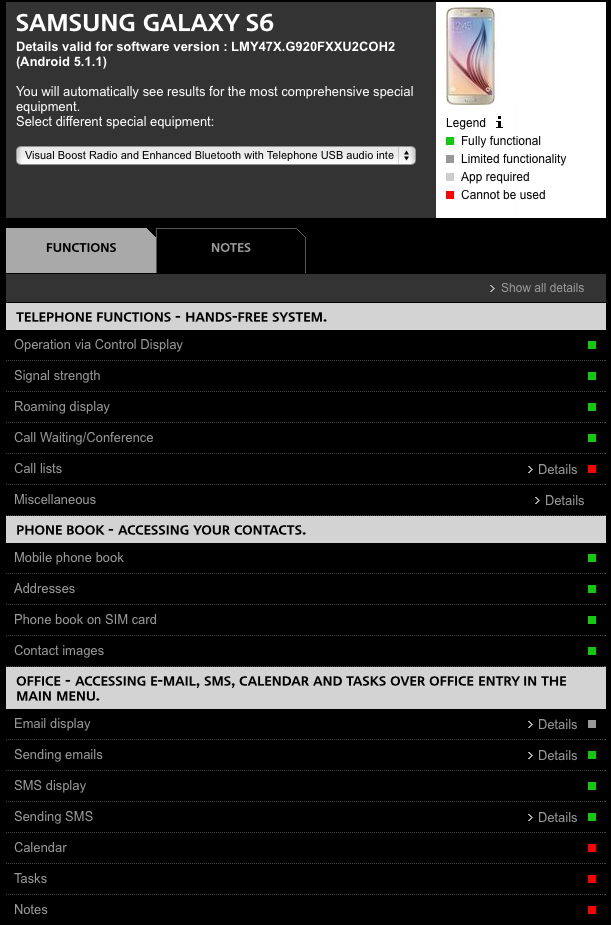
So I picked up a new phone last week, Samsung Galaxy S6 and still no SMS options, even though the MINI USA web site specifically says it works. No option under the phones Bluetooth options for SMS/TEXT only for the Phonebook with is enabled and works. I give up on this ever working.

2nd Gear
Joined: Jan 2009
Posts: 67
Likes: 5
From: Maryland
I just picked up a 2015 MCS with Media Package and Nav.
I use the IPhone 6s.
In my newly traded in 2012 Countryman with Nav, I had Office and text and some Email notifications.
In the new MCS, only contacts.
I did update with the latest version of the software, but haven't noticed a difference.
Since I had Office with this iPhone, it seems the issue lies with the car.
I use the IPhone 6s.
In my newly traded in 2012 Countryman with Nav, I had Office and text and some Email notifications.
In the new MCS, only contacts.
I did update with the latest version of the software, but haven't noticed a difference.
Since I had Office with this iPhone, it seems the issue lies with the car.
6th Gear
Joined: Jan 2011
Posts: 1,599
Likes: 42
From: Bothell, WA
I just picked up a 2015 MCS with Media Package and Nav.
I use the IPhone 6s.
In my newly traded in 2012 Countryman with Nav, I had Office and text and some Email notifications.
In the new MCS, only contacts.
I did update with the latest version of the software, but haven't noticed a difference.
Since I had Office with this iPhone, it seems the issue lies with the car.
I use the IPhone 6s.
In my newly traded in 2012 Countryman with Nav, I had Office and text and some Email notifications.
In the new MCS, only contacts.
I did update with the latest version of the software, but haven't noticed a difference.
Since I had Office with this iPhone, it seems the issue lies with the car.
-Make sure "Show Notifications" is on on your iPhone's bluetooth settings (SETTINGS -> BLUETOOTH -> click the "i" next to MINIXXXXX)
- Make sure office functions are turned on on the MINI as well. Go to TELEPHONE -> BLUETOOTH DEVICES, click the OPTION button in the iDrive controller and select CONFIGURE BLUETOOTH. Everything should be checked. If it wasn't, check them on and unpair/repair.


Thread Starter
|
3rd Gear
Joined: Aug 2007
Posts: 299
Likes: 1
From: Georgia
MINI support is worthless, telling my iPhone's do not support in-car text message even thought I've explained to them others have it working they don't believe me. They could not answer why my Galaxy does not work, only telling me it must be a technical issue with my actual phone as the car supports the feature. Brilliant!
I know for a 100% fact the issue lies with the car, however, MINI will not admit or offer any solutions/update/fix/inspection. The car MUST tell the phone it allows notifications via MAP (Message Access Profile) but for whatever reason some MINI's are not telling phones to allow MAP which prevents the phone from showing "show notifications" feature or allowing the display/read of text messages.
This is a MINI issue and not related to our/your phone. Call MINI and complain as I have done, maybe the more people logging this issue will get some results.