


R50/53 AUX/Ipod plug-in


Thread Starter
|
1st Gear
Joined: Jun 2014
Posts: 47
Likes: 0
AUX/Ipod plug-in
So I noticed the mini coopers (at least the one I have) doesn't come with an Auxilary or ipod inputs. I have been looking at different kits that include modules. Found some on mini mania and some on ECS Tuning and another one that was discontinued for draining the battery. Does anyone know of any good ones? And if so where can I find it? I want to be able to listen to my ipod again.

If you are ok with an Aux input the basic cable that plugs into the back of the radio seems to work great. No control or charging though. It's better than nothing. There was one for sale in the Marketplace or most of the vendors carry them.

3rd Gear
Joined: Mar 2014
Posts: 168
Likes: 4
From: Ventura county, CA
In case anyone is interested in it, i have one of these:
http://www.parrot.com/usa/products/b...free-car-kits/
It handles all types of audio player inputs, integrates well with the oem stereo, and the voice activation of the phone isnt too bad. I dont have an ipod, but i have mp3s on my phone and have it sync'd via bluetooth, so everytime i get in the car with my phone, i can access the tunes on the phone via the parrot interface.
It was installed in the car when i bought it, so i kinda got it for "free", but i am pretty happy with it.
http://www.parrot.com/usa/products/b...free-car-kits/
It handles all types of audio player inputs, integrates well with the oem stereo, and the voice activation of the phone isnt too bad. I dont have an ipod, but i have mp3s on my phone and have it sync'd via bluetooth, so everytime i get in the car with my phone, i can access the tunes on the phone via the parrot interface.
It was installed in the car when i bought it, so i kinda got it for "free", but i am pretty happy with it.
Thread Starter
|
1st Gear
Joined: Jun 2014
Posts: 47
Likes: 0
Behind the radio or the module that connects to the radio?

6th Gear
Joined: Sep 2013
Posts: 3,387
Likes: 14
From: Near Buffalo NY
Trending Topics

5th Gear
Joined: Jul 2011
Posts: 909
Likes: 3
From: New York, NY
Once you get the aux adaptor...get the kinvio BTC 450. It connects to your phone via bluetooth automatically every time you get in....is very small and can control basic functions: pause, play, ff, rewind.
Also acts as a bluetooth phone but in the mini the road noise is too great I've not gotten great reviews from those on the other end
Also acts as a bluetooth phone but in the mini the road noise is too great I've not gotten great reviews from those on the other end

5th Gear
Joined: Aug 2012
Posts: 1,056
Likes: 3
From: Bronx,NY
Once you get the aux adaptor...get the kinvio BTC 450. It connects to your phone via bluetooth automatically every time you get in....is very small and can control basic functions: pause, play, ff, rewind. Also acts as a bluetooth phone but in the mini the road noise is too great I've not gotten great reviews from those on the other end

2nd Gear
Joined: Oct 2012
Posts: 71
Likes: 0
In case anyone is interested in it, i have one of these: http://www.parrot.com/usa/products/b...free-car-kits/ It handles all types of audio player inputs, integrates well with the oem stereo, and the voice activation of the phone isnt too bad. I dont have an ipod, but i have mp3s on my phone and have it sync'd via bluetooth, so everytime i get in the car with my phone, i can access the tunes on the phone via the parrot interface. It was installed in the car when i bought it, so i kinda got it for "free", but i am pretty happy with it.

The Guarachero,
I've got an AUX cable in the Marketplace for sale. PM me if you are interested. As stated above, you just pull down the panel on the lower driver side, and reach up behind the radio and plug it in... Then thread it to the stock location in the glovebox or just drop it down to the vent in the center console...
Kaveman
I've got an AUX cable in the Marketplace for sale. PM me if you are interested. As stated above, you just pull down the panel on the lower driver side, and reach up behind the radio and plug it in... Then thread it to the stock location in the glovebox or just drop it down to the vent in the center console...
Kaveman


Right here: Part # 82110153367 MINI Aux Input Cable Retrofit Kit
http://www.ecstuning.com/Search/SiteSearch/82110153367/
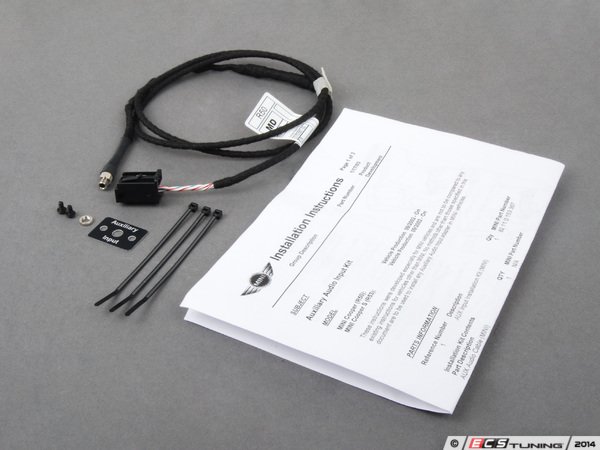
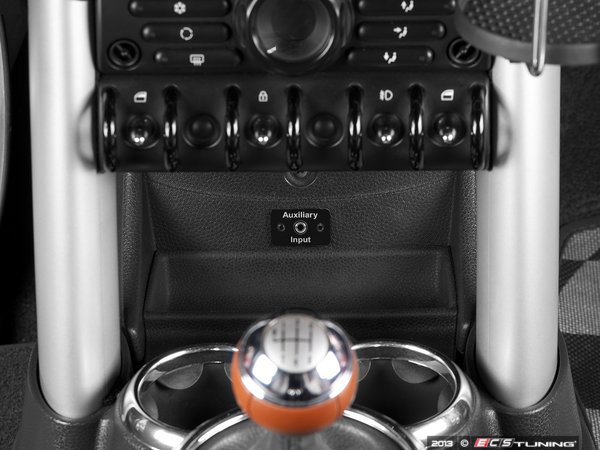
You can install it with the instructions that come with it in the glovebox. Or follow some of the instructions and install in below the toggle bank like in our pics.

Thanks
__________________

MINI Guru/ MINI Owner Since 2004 | NEW Lifetime Part Replacement | Local Pickup
Milltek | Genuine MINI | Forge Motorsport | NM Engineering | ECS Performance | M7 Speed
Customer Service Hours: 8am-8pm EST|Sales Team Hours: 8am-11pm | SAT 10am-7pm 800.924.5172
MINI Guru/ MINI Owner Since 2004 | NEW Lifetime Part Replacement | Local Pickup
Milltek | Genuine MINI | Forge Motorsport | NM Engineering | ECS Performance | M7 Speed
Customer Service Hours: 8am-8pm EST|Sales Team Hours: 8am-11pm | SAT 10am-7pm 800.924.5172
3rd Gear
Joined: Mar 2014
Posts: 168
Likes: 4
From: Ventura county, CA
i would guess all you need to do is un-sync your device from the mini system, and sync it with the aftermarket system.
It connects behind the radio. It plugs in right next to the factory wiring harness. It literally takes 2 seconds to plug in once you have the factory harness un clipped. You'll understand once you see or feel the back of the radio.

Thread
Thread Starter
Forum
Replies
Last Post
jeffu
MINI E Talk (2010)
11
Aug 4, 2009 08:08 AM