


Navigation & Audio I'm sick of listening to the radio.


Thread Starter
|
1st Gear
Joined: Aug 2013
Posts: 28
Likes: 0
I'm sick of listening to the radio.
As much as I love listening to NPR, I'd like to play some music from my iPhone 5.
Mini Cooper S '04
Non Nav
Non Harmon Kardon
I have no idea if I have the cd changer-- my original sticker just says the following:
"Anti-theft CD audio system w/ AM/FM radio, 6 speakers, presets, auxiliary input ready, satellite radio ready and pre-wired for 6-disc CD changer"
Speaking of which, what does "aux input ready" mean? If I'm ready, why the heck do I not have it?
Now, I'd like to go to the AUX Input route and to my understanding, I'll have to buy one of the kits. However, another user who installed this AUX input kit had some trouble with getting not-so-great quality of sound. She got to fix it by switching some cables, but I have no idea what the other users were talking about.
Here's the original post:
"I just got my new 2007MCSa on Monday. I have found that the sound quality using my ipod via the aux in port is really terrible (it is like in "mono" mode or something). Anyone else having this problem?"
And here's the solution posts:
"Make sure that you are using a stereo mini plug to mini plug cable. Sounds like you may be using a mono cable."
"+1 to what the others said. My iPod sounds great with the bottom line out cable."
"There's a cable that plugs into the bottom of your iPod instead of the headphone jack."
What cable are they referring to? I was under the impression that for the aux port, you plug the 3.5mm male-to-male cable into your iPhone's headphone jack and plug the other end of the cable into the aux port. Everyone else is talking about some other 'cable' that plugs into the bottom of the iPod. "Stereo mini plug to mini plug"? "bottom line out cable"? What is everyone referring to?
Am I also overlooking something in the installation? Everyone claims that the aux installation is pretty simple to do and is compatible for all 1st generation Mini's, but I feel like I'm overlooking something. I've seen some DIY threads on this, and all of them claimed to be "pretty easy to do", but then the problems (like the one mentioned above) says otherwise. Any tips or advice is appreciated.
Thanks.
Mini Cooper S '04
Non Nav
Non Harmon Kardon
I have no idea if I have the cd changer-- my original sticker just says the following:
"Anti-theft CD audio system w/ AM/FM radio, 6 speakers, presets, auxiliary input ready, satellite radio ready and pre-wired for 6-disc CD changer"
Speaking of which, what does "aux input ready" mean? If I'm ready, why the heck do I not have it?
Now, I'd like to go to the AUX Input route and to my understanding, I'll have to buy one of the kits. However, another user who installed this AUX input kit had some trouble with getting not-so-great quality of sound. She got to fix it by switching some cables, but I have no idea what the other users were talking about.
Here's the original post:
"I just got my new 2007MCSa on Monday. I have found that the sound quality using my ipod via the aux in port is really terrible (it is like in "mono" mode or something). Anyone else having this problem?"
And here's the solution posts:
"Make sure that you are using a stereo mini plug to mini plug cable. Sounds like you may be using a mono cable."
"+1 to what the others said. My iPod sounds great with the bottom line out cable."
"There's a cable that plugs into the bottom of your iPod instead of the headphone jack."
What cable are they referring to? I was under the impression that for the aux port, you plug the 3.5mm male-to-male cable into your iPhone's headphone jack and plug the other end of the cable into the aux port. Everyone else is talking about some other 'cable' that plugs into the bottom of the iPod. "Stereo mini plug to mini plug"? "bottom line out cable"? What is everyone referring to?
Am I also overlooking something in the installation? Everyone claims that the aux installation is pretty simple to do and is compatible for all 1st generation Mini's, but I feel like I'm overlooking something. I've seen some DIY threads on this, and all of them claimed to be "pretty easy to do", but then the problems (like the one mentioned above) says otherwise. Any tips or advice is appreciated.
Thanks.
Last edited by fugger; Sep 14, 2013 at 11:08 AM.

Aaron at outmotoring.com has the AUX cable for less - http://www.outmotoring.com/mini-coop...p3_hookup.html. The sound quality issues stem from a mix of defects/quality control issues with the OEM cable, wear/damage, and leakage/interference from some of the sensors monitoring the headphone jack on various MP3 players and phones. Using the line-out on the bottom of an iPhone/iPod eliminates the last issue and helps in a few other ways as well. You can do that (and charge your phone) with something like this:
. I can't vouch for that particular one, but that is generally what you are looking for.

Thread Starter
|
1st Gear
Joined: Aug 2013
Posts: 28
Likes: 0
OH! When you say "line out," you mean the 30 pin cable thing on the bottom of the iPod that charges simultaneously? Thought it was just called the "dock".... So basically, this cable would be a 30-pin connector on one end, and in the other end would be a 3.5mm male that connects to the aux port, correct?
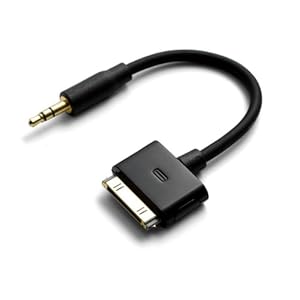
For those with an IPhone 5 then, I'm assuming that you'd need the adapter: The daisy-chain would look pretty ugly: iPhone 5 ---> pin adapter ---> lineout to 3.5mm.
For those with an IPhone 5 then, I'm assuming that you'd need the adapter: The daisy-chain would look pretty ugly: iPhone 5 ---> pin adapter ---> lineout to 3.5mm.
Last edited by fugger; Sep 14, 2013 at 11:08 AM.

For an 04, the dealer could install the aux-in kit. This plugs into the back of the radio and gives you an audio in jack in the glove box. It works pretty well for audio, you have to do all your iPod control from the iPod. It was only the next year where the radio would control the iPod.
Thread Starter
|
1st Gear
Joined: Aug 2013
Posts: 28
Likes: 0
I'm trying to avoid putting the port in the glovebox seeing how it might be a reach and annoying position to be in. (It seems like a really random place to put it in)
I did see this however... I couldn't find a DIY on it though. Any ideas on how to accomplish this? (It's located in the side-mirror adjusters in front of the e-brake):

I did see this however... I couldn't find a DIY on it though. Any ideas on how to accomplish this? (It's located in the side-mirror adjusters in front of the e-brake):


There's a great DIY at mini2.com that shows how to install it in the panel above the cigarette lighter. I installed it there on my R50, but on my R53 I installed it on the righthand downtube. It was more work getting it threaded down the tube, but the result looked good and was a little easier to access.
I was looking for an 8-pin lightning to 3.5mm cable, but everything I've read says the iPhone5 doesn't pass audio through the lightning connector. Just use a 3.5mm to 3.5mm stereo cable.
I was looking for an 8-pin lightning to 3.5mm cable, but everything I've read says the iPhone5 doesn't pass audio through the lightning connector. Just use a 3.5mm to 3.5mm stereo cable.
Thread Starter
|
1st Gear
Joined: Aug 2013
Posts: 28
Likes: 0
There's a great DIY at mini2.com that shows how to install it in the panel above the cigarette lighter. I installed it there on my R50, but on my R53 I installed it on the righthand downtube. It was more work getting it threaded down the tube, but the result looked good and was a little easier to access.
I was looking for an 8-pin lightning to 3.5mm cable, but everything I've read says the iPhone5 doesn't pass audio through the lightning connector. Just use a 3.5mm to 3.5mm stereo cable.
I was looking for an 8-pin lightning to 3.5mm cable, but everything I've read says the iPhone5 doesn't pass audio through the lightning connector. Just use a 3.5mm to 3.5mm stereo cable.
How does the downtube port look like? I dunno, I think the aux port in the side-mirror buttons in front of the e-brake is probably the best area to put the port-- You wont be dealing with wires everywhere as you're shifting. I just need to find a damn DIY, but so far that user is the only one that I know who managed to install it there.
I'm pretty sure Apply doesn't make a lightning to 3.5mm cable-- Maybe a daisy chain with the lightning to 16-pin adapter would work for you? I plan on going this route myself.
Trending Topics


Thread Starter
|
1st Gear
Joined: Aug 2013
Posts: 28
Likes: 0
This is a LONG thread, but it includes how to remove the various interior bits to get back to the mirror switch. Not real involved, just a dozen+ screws and a few snap fits.

Thread
Thread Starter
Forum
Replies
Last Post
GregoryK
F55/F56 :: Hatch Talk (2014+)
44
Dec 14, 2015 01:34 PM
67morris
MINI Parts for Sale
10
Dec 1, 2015 12:53 PM
bobbi.steines
R56 :: Hatch Talk (2007+)
3
Sep 10, 2015 11:31 AM