


First attempt at HDR


Joined: Sep 2006
Posts: 5,237
Likes: 6
From: Lincoln, NE
First attempt at HDR
Here are some shots of my first attempt at HDR. I don't think I had the right exposures to make good looking HDR. I also don't really know how to use the HDR crap in photoshop.
I'll keep trying HDR and experiment with camera settings, etc.


I'll keep trying HDR and experiment with camera settings, etc.


Joined: Sep 2006
Posts: 5,237
Likes: 6
From: Lincoln, NE
Yeah I think my camera fails. I only have 3 fstop settings, changing shutter speed is deeply embedded in the menu, and the exposure control dial doesn't do much.
I've taken natural photos with this camera that look more HDR...

I've taken natural photos with this camera that look more HDR...

5th Gear
Joined: Feb 2008
Posts: 687
Likes: 19
From: Melbourne Australia
Knowing nothing about HDR, I looked it up on Wikipedia and was none the wiser. Found a good explanation here though. Based on what it says, your 2nd-from-the-bottom photo should be a great candidate.
The tutorial is based on a single photo, then adjusting the exposure and recombining as HDR, so now I'm dying to have a go at it myself!
The tutorial is based on a single photo, then adjusting the exposure and recombining as HDR, so now I'm dying to have a go at it myself!

3rd Gear
Joined: Mar 2007
Posts: 215
Likes: 0
From: Winston Salem, NC
Follow this link: http://www.hdrsoft.com/
It is the website for a "hdr photo" software program. There is a free download that will allow you to work with a few pictures on their site. It will kind of give you some practice and knowledge on how "hdr" works.
It is the website for a "hdr photo" software program. There is a free download that will allow you to work with a few pictures on their site. It will kind of give you some practice and knowledge on how "hdr" works.

3rd Gear
Joined: Dec 2008
Posts: 197
Likes: 0
From: Greenville, SC
Just generating HDR's in Photoshop won't give you the iconic look most have, which is tone mapping that comes from paid software.
If you are trying to make HDR's with a point and shoot, unfortunately that is your problem. You need to be able to adjust the EV value, thats how you go EV -2, EV 0, and EV+2 for HDR's. (That is only an example, depending on the contrast you have to shift your range and number of exposures). You really need full manual control to make sure your camera doesn't try to auto/whatever back to normal when you adjust one thing.
If you are trying to make HDR's with a point and shoot, unfortunately that is your problem. You need to be able to adjust the EV value, thats how you go EV -2, EV 0, and EV+2 for HDR's. (That is only an example, depending on the contrast you have to shift your range and number of exposures). You really need full manual control to make sure your camera doesn't try to auto/whatever back to normal when you adjust one thing.
5th Gear
Joined: Feb 2008
Posts: 687
Likes: 19
From: Melbourne Australia
This thread prompted me to try out HDR on some existing images. I found software which glories in the name qtpfsgui - free, open source software available here. Not to say it's the best, it's just what I found. It includes tone mapping and a range of controls and algorithms.
I got some existing single images, then made a dark and a light copy. Totally guessed the EV. Most didn't do much but I got nice results with a few - example below (before and after). The "After" image was tweaked in Paint.NET (and open-source Photoshop thing) after the HDR work - a site I read up on recommended this.
I only have a few images I had done exposure bracketing on - one of those come up nicely in 5 minutes with HDR whereas it had taken me 2 hours to achieve an equivalent effect manually. But I'm starting to suspect you need more than +2 and -2 EV to get a really good result with HDR - which means doing it all manually. That's OK - I can see it being useful for certain shots.
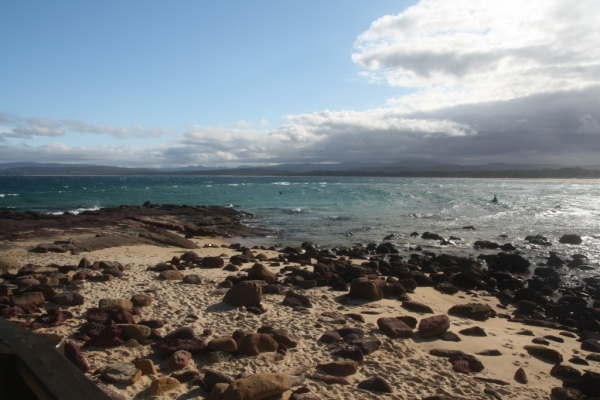
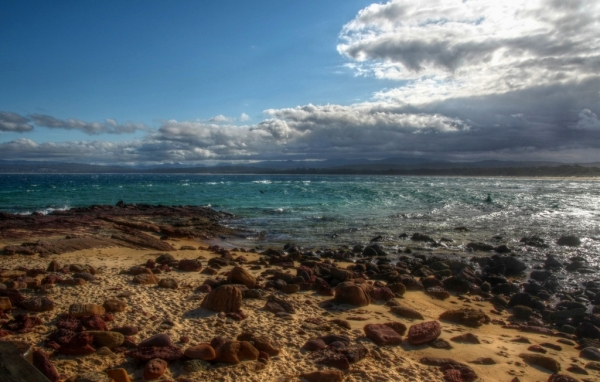
I got some existing single images, then made a dark and a light copy. Totally guessed the EV. Most didn't do much but I got nice results with a few - example below (before and after). The "After" image was tweaked in Paint.NET (and open-source Photoshop thing) after the HDR work - a site I read up on recommended this.
I only have a few images I had done exposure bracketing on - one of those come up nicely in 5 minutes with HDR whereas it had taken me 2 hours to achieve an equivalent effect manually. But I'm starting to suspect you need more than +2 and -2 EV to get a really good result with HDR - which means doing it all manually. That's OK - I can see it being useful for certain shots.
Trending Topics

3rd Gear
Joined: Mar 2008
Posts: 161
Likes: 0
To really do HDR you need to change only the shutterspeed when you change the exposure. If you change the aperture too it will mess with the focus of the image.
I would suggest looking into some cheap HDR software. Their are plenty of options out their that do a great job.
I would suggest looking into some cheap HDR software. Their are plenty of options out their that do a great job.


Follow this link: http://www.hdrsoft.com/
It is the website for a "hdr photo" software program. There is a free download that will allow you to work with a few pictures on their site. It will kind of give you some practice and knowledge on how "hdr" works.
It is the website for a "hdr photo" software program. There is a free download that will allow you to work with a few pictures on their site. It will kind of give you some practice and knowledge on how "hdr" works.
5th Gear
Joined: Feb 2008
Posts: 687
Likes: 19
From: Melbourne Australia
I've started an HDR thread in this forum, if you're interested. It's over here: https://www.northamericanmotoring.co...nd-random.html

Thread
Thread Starter
Forum
Replies
Last Post
R50/53 Broken Strut Pinch Bolt
ericbryant24
R50/R53 :: Hatch Talk (2002-2006)
55
Sep 30, 2024 02:10 PM