


Interior/Exterior Outmotoring gauge faces


Thread Starter
|
1st Gear
Joined: May 2007
Posts: 43
Likes: 0
Outmotoring gauge faces
So I recently installed white Outmotoring guage faces because I really like the cleaner look, more refined look. They look fantastic during the day and nicely tie in with the white roof...
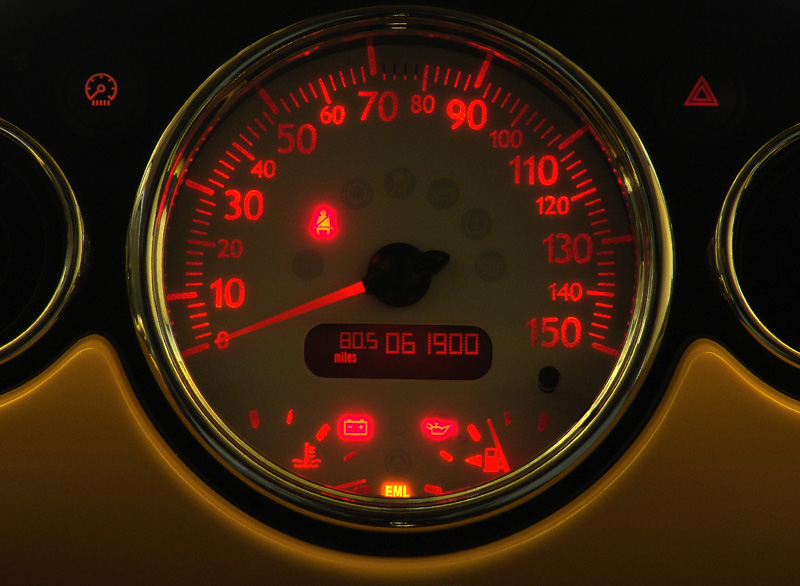
Then I turn on the lights at night and the guage backlight comes on. Problem is, with the new guages the backlights have uneven illumination with hot spots. There are also sections of the dial blocked by objects behind the faces leaving dark spots (see photos). This was obviously not an issue with the stock faces, but that may be because they had fewer gradations on the dials.
Has anyone else had this issue? Anyone know if there's a fix for this?
Then I turn on the lights at night and the guage backlight comes on. Problem is, with the new guages the backlights have uneven illumination with hot spots. There are also sections of the dial blocked by objects behind the faces leaving dark spots (see photos). This was obviously not an issue with the stock faces, but that may be because they had fewer gradations on the dials.
Has anyone else had this issue? Anyone know if there's a fix for this?

mine did that a little bit. but its just the faces. they aren't that great.
I got a member to change the leds out for me. So since they are so bright it fixes the problem. I can still see a little bit of hot spots.. but not as bad as the pictures. For the tach being blocked. I think you can fix that by scraping the back of the face a little.. not sure though but it seems like i heard about that somewhere....
here are mine so you can see.


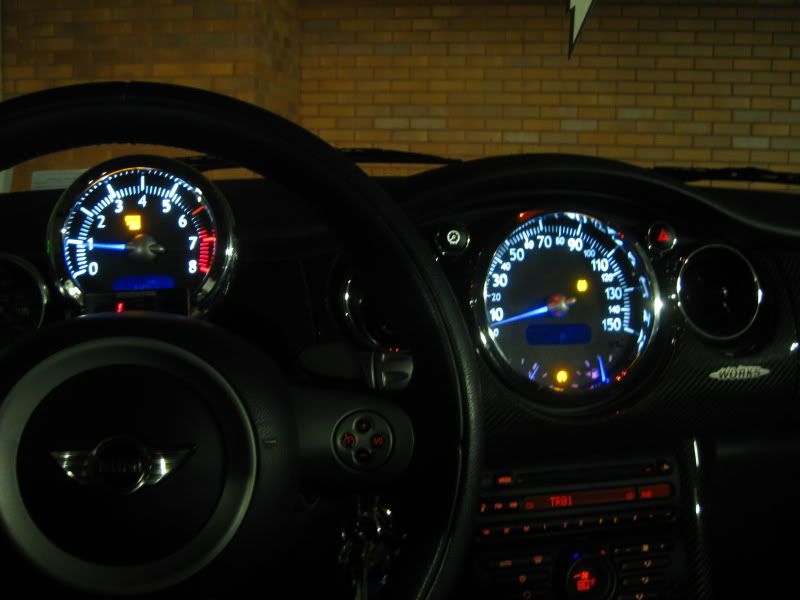
the picture makes them look brighter than they are.
I got a member to change the leds out for me. So since they are so bright it fixes the problem. I can still see a little bit of hot spots.. but not as bad as the pictures. For the tach being blocked. I think you can fix that by scraping the back of the face a little.. not sure though but it seems like i heard about that somewhere....
here are mine so you can see.
the picture makes them look brighter than they are.
Thread Starter
|
1st Gear
Joined: May 2007
Posts: 43
Likes: 0
The backs of the stock faces are not evenly translucent, presumably to compensate for the hotspots. So maybe by adding extra material such as semitranslucent tape to the hotspot areas, that problem might be reduced or eliminated. The blocked area at 12 o'clock on the Outmotoring speedo was hidden between marks on the stock face. The area near the 6K rpm on the tach I'm still not sure about.
I'm considering going back to the stock guages. It wouldn't be hard to make a white adhesive overlay for the stock guages by scanning them and printing on the appropriate paper...
Anyway, thanks for your help and comparison pictures. Awesome interior BTW.
I'm considering going back to the stock guages. It wouldn't be hard to make a white adhesive overlay for the stock guages by scanning them and printing on the appropriate paper...
Anyway, thanks for your help and comparison pictures. Awesome interior BTW.

6th Gear
Joined: Oct 2006
Posts: 1,511
Likes: 3
From: Las Vegas
Then I turn on the lights at night and the guage backlight comes on. Problem is, with the new guages the backlights have uneven illumination with hot spots. There are also sections of the dial blocked by objects behind the faces leaving dark spots (see photos). This was obviously not an issue with the stock faces, but that may be because they had fewer gradations on the dials.
Has anyone else had this issue? Anyone know if there's a fix for this?
Has anyone else had this issue? Anyone know if there's a fix for this?
In short, the new faces need light that the older ones didn't. It requires carving away some plastic before you mount the new ones.

OVERDRIVE
Joined: May 2005
Posts: 8,233
Likes: 127
From: San Francisco
Been heavily reported and fixes have also been described. Here is one such thread.
In short, the new faces need light that the older ones didn't. It requires carving away some plastic before you mount the new ones.
In short, the new faces need light that the older ones didn't. It requires carving away some plastic before you mount the new ones.
The uneven brightness really doesn't look so good. I noticed some unevenness in the Cockpit Specialties version as well, but not as bad as this.

Thread Starter
|
1st Gear
Joined: May 2007
Posts: 43
Likes: 0
Looks like I'll be doing some cutting on the plastic backing. Maybe some reflective foil behind the face would diffuse more light??? I can't mess with it for at least a week, but will have to do some experimenting then.
Trending Topics


Thread
Thread Starter
Forum
Replies
Last Post