


JCW new jcw aero kit 2011 differences


4th Gear
Joined: Jul 2008
Posts: 317
Likes: 1
From: Los Angeles
Not really. Actually cheaper if you are ordering a new car. It's going to be a factory installed option for $1500 total starting with April productions. I included the aero kit on my JCW order which should go into production at start of April.


Well, I was thinking of when ordering JCW Aero Kit components on existing car (or after it get's delivered), like I did on my 2008 Clubman S. I bought front bumper kit only. Now, anybody buying the same for 2011+ has to buy additional parts as per my previous post...
4th Gear
Joined: Jul 2008
Posts: 317
Likes: 1
From: Los Angeles
You should call around cause maybe with it becoming a factory installed option, the dealers will sell much fewer of the kits. and if they have any in stock, they'll want to move them and give you a good deal.

3rd Gear
Joined: Jan 2011
Posts: 187
Likes: 0
From: Metro Detroit Area

3rd Gear
Joined: Dec 2010
Posts: 227
Likes: 0
From: Phoenix AZ
I was wondering about new parts added to JCW Aero kit:
Front bumper support & Front bumper mount (ISTA-Nr. 51 11 050)
Rear Bumper support (ISTA-Nr. 51 12 050)
These are listed and included (as separate order) for cars build after 08/10 in MINI OEM install guide. Just the front additional part costs $258 (at Outmotoring.com).
So I guess, for all 2011- cars cost of the JCW Aero kit will be more $$?
Anybody tried to install front bumper DIY on 2011 Cooper S?

Front bumper support & Front bumper mount (ISTA-Nr. 51 11 050)
Rear Bumper support (ISTA-Nr. 51 12 050)
These are listed and included (as separate order) for cars build after 08/10 in MINI OEM install guide. Just the front additional part costs $258 (at Outmotoring.com).
So I guess, for all 2011- cars cost of the JCW Aero kit will be more $$?
Anybody tried to install front bumper DIY on 2011 Cooper S?
What they are, pretty much a retrofiting with a 07-10 bumper support with a triangular hole for the brake ducts instead of being square for the newer models
I have made a thread and u can see some pics there
3rd Gear
Joined: Dec 2010
Posts: 227
Likes: 0
From: Phoenix AZ
Hi All
Sorry to dig up this thread but I am having an issue here regarding the Cooper S LCI Aerokit and its lights.
Two issues actually.
1 Issue
I have the kit installed and ready but it is with two reverse lights like this but no FOG LIGHTS and Warning Error on both left and right Fog Lights on the On-Board Computer.
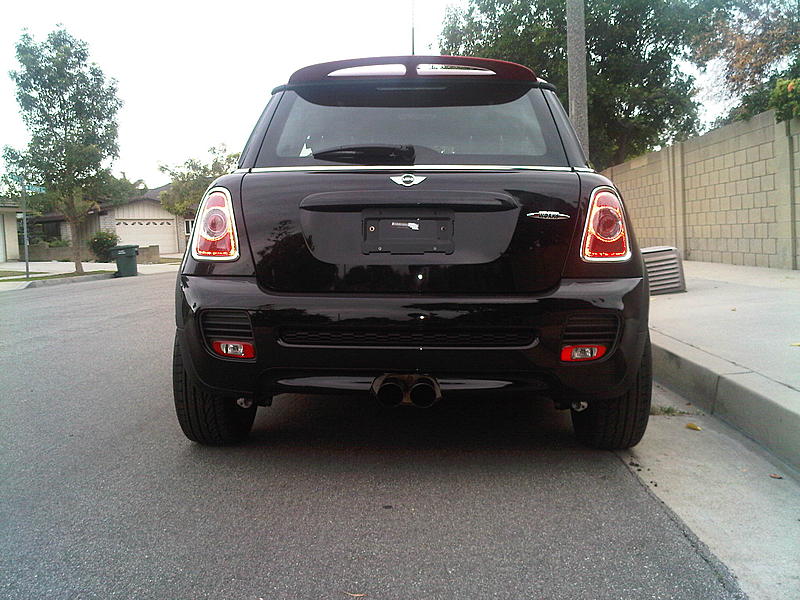
I have the new wiring loom but for now i have only connected the reverse lights and not the Fog Lights.
I had heard that some re-coding is needed but I think here in Portugal there isn't any coding information about this.
Can anyone provide me with the instalation instructions regarding the connections to be made on this lights please?
2nd Issue
As the new Cooper S LCI models have already a pre installed Brake Air Duct, when installing the Aerokit I had to use the existing holes on the wheel Arch and the Brake Duct of the Aerokit but it was not possible to attahced correctly the ducts because of the difference of the size of the hole. This makes a bit of a ratle at a certain speed because the duct is not completly fixed.
Was there anything to be done so the ducts can be well attached?
Sorry for the huge testimony
Cheers
Sorry to dig up this thread but I am having an issue here regarding the Cooper S LCI Aerokit and its lights.
Two issues actually.
1 Issue
I have the kit installed and ready but it is with two reverse lights like this but no FOG LIGHTS and Warning Error on both left and right Fog Lights on the On-Board Computer.
I have the new wiring loom but for now i have only connected the reverse lights and not the Fog Lights.
I had heard that some re-coding is needed but I think here in Portugal there isn't any coding information about this.
Can anyone provide me with the instalation instructions regarding the connections to be made on this lights please?
2nd Issue
As the new Cooper S LCI models have already a pre installed Brake Air Duct, when installing the Aerokit I had to use the existing holes on the wheel Arch and the Brake Duct of the Aerokit but it was not possible to attahced correctly the ducts because of the difference of the size of the hole. This makes a bit of a ratle at a certain speed because the duct is not completly fixed.
Was there anything to be done so the ducts can be well attached?
Sorry for the huge testimony
Cheers
1. the wiring that comes with the retrofiting comes with 2 wires, positive and negative for the reverse light, but the harness that gets cut has 3 wires, positive fog, positive reverse and negative, the manual tells you to tape off the fog light, and connect the other two, i get a foglight warning on the onboard computer sometimes but it shuts off after a while since i didnt but my car with rear foglights.
2 Now the brake ducts align you use the front part of the brake duct kit but the rear part of the 2011 stock unit, so this is how it goes, starts with the triangular shape brake duct till the bumper support(which comes with the retrofit kit so is triangular too)on the other side you use the stock brake duct the square and tie it together to the bumper support with zip ties, now your holes are covered
The instructions that are available online thru motoringfile or whatever are DATED, they are very different for the ones for the 2011 production, make sure you go to the dealer and have them print them for you, i ran into a bunch of issues cuz of this!
Last edited by cesar418; Mar 28, 2011 at 09:32 AM.
You need the front bumper support (r55, r56) and rear bumper support(r55) also the kit comes with the reverse lights harness and reverse lights
What they are, pretty much a retrofiting with a 07-10 bumper support with a triangular hole for the brake ducts instead of being square for the newer models
I have made a thread and u can see some pics there
What they are, pretty much a retrofiting with a 07-10 bumper support with a triangular hole for the brake ducts instead of being square for the newer models
I have made a thread and u can see some pics there
Thanks!
Can you make some photos of "old" and "new" front support on your car before mounting JCW bumper skin?
Thanks.


4th Gear
Joined: Jul 2007
Posts: 312
Likes: 0
From: Canada

Thanks,

Neutral
Joined: Aug 2011
Posts: 1
Likes: 0
Sorry to bring up an old thread. My 2011 MCS with a factory installed JCW Aero Kit has a rear fog lamp (wires, bulb socket, bulb, etc.). However there is no toggle switch next to the front fog lamp switch to turn the rear lamp on. My questions are: 1) Is there supposed to be a switch in that blank spot? 2) If not how does one turn on the rear fog lamp?
Thanks!
Don
Thanks!
Don
3rd Gear
Joined: Dec 2010
Posts: 227
Likes: 0
From: Phoenix AZ
Sorry to bring up an old thread. My 2011 MCS with a factory installed JCW Aero Kit has a rear fog lamp (wires, bulb socket, bulb, etc.). However there is no toggle switch next to the front fog lamp switch to turn the rear lamp on. My questions are: 1) Is there supposed to be a switch in that blank spot? 2) If not how does one turn on the rear fog lamp?
Thanks!
Don
Thanks!
Don


1st Gear
Joined: Jan 2008
Posts: 17
Likes: 0
From: Izmir, Turkey
OK, I have a Question!
I'm having the same issue. 2011 JCW and aftermarket JCW aero kit. I used to have fog and reverse light before I changed my bodykit with JCW aero. Now I don't have foglight nor reverse light.
My question is, any of you ever tried to connect fog and reverse lights just in one fog light? What am I trying to say is, I want 2010 fogs and connect fogs and reverse to them. (yes I know reverse lights will be red. But it's OK)
Do you have any idea how to do that? I'm thinking about connecting positive cables of Fog and reverse together and negatives together. Technically it should work.
BUT!
- Will OBD give error?
- What will happen if I go backwards while my fogs are on?
I really need your help! If someone can take a picture of wire, plug and light that will be great. We can discuss more efficiently.
Thanks guys..
I'm having the same issue. 2011 JCW and aftermarket JCW aero kit. I used to have fog and reverse light before I changed my bodykit with JCW aero. Now I don't have foglight nor reverse light.
My question is, any of you ever tried to connect fog and reverse lights just in one fog light? What am I trying to say is, I want 2010 fogs and connect fogs and reverse to them. (yes I know reverse lights will be red. But it's OK)
Do you have any idea how to do that? I'm thinking about connecting positive cables of Fog and reverse together and negatives together. Technically it should work.
BUT!
- Will OBD give error?
- What will happen if I go backwards while my fogs are on?
I really need your help! If someone can take a picture of wire, plug and light that will be great. We can discuss more efficiently.
Thanks guys..

3rd Gear
Joined: Sep 2010
Posts: 182
Likes: 1
From: Los Angeles
Cesar418. I have a question. I'm looking to install an JCW Aero Kit front bumper on my 2011 JCW. Does the front bumper required both the support -Part BA and support mount AZ x2 (per diagram). Seems like your are very knowledgeable and that looks like a lot of work to retro fit the 2011 LCI model. Thanks in advance.
3rd Gear
Joined: Dec 2010
Posts: 227
Likes: 0
From: Phoenix AZ
The BA part, yes it does, the AZx2 is the same one that you have in your car, so that is not needed, yet when you buy the retrofit kit it all comes there. If youre buying an older bumper you will need those parts. Ive seen in realoem.com that many parts have changed now that the JCW aero kit is offer as an option, and the new JCW 2011+ are different, so i have a feeling that these new ones dont need the support any more, but the new brake ducks work around the 2011 bumper support. You may want to ask at the dealer if youre buying the bumper from there


I have the JCW aerokit but wanted to see if I can replace the front lower black part of the kit (lip as I call it) with the JCW aerokit II since its more aggressive. Do any of you know if the part will go right in without having to buy the whole front kit?
I'm talking about #4 from the diagram below and of course it will be left and right. Thanks in advance!

I'm talking about #4 from the diagram below and of course it will be left and right. Thanks in advance!
3rd Gear
Joined: Dec 2010
Posts: 227
Likes: 0
From: Phoenix AZ
I have the JCW aerokit but wanted to see if I can replace the front lower black part of the kit (lip as I call it) with the JCW aerokit II since its more aggressive. Do any of you know if the part will go right in without having to buy the whole front kit?
I'm talking about #4 from the diagram below and of course it will be left and right. Thanks in advance!
I'm talking about #4 from the diagram below and of course it will be left and right. Thanks in advance!
3rd Gear
Joined: Sep 2010
Posts: 182
Likes: 1
From: Los Angeles
The BA part, yes it does, the AZx2 is the same one that you have in your car, so that is not needed, yet when you buy the retrofit kit it all comes there. If youre buying an older bumper you will need those parts. Ive seen in realoem.com that many parts have changed now that the JCW aero kit is offer as an option, and the new JCW 2011+ are different, so i have a feeling that these new ones dont need the support any more, but the new brake ducks work around the 2011 bumper support. You may want to ask at the dealer if youre buying the bumper from there
3rd Gear
Joined: Dec 2010
Posts: 227
Likes: 0
From: Phoenix AZ

Just to confirm that 2011 Clubman S needs only one part of "adapter kit" and that is front steel bumper carrier. The new rear bumper carrier is not needed (as per official MINI instructions- apparently that is for eu cars). I was able to install the full Aero JCW kit with only replacing front bumper carrier. And even that is not much different except the openings and mounting holes for air brake ducts.
It was not that complicated after studying all info. On this forum and instructions included. I did it by my self, with no extra hands for help...
It was not that complicated after studying all info. On this forum and instructions included. I did it by my self, with no extra hands for help...

Coordinator :: Metroplex MINI

Joined: Apr 2003
Posts: 162
Likes: 0
From: Dallas, TX
For anyone curious, I'm not sure why MINI decided to change the 2012 JCW aerokit lights, but there is only 1 rear fog and the backup light has been moved to the other lense. I don't care of this setup at all... not sure what the thought process was.
