


Electrical BMWhat App: What have you coded?


Thread Starter
|
3rd Gear
Joined: Dec 2012
Posts: 236
Likes: 1
From: Phoenix,Az.
BMWhat App: What have you coded?
I got the app a few days ago. What have you coded? What would you like to see the developers add?
I coded my front position lights (where the fog lights would be) to run as drl's
I set the car to unlock doors when engine off and key removed.
I'd like them to add coding for the audio system so I can plug my iPhone into the USB port and music will play without connecting the auxiliary in as well.
I coded my front position lights (where the fog lights would be) to run as drl's
I set the car to unlock doors when engine off and key removed.
I'd like them to add coding for the audio system so I can plug my iPhone into the USB port and music will play without connecting the auxiliary in as well.

1st Gear
Joined: Feb 2007
Posts: 41
Likes: 2
From: Prince George, BC
I like the app, I fixed the windows to roll up or down with the remote and when unlocking the fogs and parking lights come on slowly.
I have a GP2 and cant get the position lights or the fogs to be DRL. Would love to be able to just plug iphone into the USB port.
I have a GP2 and cant get the position lights or the fogs to be DRL. Would love to be able to just plug iphone into the USB port.
Thread Starter
|
3rd Gear
Joined: Dec 2012
Posts: 236
Likes: 1
From: Phoenix,Az.
Try setting " additional lights, US." To on


1st Gear
Joined: Sep 2012
Posts: 15
Likes: 0
Here's what I've done so far:
Windows up on locking
Digital Speedometer correction
One-touch turn signal function from 3 to 5
Unlock car when turned off
DRL - Hi Beams set to low brightness (I'm thinking that I'll switch this to the front position lights when I upgrade to LED's)
Windows up on locking
Digital Speedometer correction
One-touch turn signal function from 3 to 5
Unlock car when turned off
DRL - Hi Beams set to low brightness (I'm thinking that I'll switch this to the front position lights when I upgrade to LED's)
Thread Starter
|
3rd Gear
Joined: Dec 2012
Posts: 236
Likes: 1
From: Phoenix,Az.
Here's what I've done so far: Windows up on locking Digital Speedometer correction One-touch turn signal function from 3 to 5 Unlock car when turned off DRL - Hi Beams set to low brightness (I'm thinking that I'll switch this to the front position lights when I upgrade to LED's)
1st Gear
Joined: Sep 2012
Posts: 15
Likes: 0
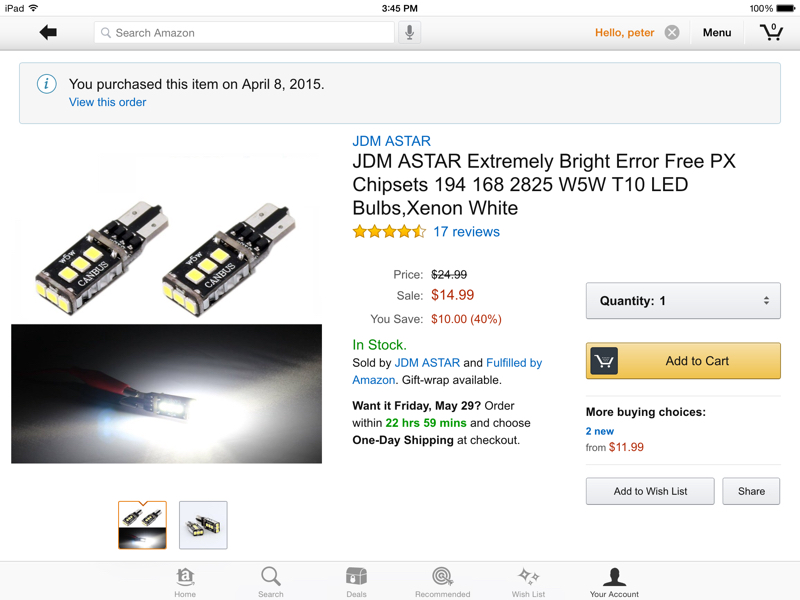
Don't happen to have the part number do ya?
Trending Topics
1st Gear
Joined: Sep 2012
Posts: 15
Likes: 0
 Any issues with them, i.e., lights out code?
Thread Starter
|
3rd Gear
Joined: Dec 2012
Posts: 236
Likes: 1
From: Phoenix,Az.
No issues at all. No codes, nothing. The bulbs look fantastic. They match the color of my headlights, nice bright white light.


BMWhat App: What have you coded?
Originally Posted by pfarinelli
I'd like them to add coding for the audio system so I can plug my iPhone into the USB port and music will play without connecting the auxiliary in as well.
Edit: removed stuff that was wrong!
Last edited by bratling; Aug 2, 2015 at 04:31 PM.

1st Gear

Joined: Nov 2013
Posts: 37
Likes: 1
From: St. Paul Mn
I would also like to know if anyone was successful with this.

2nd Gear
Joined: Aug 2014
Posts: 54
Likes: 2
I've done a bunch of stuff so far, there is probably more that I'm forgetting:
Flashers blink at double speed
Headlights and fogs on at same time
Digital speedo in tach with speed correction
5x blinkers
Extended the welcome home and "leaving" home times to 90 seconds
Welcome home and leaving to include low beams and rear fog
Coded out bulb errors for LED license plate and reverse light
One remote push unlocks all doors, another opens the drivers window
Windows open/close on lock/unlock w/ remote
The only one I can't get to work is the folding mirrors upon lock and unlock...
Flashers blink at double speed
Headlights and fogs on at same time
Digital speedo in tach with speed correction
5x blinkers
Extended the welcome home and "leaving" home times to 90 seconds
Welcome home and leaving to include low beams and rear fog
Coded out bulb errors for LED license plate and reverse light
One remote push unlocks all doors, another opens the drivers window
Windows open/close on lock/unlock w/ remote
The only one I can't get to work is the folding mirrors upon lock and unlock...
2nd Gear
Joined: Aug 2014
Posts: 54
Likes: 2
While I haven't installed the panel and toggle, I was able to code the fog light to come on when I unlock the car, so I don't think it should be a problem for it to work. Have you tried coding the rear fog (after installing the panel/toggle) and not had luck?

2nd Gear
Joined: Jul 2015
Posts: 145
Likes: 0
I've done a bunch of stuff so far, there is probably more that I'm forgetting:
Flashers blink at double speed
Headlights and fogs on at same time
Digital speedo in tach with speed correction
5x blinkers
Extended the welcome home and "leaving" home times to 90 seconds
Welcome home and leaving to include low beams and rear fog
Coded out bulb errors for LED license plate and reverse light
One remote push unlocks all doors, another opens the drivers window
Windows open/close on lock/unlock w/ remote
The only one I can't get to work is the folding mirrors upon lock and unlock...
Flashers blink at double speed
Headlights and fogs on at same time
Digital speedo in tach with speed correction
5x blinkers
Extended the welcome home and "leaving" home times to 90 seconds
Welcome home and leaving to include low beams and rear fog
Coded out bulb errors for LED license plate and reverse light
One remote push unlocks all doors, another opens the drivers window
Windows open/close on lock/unlock w/ remote
The only one I can't get to work is the folding mirrors upon lock and unlock...
2nd Gear
Joined: Aug 2014
Posts: 54
Likes: 2
1. You need the BMWhat app. There is a "lite" version that is free, it wont code but it is a good way to be sure you can connect your car to the app. The full version of the app is about $45. I got the free version for iOS in the app store and once I was able to connect to my car, I installed the full version. I know you can get it for Android too, but I dont know where to get Android apps since I dont have one.
2. You need what is called a "dongle". A dongle is basically a wifi (for iOS) or a Bluetooth (for Android) version of a traditional cord that would be used by an OBDII scan tool. The dongle plugs into your OBDII port and then send a signal for your phone/ipad/etc. to communicate with.
2a. You have some options for the dongle.
Option 1: A fully supported dongle, for either android or iOS can be bought from carly directly via there amazon store (for US customers) for about $75. This dongle is fully supported by the vendor and should work for every model they advertise.
The iOS dongle link is:

The bluetooth version should also be in the related products section too, if you have an android device.
Option 2: A generic dongle for anywhere from $15-40. Some features or car models wont be able to connect (if you buy a generic one, I recommend trying the lite version of the app to ensure you can connect). I bought this one from ebay (http://www.ebay.com/itm/200911500498?_trksid=p2057872.m2749.l2649&ssPageName=STRK%3AMEBIDX%3AIT). It worked great on my R55, but on my e46 and e90, it wouldnt connect so I ended up getting the iOS version in the link in option 1.
Side note, I'd sell my generic dongle that worked on the r55 (and r56) since I have the fully supported version.
3. Once you have the dongle and full version of the app, connection is simple, for my iphone i did the following:
- turn on airplane mode
- plug dongle into obd2 port
- turned on wifi (or BT if android)
- connected to wifi network created by dongle (the naming of the network was easy to figure out)
- opened app
- selected car from list
- clicked connect
- clicked coding
- coded modules that were available
note: the app makes a backup of the module so if you have troubles, you can restore the module settings from the back up.
4. Here is the list of models and what functions are supported (note, sometimes, all codings may not work but the MAJORITY of them do):
http://support.mycarly.com/knowledge..._campaign=home
good luck and if you decide to go through with this, let us know if you have any questions.
5. if anyone is in the Connecticut area and isnt up for the cost of the app or is intimidated to try coding their car, I would be happy to code away for a few pennies - PM me for details.

1st Gear
Joined: Nov 2013
Posts: 24
Likes: 0
From: Huntsville, Ontario, Canada
Dongle
Does the iPhone need to be jailbroken for the generic eBay dongle to work?
The eBay listing says it does...
Thanks!
----
QUOTE=InDaClubMan;4143384]Benny - here is some background info:
1. You need the BMWhat app. There is a "lite" version that is free, it wont code but it is a good way to be sure you can connect your car to the app. The full version of the app is about $45. I got the free version for iOS in the app store and once I was able to connect to my car, I installed the full version. I know you can get it for Android too, but I dont know where to get Android apps since I dont have one.
2. You need what is called a "dongle". A dongle is basically a wifi (for iOS) or a Bluetooth (for Android) version of a traditional cord that would be used by an OBDII scan tool. The dongle plugs into your OBDII port and then send a signal for your phone/ipad/etc. to communicate with.
2a. You have some options for the dongle.
Option 1: A fully supported dongle, for either android or iOS can be bought from carly directly via there amazon store (for US customers) for about $75. This dongle is fully supported by the vendor and should work for every model they advertise.
The iOS dongle link is:
The bluetooth version should also be in the related products section too, if you have an android device.
Option 2: A generic dongle for anywhere from $15-40. Some features or car models wont be able to connect (if you buy a generic one, I recommend trying the lite version of the app to ensure you can connect). I bought this one from ebay (http://www.ebay.com/itm/200911500498?_trksid=p2057872.m2749.l2649&ssPageName=STRK%3AMEBIDX%3AIT). It worked great on my R55, but on my e46 and e90, it wouldnt connect so I ended up getting the iOS version in the link in option 1.
Side note, I'd sell my generic dongle that worked on the r55 (and r56) since I have the fully supported version.
3. Once you have the dongle and full version of the app, connection is simple, for my iphone i did the following:
- turn on airplane mode
- plug dongle into obd2 port
- turned on wifi (or BT if android)
- connected to wifi network created by dongle (the naming of the network was easy to figure out)
- opened app
- selected car from list
- clicked connect
- clicked coding
- coded modules that were available
note: the app makes a backup of the module so if you have troubles, you can restore the module settings from the back up.
4. Here is the list of models and what functions are supported (note, sometimes, all codings may not work but the MAJORITY of them do):
http://support.mycarly.com/knowledge..._campaign=home
good luck and if you decide to go through with this, let us know if you have any questions.
5. if anyone is in the Connecticut area and isnt up for the cost of the app or is intimidated to try coding their car, I would be happy to code away for a few pennies - PM me for details.[/QUOTE]
The eBay listing says it does...
Thanks!
----
QUOTE=InDaClubMan;4143384]Benny - here is some background info:
1. You need the BMWhat app. There is a "lite" version that is free, it wont code but it is a good way to be sure you can connect your car to the app. The full version of the app is about $45. I got the free version for iOS in the app store and once I was able to connect to my car, I installed the full version. I know you can get it for Android too, but I dont know where to get Android apps since I dont have one.
2. You need what is called a "dongle". A dongle is basically a wifi (for iOS) or a Bluetooth (for Android) version of a traditional cord that would be used by an OBDII scan tool. The dongle plugs into your OBDII port and then send a signal for your phone/ipad/etc. to communicate with.
2a. You have some options for the dongle.
Option 1: A fully supported dongle, for either android or iOS can be bought from carly directly via there amazon store (for US customers) for about $75. This dongle is fully supported by the vendor and should work for every model they advertise.
The iOS dongle link is:
The bluetooth version should also be in the related products section too, if you have an android device.
Option 2: A generic dongle for anywhere from $15-40. Some features or car models wont be able to connect (if you buy a generic one, I recommend trying the lite version of the app to ensure you can connect). I bought this one from ebay (http://www.ebay.com/itm/200911500498?_trksid=p2057872.m2749.l2649&ssPageName=STRK%3AMEBIDX%3AIT). It worked great on my R55, but on my e46 and e90, it wouldnt connect so I ended up getting the iOS version in the link in option 1.
Side note, I'd sell my generic dongle that worked on the r55 (and r56) since I have the fully supported version.
3. Once you have the dongle and full version of the app, connection is simple, for my iphone i did the following:
- turn on airplane mode
- plug dongle into obd2 port
- turned on wifi (or BT if android)
- connected to wifi network created by dongle (the naming of the network was easy to figure out)
- opened app
- selected car from list
- clicked connect
- clicked coding
- coded modules that were available
note: the app makes a backup of the module so if you have troubles, you can restore the module settings from the back up.
4. Here is the list of models and what functions are supported (note, sometimes, all codings may not work but the MAJORITY of them do):
http://support.mycarly.com/knowledge..._campaign=home
good luck and if you decide to go through with this, let us know if you have any questions.
5. if anyone is in the Connecticut area and isnt up for the cost of the app or is intimidated to try coding their car, I would be happy to code away for a few pennies - PM me for details.[/QUOTE]

3rd Gear
Joined: Jan 2015
Posts: 215
Likes: 1
From: Mt Pleasant, SC 29466

USB1_IPOD_AUDIO
digital

this setting lets you use lightning cable and iphone 5/5s/6/6s to play back music via front usb and also charge phone and also use mini connected


