

Hi Folks, I just recently used the INPA K+CAN cable with NCSExpert to change all the little things that make the car much more driveable. Today I got a Check Engine Light. Can I use my INPA K+CAN to check and clear the code? I imagine there's software I'd need to do this, can anyone point me in the right direction? Thanks in advance!
Anybody? I tried installing scantool.net (http://sourceforge.net/projects/scantool/) but couldn't get the software to recognize the interface.

2nd Gear
Here are the steps to use INPA to clear error codes:
- Turn ignition on (engine does not need to be running).
- Start INPA.
- Make sure both the "Battery" and "Ignition" circles are solid black.
- Select "Mini R56" model.
- Double-click "Functional Jobs" in the right pane.
- Click Ok to dismiss any INPA language mismatch errors that pop up.
- Press F4 (Error Memory).
- Press F1 (Read error memory) to see the error codes stored in all modules.
- Press F2 (Clear error memory) to delete all error codes.
- If you want, press F1 again to verify that all modules report "No Error stored".
Hey Chernobyl, thanks for the advice. I'm still not succeeding, though.
After selecing Functional Jobs, I press F7 to select R56, and get this message:
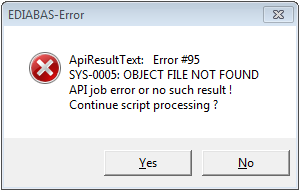
I've tried clicking both Yes and No, either way I have to click it several times, then I get the warning messages about version and language mismatches, and when I get to Read Error Memory, I get this:
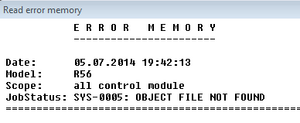
Hitting F2 for CLear Error Memory gives the same message. CEL is still lit.
Any more ideas?
After selecing Functional Jobs, I press F7 to select R56, and get this message:
I've tried clicking both Yes and No, either way I have to click it several times, then I get the warning messages about version and language mismatches, and when I get to Read Error Memory, I get this:
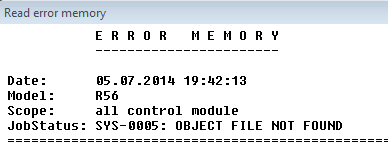
Hitting F2 for CLear Error Memory gives the same message. CEL is still lit.
Any more ideas?
2nd Gear
That's because the necessary data files for INPA were not installed. I've sent a PM with some hints which will get you going.