


Electrical OBD2 Gauges?


Thread Starter
|
6th Gear
Joined: Jul 2007
Posts: 2,881
Likes: 6
OBD2 Gauges?
Mach V just posted this,
https://www.northamericanmotoring.co...d.php?t=122249
What information is available to display on a 2nd Gen Min through the OBD2 port?
Coolant Temp? Oil Temp? Oil Pressure? Boost?
The DashDAQ website has some nice user videos and info on this system. Looks really nice. March 31, 2008 date for the GPS addon (which is an external GPS antenna and software on a memory card).
The whole thing runs on Linux.
https://www.northamericanmotoring.co...d.php?t=122249
What information is available to display on a 2nd Gen Min through the OBD2 port?
Coolant Temp? Oil Temp? Oil Pressure? Boost?
The DashDAQ website has some nice user videos and info on this system. Looks really nice. March 31, 2008 date for the GPS addon (which is an external GPS antenna and software on a memory card).
The whole thing runs on Linux.
Last edited by Minidrivr; Dec 7, 2007 at 03:55 PM.

6th Gear
Joined: Jan 2003
Posts: 2,319
Likes: 94
From: Tsunami Zone
The Scangauge II will display the following:
- Fuel Economy
- Fuel Rate
- Battery Voltage
- Coolant Temperature
- Intake Air Temperature
- Engine Speed (RPM)
- Vehicle speed (MPH)
- Manifold Pressure
- Engine Load
- Throttle Position
- Ignition Timing
- Open/Closed Loop

Former Vendor
Joined: Feb 2007
Posts: 1,472
Likes: 2
From: Sterling, VA
Mach V just posted this,
https://www.northamericanmotoring.co...d.php?t=122249
What information is available to display on a 2nd Gen Min through the OBD2 port?
Coolant Temp? Oil Temp? Oil Pressure? Boost?
https://www.northamericanmotoring.co...d.php?t=122249
What information is available to display on a 2nd Gen Min through the OBD2 port?
Coolant Temp? Oil Temp? Oil Pressure? Boost?
The complete list:
- Calculated load value
- Engine coolant temp
- Short-term fuel trim
- Long-term fuel trim
- Intake manifold absolute pressure
- Engine RPM
- Vehicle speed
- Ignition timing advance
- Intake air temperature
- Air flow rate from MAF
- Absolute throttle #1 position
- Oxygen sensor #2
- Time since engine start
- Distance traveled while MIL activated
- Fuel rail pressure
- Commanded evap purge
- Fuel level
- Distance since DTCs cleared
- Barometric pressure
- Oxygen sensor #1 (wide range)
- Catalytic converter temp
- Control module voltage
- Commanded equivalence
- Relative throttle position
- Ambient air temp
- Absolute throttle position B
- Accelerator pedal position D
- Accelerator pedal position E
- Commanded throttle actuator control
- OBD Latency
- OBD update rate
Mach V

Former Vendor
Joined: Feb 2007
Posts: 1,472
Likes: 2
From: Sterling, VA
Under the dash, above the driver's left knee. There's a little tethered cover on it. Pull straight down to remove the cover.
Yes.
Heh! No.
--Dan
Mach V
Is it easy to plug into?
Is Drilling required?
--Dan
Mach V
Thread Starter
|
6th Gear
Joined: Jul 2007
Posts: 2,881
Likes: 6
It looks like DashDAQ is banking on the fact they have a more customizable touchscreen than the others with higher resolution. Still expensive for such a toy though. Combining GPS into it is a plus the others don't have. But it's requirement of an external antenna just makes it more complicated in my book.
Trending Topics

3rd Gear
Joined: Jul 2007
Posts: 201
Likes: 0
From: Pickens, SC/ Vermillion, SD
wow
That DashDaq is a lot of cash for an OBD2 reader. For that kind of money you can almost afford to buy a laptop computer and interface cable and just leave them in the car. You could certainly afford a nice PDA and interface cable, like the ElmScan 5 for $115 or $189 set up with bluetooth:
http://www.scantool.net/products/index.php?cPath=8_6
If you just want to watch some parameters, there's:
Aeroforce Intercepter, $239:
http://marylandspeed.com/aeroforce-i...dii-p-404.html
Same guys have the MSD Dashhawk for $299:
http://marylandspeed.com/msd-dashhaw...100-p-739.html
ScanGauge II, $169:
http://www.scangauge.com/
RaceTech has ones hard-wired to only display one or two parameters and not be adjustable, but at @$80 each that might be fine?:
http://www.race-tech-designs.com/sto...p-1-c-248.html
http://www.scantool.net/products/index.php?cPath=8_6
If you just want to watch some parameters, there's:
Aeroforce Intercepter, $239:
http://marylandspeed.com/aeroforce-i...dii-p-404.html
Same guys have the MSD Dashhawk for $299:
http://marylandspeed.com/msd-dashhaw...100-p-739.html
ScanGauge II, $169:
http://www.scangauge.com/
RaceTech has ones hard-wired to only display one or two parameters and not be adjustable, but at @$80 each that might be fine?:
http://www.race-tech-designs.com/sto...p-1-c-248.html
Last edited by oldopelguy; Dec 10, 2007 at 02:25 PM.
Thread Starter
|
6th Gear
Joined: Jul 2007
Posts: 2,881
Likes: 6
Aeroforce Intercepter, $239:
http://marylandspeed.com/aeroforce-i...dii-p-404.html
RaceTech has ones hard-wired to only display one or two parameters and not be adjustable, but at @$80 each that might be fine?:
http://www.race-tech-designs.com/sto...p-1-c-248.html
http://marylandspeed.com/aeroforce-i...dii-p-404.html
RaceTech has ones hard-wired to only display one or two parameters and not be adjustable, but at @$80 each that might be fine?:
http://www.race-tech-designs.com/sto...p-1-c-248.html

4th Gear
Joined: Oct 2007
Posts: 419
Likes: 0
Thread Starter
|
6th Gear
Joined: Jul 2007
Posts: 2,881
Likes: 6
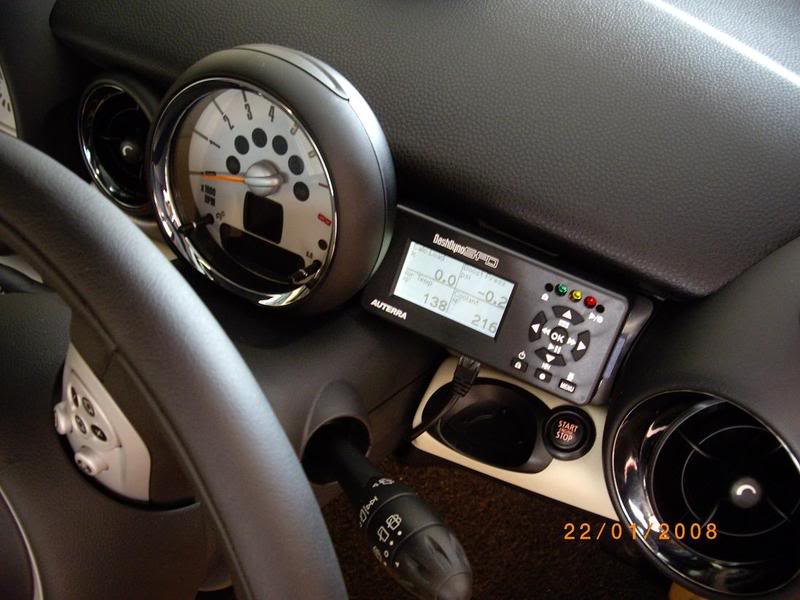
or what i just bought for my R56, the DashDyno SPD.
http://www.auterraweb.com/index.html
http://www.auterraweb.com/index.html
4th Gear
Joined: Oct 2007
Posts: 419
Likes: 0
Well, i've purchased it, i haven't received it yet.
The reason i bought a diagonistic tool was that i could monitor my water temp. All the rest that comes with it are bonuses.
Degi gauges was a no no cause i wan't prepared to hack into my wiring.
The reason i bought a diagonistic tool was that i could monitor my water temp. All the rest that comes with it are bonuses.
Degi gauges was a no no cause i wan't prepared to hack into my wiring.
Thread Starter
|
6th Gear
Joined: Jul 2007
Posts: 2,881
Likes: 6
Where do you think you'll mount it?
4th Gear
Joined: Oct 2007
Posts: 419
Likes: 0
Hi, sorry didn't check back on this thread.
My scan tool also shows water temp.
I picked this cause apprently the DashHawk (my 1st choice) doesn't work on the Mini R56. The ScanGauge would have done what i wanted it to since i only wanted a temp gauge but after contacting Dave from Auterra, he convinced me that his product was the better choice, even though a bit more expensive.
It was also the that Dave was the only one that responded to my emails regarding the product. The other 2 companies didn't bother to reply back to me.
I mounted mine right above the key slot!
My scan tool also shows water temp.
I picked this cause apprently the DashHawk (my 1st choice) doesn't work on the Mini R56. The ScanGauge would have done what i wanted it to since i only wanted a temp gauge but after contacting Dave from Auterra, he convinced me that his product was the better choice, even though a bit more expensive.
It was also the that Dave was the only one that responded to my emails regarding the product. The other 2 companies didn't bother to reply back to me.
I mounted mine right above the key slot!
Thread Starter
|
6th Gear
Joined: Jul 2007
Posts: 2,881
Likes: 6
Hi, sorry didn't check back on this thread.
My scan tool also shows water temp.
I picked this cause apprently the DashHawk (my 1st choice) doesn't work on the Mini R56. The ScanGauge would have done what i wanted it to since i only wanted a temp gauge but after contacting Dave from Auterra, he convinced me that his product was the better choice, even though a bit more expensive.
It was also the that Dave was the only one that responded to my emails regarding the product. The other 2 companies didn't bother to reply back to me.
I mounted mine right above the key slot!
My scan tool also shows water temp.
I picked this cause apprently the DashHawk (my 1st choice) doesn't work on the Mini R56. The ScanGauge would have done what i wanted it to since i only wanted a temp gauge but after contacting Dave from Auterra, he convinced me that his product was the better choice, even though a bit more expensive.
It was also the that Dave was the only one that responded to my emails regarding the product. The other 2 companies didn't bother to reply back to me.
I mounted mine right above the key slot!

5th Gear
Joined: May 2007
Posts: 603
Likes: 1
From: Aventura, Florida
PLX devices has an awesome OBDII package.
http://www.plxdevices.com/products/dm200obd/
I believe Dan @ Mach V carries them, it looks great and is customizable. And honestly, just my opinion, but the dashhawk looks like it belongs in the late 80s along with corvette digital dashes and knight rider.
Have fun,
Josh
http://www.plxdevices.com/products/dm200obd/
I believe Dan @ Mach V carries them, it looks great and is customizable. And honestly, just my opinion, but the dashhawk looks like it belongs in the late 80s along with corvette digital dashes and knight rider.
Have fun,
Josh


You would be best to ask in the Gen 1 section as your car is a Gen 1 car. This is the Gen2 Section
Well it could be done if you have a sperate ODBii unit that outputs a TV or video signal and then inject it back in thru the tv or avideo input wiring that is not standard in the USA and can be gotten thru newministuff.com
Lots of work to ma e it happen.

1st Gear
Joined: Aug 2009
Posts: 31
Likes: 0
Might be better off installing a custom head unity with an actual embeded PC and video monitor capable of VGA output. Of course, that might also mean swapping out alternator to generate more juice for the car pc. Perhaps hardwire a docking station and dock the laptop in the trunk. Undock when you leave the car. Netbook should be perfect for a project like this.
Might be better off installing a custom head unity with an actual embeded PC and video monitor capable of VGA output. Of course, that might also mean swapping out alternator to generate more juice for the car pc. Perhaps hardwire a docking station and dock the laptop in the trunk. Undock when you leave the car. Netbook should be perfect for a project like this.
https://www.northamericanmotoring.co...-upgrades.html
EDIT: and BTW this draws less than 6 amps at 14.4 volts when running.

5th Gear
Joined: May 2008
Posts: 942
Likes: 0
From: Nor-Cal
I've been looking into getting a water temp guage and boost guage, although what I really care about is water temp. I too don't like the idea of taping into my electrical and drilling a hole into my radiator overflow tank. I like keeping my Mini as stock as possible (even though I've installed a FMIC, DDM street intake, etc..) ..these are all upgrades that can be reversed easily.
I like the look of traditional guages, ..the PLX system interests me most as it looks like a traditional guage.
my questions about the PLX setup:
1) confused as what I need to purchase to use the PLX system. Can I just buy the PLX -100 ..or do I need to purchase a "Sensor" unit w/ it as well, ..if so that doubles the price depending on which sensor ...also there are like 10 different sensors they sell. ...which one do i need to run one PLX guage?
2) all I have to do is plug this into the OBD port and that's it?
3) will the PLX display water temp + boost? (Dan's list above didn't mention that Boost was available, ...yet some of you guys are saying your readers display boost). Still confused on that.
Thanks,
Dan i'll purchase the PLX from your site (provided it does what I want).
I like the look of traditional guages, ..the PLX system interests me most as it looks like a traditional guage.
my questions about the PLX setup:
1) confused as what I need to purchase to use the PLX system. Can I just buy the PLX -100 ..or do I need to purchase a "Sensor" unit w/ it as well, ..if so that doubles the price depending on which sensor ...also there are like 10 different sensors they sell. ...which one do i need to run one PLX guage?
2) all I have to do is plug this into the OBD port and that's it?
3) will the PLX display water temp + boost? (Dan's list above didn't mention that Boost was available, ...yet some of you guys are saying your readers display boost). Still confused on that.
Thanks,
Dan i'll purchase the PLX from your site (provided it does what I want).