


R56 AUX/iPod input jack - 08 MCS


Neutral
Joined: Apr 2008
Posts: 9
Likes: 0
Question regarding this option
I have this aux/usb option in my mini and today it stopped working. I have only had the car 3 days and it has been working until this point. I plugged in the aux/usb to my ipod and it is not showing up as an alternative in the car. I ony see tuner, CD, and USB. Usually, it would say IPOD when the IPOD is plugged up. It's not recognizing my IPOD at all. Am I doing something wrong? I am wondering if I pressed a button I shouldn't have. Any help would be appreciated. I would hate think that I need to schedule an appointment at the dealership for some type of faulty connection.
There is a cable that you can get that can be purchased or if you get the convenience package it comes with it, that alows you to connect through the aux in and usb, but you have to have the media connect for it to work. My personal opinion is that if you want the functionality through the car, that would be the only way to go. The iPod interface that is available that goes through the glove box is way to expensive, and outdated. My dealer wanted $1100 for that option, so I opted for the aux/usb cable available at Mini and it works great.

2nd Gear
Joined: Apr 2008
Posts: 140
Likes: 0
That's what i'm trying to do. I'm trying to use the aux jack and be able to change songs on the MFSW and it's not working. It should work, right?
I haven't noticed if the songs show up on the radio interface. i'll have to check. but i know that using the buttons on the mfsw doesn't allow me to go to the next track on my ipod.
I haven't noticed if the songs show up on the radio interface. i'll have to check. but i know that using the buttons on the mfsw doesn't allow me to go to the next track on my ipod.


1st Gear
Joined: Apr 2008
Posts: 17
Likes: 0
From: New York (Albany Area)
After doing my research, I chose the aux cable and I'm quite happy with it. 30 dollars and very easy installation. Its definitely true that controlling the ipod itself can be bit dangerous but I set a podcast up to play and I'm good for an hour. I also heard that you could not search by artist using the MFSW or MINI factory deck, but that you could only skip to the next track in line. Maybe this is not the way it works in all cases. Anyway wanted to put some positive feedback about the aux out there. It works for me.

2nd Gear
Joined: Mar 2008
Posts: 56
Likes: 0
Last night I tried a bog standard USB stick in the USB port with some mp3 files - works perfectly apart from the ugly usb stick protruding from the USB socket.
So, the hunt started for a small USB stick that would work with microSD cards. A 2Gb microSD card can be had for about $10.
I found one of these:

http://usb.brando.com.hk/prod_detail.php?prod_id=00331
It's tiny.... unless they used really big keys in the reference photo! Once I have it, I'll post a picture of the stick installed in the mini.
John.
So, the hunt started for a small USB stick that would work with microSD cards. A 2Gb microSD card can be had for about $10.
I found one of these:
http://usb.brando.com.hk/prod_detail.php?prod_id=00331
It's tiny.... unless they used really big keys in the reference photo! Once I have it, I'll post a picture of the stick installed in the mini.
John.

4th Gear
Joined: Nov 2007
Posts: 322
Likes: 1
The above looks very much like this:
http://www.kingston.com/flash/usb_microsd_reader.asp
when you remove the plastic around the actual reader. I have the red version and it came with a 2GB card. Part number is: FCR-MRR+SDC/2GBKR
It is available from various retailers. I've never tried it in my MINI but if someone is interested I'll take the time to load up a few MP3 and walk out to the car.
http://www.kingston.com/flash/usb_microsd_reader.asp
when you remove the plastic around the actual reader. I have the red version and it came with a 2GB card. Part number is: FCR-MRR+SDC/2GBKR
It is available from various retailers. I've never tried it in my MINI but if someone is interested I'll take the time to load up a few MP3 and walk out to the car.
2nd Gear
Joined: Mar 2008
Posts: 56
Likes: 0
Kingston microSD reader: 32.89mm x 15.3mm x 7.66mm
Brando microSD reader: 25.5x12x4.5mm
(sorry for the metric but the Brando only lists metric dimensions).
The key for me is that the bit sticking out of the USB port is going to be as small as possible.
John.
Brando microSD reader: 25.5x12x4.5mm
(sorry for the metric but the Brando only lists metric dimensions).
The key for me is that the bit sticking out of the USB port is going to be as small as possible.
John.
4th Gear
Joined: Nov 2007
Posts: 322
Likes: 1
Those are the exact dimensions of the Kingston when you remove the reader from the plastic case which you must do in order to use the thing. I'm pretty sure this is the same part. Buy.com has a pic with it out of the case.

OVERDRIVE
Joined: May 2005
Posts: 8,233
Likes: 127
From: San Francisco
http://sandisk.com/Products/Catalog(1096)-SanDisk_Ultra_II_SD_and_SDHC_Plus_Cards.aspx
http://www.amazon.com/gp/product/B00..._cp_ob_title_1
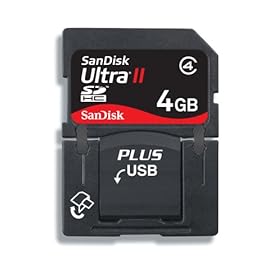
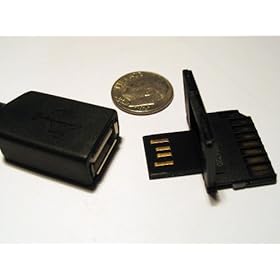
4th Gear
Joined: Nov 2007
Posts: 322
Likes: 1

There you go. Now you can compare.
The USB/SD cards from SanDisk are not as fragile as they look in photos but they are not the most robust piece of plastic either. They also don't fit real snug in any USB and they have a tendency to wobble. The USB/SD card comes with a stand SD case and I think if you kept the card in that case when transporting it then the card should be fine.
Oh, and I should mention that card has a very tiny blue LED on one of the corners that will light and flash when the card is being read/written. If that will distract you then stay away.
Neutral
Joined: Apr 2008
Posts: 9
Likes: 0
I have an 80GB IPOD and it has been working since I posted my last comment. I don't what I did different to cause it not to register my IPOD when it was plugged in that one time. Currently, I plug it in before I even start the car rather than plugging it once the car is already on. I love being able to navigate through my playlist on the radio interface without looking down and manuevering the IPOD itself.

4th Gear
Joined: Dec 2007
Posts: 432
Likes: 0
From: Los Angeles, CA
I have an 80GB IPOD and it has been working since I posted my last comment. I don't what I did different to cause it not to register my IPOD when it was plugged in that one time. Currently, I plug it in before I even start the car rather than plugging it once the car is already on. I love being able to navigate through my playlist on the radio interface without looking down and manuevering the IPOD itself.
Neutral
Joined: Apr 2008
Posts: 9
Likes: 0
Robin81 thanks for your post. I'm glad it's not just me and maybe I will ask the dealer if they know what the problem could be once I go in for my 1st service. I'm only 1,000 miles in now and according to my service projection, I will be there at 15,000 miles.

1st Gear
Joined: Apr 2008
Posts: 26
Likes: 0
From: Tempe, AZ
Does anyone know if the 08 MCS is compatible with all the current iPods being sold? I've read some old post on other sites sighting the new video Nano's are incompatible but no new postings for the 08. My MINI arrives in a few weeks and I am curious if I have to invest in a old style iPod in order to get the USB adapter to register correctly.
4th Gear
Joined: Dec 2007
Posts: 432
Likes: 0
From: Los Angeles, CA
Does anyone know if the 08 MCS is compatible with all the current iPods being sold? I've read some old post on other sites sighting the new video Nano's are incompatible but no new postings for the 08. My MINI arrives in a few weeks and I am curious if I have to invest in a old style iPod in order to get the USB adapter to register correctly.
1st Gear
Joined: Apr 2008
Posts: 26
Likes: 0
From: Tempe, AZ
Thank you for the response about the "classic" iPod. I incorrectly stated 'old' iPod instead of classic in my original question. If anyone has a new Nano that works on the 08 MCS that would be great to know as well. It might come down to buying both and using one in the car and other at the gym. Thanks everyone.


Thread
Thread Starter
Forum
Replies
Last Post
igzekyativ
MINIs & Minis for Sale
34
Jul 16, 2020 12:54 PM
Navigation & Audio My 07 COOPER S has an mp3 jack STOCK!
surfblue
Navigation & Audio
4
Oct 24, 2018 01:20 AM
minipopkart
R50/R53 :: Hatch Talk (2002-2006)
2
Aug 13, 2015 05:22 AM