


R56 Love the nav, hate the nav


Coordinator :: Emerald MINI Car Club
Joined: Jun 2007
Posts: 1,790
Likes: 0
From: Eugene, OR
How many updates were there for the R53 NAV? Several if I recall correctly... yes at a cost, but EVERY GPS Mfgr charges for updates, Garmin, TomTom, Magellan, Alpine, Clarion, etc... average price about $150.00.
The fact is there are pros/cons to every NAV system, OEM Integrated, aftermarket portable, cell phone based, etc...
There is no "perfect" solution for everyone, we will all have our own preferences and opinions. What works for my wife is a TomTom 910, me I ordered my R56 with NAV. It's just way too subjective to be a "right/wrong" issue... that's why it's called an "Option"
The fact is there are pros/cons to every NAV system, OEM Integrated, aftermarket portable, cell phone based, etc...
There is no "perfect" solution for everyone, we will all have our own preferences and opinions. What works for my wife is a TomTom 910, me I ordered my R56 with NAV. It's just way too subjective to be a "right/wrong" issue... that's why it's called an "Option"
+1


6th Gear
Joined: Dec 2006
Posts: 1,187
Likes: 0
From: On the Oregon 5
I gotta say, I'm satisfied with the built-in NAV system. I'm on the road a lot and its very helpful. Yes, it's a little cumbersome to input addresses for directions, but overall I like it.
Even when you don't follow the directions, it recalculates the route. I find it more convenient that it tells you to "turn right on the second street" rather than naming the road. If I'm unfamiliar with a town, that's more helpful than giving me a street name I don't know.
I like using it even for destinations where I know where I'm going. Lets me know the mileage left and estimated ETA.
I really don't care how it affects resale value. I just know I didn't want to worry about bringing in and out a portable unit. Yes, the price was high and I had to think hard about that, but I'm glad I chose to get the car with the nav system.
Even when you don't follow the directions, it recalculates the route. I find it more convenient that it tells you to "turn right on the second street" rather than naming the road. If I'm unfamiliar with a town, that's more helpful than giving me a street name I don't know.
I like using it even for destinations where I know where I'm going. Lets me know the mileage left and estimated ETA.
I really don't care how it affects resale value. I just know I didn't want to worry about bringing in and out a portable unit. Yes, the price was high and I had to think hard about that, but I'm glad I chose to get the car with the nav system.


OVERDRIVE
Joined: Mar 2007
Posts: 5,602
Likes: 107
From: Arizona


I gotta admit I'd have trouble reading that screen. I hope it talks better than it looks.

6th Gear
Joined: Mar 2007
Posts: 7,578
Likes: 5
From: Paradise
Try using the split view. It is very easy to see what street you are to turn onto.

6th Gear
Joined: May 2005
Posts: 15,478
Likes: 2
There's just a certain level of "snappiness" I expect from a user interface.
And my biggest complaint with the 276c was inputting addresses or waypoint names. You had to use the rocker switch to go from letter to letter, then press the rocker switch to the right to get to next character, and then start all over again. The touchscreen on the Nuvi is *much* nicer, even if they haven't implemented a QWERTY keyboard instead of the current ABCDEF keyboard.
And my biggest complaint with the 276c was inputting addresses or waypoint names. You had to use the rocker switch to go from letter to letter, then press the rocker switch to the right to get to next character, and then start all over again. The touchscreen on the Nuvi is *much* nicer, even if they haven't implemented a QWERTY keyboard instead of the current ABCDEF keyboard.
Using Compact cards is more than 3 years old. No touch screen. I agree. Why get a marine unit? Maybe I lucked out but I got internal HD, touch screen, multiple views, etc and three years old2002 MINI Updates on CD can be bought here.
How far back do they go? Well a quick check on the Navteq sites show BMW going back to 1997 models. So how many 2002 MINI owners will be driving their car in 2012? If Navteq holds true to form, then they will be able to get new maps

Thread Starter
|
5th Gear
Joined: Dec 2006
Posts: 1,082
Likes: 1
From: merchantville, nj
Obviously the people who have the nav are enjoying it which is great. The graphics do have sort of a retro feel to them, in a Dr. Strangelove kind of way. Who needs color graphics and perspective views. I think Sean Connery/Bond had that unit in his Austin Martin!
6th Gear
Joined: May 2005
Posts: 15,478
Likes: 2
6th Gear
Joined: May 2005
Posts: 15,478
Likes: 2
Two answers:
First, you throw crap into it. You follow the cell phone model. Instead of just having a cell phone ... duh ... you got a phone, camera, video recorded, picture viewer, mp3 player, internet device. Despite the iphone, they really do none of them better than dedicated devices. You don't order fish at a steak house. But how else to sell the hardware??? Throw more crap into it that many people dont want. ... But, marketing trys to convince you your need it. Hence GPS devices with a bunch of crap you may not need in an attempt to keep the prices from dropping to nothing.
Second, you charge for the services. Again, follow the cell phone model. Give the hardware away, pay for the services. Now obviously they can't charge for the GPS signal so what can they charge for? Oh yeah, the traffic info

See here. Its a just a matter of time before GPS becomes ubiquitous, just like cell phones, and then they have to just make them standard OEM equipment like a stereo ... or come up with a way to charge for services.
And BTW, I'm sure a 10 year old cell phone would work just fine today ... but people just HAVE to have the latest electronic widgets ... they got to line up to buy iphone because they have to have the latest ... More power to them
Our two cell phone are now 3 years old. I have no need for any more electronic widgets to be built into them because all I do is make phone calls (if that). I'll keep them until they literally die. But, IMO, if it ain't broke, dont fix it.
Last edited by chows4us; Jul 22, 2007 at 10:00 AM.
6th Gear
Joined: Mar 2007
Posts: 7,578
Likes: 5
From: Paradise

OVERDRIVE


Joined: Aug 2006
Posts: 7,201
Likes: 8
From: Norfolk, VA
I looked up your unit here. It looks like a marine unit. Perhaps that is one reason why its cumbersome... the auto screens look terrible Using Compact cards is more than 3 years old. No touch screen. I agree. Why get a marine unit? Maybe I lucked out but I got internal HD, touch screen, multiple views, etc and three years old
MINI does not release Nav updates. Navteq does. BMW might repackage them and charge you more but they dont create any maps.
2002 MINI Updates on CD can be bought here.
How far back do they go? Well a quick check on the Navteq sites show BMW going back to 1997 models. So how many 2002 MINI owners will be driving their car in 2012? If Navteq holds true to form, then they will be able to get new maps
Using Compact cards is more than 3 years old. No touch screen. I agree. Why get a marine unit? Maybe I lucked out but I got internal HD, touch screen, multiple views, etc and three years oldMINI does not release Nav updates. Navteq does. BMW might repackage them and charge you more but they dont create any maps.
2002 MINI Updates on CD can be bought here.
How far back do they go? Well a quick check on the Navteq sites show BMW going back to 1997 models. So how many 2002 MINI owners will be driving their car in 2012? If Navteq holds true to form, then they will be able to get new maps
The 276c is a combination marine/automotive unit. I didn't use it on the water much, but since it was a marine unit, it was also waterproof, which made it a nice choice because I was using it on my motorcycle a lot. The bulk didn't have anything to do with its marine capabilities, though. The other Garmin automotive units that were available at about the same time or shortly afterward (the StreetPilot, StreetPilot III, and StreetPilot 2610/2620) were about the same size.
As for the MINI maps from Navteq, I noticed that the "current" version for the full mapset for the 2002 MINI was 2006.2, while the current version for a 2006 MINI is 2007.2. So it sounds like the support for the 2002 MINI NAV is already starting to wane after only five years.
It's true that you can get 2007.2 CDs *for individual regions* that will work in a 2002 MINI, but the individual region discs are $129 each, and you need all eight discs to get full coverage of the US and Canada. So a full update of all the regions for a 2002 MINI now costs $1032. Compare that to the later cars, where $199 gets you all of the regions.
It's true that you probably wouldn't need all of the region discs every time you upgrade, but depending on how close you live to a region boundary and what kind of traveling you do with your MINI, you'd probably need at least two or three, so that's $260-390 just to upgrade to *some* of the current maps.
6th Gear
Joined: May 2005
Posts: 15,478
Likes: 2
It's true that you can get 2007.2 CDs *for individual regions* that will work in a 2002 MINI, but the individual region discs are $129 each, and you need all eight discs to get full coverage of the US and Canada. So a full update of all the regions for a 2002 MINI now costs $1032. Compare that to the later cars, where $199 gets you all of the regions.
Yes, $129 for individual 07 regions. I would expect that shortly the 8 set of CDs cost $199 as well. Why? Go here

1997 - 2002 BMW CD sets, all 8 disks, $199.
OVERDRIVE
Joined: Aug 2006
Posts: 7,201
Likes: 8
From: Norfolk, VA
It cost $199 to get the complete set for 2006 maps
Yes, $129 for individual 07 regions. I would expect that shortly the 8 set of CDs cost $199 as well. Why? Go here
1997 - 2002 BMW CD sets, all 8 disks, $199.
Yes, $129 for individual 07 regions. I would expect that shortly the 8 set of CDs cost $199 as well. Why? Go here
1997 - 2002 BMW CD sets, all 8 disks, $199.

2nd Gear
Joined: Nov 2002
Posts: 122
Likes: 0
From: Ohio
Based on those pictures, I'll take my Garmin anyday! It gives you auto zoom with 3D Navigation Maps. and you can allways tell what street you are on! Wow is that screen shot "cluttered"! At $2100 the OEM should look better than that IMHO. I'm getting the MINI/Garmin Tach. mounting bracket. I think the mount next to the tach looks great.
Thread Starter
|
5th Gear
Joined: Dec 2006
Posts: 1,082
Likes: 1
From: merchantville, nj
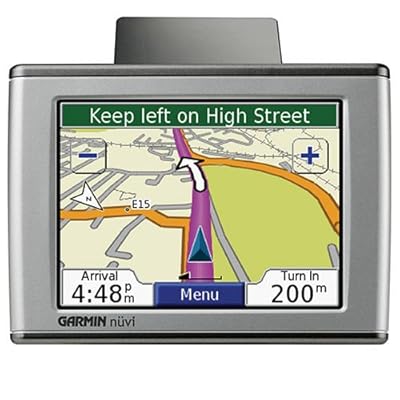
Garmin 660 - same graphics, wider screen

This is a Mio C310. My brother has this and its the only one I have first hand knowledge of.

Somebody mentioned how these are open and hackable. My brother has installed a third party interface which to me looks more like the Garmin than these images. Maps are the same, but data and buttons are located differently.
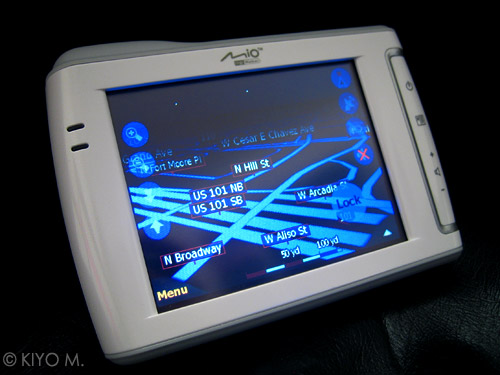
night time interface - changes to lower luminance grahic.
Last edited by lava; Jul 22, 2007 at 06:57 PM.
6th Gear
Joined: Mar 2007
Posts: 7,578
Likes: 5
From: Paradise
Those all seem zoomed out farther than the MINI NAV shots shown here. You can zoom the NAV out as well and it will show fewer street names. I think people are making apple and orange comparisons with the screens. I've got a friend with a new Garming 3-something. If I get a chance, I'll see if we can do some side-by-side shots of the same area at equivalent zooms.
OVERDRIVE
Joined: Mar 2007
Posts: 5,602
Likes: 107
From: Arizona
I played with a Magellan unit at Costco to day that they sell for $400. Plugged in my address, fastest route. The think took me right through the middle of my town (not fast), there are 2 better routes. It barked out directions fine. The street names were there, but try reading them while you're driving. Not. I can use my Blackberry and see them almost as well. From what I can see so far audio turn by turn directions is the only reason to get a Nav unit. Maybe traffic adds something, but how many change their route based on that? I've never needed one, I think they're cool, but am I missing something?

1st Gear
Joined: Jun 2007
Posts: 12
Likes: 0
From: Houston, TX
Shortcut commands for NAV
First and foremost, I love my MCS. I's a lot of fun to drive. Nonetheless, there are a few minor areas in which Mini can improve on, namely--the NAV system. Compared to its Japanese counterparts, it's a bit behind.
The NAV can be frustrating at times due to the slow interface and the ergonamically challenged "joystick". With the addition of voice command, I was hoping it would help alleviate the need to reply on the "joystick", ei, comman short cuts. Unfortunately, Mini has fallen short of my expectations. For example, I wanted to input a command to set a route to my "home address". I would imagine, motorist would commonly use this function. I discovered, in order to set a route home, I will have to speak two voice commands, and toggle once. Due to the slow interface and having to take my eyes off the road to look at the monitor, it took me approximately 10 seconds to complete this command. It would have been great, if there was a phrase that I can say to command the name to set a route to my house like, "set guidance home". Or other phrases that can retrive commonly used destinations.

The NAV can be frustrating at times due to the slow interface and the ergonamically challenged "joystick". With the addition of voice command, I was hoping it would help alleviate the need to reply on the "joystick", ei, comman short cuts. Unfortunately, Mini has fallen short of my expectations. For example, I wanted to input a command to set a route to my "home address". I would imagine, motorist would commonly use this function. I discovered, in order to set a route home, I will have to speak two voice commands, and toggle once. Due to the slow interface and having to take my eyes off the road to look at the monitor, it took me approximately 10 seconds to complete this command. It would have been great, if there was a phrase that I can say to command the name to set a route to my house like, "set guidance home". Or other phrases that can retrive commonly used destinations.
6th Gear
Joined: Mar 2007
Posts: 7,578
Likes: 5
From: Paradise
The voice instructions in combination with the split screen seem quite useful to me. I can glance at the arrow, street name, and distance to anticipate the next move. The map gives it context.
The full screen map, set to vehicle orientation, is mainly for impressing passengers. Some seem to get a kick out of the map rotating as the car turns.
OVERDRIVE
Joined: Mar 2007
Posts: 5,602
Likes: 107
From: Arizona
You know, that was my gut feeling all along! They can check up on the driver and verify if he's going the right way.

6th Gear
Joined: May 2006
Posts: 1,428
Likes: 1
From: Long Island, NY
Those screen shots of the Garman are all useless. they look pretty, but they don't help with "Navigating" in any way.
By the way, I'm glad somebody mentioned it, the built in TRAFFIC info on the MINI Nav is GREAT. I didn't even know I was getting that, really cool info.
Long Island's got allot of traffic!! ;-)
By the way, I'm glad somebody mentioned it, the built in TRAFFIC info on the MINI Nav is GREAT. I didn't even know I was getting that, really cool info.
Long Island's got allot of traffic!! ;-)
Thread Starter
|
5th Gear
Joined: Dec 2006
Posts: 1,082
Likes: 1
From: merchantville, nj
The problem I see is that there is no good place to mount one. As much as I dislike what the factory nav does to the speedo I don't think there is a good place to suction cup a nav. Perhaps the factory Garmin mount is the best option. Too bad the Garmins are so much more than their competition.
Last edited by lava; Jul 23, 2007 at 03:14 PM.
6th Gear
Joined: Mar 2007
Posts: 7,578
Likes: 5
From: Paradise
No, both those units zoom in and out as well. The big difference to me is the perspective view and the representation of streets and roads as road ways, and not just lines. Most people can not read maps or plan views. The perspective view is much clearer for orientation to what you see out the windshield.