


Navigation & Audio Garmin Nuvi 350


Thread Starter
|
6th Gear
Joined: May 2006
Posts: 1,845
Likes: 0
From: Oswego, IL
Garmin Nuvi 350
Just purchased (well exchanged a new unit for a defective one).
Did some search functions but nothing really coming up, anyone on the site knows of some good threads for operational, known bugs and such.
As for mounting, I've seen one good post, but any others trying different locations?
Thanks in advance.
Paul
Oops...that should read Garmin Nuvi 350
Did some search functions but nothing really coming up, anyone on the site knows of some good threads for operational, known bugs and such.
As for mounting, I've seen one good post, but any others trying different locations?
Thanks in advance.
Paul
Oops...that should read Garmin Nuvi 350
Last edited by Ords; Oct 31, 2006 at 08:33 AM. Reason: Thread title spelled incorrectly


4th Gear
Joined: Nov 2004
Posts: 376
Likes: 3
From: Rancho Palos Verdes, CA
Try
http://www.nuvipassion.com

_Dave_
PS: Pretty happy with my suction mount on the clear plastic face of the chrono-pack... With care, it can be placed so that it does not block driver visibility of anyt of the idiot lights, and only the upper portion of the fuel gauge ...
http://www.nuvipassion.com
_Dave_
PS: Pretty happy with my suction mount on the clear plastic face of the chrono-pack... With care, it can be placed so that it does not block driver visibility of anyt of the idiot lights, and only the upper portion of the fuel gauge ...

1st Gear
Joined: Jun 2005
Posts: 20
Likes: 0
My wife and I have a Garmin Nuvi 350 for the past 3 months. My wife had it on Mini Takes The States and thought it was great. I have used it for many of my business trips both local and out of state and it's been very very good. The only time it flaked out was in downtown Chicago, but I kept pressing on and the Nuvi finally calmed own and got back to normal. The thing is so small and easy to use and easy to move from car to car...I give it a solid 8 out of 10.


4th Gear
Joined: Sep 2006
Posts: 336
Likes: 0
From: Fort Wayne, IN
I'm using the 360, mounted on the lower left corner of the windshield. I am using the bluetooth thru my Aux input and I added the external mic. Nav and BT both work great.
Trending Topics
Thread Starter
|
6th Gear
Joined: May 2006
Posts: 1,845
Likes: 0
From: Oswego, IL
That's where mine now sits. I've been trying different placements to see what's the most comfortable and such. I saw proclipusa has a MINI specific mount but not sure how reception would be sitting down in the vehicle.
Still learning the device but so far, it's great.

Vendor & Moderator :: MINI Camera and Video & c3 club forum
iTrader: (6)
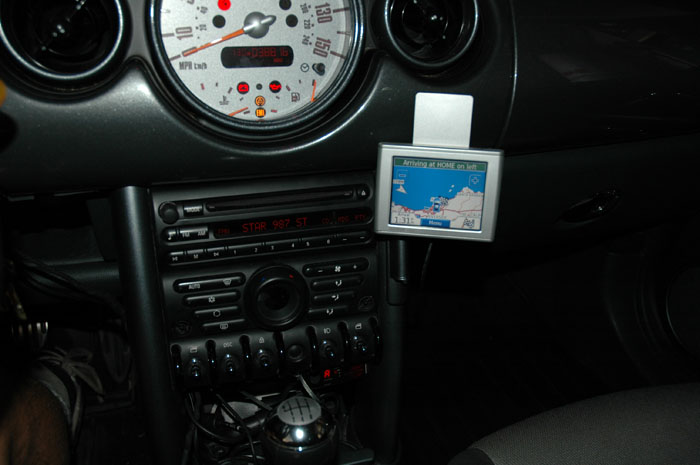
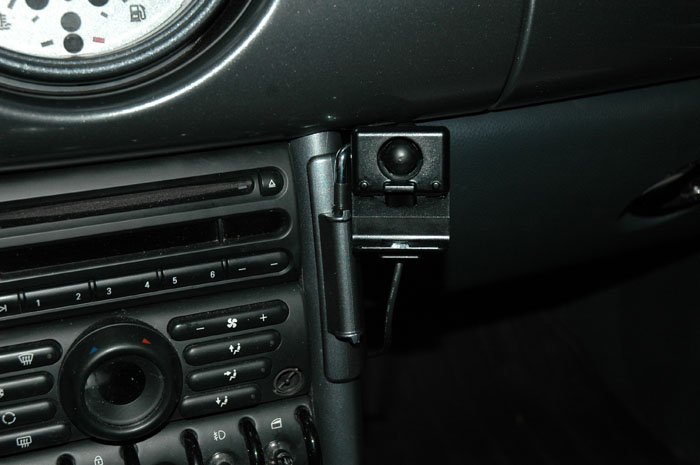
My writeup on how I modified the OEM cup holder mount
http://www.c3club.org/forum/topic.asp?TOPIC_ID=511
Vendor & Moderator :: MINI Camera and Video & c3 club forum
iTrader: (6)
Oh its great! The aux completes the Nuvi install. Add an SD card, fill it with Mp3s and you have a full audio system that cuts out as needed when directions are given. No need for iPod or cd player anymore. I love being able to select music by artist or album, all via touch screen.
As for the mount itself, I think I'm going to add some small wheel collars to help tighten up the mount.. When I get back from this tradeshow, I will post details.
Richard
As for the mount itself, I think I'm going to add some small wheel collars to help tighten up the mount.. When I get back from this tradeshow, I will post details.
Richard
Thread Starter
|
6th Gear
Joined: May 2006
Posts: 1,845
Likes: 0
From: Oswego, IL
Richard,
I think this is what I'm going to do as it's simple, practical and not too expensive.
I'm going to see if I can adapt it for my minivan as well. The wife and kids would love this.
Thanks again!
I think this is what I'm going to do as it's simple, practical and not too expensive.
I'm going to see if I can adapt it for my minivan as well. The wife and kids would love this.
Thanks again!

2nd Gear
Joined: Sep 2005
Posts: 116
Likes: 0
From: Toronto, Canada
Nice install -- but it seems that the antenna has to be pointed straight up, since there's no room for it to be folded back at 90 degrees? So I'd imagine you're giving up some signal strength & maybe accuracy, as a result?
Vendor & Moderator :: MINI Camera and Video & c3 club forum
iTrader: (6)
I'm not sure I understand your post. The Nuvi antennae points straight up. It normally folds into the unit when not in use, but in order to put it on the standard mount, you have to fold it away out of the body and up.
So having it pointed straight up is optimal.
I just drove 240+ miles (one way) from Los Angeles to Las Vegas and back and it performed perfectly.
So having it pointed straight up is optimal.
I just drove 240+ miles (one way) from Los Angeles to Las Vegas and back and it performed perfectly.

6th Gear
Joined: Sep 2004
Posts: 1,497
Likes: 0
From: Orange County, CA
Actually, I believe that the nuvi's antenna is a "patch" type version (vs a "helical" type) that is designed to be extended 90 degrees out from the unit (i.e. so that the flat part of the flip out antenna is pointed towards the sky). That should be the optimal position for the antenna, but since it's a high sensitive SiRF Star III based GPS receiver, it's probably sensitive enough to pick up a strong signal even when pointing straight up (just as Richard noted).

6th Gear
Joined: Dec 2004
Posts: 8,354
Likes: 0
From: Overthemountain, AL
I have narrowed down my GPS buying decision to the Garmin Nuvi 350 & one other. I was skimming the owners manual & couldn't find an answer to my question so I hope some of you owners can help me.
When doing Mini rides we are never taking the shortest, fastest, or most sensible route. We are looking for the long twisty way . Will this Garmin let me program in waypoints so I can force it to direct me the way I want to go on Mini rides? All I saw in the owners manual was that your could program "points of interest" & there aren't usually any POI's on our backroad Mini rides so that wouldn't help much.
Thanks for your help.
When doing Mini rides we are never taking the shortest, fastest, or most sensible route. We are looking for the long twisty way
. Will this Garmin let me program in waypoints so I can force it to direct me the way I want to go on Mini rides? All I saw in the owners manual was that your could program "points of interest" & there aren't usually any POI's on our backroad Mini rides so that wouldn't help much.Thanks for your help.

6th Gear
Joined: Sep 2002
Posts: 1,284
Likes: 1
From: Middle Earth
I have a Nuvi 360 and the only way that I have been able to "program" nice motoring routes is to do a point to point type program. You can also de-select highways from the units routing choices.
What I have done is to select various points along the route that I want to travel and save them as favorites. As I arrive at one destination I then select the next destination. A bit of a pain. I would much rather be able to select way points, but I just have not been able to find any other way around it.
It will allow you to scroll around the map and then using the touch screen to select points and save them. Sort of like way points, but you have to scroll thru the whole route you have planned. A little time consuming. Thank goodness you have 4 - 5 hours of battery life.
I have found the best spot to mount it, for us, is the face of the speedo, sort of at the 2 o'clock position. That way either of us can access the unit and we can both see it.
What I have done is to select various points along the route that I want to travel and save them as favorites. As I arrive at one destination I then select the next destination. A bit of a pain. I would much rather be able to select way points, but I just have not been able to find any other way around it.
It will allow you to scroll around the map and then using the touch screen to select points and save them. Sort of like way points, but you have to scroll thru the whole route you have planned. A little time consuming. Thank goodness you have 4 - 5 hours of battery life.
I have found the best spot to mount it, for us, is the face of the speedo, sort of at the 2 o'clock position. That way either of us can access the unit and we can both see it.

Yep - Bilbo is right - the Nuvi sacrifices robust waypoint features for ease of use. They make is simple so ANYONE can use it pretty much without RTFM. And I know if my father-in-law stumbled upon waypoints he'd be hopelessly lost forever...
It'll let you insert ONE "via-point" between where you are and your current destination - but that's it. Handy for finding gas and resuming your route when done filling up - but not much else - though sometimes if I'm going somewhere and it plots a route I don't like, I'll plug in a point that I know IS on the way I'd like and it figures it out... but it will NOT find the nicest twisties for you...
First person to make a GPS as good as the Nuvi's that has the auto-twisty-no-gravel route feature will make a mint off MINI owners...
It'll let you insert ONE "via-point" between where you are and your current destination - but that's it. Handy for finding gas and resuming your route when done filling up - but not much else - though sometimes if I'm going somewhere and it plots a route I don't like, I'll plug in a point that I know IS on the way I'd like and it figures it out... but it will NOT find the nicest twisties for you...
First person to make a GPS as good as the Nuvi's that has the auto-twisty-no-gravel route feature will make a mint off MINI owners...
6th Gear
Joined: Dec 2004
Posts: 8,354
Likes: 0
From: Overthemountain, AL
- get you from A to B with the greatest ease
- let you plot a map on your pc using the roads of your choice & then load it into the GPS
 & hopefully they will address the lack of waypoint plotting ability in a future update.
Yeah - I wish that too. They've gone through quite a few updates so far with some fairly significant enhancements (yes, downloaded/installed from the net) but noting hinting that they may add robust waypointing to these units. It seems that there are a few "forks" to GPS design:
* Units with pre-loaded maps and extreme ease of use, but no waypointing
* Units designed to have maps and routes loaded from a PC, that support waypointing, but don't have the pre-loaded maps and ease of use of the Nuvi
* Handheld units with good waypointing, etc. that work well for geocaching, etc.
* I suspect we could think of some others...
It ALMOST seems like this is a deliberate feature plan on the part of the manufacturers, pushing toward multiple units to meet multiple needs - so conceivably you might buy 2 or 3 units if you really need/want all these features at different times (easy GPS for the non-techie spouse, PC mappable GPS for the techie who likes to pick their own routes, handheld for hiking/geocaching, etc.). Of course, that borders on conspiracy theory... and I'm a free market capitalist so I guess I'll have to wait until one company decides that they can make the "killer" unit that does all this for maybe $20 more in production costs and sets out to kick everyone else in the tush and make lots of coin...
* Units with pre-loaded maps and extreme ease of use, but no waypointing
* Units designed to have maps and routes loaded from a PC, that support waypointing, but don't have the pre-loaded maps and ease of use of the Nuvi
* Handheld units with good waypointing, etc. that work well for geocaching, etc.
* I suspect we could think of some others...
It ALMOST seems like this is a deliberate feature plan on the part of the manufacturers, pushing toward multiple units to meet multiple needs - so conceivably you might buy 2 or 3 units if you really need/want all these features at different times (easy GPS for the non-techie spouse, PC mappable GPS for the techie who likes to pick their own routes, handheld for hiking/geocaching, etc.). Of course, that borders on conspiracy theory... and I'm a free market capitalist so I guess I'll have to wait until one company decides that they can make the "killer" unit that does all this for maybe $20 more in production costs and sets out to kick everyone else in the tush and make lots of coin...
6th Gear
Joined: Dec 2004
Posts: 8,354
Likes: 0
From: Overthemountain, AL
It ALMOST seems like this is a deliberate feature plan on the part of the manufacturers, pushing toward multiple units to meet multiple needs - so conceivably you might buy 2 or 3 units if you really need/want all these features at different times (easy GPS for the non-techie spouse, PC mappable GPS for the techie who likes to pick their own routes, handheld for hiking/geocaching, etc.)....
Hmmmm.... Checking..... it APPEARS that almost all of the Garmin units can do this if you purchase the separate MapSource PC mapping software - but I'm searching around to confirm this. For example, to see if you setup multiple waypoints on the PC if this really works properly on the Nuvi even though the Nuvi itself doesn't support multiple waypoints... gpspassion.com seems to suggest that this works in some places and not in others - but there ARE other Garmin units that clearly support multiple waypoints and it certainly works for those.
6th Gear
Joined: Dec 2004
Posts: 8,354
Likes: 0
From: Overthemountain, AL
Hmmmm.... Checking..... it APPEARS that almost all of the Garmin units can do this if you purchase the separate MapSource PC mapping software - but I'm searching around to confirm this. For example, to see if you setup multiple waypoints on the PC if this really works properly on the Nuvi even though the Nuvi itself doesn't support multiple waypoints... gpspassion.com seems to suggest that this works in some places and not in others - but there ARE other Garmin units that clearly support multiple waypoints and it certainly works for those.