


Navigation & Audio Help With SiriusXM


Thread Starter
|
Neutral
Joined: May 2019
Posts: 2
Likes: 0
Help With SiriusXM
First time post.... The SiriusXM receiver quit working on my 2007 Mini "S" with a factory Nav system. It's not a subscription or authorization problem, it's simply "greyed out" on the display and cannot be accessed or chosen from the menu.It's just not there now. It's worked perfect up until a few weeks ago and it simply quit working as I was driving... Information on this is very "sketchy", not much out there. So, if any of you Mini "Gurus" may have a hint as to the issue and help for it,it would be greatly appreciated.....

OVERDRIVE
Joined: Jul 2006
Posts: 7,037
Likes: 283
From: Melbourne, FL
I believe that on a GEN2 MINI the reciever is a sep' item and not fully integrated into the head unit.
something like this .... https://www.crutchfield.com/p_220SXV...0V1-Tuner.html
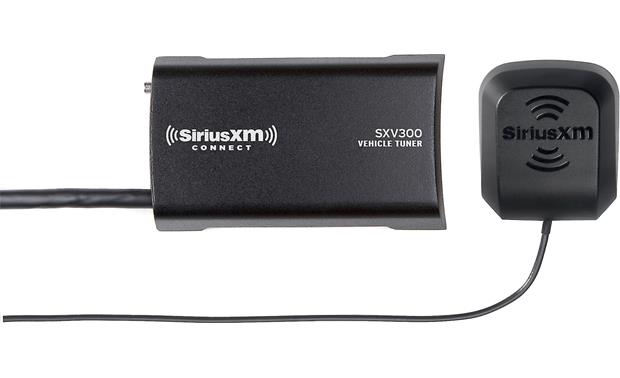
perhaps yours has crapped out. You might try a local car audio store that sells this and see if they are familiar and if there is a generic replacement ..... or maybe SIRIUS has recommended repair places . . .
unlike a lot of cars where SIRIUS is 'built into' the radio and included in base cost, even my '15 R59 charged $250 for SIRIUS with 1 year service ..... most cars get 6 months free if SIRIUS is built in ... my FOCUS ST did and daughter's SOUL did ...... the receiver I linked above which connects to a compatible radio is $70 ..
something like this .... https://www.crutchfield.com/p_220SXV...0V1-Tuner.html
perhaps yours has crapped out. You might try a local car audio store that sells this and see if they are familiar and if there is a generic replacement ..... or maybe SIRIUS has recommended repair places . . .
unlike a lot of cars where SIRIUS is 'built into' the radio and included in base cost, even my '15 R59 charged $250 for SIRIUS with 1 year service ..... most cars get 6 months free if SIRIUS is built in ... my FOCUS ST did and daughter's SOUL did ...... the receiver I linked above which connects to a compatible radio is $70 ..
Thread Starter
|
Neutral
Joined: May 2019
Posts: 2
Likes: 0
Thanks for the help Capt.... With so little general info out there regarding that early Nav system, even a "hint" is very helpful. Until I tear into it, I may never know. Your guess that the SiriusXM may be an external device in this generation of Mini does make a lot of sense. I noticed that the CD player is also "greyed" out in the menu UNITIL you shove a CD into it, then it becomes a choice in the menu. With that in mind, if the XM radio is an external source, it to may be "greyed" out in the menu unless there's activity from it. If it died, there's certainly nothing coming from it, so it could very well not be a choice in the menu. Before I activated it, only a year ago, it would provide a phone number and the ID for the receiver if you chose it, which proves it doesn't have to activated to be alive. When it quit, it totally quit. I've got a pretty good background in electronics, so I may have a fighting chance to either fix this thing or find a replacement....
Thanks again for you insite, I guess it's time to suck it up and start tearing it down!!!
Thanks again for you insite, I guess it's time to suck it up and start tearing it down!!!

Moderator


Joined: May 2012
Posts: 1,782
Likes: 341
From: San Francisco Bay Area
Moved you to the right forum section, you should find some help here.
Satellite receiver is under the passenger seat. Also see here: http://www.realoem.com/bmw/enUS/show...diagId=65_1667, check for your car's build date to verify exact details. Also check other threads in this section.
Satellite receiver is under the passenger seat. Also see here: http://www.realoem.com/bmw/enUS/show...diagId=65_1667, check for your car's build date to verify exact details. Also check other threads in this section.
Last edited by squawSkiBum; May 12, 2019 at 12:14 PM.

Thread
Thread Starter
Forum
Replies
Last Post
Navigation & Audio SiriusXM Satellite Radio Audio Quality
christomapher
Navigation & Audio
5
May 17, 2012 02:52 PM