


R60 R60 Mini Countryman 2014 USB iPhone 5 Lightning + Audio cable experiments


Thread Starter
|
1st Gear
Joined: Mar 2014
Posts: 27
Likes: 0
From: Jersey City, NJ
R60 Mini Countryman 2014 USB iPhone 5 Lightning + Audio cable experiments
Hello everyone,
Just wanted to foliow up with an iPhone 5 install. Unfortunately, the combined audio and usb cable didn't work, as I couldn't unplug just the audio to get the USB to be recognized. (There is an issue when using the USB from iPhone 5 lightning that we need the extra audio plug. But, this plug needs to be inserted after connected the USB. Otherwise there's no sound, even if the USB works fine. It's something weird to do with the iPhone, I think, as the sound doesn't return unless you unplug the audio cable at the iPhone, whereas unplugging it from the Aux In doesn't restore sound.)
So far, I've tried: the original factory Mini USB to Lightning cable, which didn't work, still no sound; then the adapter shown in the picture, which has also no sound but because the audio cannot be unplugged first. It's back to two separate cables and then only plugging in the audio after the USB is recognized by the car.... Such hassle!
By the way, using the Mountec to CD slot holder is amazing. It works really well. The connection is secure, the magnetic holder is inspired, easy to return and put back, nice click sound. Only problem is that the CD slot is too low, so I can't look down and still maintain view of roads/outside. So, I disassembled the holder, drilled a hole in the rabbit ear center piece that pops right off, and mounted the Mountec to the center console with a 1/4-20 bolt. Now the phone is in the perfect position, still easy to put on, though I still can't get rid of the ungainly cable connection. Maybe one day. It's so easy to discreetly run wiring down from there though.
Just wanted to foliow up with an iPhone 5 install. Unfortunately, the combined audio and usb cable didn't work, as I couldn't unplug just the audio to get the USB to be recognized. (There is an issue when using the USB from iPhone 5 lightning that we need the extra audio plug. But, this plug needs to be inserted after connected the USB. Otherwise there's no sound, even if the USB works fine. It's something weird to do with the iPhone, I think, as the sound doesn't return unless you unplug the audio cable at the iPhone, whereas unplugging it from the Aux In doesn't restore sound.)
So far, I've tried: the original factory Mini USB to Lightning cable, which didn't work, still no sound; then the adapter shown in the picture, which has also no sound but because the audio cannot be unplugged first. It's back to two separate cables and then only plugging in the audio after the USB is recognized by the car.... Such hassle!
By the way, using the Mountec to CD slot holder is amazing. It works really well. The connection is secure, the magnetic holder is inspired, easy to return and put back, nice click sound. Only problem is that the CD slot is too low, so I can't look down and still maintain view of roads/outside. So, I disassembled the holder, drilled a hole in the rabbit ear center piece that pops right off, and mounted the Mountec to the center console with a 1/4-20 bolt. Now the phone is in the perfect position, still easy to put on, though I still can't get rid of the ungainly cable connection. Maybe one day. It's so easy to discreetly run wiring down from there though.
Thread Starter
|
1st Gear
Joined: Mar 2014
Posts: 27
Likes: 0
From: Jersey City, NJ
I'll post pictures of what I think is the best iPhone or cell phone holder solution tomorrow. So glad that center trim is so easy to remove, with enough gap for the wiring to come all the way down...

1st Gear
Joined: Oct 2013
Posts: 41
Likes: 0
From: DFW
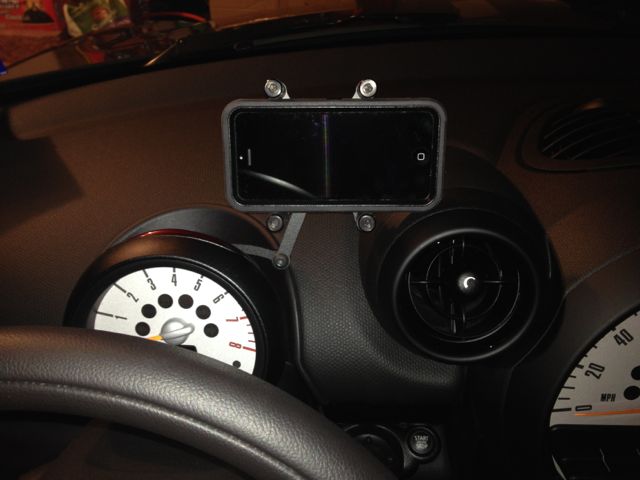
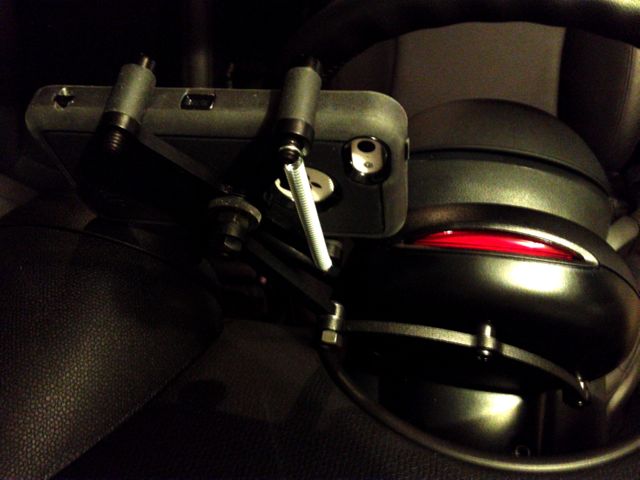
For a mount, I went with the Craven Speed MINI Smartphone Mount Pro attached to the back of the tach. I'm really pleased with it. It was easy to install, and holds my iPhone securely. I haven't had any issues with movement or vibration.


Cheers
Cheers

1st Gear
Joined: Apr 2014
Posts: 24
Likes: 1

Have you considered going Bluetooth for the audio connection (and using a lightning USB cable for just power)?
If you don't have Mini Connected, the following works well: http://www.viseeo.com/ugC_ShowroomIt...p?hidShowID=15
It is a small bluetooth dongle that attaches to the old style 30-pin iPod connector on the Y-cable and acts just like an iPod. Your phone connects to the dongle via bluetooth as an audio only device. Fits nicely under the phone cradle positioned at the front of the rail.
Works great for me. Audio quality is high. Very minor drawback(s) is that you use up the USB port (use the lighter socket for power) and that you will use a second bluetooth connection for the phone to the built-in Mini bluetooth (which works seamlessly). Nice thing is I only worry about plugging in the phone on a long trip or when mu battery is low.
If you don't have Mini Connected, the following works well: http://www.viseeo.com/ugC_ShowroomIt...p?hidShowID=15
It is a small bluetooth dongle that attaches to the old style 30-pin iPod connector on the Y-cable and acts just like an iPod. Your phone connects to the dongle via bluetooth as an audio only device. Fits nicely under the phone cradle positioned at the front of the rail.
Works great for me. Audio quality is high. Very minor drawback(s) is that you use up the USB port (use the lighter socket for power) and that you will use a second bluetooth connection for the phone to the built-in Mini bluetooth (which works seamlessly). Nice thing is I only worry about plugging in the phone on a long trip or when mu battery is low.

Thread
Thread Starter
Forum
Replies
Last Post
igzekyativ
MINIs & Minis for Sale
34
Jul 16, 2020 12:54 PM
dyeLucky
MINI Parts for Sale
3
Aug 7, 2015 07:10 AM
tippin
F55/F56 :: Hatch Talk (2014+)
3
Aug 5, 2015 08:43 AM