


R60 Iphone 5 armrest adapter


Thread Starter
|
1st Gear
Joined: Aug 2013
Posts: 39
Likes: 0
From: Dallas
Iphone 5 armrest adapter
I heard news about the iPhone 5 adapter for the armrest comes out late August, it is now September and I haven't heard anything more about it. Does anyone know if it's out or what's happening with it? I want to watch movies while I'm parked with my nav screen since I eat lunch in my car a lot and I've tried workarounds with different cable attachments with no luck. Looked up video in motion and they charge $600+ to make it work, wayyyy too much so was wondering what else is out there that you guys figured out. I tried my 5th gen iPod nano with the adapter USB and aux in cable but it doesn't detect the video on that either. Maybe bc I bought my cable from amazon but it came in BMW parts bag with serial number.

5th Gear
Joined: Jan 2011
Posts: 885
Likes: 0
From: CT
Hundreds of post on NAM in regards to this topic. Even when they release the 5 cradle, video will not be available. I've had a few and will do most everything except video. Several mirrored there iPhones but I'm pretty sure they did it through the mini supplied Y cable. Also you can have it programmed for video in motion, again search the forums. I went this route, http://prochip.de/shop/index.php?pag...74d1689ffa1371
Works great but only with the Y cable not the cradle.....
Works great
but only with the Y cable not the cradle.....

Thread Starter
|
1st Gear
Joined: Aug 2013
Posts: 39
Likes: 0
From: Dallas
Thanks for the response, I did search the forum but came up with nothing pertaining to this last week about the armrest that's why I created a post as there might be updated info about it. If you read my post I did mention video-in-motion but steered away because of the price. Sucks when companies don't live up to their promises especially when it seems like the entire mini line Is geared towards the iPhone. :/
5th Gear
Joined: Jan 2011
Posts: 885
Likes: 0
From: CT
Thanks for the response, I did search the forum but came up with nothing pertaining to this last week about the armrest that's why I created a post as there might be updated info about it. If you read my post I did mention video-in-motion but steered away because of the price. Sucks when companies don't live up to their promises especially when it seems like the entire mini line Is geared towards the iPhone. :/

5th Gear
Joined: Jan 2011
Posts: 885
Likes: 0
From: CT
I was told about the chip by a member of NAM from Italy....I was hesitant at first but decided to go for it. I have the part in my office. I'll post the part #I ordered and verify it with Germany. I don't recall if it specifically called it out as a mini part or just as BMW. Less than a minute plugged into the OBC and video in motion off your iPhone via the provided Y cable, not the cradle!
Trending Topics

There are two different cables. One supports video the other does not. They look identical.
Thread Starter
|
1st Gear
Joined: Aug 2013
Posts: 39
Likes: 0
From: Dallas
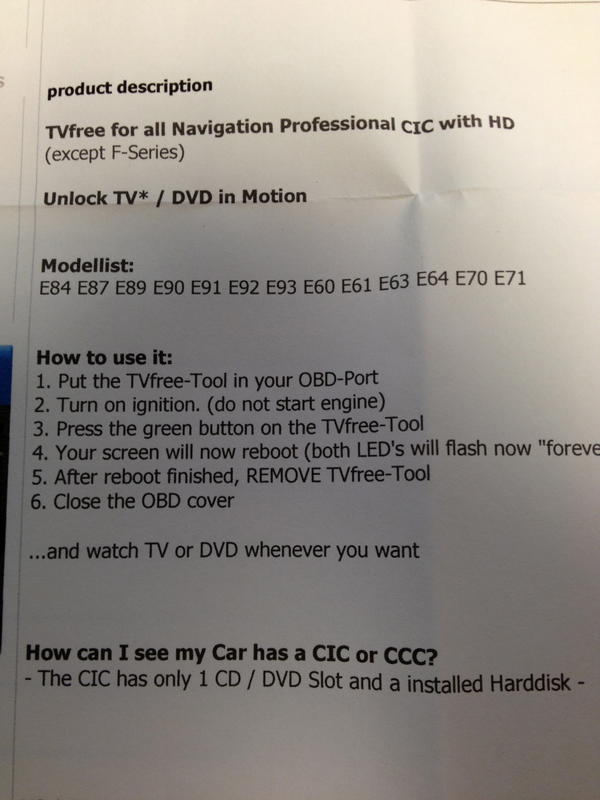
Flyer53, I looked at the Prochip link you posted and I'm interested in that. However, it seems like there are instructions and using google translate it didn't seem too clear on what to do. It looks like you don't leave that plugged into the OBD correct? This is how I understood the instructions. Correct me if I'm wrong but this is what I gathered from the translation.
Handling:
1 Plug TVFree into OBD Port
2 Switch on the ignition (do not start the engine)
3 Press the short(?) green light on the TVFree
4 The monitor (CID) will reboot (both LEDs flash on TVfree "forever")
5 Found after the reboot the TVfree from the OBD port <--not sure what this part means.
6 Close the cover of the OBD Port (I'm assuming after removing the TVFree device?) ... and watch TV or DVD Whenever You want
Handling:
1 Plug TVFree into OBD Port
2 Switch on the ignition (do not start the engine)
3 Press the short(?) green light on the TVFree
4 The monitor (CID) will reboot (both LEDs flash on TVfree "forever")
5 Found after the reboot the TVfree from the OBD port <--not sure what this part means.
6 Close the cover of the OBD Port (I'm assuming after removing the TVFree device?) ... and watch TV or DVD Whenever You want

2nd Gear
Joined: Feb 2013
Posts: 51
Likes: 0
From: Italy
I'm here.
Just to give the same suggestion I gave to Flyer53 at that time:
1) you can switch the prochip web page in english;
2) the description of the product, within the car models, doesn't mention the mini;
3) if you buy the correct one ( it should be this one: http://prochip.de/shop/index.php?pag...a8415763ca4fb7), it will work correctly;
4) in order to see video you don't need jailbreak, unless you only need to see video from the native video app;
5) if you want to mirror the iphone you will need jailbreak: in this last case you will be able to see everything, like your cable tv (I do it with slingplayer app).
Ciaoooo..
Just to give the same suggestion I gave to Flyer53 at that time:
1) you can switch the prochip web page in english;
2) the description of the product, within the car models, doesn't mention the mini;
3) if you buy the correct one ( it should be this one: http://prochip.de/shop/index.php?pag...a8415763ca4fb7), it will work correctly;
4) in order to see video you don't need jailbreak, unless you only need to see video from the native video app;
5) if you want to mirror the iphone you will need jailbreak: in this last case you will be able to see everything, like your cable tv (I do it with slingplayer app).
Ciaoooo..
5th Gear
Joined: Jan 2011
Posts: 885
Likes: 0
From: CT
I'm here.
Just to give the same suggestion I gave to Flyer53 at that time:
1) you can switch the prochip web page in english;
2) the description of the product, within the car models, doesn't mention the mini;
3) if you buy the correct one ( it should be this one: http://prochip.de/shop/index.php?pag...a8415763ca4fb7), it will work correctly;
4) in order to see video you don't need jailbreak, unless you only need to see video from the native video app;
5) if you want to mirror the iphone you will need jailbreak: in this last case you will be able to see everything, like your cable tv (I do it with slingplayer app).
Ciaoooo..
Just to give the same suggestion I gave to Flyer53 at that time:
1) you can switch the prochip web page in english;
2) the description of the product, within the car models, doesn't mention the mini;
3) if you buy the correct one ( it should be this one: http://prochip.de/shop/index.php?pag...a8415763ca4fb7), it will work correctly;
4) in order to see video you don't need jailbreak, unless you only need to see video from the native video app;
5) if you want to mirror the iphone you will need jailbreak: in this last case you will be able to see everything, like your cable tv (I do it with slingplayer app).
Ciaoooo..
....But again only through the Mini provided Y cable, not through the armrest/cradle for any of the I phones. And yes...cables purchased through a 3rd party needs the 3rd ring on it! I've had great luck here: http://www.radtech.us for cables & more. Not the cheapest but excellent quality.
5th Gear
Joined: Jan 2011
Posts: 885
Likes: 0
From: CT
Interesting.....I have yet to get that working, but then again I have not tried it since the initial try....I've heard that the european cradles are somewhat different. When convenient could you let me know the iphone model and a part # for the cradle if available. Thanks !
Thread Starter
|
1st Gear
Joined: Aug 2013
Posts: 39
Likes: 0
From: Dallas
I appreciate the feedback, but I did use google to translate the page, however, as mentioned in my step to step post there's a step or two that doesn't come out quite clear. Since some of you use that same device, can you clarify the instructions?
5th Gear
Joined: Jan 2011
Posts: 885
Likes: 0
From: CT
Very frustrating...That's why for the past year or so I've been using the mini Y cable, with short ext. cable from a mount by Pro-Mount...
My Cradle # is BMW 84.21-2 218 390-02 Also on the label it says iPhone4 Media. On the front where you snap-it in says MEDIA.
2nd Gear
Joined: Feb 2013
Posts: 51
Likes: 0
From: Italy
I don't think it depends on the jailbreaking.
It used to work the same way even before the jailbreak. Probably there's something differeng on the software side.
My armrest works exactly as the y cable. Connected included.
But, i've to say that the temperature of the iphone inside the armrest sometimes reaches super high levels.
At the same time it's pretty cool to keep the phone inside there, locked.
It used to work the same way even before the jailbreak. Probably there's something differeng on the software side.
My armrest works exactly as the y cable. Connected included.
But, i've to say that the temperature of the iphone inside the armrest sometimes reaches super high levels.
At the same time it's pretty cool to keep the phone inside there, locked.
2nd Gear
Joined: Feb 2013
Posts: 51
Likes: 0
From: Italy
And watch out that the part number is not exacly the same.
I was talking about the same topic here with another person and we found out that a singol number could affect the functionality of the armrest. I would like to let you try mine.
Anyway, to find the right one i went to the bmw dealer and they let me try the ones they had available.
I was talking about the same topic here with another person and we found out that a singol number could affect the functionality of the armrest. I would like to let you try mine.
Anyway, to find the right one i went to the bmw dealer and they let me try the ones they had available.
5th Gear
Joined: Jan 2011
Posts: 885
Likes: 0
From: CT
I don't think it depends on the jailbreaking.
It used to work the same way even before the jailbreak. Probably there's something differeng on the software side.
My armrest works exactly as the y cable. Connected included.
But, i've to say that the temperature of the iphone inside the armrest sometimes reaches super high levels.
At the same time it's pretty cool to keep the phone inside there, locked.
It used to work the same way even before the jailbreak. Probably there's something differeng on the software side.
My armrest works exactly as the y cable. Connected included.
But, i've to say that the temperature of the iphone inside the armrest sometimes reaches super high levels.
At the same time it's pretty cool to keep the phone inside there, locked.
Does your have the little fan..Mine does and helps a bit...but can get pretty warm if in there on a long trip...
5th Gear
Joined: Jan 2011
Posts: 885
Likes: 0
From: CT
And watch out that the part number is not exacly the same.
I was talking about the same topic here with another person and we found out that a singol number could affect the functionality of the armrest. I would like to let you try mine.
Anyway, to find the right one i went to the bmw dealer and they let me try the ones they had available.
I was talking about the same topic here with another person and we found out that a singol number could affect the functionality of the armrest. I would like to let you try mine.
Anyway, to find the right one i went to the bmw dealer and they let me try the ones they had available.

2nd Gear
Joined: Mar 2013
Posts: 76
Likes: 0
From: ME
iPhone 5s working fine
I have a 2013 CMS4 and upgraded last week to the iPhone 5s. I have the latest iOS 7 update and the steering wheel controls are working fine, mini connect is working (only actually used the FB plug-in so far), but everything appears to be working. Prior to the very latest iOS 7 update the steering wheel controls were not working.
Do not have the arm rest adaptor, just the Y adaptor and the 30-pin to lightning adapter. I have not yet used the video with either my iPhone 4 or my iPhone 5s, so I do not know if that works or not.
Do not have the arm rest adaptor, just the Y adaptor and the 30-pin to lightning adapter. I have not yet used the video with either my iPhone 4 or my iPhone 5s, so I do not know if that works or not.