


R60 Non Mini Connected People - We may have a good solution for Bluetooth Streaming...


Non Mini Connected People - We may have a good solution for Bluetooth Streaming...
So I was digging around on the Inifiniti forums (for my wife's car) and came across a solution those guys are using for the earlier models that dont have a2dp.
They posted about these devices that do bluetooth a2dp to apple 30 pin. What this means is you can use the ipod connector in the mini to connect and power the adaptor without any need for additional power
ive been researching these devices (there's dozens of them) on amazon to find one that supports AVRCP and good sound quality. AVRCP will allow track skipping, reverse, forward, pause/start etc.
So I had posted a bunch of these devices. But I actually purchased 2 of them to try out and now Im happy to post my results.
The absolute best a2dp adapter you can buy for the car right now is the tune2air by Viseeo. This device is specifically designed for interfacing with cars, and is unversally compatible with all major brands (BMW, Mini, Audi, MB, etc). It is also the most expensive at around 90-100 dollars but I just got mine and tried it and I have to say it works so well, it is as if the car came with a2dp from the factory. It allows Ipod pass through, which means you can actually browse your playlists and select songs right from your car, without taking your phone out of your pocket!!!! No other a2dp to 30 pin connector offers this!
You just plug the unit into the ipod dock on the car, pair your phone with it and within about 30 seconds, the car detects it as an ipod. The only caveat with the tune2air is right now it doesnt have android support out of the box. They JUST released android support for it this week, which requires a firmware update on the tune2air device. To get the update file you have to register your unit with the manufacturer and they send you a login/password for you to download the upgrade file. I just got my unit and emailed them so I dont have any info on this just yet. Stay tuned...
I also picked up the iSRX a2dp adapter, which is about 40 dollars on ebay. It supports AVRCP, and it actually works. Meaning if you plug it into an ipod player and use a remote control to change songs, it will pass those skip/forward/volume control commands to your ipod/android and skip songs. However this device doesnt pass through the ipod functonality in the mini. If you plug it in, you can stream music through bluetooth using the ipod doc, but it will only do so on AUX mode. In other words, its cheaper and you can stream audio but not use your remote control to skip songs..
They posted about these devices that do bluetooth a2dp to apple 30 pin. What this means is you can use the ipod connector in the mini to connect and power the adaptor without any need for additional power
ive been researching these devices (there's dozens of them) on amazon to find one that supports AVRCP and good sound quality. AVRCP will allow track skipping, reverse, forward, pause/start etc.
So I had posted a bunch of these devices. But I actually purchased 2 of them to try out and now Im happy to post my results.
The absolute best a2dp adapter you can buy for the car right now is the tune2air by Viseeo. This device is specifically designed for interfacing with cars, and is unversally compatible with all major brands (BMW, Mini, Audi, MB, etc). It is also the most expensive at around 90-100 dollars but I just got mine and tried it and I have to say it works so well, it is as if the car came with a2dp from the factory. It allows Ipod pass through, which means you can actually browse your playlists and select songs right from your car, without taking your phone out of your pocket!!!! No other a2dp to 30 pin connector offers this!
You just plug the unit into the ipod dock on the car, pair your phone with it and within about 30 seconds, the car detects it as an ipod. The only caveat with the tune2air is right now it doesnt have android support out of the box. They JUST released android support for it this week, which requires a firmware update on the tune2air device. To get the update file you have to register your unit with the manufacturer and they send you a login/password for you to download the upgrade file. I just got my unit and emailed them so I dont have any info on this just yet. Stay tuned...
I also picked up the iSRX a2dp adapter, which is about 40 dollars on ebay. It supports AVRCP, and it actually works. Meaning if you plug it into an ipod player and use a remote control to change songs, it will pass those skip/forward/volume control commands to your ipod/android and skip songs. However this device doesnt pass through the ipod functonality in the mini. If you plug it in, you can stream music through bluetooth using the ipod doc, but it will only do so on AUX mode. In other words, its cheaper and you can stream audio but not use your remote control to skip songs..
Last edited by Shoe Coupe; Mar 28, 2013 at 03:11 PM.
There's also this but it is not compatible with android :(
http://www.creativecaraudioshop.com/...2air-wma-1000/
http://www.creativecaraudioshop.com/...2air-wma-1000/


1st Gear
Joined: Jul 2011
Posts: 36
Likes: 0
I will be ordering this one (in about a week) to use for something else. I'd be happy to try it on the car to see if it works. If you find one sooner that does work, please post as I wouldn't mind one that will do double duty.


3rd Gear
Joined: Jan 2013
Posts: 287
Likes: 1
From: NY
i like the idea of being able to usb stream, but also if you connect the phone to this device in the usb port, then wouldn't it not be connected to the car's bluetooth, meaning then that there is no phone option anymore? or does the car see it as you having an iphone and both work?
just asking, but what are the advantages of streaming through bluetooth as opposed to using the aux port?
just asking, but what are the advantages of streaming through bluetooth as opposed to using the aux port?
i like the idea of being able to usb stream, but also if you connect the phone to this device in the usb port, then wouldn't it not be connected to the car's bluetooth, meaning then that there is no phone option anymore? or does the car see it as you having an iphone and both work?
just asking, but what are the advantages of streaming through bluetooth as opposed to using the aux port?
just asking, but what are the advantages of streaming through bluetooth as opposed to using the aux port?
I just purchased the iSRX one and tried it on my home stereo. It works exactly as advertised. It even works with AVRCP, meaning I can use the dock's remote control to control my phone...
Unforuntately I tried it in the mini and it did not detect it as an ipod. That being said if I set it to AUX, I get bluetooth streaming, but no wheel controls. However it does pause and use the car's bluetooth for phonecalls.
Im goign to order the tune2air one, I think that's the only designed to have the car pick it up as an IPOD and its supposed to work with BMWs.

3rd Gear
Joined: Dec 2011
Posts: 193
Likes: 0
From: NJ
Trending Topics
i use this and works great. powers my phone and streams via BT to my aux input.
Amazon.com
Amazon.com

I got the tune2air but so far I dont have anything to report yet as im fighting the vendor. If you have an ipod or iphone it works perfectly with the mini. They had promised a firmware update to get android support, albiet without playlist support, but being able to skip tracks forward/backward
Let me tell you how big of a pain it has been to deal with the vendor.
First I get the product, and they have the firmware on their site, but you cant download it without a username and password. So I contact them, they want my serial number. I give them my serial number, they send me a login to download and the link.
Then I click on the link to download, they just happen to redesign their site THE DAY i got the login info, I click the link and get a 404 error.
I email them back (mind you they are in Taiwan so reponses take a day because of the time difference). They give me a link to download it from another part of their website. Ok yay!
I go to download the software, install it. Now there is a SECOND registration that you need to do to be able to update the firmware, you have to get the registration code from them. So I email them again with the hardware ID, and they send me the registration code the next day.
I excitedly try to upgrade the firmware for a couple hours. It fails. I figure out you cannot use a mac or windows 7 machine to ugprade the firmware, it simply wont work. I reinstall the upgrade software on my windows xp laptop and try to install. HEY GUESS WHAT! He wants ANOTHER registration code.
At this point I get mad and hack the software through the windows registry to accept the registration code I already have. Finally I can upgrade the firmware
I upgrade the firmware sucessfully. Plug it into the Mini to see what happens...
....aaaaaandddd..... NOTHING! There is no difference. No android support whatsoever
I spent the next 3 days emailing back and forth with the vendor, who asks me if I have the Y-cable on the mini. I confirm. He says Ok I'll get back to you.
I havent heard back since.
Their customer support is atrocious at best and the fact that Ive spent a week trying to get this to work is ridiculous.
I have a feeling they'll come back and say sorry not compatible with the MINI. But guess what, I plugged it into the kenwood stereo on my M-coupe, and it didnt work there either with Android.
Let me tell you how big of a pain it has been to deal with the vendor.
First I get the product, and they have the firmware on their site, but you cant download it without a username and password. So I contact them, they want my serial number. I give them my serial number, they send me a login to download and the link.
Then I click on the link to download, they just happen to redesign their site THE DAY i got the login info, I click the link and get a 404 error.
I email them back (mind you they are in Taiwan so reponses take a day because of the time difference). They give me a link to download it from another part of their website. Ok yay!
I go to download the software, install it. Now there is a SECOND registration that you need to do to be able to update the firmware, you have to get the registration code from them. So I email them again with the hardware ID, and they send me the registration code the next day.
I excitedly try to upgrade the firmware for a couple hours. It fails. I figure out you cannot use a mac or windows 7 machine to ugprade the firmware, it simply wont work. I reinstall the upgrade software on my windows xp laptop and try to install. HEY GUESS WHAT! He wants ANOTHER registration code.
At this point I get mad and hack the software through the windows registry to accept the registration code I already have. Finally I can upgrade the firmware
I upgrade the firmware sucessfully. Plug it into the Mini to see what happens...
....aaaaaandddd..... NOTHING! There is no difference. No android support whatsoever
I spent the next 3 days emailing back and forth with the vendor, who asks me if I have the Y-cable on the mini. I confirm. He says Ok I'll get back to you.
I havent heard back since.
Their customer support is atrocious at best and the fact that Ive spent a week trying to get this to work is ridiculous.
I have a feeling they'll come back and say sorry not compatible with the MINI. But guess what, I plugged it into the kenwood stereo on my M-coupe, and it didnt work there either with Android.
So I just saw on their website they released yet another update on the tune2air. This one is version 3.14.
Now that I have the software installed and ready to go, upgrading it to the newest firmware was a snap.
I upgraded to 3.14 and viola! It works with android in the mini!
When you pair it, it detects the android phone as an ipod. You can skip forward and back on your playlist and it pauses the music when you stop the car. This is perfect!!!
Now that I have the software installed and ready to go, upgrading it to the newest firmware was a snap.
I upgraded to 3.14 and viola! It works with android in the mini!
When you pair it, it detects the android phone as an ipod. You can skip forward and back on your playlist and it pauses the music when you stop the car. This is perfect!!!
Sweeeet! im so happy! This is exactly what I was looking for in a2dp streaming. Perfect ipod integration and good android intergration. Now every time i drive the mini, I wont wish it had a2dp like the m-coupe! :P

4th Gear
Joined: Sep 2012
Posts: 407
Likes: 0
From: Lake Saint Louis, MO
I got the tune2air but so far I dont have anything to report yet as im fighting the vendor. If you have an ipod or iphone it works perfectly with the mini. They had promised a firmware update to get android support, albiet without playlist support, but being able to skip tracks forward/backward
Let me tell you how big of a pain it has been to deal with the vendor.
First I get the product, and they have the firmware on their site, but you cant download it without a username and password. So I contact them, they want my serial number. I give them my serial number, they send me a login to download and the link.
Then I click on the link to download, they just happen to redesign their site THE DAY i got the login info, I click the link and get a 404 error.
I email them back (mind you they are in Taiwan so reponses take a day because of the time difference). They give me a link to download it from another part of their website. Ok yay!
I go to download the software, install it. Now there is a SECOND registration that you need to do to be able to update the firmware, you have to get the registration code from them. So I email them again with the hardware ID, and they send me the registration code the next day.
I excitedly try to upgrade the firmware for a couple hours. It fails. I figure out you cannot use a mac or windows 7 machine to ugprade the firmware, it simply wont work. I reinstall the upgrade software on my windows xp laptop and try to install. HEY GUESS WHAT! He wants ANOTHER registration code.
At this point I get mad and hack the software through the windows registry to accept the registration code I already have. Finally I can upgrade the firmware
I upgrade the firmware sucessfully. Plug it into the Mini to see what happens...
....aaaaaandddd..... NOTHING! There is no difference. No android support whatsoever
I spent the next 3 days emailing back and forth with the vendor, who asks me if I have the Y-cable on the mini. I confirm. He says Ok I'll get back to you.
I havent heard back since.
Their customer support is atrocious at best and the fact that Ive spent a week trying to get this to work is ridiculous.
I have a feeling they'll come back and say sorry not compatible with the MINI. But guess what, I plugged it into the kenwood stereo on my M-coupe, and it didnt work there either with Android.
Let me tell you how big of a pain it has been to deal with the vendor.
First I get the product, and they have the firmware on their site, but you cant download it without a username and password. So I contact them, they want my serial number. I give them my serial number, they send me a login to download and the link.
Then I click on the link to download, they just happen to redesign their site THE DAY i got the login info, I click the link and get a 404 error.
I email them back (mind you they are in Taiwan so reponses take a day because of the time difference). They give me a link to download it from another part of their website. Ok yay!
I go to download the software, install it. Now there is a SECOND registration that you need to do to be able to update the firmware, you have to get the registration code from them. So I email them again with the hardware ID, and they send me the registration code the next day.
I excitedly try to upgrade the firmware for a couple hours. It fails. I figure out you cannot use a mac or windows 7 machine to ugprade the firmware, it simply wont work. I reinstall the upgrade software on my windows xp laptop and try to install. HEY GUESS WHAT! He wants ANOTHER registration code.
At this point I get mad and hack the software through the windows registry to accept the registration code I already have. Finally I can upgrade the firmware
I upgrade the firmware sucessfully. Plug it into the Mini to see what happens...
....aaaaaandddd..... NOTHING! There is no difference. No android support whatsoever
I spent the next 3 days emailing back and forth with the vendor, who asks me if I have the Y-cable on the mini. I confirm. He says Ok I'll get back to you.
I havent heard back since.
Their customer support is atrocious at best and the fact that Ive spent a week trying to get this to work is ridiculous.
I have a feeling they'll come back and say sorry not compatible with the MINI. But guess what, I plugged it into the kenwood stereo on my M-coupe, and it didnt work there either with Android.


Neutral
Joined: May 2013
Posts: 2
Likes: 0
I would like to know where you bought your tune2air and if you were satisfied with the reseller. I would like to get one, but it seems to me like most online retailers are a little shady and I don't have a lot of options since I'm in Canada...
Thanks
I got it from ebay. There was only one vendor at the time based in Washington State. I paid 89 for it. I think since then the price has gone up to 119. :(

1st Gear
Joined: Mar 2013
Posts: 14
Likes: 0
bought a tune2air and it's awesome. this is the only thing I thought Mini Connected was good for, and saved about $900!
quick question though - does anyone know if leaving it connected to the Y cable has any drain on the battery at all?
quick question though - does anyone know if leaving it connected to the Y cable has any drain on the battery at all?
The USB ports turns off about 5-10 mins after you shut the car off. No chance of battery drain!
I LOVE this thing!

6th Gear
Joined: Nov 2004
Posts: 2,607
Likes: 316
From: Arnold, MO.
For those who just want an audio connection:
Not new, but I just found it.
HTC Bluetooth Audio Adaptor, works w/ any bluetooth device, charges w/ micro-usb, 5-6 hrs of use or keep it plugged in. All the reviews seem good. $40-$60.
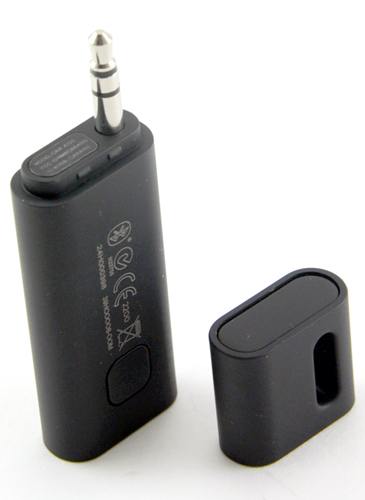
Ordered mine yesterday, I'll let you know.
Not new, but I just found it.
HTC Bluetooth Audio Adaptor, works w/ any bluetooth device, charges w/ micro-usb, 5-6 hrs of use or keep it plugged in. All the reviews seem good. $40-$60.
Ordered mine yesterday, I'll let you know.

2nd Gear
Joined: Aug 2006
Posts: 51
Likes: 0
Since I have a lifeproof case, the stock connection wouldn't fit, so I ended up getting this one from amazon:
Works fine, only complaint is the bass seems muted when I play through bluetooth as opposed to direct connecting
Works fine, only complaint is the bass seems muted when I play through bluetooth as opposed to direct connecting

2nd Gear
Joined: Jul 2012
Posts: 122
Likes: 0
I wound up switching to the
Bluetooth unit and am using it with my Galaxy Note 3 and it works flawlessly and sounds great.
The greatest part is that my steering wheel controls for next and previous song works as well as compared to using the Kinivo or the Belkin unit.
It has an old style iphone connector on it so it works with the Y Cable from mini.
ViseeO makes a special Y cable for the mini that allows the song names to be passed to the radio as well and I have that on order. Right now it just says next where the song name would be. LOVE LOVE LOVE this unit. It even works in my other car with a Dension PCM Adapter although there is no song name support in that scenario.
The greatest part is that my steering wheel controls for next and previous song works as well as compared to using the Kinivo or the Belkin unit.
It has an old style iphone connector on it so it works with the Y Cable from mini.
ViseeO makes a special Y cable for the mini that allows the song names to be passed to the radio as well and I have that on order. Right now it just says next where the song name would be. LOVE LOVE LOVE this unit. It even works in my other car with a Dension PCM Adapter although there is no song name support in that scenario.


2nd Gear
Joined: Jul 2012
Posts: 122
Likes: 0
My 2012 Mini cooper S has the optional bluetooth used for phone
So for Phone calls I use the bluetooth in the car and for music I use the multimedia A2DP that the Tune to Air provides from ViseO. If you go into your phones bluetooth options you can select which to use under each specific device.
If your car does not have bluetooth at all then your best bet and cheapest is probably the Kinivo Unit . Unlike the Tune2air you can use it for voice calls too. It has a big voice activation button that you can mount in the car and also has forward and back buttons for next and previous song. I used it for a bit before I got the Viseeo unit and I was pretty happy with it.
If your car does not have bluetooth at all then your best bet and cheapest is probably the Kinivo Unit . Unlike the Tune2air you can use it for voice calls too. It has a big voice activation button that you can mount in the car and also has forward and back buttons for next and previous song. I used it for a bit before I got the Viseeo unit and I was pretty happy with it.