


Navigation & Audio Hooking up my Cooper S with my Bluetooth phone


Thread Starter
|
Neutral
Joined: Jan 2007
Posts: 3
Likes: 0
Hooking up my Cooper S with my Bluetooth phone
I have heard that there is a way to activate your blue tooth phone with the speaker system in our Mini's. Since there will be a new law in California requiring handsfree phone use as of July 1st, I need to know if this is really possible. Anyone know how to accomplish it? I have a 2006 Cooper S.
thanks,
Betty
thanks,
Betty
Last edited by Betty J Lamb; Jun 13, 2008 at 08:33 AM. Reason: forgot to mention the year


Vendor & Moderator :: MINI Camera and Video & c3 club forum
iTrader: (6)
Depends if you paid for the Bluetooth option or not when you bought your MINI. It was like $500 or so, so if you didn't request that pricey add on, you probably don't have it.
I bought a Garmin Nuvi 360 nav which has bluetooth, and liked how I could hear my callers on the speakers--using the Aux In on my head unit. However, hearing them was only part of the battle. Turns out callers couldn't hear me! They said my voice was all garbled.
So after talking to a fellow NAMer who gave me a bunch of links as well as the solution she chose--I endedup buying this.
http://www.newministuff.com/new/shop...uctshow&id=256
It's not cheap and ships from the UK--costs about US$300
But it does allow you to use the MFSW controls on your steering wheel to answer the phone and make calls. The primary reason though was that supposedly the sound quality was top notch, and it's got circuitry to reduce background noise.
My unit just arrived yesterday, and won't be installed until next week, so I can't report anything yet.
Richard
I bought a Garmin Nuvi 360 nav which has bluetooth, and liked how I could hear my callers on the speakers--using the Aux In on my head unit. However, hearing them was only part of the battle. Turns out callers couldn't hear me! They said my voice was all garbled.
So after talking to a fellow NAMer who gave me a bunch of links as well as the solution she chose--I endedup buying this.
http://www.newministuff.com/new/shop...uctshow&id=256
It's not cheap and ships from the UK--costs about US$300
But it does allow you to use the MFSW controls on your steering wheel to answer the phone and make calls. The primary reason though was that supposedly the sound quality was top notch, and it's got circuitry to reduce background noise.
My unit just arrived yesterday, and won't be installed until next week, so I can't report anything yet.
Richard
I have heard that there is a way to activate your blue tooth phone with the speaker system in our Mini's. Since there will be a new law in California requiring handsfree phone use as of July 1st, I need to know if this is really possible. Anyone know how to accomplish it?
thanks,
Betty
thanks,
Betty
If installed, you would have a pairing button in the arm rest (if you have navigation) or along with other buttons and a small display right next to your head unit. Holding the push-to-talk button and the pairing button will display Bluetooth Pairing on the navigation screen or the display next to the head unit.
If it is not installed, you can get the parts from a dealer for about $1000 (not including arm rest) plus three hours of installation time, which hooks into navigation if you have it or adds controls and display if you don't. Bimmernav sell kits with newer modules and microphones for about $450 with controls but no display for cars without navigation, and for $850 for cars with navigation, installation is similar except without the optional wiring for the arm rest.
https://www.northamericanmotoring.co...ad.php?t=90414
http://www.trademotion.com/partlocat...catalogid=3751
http://www.bimmernav.com/store/catalog/product_info.php?products_id=119{23}145
http://www.europeanautosource.com/pr...roducts_id=657
Last edited by Michal; Jun 13, 2008 at 12:56 PM.
Trending Topics

4th Gear
Joined: Mar 2008
Posts: 369
Likes: 0
From: San Diego, CA
If you have the Bluetooth option, it does work. It is a matter of pairing up your phone to the car. I have a Blackberry and I paired it up and had it working in about 5 minutes. The car with have something in the manual about how to do it. Good luck! 
Thread Starter
|
Neutral
Joined: Jan 2007
Posts: 3
Likes: 0
If it turns out my car doesn't have blue tooth as I thought (and it's looking like that the case), does anyone have a good solution to handsfree talking through the speaker system? I know "Parrot" has several options, but didn't know if anyone had any experience with any of them.
Thanks,
Betty
Thanks,
Betty
Again, what model and year do you have, with nav and/or sw controls or without?
I listed and linked some options for older model cars above, starting with the 2007 coupe Bluetooth more commonly comes with the cars, and there are other options for adding it.
I listed and linked some options for older model cars above, starting with the 2007 coupe Bluetooth more commonly comes with the cars, and there are other options for adding it.
Last edited by Michal; Jun 13, 2008 at 04:52 PM.
Thread Starter
|
Neutral
Joined: Jan 2007
Posts: 3
Likes: 0
Thanks for your help!
Betty

If you have navigation, you can choose between the dealer kit with optional armrest cradle but old electronics for $1k or the newer electronics without the armrest option from Bimmernav or EAS for $850, all of these options will work with your navigation system display, sound system, and steering wheel controls if you have them.
If you don't have navigation, you can choose between the same dealer kit for $1k setup with separate buttons and display next to your head unit, or one from Bimmernav for $450 which has the separate buttons but no display.
Vendor & Moderator :: MINI Camera and Video & c3 club forum
iTrader: (6)
Based on those prices, the Parrot CK 3000 Evolution is a steal for under $300. I just installed mine and so far so good. I've got a 2005 MCS by the way.
My phone is an AT&T Tilt (PocketPC) running Windows Mobile 6 Pro. I've got the Microsoft Text to Speech software on it and so when I hit the little phone icon on my MFSW, it goes into the Voice Recognition mode.
From there I can control my phone. Although the Parrot permits recording voice tags, I hate having to remember the tags I assigned to people.
With my phone I can say---DIAL 800 xxx-xxxx or CALL Voicemail to check my voice mail, or CALL Home etc.. And I can even say--What is my next appointment and it tells me what's coming up on my agenda.
It's worked fine in the shop here--but I'll have to see how it works while driving--if so I'll be very pleased, as my phone has trouble recognizing my commands while driving due to the background noise. Can't wait to see how the Parrot responds.
I'm also going to take steps to quiet the interior with sound dampening material which will happen very soon.
I'll post more info about how it works under the noisy driving environment shortly.
Richard
My phone is an AT&T Tilt (PocketPC) running Windows Mobile 6 Pro. I've got the Microsoft Text to Speech software on it and so when I hit the little phone icon on my MFSW, it goes into the Voice Recognition mode.
From there I can control my phone. Although the Parrot permits recording voice tags, I hate having to remember the tags I assigned to people.
With my phone I can say---DIAL 800 xxx-xxxx or CALL Voicemail to check my voice mail, or CALL Home etc.. And I can even say--What is my next appointment and it tells me what's coming up on my agenda.
It's worked fine in the shop here--but I'll have to see how it works while driving--if so I'll be very pleased, as my phone has trouble recognizing my commands while driving due to the background noise. Can't wait to see how the Parrot responds.
I'm also going to take steps to quiet the interior with sound dampening material which will happen very soon.
I'll post more info about how it works under the noisy driving environment shortly.
Richard
Vendor & Moderator :: MINI Camera and Video & c3 club forum
iTrader: (6)
Just went out for a bit of city driving to get some lunch---yeah at 4:30pm..anyways...feelings are mixed right now about the Parrot performance. My interior is pretty noisy and polluted so maybe I'm expecting too much. But between the AC running, my Valentine V1 radar beeping, and road noise--the voice response wasn't very accurate. With just road noise present, it worked well however. I just adjusted my V1 so the mute is completely off, so it won't beep.
The big test will be on my way home tonight during my 50 mile commute. So far the Parrot has worked better than my Garmin Nuvi 360, and I got much better accuracy when I held the external mic close to my mouth--which makes sense--but not very practical for a hands free solution.
The big test will be on my way home tonight during my 50 mile commute. So far the Parrot has worked better than my Garmin Nuvi 360, and I got much better accuracy when I held the external mic close to my mouth--which makes sense--but not very practical for a hands free solution.
Last edited by OctaneGuy; Jun 13, 2008 at 05:14 PM. Reason: I said radio--I meant road noise
The OEM retrofits do cost more than the third party stuff, unlike most third party stuff they fit with the car and other equipment, however.
OctaneGuy mentions all the sources of noise including "the radio", the OEM kit mutes/pauses all other audio sources when in use and uses the audio system for the incoming part of the conversation.
OctaneGuy mentions "held the external mic close to my mouth", the OEM kit puts the mike into the roof location just aft of the map lights.
Anyway, those two phrases in the last post just struck me as odd, perhaps I'm interpreting them incorrectly.
I don't know enough about the Parrot kit to really compare, perhaps someone that has tried both OEM and Parrot can chime in with a real comparison of actual differences and similarities.
OctaneGuy mentions all the sources of noise including "the radio", the OEM kit mutes/pauses all other audio sources when in use and uses the audio system for the incoming part of the conversation.
OctaneGuy mentions "held the external mic close to my mouth", the OEM kit puts the mike into the roof location just aft of the map lights.
Anyway, those two phrases in the last post just struck me as odd, perhaps I'm interpreting them incorrectly.
I don't know enough about the Parrot kit to really compare, perhaps someone that has tried both OEM and Parrot can chime in with a real comparison of actual differences and similarities.
Last edited by Michal; Jun 13, 2008 at 04:53 PM.
Vendor & Moderator :: MINI Camera and Video & c3 club forum
iTrader: (6)
Actually the Parrot works the same as the OEM. I shouldn't have said the noisy radio, as when you use the Parrot in Voice Recognition mode or for making calls, the radio is silenced, however neither the OEM nor the Parrot will silence radar detectors that have their own speakers, airconditioning, etc... and that's what I was referring to.
As for the external mic--it too is mounted on the roof, however I haven't done the full install yet. I've left the mic loose so I can experiment with mic positions. Right now I have it clipped to the sunroof surround adjacent to where the OEM mic would mount, and that's where it's not recognizing my commands under the noisy conditions. I'm moving the mic around to find the optimal locations.
As for the external mic--it too is mounted on the roof, however I haven't done the full install yet. I've left the mic loose so I can experiment with mic positions. Right now I have it clipped to the sunroof surround adjacent to where the OEM mic would mount, and that's where it's not recognizing my commands under the noisy conditions. I'm moving the mic around to find the optimal locations.
The OEM retrofits do cost more than the third party stuff, unlike most third party stuff they fit with the car and other equipment, however.
OctaneGuy mentions all the sources of noise including "the radio", the OEM kit mutes/pauses all other audio sources when in use and uses the audio system for the incoming part of the conversation.
OctaneGuy mentions "held the external mic close to my mouth", the OEM kit puts the mike into the roof location just aft of the map lights.
Anyway, those two phrases in the last post just struck me as odd, perhaps I'm interpreting them incorrectly.
I don't know enough about the Parrot kit to really compare, perhaps someone that has tried both OEM and Parrot can chime in with a real comparison of actual differences and similarities.
OctaneGuy mentions all the sources of noise including "the radio", the OEM kit mutes/pauses all other audio sources when in use and uses the audio system for the incoming part of the conversation.
OctaneGuy mentions "held the external mic close to my mouth", the OEM kit puts the mike into the roof location just aft of the map lights.
Anyway, those two phrases in the last post just struck me as odd, perhaps I'm interpreting them incorrectly.
I don't know enough about the Parrot kit to really compare, perhaps someone that has tried both OEM and Parrot can chime in with a real comparison of actual differences and similarities.

4th Gear
Joined: Sep 2006
Posts: 336
Likes: 0
From: Fort Wayne, IN
The Parrot is a good option and doesn't take any space.
Silences the radio and rings thru the speakers when the call comes in. The mic is overhead and all sound is through the speakers. The only caller complaint I get is when on the road at high speeds, they say it sounds like its raining.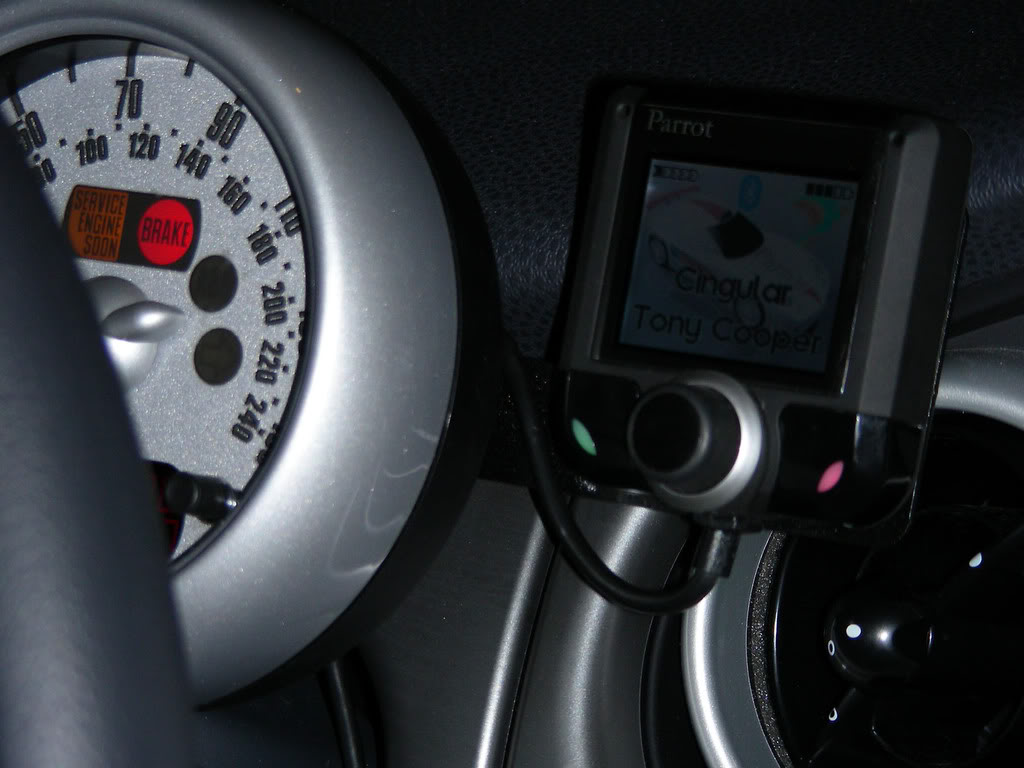
Silences the radio and rings thru the speakers when the call comes in. The mic is overhead and all sound is through the speakers. The only caller complaint I get is when on the road at high speeds, they say it sounds like its raining.
If it turns out my car doesn't have blue tooth as I thought (and it's looking like that the case), does anyone have a good solution to handsfree talking through the speaker system? I know "Parrot" has several options, but didn't know if anyone had any experience with any of them.
Thanks,
Betty
Thanks,
Betty
Buy a newer mini


I have the Parrot 3K installed in my 06 JCW car and while it does function, it is also disappointing. The audio come thru the OEM head unit and it will silence the tunes and display PHONE while in operation, cool but the audio is not loud enough. Also, I have the mic mounted at the top of the A-pillar, obviously that is too far away as I have to lean forward and shout for anyone to hear me.
It does work great if the engine is off, but then again I don't really need it if the engine is off.
Just use your bluetooth headset and you will get better performance.
It does work great if the engine is off, but then again I don't really need it if the engine is off.
Just use your bluetooth headset and you will get better performance.
Vendor & Moderator :: MINI Camera and Video & c3 club forum
iTrader: (6)
Yeah that's not exactly what I wanted to hear after spending $330 for this--it's only marginally better than the bluetooth on my Garmin Nuvi 360.
Does the stereo volume control control the loudness of the caller? Because it doesn't for me. In fact, I hear the same volume whether the HU is on or off. Strange but yeah, with the HU off, I can still hear callers and check my voicemail through the car speakers.
Richard
Does the stereo volume control control the loudness of the caller? Because it doesn't for me. In fact, I hear the same volume whether the HU is on or off. Strange but yeah, with the HU off, I can still hear callers and check my voicemail through the car speakers.
Richard
I have the Parrot 3K installed in my 06 JCW car and while it does function, it is also disappointing. The audio come thru the OEM head unit and it will silence the tunes and display PHONE while in operation, cool but the audio is not loud enough. Also, I have the mic mounted at the top of the A-pillar, obviously that is too far away as I have to lean forward and shout for anyone to hear me.
It does work great if the engine is off, but then again I don't really need it if the engine is off.
Just use your bluetooth headset and you will get better performance.
It does work great if the engine is off, but then again I don't really need it if the engine is off.
Just use your bluetooth headset and you will get better performance.
This system does not seem to utilize the amp in the HU, it must have it's own internal and obviously tiny amp. So, no the volume control on the HU has no effect, it plays through the HU, but it does not seem to use the HU.
It's in there, but I almost never use it, I just resort to the BT headset, kind of a bummer.
It's in there, but I almost never use it, I just resort to the BT headset, kind of a bummer.
Vendor & Moderator :: MINI Camera and Video & c3 club forum
iTrader: (6)
Yeah that's what I've experienced as well, and wondered if maybe I installed it incorrectly. MLWagner79 has it--and said she can turn the volume up on the head unit for more volume---I'm trying to get her to clarify that if that's true because it does nothing for me. I also sent a PM to Mikey at NewMINIStuff--but no reply yet.
To me, the only drawback to the parrot is the small amp...seems to me that should be a pretty simple fix with an external amplifier--if I know what wires are coming out of the unit to the speaker.
Today I installed the Raamaudio BXT sound deadening material and it made a huge difference in sound reduction. My Invidia isn't exactly quiet, and with my seats out--I really want to wear ear plugs on long drives. So I pulled the rear seats and bench, and the battery and installed the material over all the sheet metal from the rear seats to the boot hatch.
The voice recognition actually worked while at 75+ mph, and the wife said my voice sounded fine. I temporarily mounted the mic near the tach so that its inline with my mouth---so I don't have to talk towards the ceiling.
I still need to put the BXT in the doors and under the driver/passenger seating area/foot wells to complete the install, but even with the half install today, the Parrot definitely performs better.
To me, the only drawback to the parrot is the small amp...seems to me that should be a pretty simple fix with an external amplifier--if I know what wires are coming out of the unit to the speaker.
Today I installed the Raamaudio BXT sound deadening material and it made a huge difference in sound reduction. My Invidia isn't exactly quiet, and with my seats out--I really want to wear ear plugs on long drives. So I pulled the rear seats and bench, and the battery and installed the material over all the sheet metal from the rear seats to the boot hatch.
The voice recognition actually worked while at 75+ mph, and the wife said my voice sounded fine. I temporarily mounted the mic near the tach so that its inline with my mouth---so I don't have to talk towards the ceiling.
I still need to put the BXT in the doors and under the driver/passenger seating area/foot wells to complete the install, but even with the half install today, the Parrot definitely performs better.
This system does not seem to utilize the amp in the HU, it must have it's own internal and obviously tiny amp. So, no the volume control on the HU has no effect, it plays through the HU, but it does not seem to use the HU.
It's in there, but I almost never use it, I just resort to the BT headset, kind of a bummer.
It's in there, but I almost never use it, I just resort to the BT headset, kind of a bummer.

Okay, so I just went and played with mine, and the volume on the stereo *does* increase the volume through the speakers...but only to a point. So I don't know if the internal volume on the unit only allows it to be so loud (sort of like when I have a song on my iPod that won't play any louder, no matter how much I try to turn up the volume)...maybe?
The other thing is, I was noting where people were putting the mic. I have mine currently at the top of the driver's side A-pillar, with the little flat end just wedged in between the pillar and the roofline. I don't get any complaints about the noise from my end, and maybe I just have awesome hearing...haha...but I don't have an issue with volume at all.
The other thing is, I was noting where people were putting the mic. I have mine currently at the top of the driver's side A-pillar, with the little flat end just wedged in between the pillar and the roofline. I don't get any complaints about the noise from my end, and maybe I just have awesome hearing...haha...but I don't have an issue with volume at all.
Vendor & Moderator :: MINI Camera and Video & c3 club forum
iTrader: (6)
There is definitely something wrong with my install because the volume **** has no effect. Thanks for confirming...I've emailed Parrot support in the UK.
Richard
Richard
Okay, so I just went and played with mine, and the volume on the stereo *does* increase the volume through the speakers...but only to a point. So I don't know if the internal volume on the unit only allows it to be so loud (sort of like when I have a song on my iPod that won't play any louder, no matter how much I try to turn up the volume)...maybe?
The other thing is, I was noting where people were putting the mic. I have mine currently at the top of the driver's side A-pillar, with the little flat end just wedged in between the pillar and the roofline. I don't get any complaints about the noise from my end, and maybe I just have awesome hearing...haha...but I don't have an issue with volume at all.
The other thing is, I was noting where people were putting the mic. I have mine currently at the top of the driver's side A-pillar, with the little flat end just wedged in between the pillar and the roofline. I don't get any complaints about the noise from my end, and maybe I just have awesome hearing...haha...but I don't have an issue with volume at all.