


R56 Sat-Nav Options


Thread Starter
|
1st Gear
Joined: Aug 2013
Posts: 29
Likes: 0
Sat-Nav Options
Hi guys, I bought an R56 a few years ago it has every optional extra except for the sat nav. At the time I didn't really see a need for it as I only drove a few miles a day. Now with a change of job i find myself using my phone and its starting to p*ss me off!
I've been looking around and I have found a few solutions and was wondering what anyone else had done/thought.
My uncle (in law) works for BMW and I have asked if I bought all the neccasary parts for the OEM sat nav is it possible to fit it. And his reply was its virtually impossible due to the different loom added ECU's etc.
SO there's this chinese site which has a similar looking OEM but with the crappy chinese WindowsCE OS. Here's what it looks like, its around £300 and I would buy it if it wasn't for KM/h as im in the UK I need Mph!! :(
http://www.aliexpress.com/item/car-d...299298202.html
It kinda looks good. (haven't seen one in person)
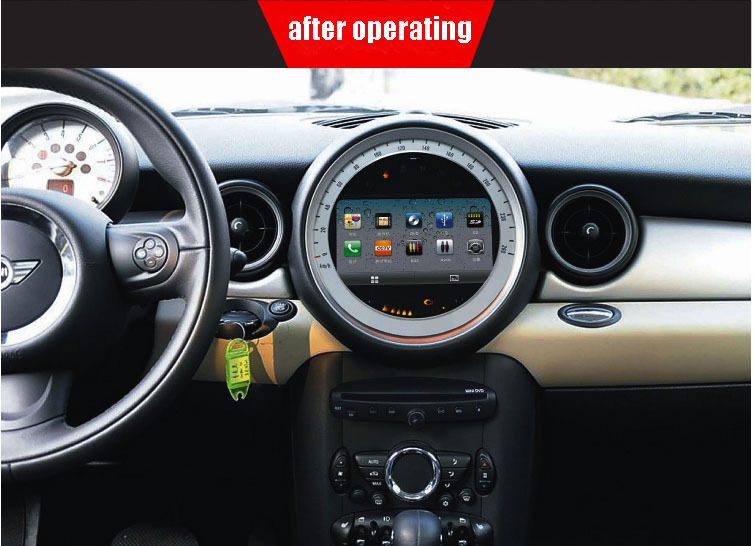
Or I was going to get the Retrofit (garmin I believe) which goes next to the speedo, but to me that looked ugly.
Wondering if any of you guys had any other solutions or ideas? Money isn't really a big issue for me as im looking to spend money on the car anyway as I've decided i'm not upgrading to the 2014 Mini (so ugly!)
I've been looking around and I have found a few solutions and was wondering what anyone else had done/thought.
My uncle (in law) works for BMW and I have asked if I bought all the neccasary parts for the OEM sat nav is it possible to fit it. And his reply was its virtually impossible due to the different loom added ECU's etc.
SO there's this chinese site which has a similar looking OEM but with the crappy chinese WindowsCE OS. Here's what it looks like, its around £300 and I would buy it if it wasn't for KM/h as im in the UK I need Mph!! :(
http://www.aliexpress.com/item/car-d...299298202.html
It kinda looks good. (haven't seen one in person)
Or I was going to get the Retrofit (garmin I believe) which goes next to the speedo, but to me that looked ugly.
Wondering if any of you guys had any other solutions or ideas? Money isn't really a big issue for me as im looking to spend money on the car anyway as I've decided i'm not upgrading to the 2014 Mini (so ugly!)

6th Gear
Joined: Aug 2011
Posts: 2,064
Likes: 15
From: Silly-con Valley
I use a CravenSpeed mount that puts my phone (running a GPS mapping app) next to my tach. Works great--I don't have to look down away from the road, and the nav is always at my fingertips.
Since everything in the MINI is so software-dependent, I bet you would have to code the car to enable the nav system no matter what you did. And with an aftermarket system, it still wouldn't be integrated into the rest of the car's functions.
Since everything in the MINI is so software-dependent, I bet you would have to code the car to enable the nav system no matter what you did. And with an aftermarket system, it still wouldn't be integrated into the rest of the car's functions.


What year is your mini? The 2011+ models are reputedly hard to retrofit for the reasons you mentioned, but up to 2010 it's possible.
I'm testing this theory shortly. I have a 2009 and have procured all the parts needed (I think) except the joystick. Once I get them all I'll swap them in, code the Nav into the VO, and with luck it will work.
(As for why … well, why not? Waze is certainly superior but hey, I like toys.)
I'm testing this theory shortly. I have a 2009 and have procured all the parts needed (I think) except the joystick. Once I get them all I'll swap them in, code the Nav into the VO, and with luck it will work.
(As for why … well, why not? Waze is certainly superior but hey, I like toys.)
Thread Starter
|
1st Gear
Joined: Aug 2013
Posts: 29
Likes: 0
What year is your mini? The 2011+ models are reputedly hard to retrofit for the reasons you mentioned, but up to 2010 it's possible.
I'm testing this theory shortly. I have a 2009 and have procured all the parts needed (I think) except the joystick. Once I get them all I'll swap them in, code the Nav into the VO, and with luck it will work.
(As for why … well, why not? Waze is certainly superior but hey, I like toys.)
I'm testing this theory shortly. I have a 2009 and have procured all the parts needed (I think) except the joystick. Once I get them all I'll swap them in, code the Nav into the VO, and with luck it will work.
(As for why … well, why not? Waze is certainly superior but hey, I like toys.)
I'd be very interested in seeing how your build turns out! I've seen joysticks on eBay many of times whilst i've been looking.
Trending Topics

2nd Gear
Joined: Dec 2014
Posts: 80
Likes: 0
From: San Diego, California (North Park)
I replaced my factory stereo with a pioneer AVIC-5000NEX which has navigation, car play which puts my apps onto the screen and allows me to hear texts and respond using my voice.
It was quite a challenge to get it all installed correctly but it can be done, It was done on my mini and I love it!
It was quite a challenge to get it all installed correctly but it can be done, It was done on my mini and I love it!

3rd Gear


Joined: Mar 2014
Posts: 178
Likes: 2
From: Long Beach, CA
That looks good.
In the FWIW category, I have a 2009 with factory Nav. It pretty much sucks. It does have a feature I like, though. I can pull up traffic alerts without having to go into Nav mode. This is most convenient since I know the way to work already, but would like to know if there are any traffic issues. Most aftermarket solutions work better.
In the FWIW category, I have a 2009 with factory Nav. It pretty much sucks. It does have a feature I like, though. I can pull up traffic alerts without having to go into Nav mode. This is most convenient since I know the way to work already, but would like to know if there are any traffic issues. Most aftermarket solutions work better.
Thread Starter
|
1st Gear
Joined: Aug 2013
Posts: 29
Likes: 0
I replaced my factory stereo with a pioneer AVIC-5000NEX which has navigation, car play which puts my apps onto the screen and allows me to hear texts and respond using my voice.
It was quite a challenge to get it all installed correctly but it can be done, It was done on my mini and I love it!
It was quite a challenge to get it all installed correctly but it can be done, It was done on my mini and I love it!
I do like that! But do you find that it's too low down? Or is it just fine?
I actually installed a Double DIN Sony system in a friend of mine's car and I used my phone to set it up (MirrorLink) and I actually thought *wish my car could fit a double DIN* I'll definitely take that in to consideration.
Thread Starter
|
1st Gear
Joined: Aug 2013
Posts: 29
Likes: 0
That looks good.
In the FWIW category, I have a 2009 with factory Nav. It pretty much sucks. It does have a feature I like, though. I can pull up traffic alerts without having to go into Nav mode. This is most convenient since I know the way to work already, but would like to know if there are any traffic issues. Most aftermarket solutions work better.
In the FWIW category, I have a 2009 with factory Nav. It pretty much sucks. It does have a feature I like, though. I can pull up traffic alerts without having to go into Nav mode. This is most convenient since I know the way to work already, but would like to know if there are any traffic issues. Most aftermarket solutions work better.
I'm definitely going to look into the double DIN, another question arrises.... Will that work with my H/K Amp?
I have a 2007 Justa. I can get someone to do the programming for me (probably free of charge as I have family at BMW) but the physical part would have to be done by myself, I have gone to the extent of looking for another Mini with the options I have plus the sat nav but im afraid im too fussy. I'd be very interested in seeing how your build turns out! I've seen joysticks on eBay many of times whilst i've been looking.
https://www.northamericanmotoring.co...-to-guide.html
I haven't yet chased down all the necessary cables. But I have gotten so far as to tear apart my dash...


I'll try to keep this thread updated as I make progress. It's a cold time of year so I may only tackle bits every few weeks.
Btw, if you are feeling really adventurous, one guy built a touch-screen car PC into the OEM nav space. It was a complete replacement of the screen. Somewhere here on NAM.
2nd Gear
Joined: Dec 2014
Posts: 80
Likes: 0
From: San Diego, California (North Park)
It did lower everything a few inches and I am fairly short, but so far everything is still easily accessible. I am going to add the steering wheel adapter, not for need but want.
Thread Starter
|
1st Gear
Joined: Aug 2013
Posts: 29
Likes: 0
OK great thanks for your reply, also I noticed you have manual air conditioning and have filled the holes, what did you use to do that? I've been looking but can't find a manual fascia
Thread Starter
|
1st Gear
Joined: Aug 2013
Posts: 29
Likes: 0
You will find this thread useful then:
https://www.northamericanmotoring.co...-to-guide.html
I haven't yet chased down all the necessary cables. But I have gotten so far as to tear apart my dash...
Attachment 104382
I'll try to keep this thread updated as I make progress. It's a cold time of year so I may only tackle bits every few weeks.
Btw, if you are feeling really adventurous, one guy built a touch-screen car PC into the OEM nav space. It was a complete replacement of the screen. Somewhere here on NAM.
https://www.northamericanmotoring.co...-to-guide.html
I haven't yet chased down all the necessary cables. But I have gotten so far as to tear apart my dash...
Attachment 104382
I'll try to keep this thread updated as I make progress. It's a cold time of year so I may only tackle bits every few weeks.
Btw, if you are feeling really adventurous, one guy built a touch-screen car PC into the OEM nav space. It was a complete replacement of the screen. Somewhere here on NAM.
2nd Gear
Joined: Dec 2014
Posts: 80
Likes: 0
From: San Diego, California (North Park)
Metro is the company that made my kit, I believe it's the same for auto or manual a/c

4th Gear
Joined: Aug 2007
Posts: 339
Likes: 1
From: Palatine, IL
You will find this thread useful then:
https://www.northamericanmotoring.co...-to-guide.html
I haven't yet chased down all the necessary cables. But I have gotten so far as to tear apart my dash...
Attachment 104382
I'll try to keep this thread updated as I make progress. It's a cold time of year so I may only tackle bits every few weeks.
Btw, if you are feeling really adventurous, one guy built a touch-screen car PC into the OEM nav space. It was a complete replacement of the screen. Somewhere here on NAM.
https://www.northamericanmotoring.co...-to-guide.html
I haven't yet chased down all the necessary cables. But I have gotten so far as to tear apart my dash...
Attachment 104382
I'll try to keep this thread updated as I make progress. It's a cold time of year so I may only tackle bits every few weeks.
Btw, if you are feeling really adventurous, one guy built a touch-screen car PC into the OEM nav space. It was a complete replacement of the screen. Somewhere here on NAM.
https://www.flickr.com/photos/rmohns...7633205777508/
I was so paranoid about the process I bought a spare steering wheel in case I screwed up. Shouldn't have worried; it was easy!
I did learn that redline assumes you will cover your stock wheel, rather than remove the factory leather as I did. They kindly sent me some padding to make up the extra difference, so I ended up with an extra cushy feel. It's actually quite nice and all worked out well.
No complaints about Redline. I'll give them more business for sure.

Beats Garmin, BMW nav, Honda nav, and MINI nav hands down. Not to mention that it's free, and perfectly integrates with my appointments, contacts, and addresses. I use it even when driving my other cars with build-in Nav (not MINI - it didn't come with nav).
MINI's large dish-screen is a perfect attachment spot for a smart-phone holder (what I use), or you can use Craven holder to place the phone closer to the line-of-sign near the tachometer. Either way, just make sure to feed a charging cable nearby as Nav sucks up phone battery juice in a hurry.
YMMV,
a

While I agree Google Maps is great but it definitely can't beat current gen iDrives. I looooved it when I had my 335i and being able to quickly zoom out and scroll the screen to find shortcuts in a route was so much easier and also, if you take a wrong turn while talking on the phone, Google Maps would not update my route because I was on a call, I had to hang up and allow Maps to reroute.
The one BIG thing I still haven't warmed up to with iDrive/BMW nav is input method. Neither voice recognition (error prone), nor letter-by-letter scrolling/drawing on **** (super tedious) are desirable. Sending directions to the car from within Google Maps is OK. Picking old addresses (home, work) from the "recent" menu is OK. But entering new ones directly via iDrive is a PITA.
I really like how Google Maps prompts me for better routs as additional traffic information comes in. Has saved me from many a traffic jam before I even thought of re-routing !

a
Let me be clear - I love BMW's nav's HD screen and integration with HUD - absolutely awesome, and no way that could have been done without deep in-car app integration. But HUD and nav were all part of a $4K (exec) package on my F80 (along with many other cool features). I probably would have never bought nav for HUD alone.
The one BIG thing I still haven't warmed up to with iDrive/BMW nav is input method. Neither voice recognition (error prone), nor letter-by-letter scrolling/drawing on **** (super tedious) are desirable. Sending directions to the car from within Google Maps is OK. Picking old addresses (home, work) from the "recent" menu is OK. But entering new ones directly via iDrive is a PITA.
I have the opposite experience with my LTE iPhone and Android (Verizon) devices - both mange auto-updates and concurrent phone calls with aplomb.
I really like how Google Maps prompts me for better routs as additional traffic information comes in. Has saved me from many a traffic jam before I even thought of re-routing !
a
The one BIG thing I still haven't warmed up to with iDrive/BMW nav is input method. Neither voice recognition (error prone), nor letter-by-letter scrolling/drawing on **** (super tedious) are desirable. Sending directions to the car from within Google Maps is OK. Picking old addresses (home, work) from the "recent" menu is OK. But entering new ones directly via iDrive is a PITA.
I have the opposite experience with my LTE iPhone and Android (Verizon) devices - both mange auto-updates and concurrent phone calls with aplomb.
I really like how Google Maps prompts me for better routs as additional traffic information comes in. Has saved me from many a traffic jam before I even thought of re-routing !
a
I'm on Verizon too! And it definitely didn't update when I took a wrong turn the other night

I am not so certain that either BMW or Audi (same supplier) will go with touch screens any time soon. If for no other reason that doing so will be an admission of failure in betting on iDrive controller.
Germans are way too stubborn to admit defeat so easily.

Women remember everything your blurb out, even if you don't
Either that, or you have an old pre-LTE phone that can't handle voice and data simultaneously.
a
4th Gear
Joined: Aug 2007
Posts: 339
Likes: 1
From: Palatine, IL
It's a custom cover from Redline Leather Goods (they advertise here on NAM). Here are a few more pics: https://www.flickr.com/photos/rmohns...7633205777508/ I was so paranoid about the process I bought a spare steering wheel in case I screwed up. Shouldn't have worried; it was easy! I did learn that redline assumes you will cover your stock wheel, rather than remove the factory leather as I did. They kindly sent me some padding to make up the extra difference, so I ended up with an extra cushy feel. It's actually quite nice and all worked out well. No complaints about Redline. I'll give them more business for sure.

Thread
Thread Starter
Forum
Replies
Last Post
Bruce/Fl
R56 :: Hatch Talk (2007+)
9
Aug 28, 2015 11:59 AM
kyungmanpark
MINIs & Minis for Sale
0
Aug 23, 2015 07:26 PM
ECSTuning
Vendor Announcements
0
Aug 12, 2015 01:24 PM